
Windows Azure Cloud Service (42) 使用Azure In-Role Cache缓存(1)Co-located Role
《Windows Azure Platform 系列文章目录》
Update 2016-01-12
https://azure.microsoft.com/zh-cn/documentation/articles/cache-dotnet-how-to-use-in-role/
微软宣布Azure Managed Cache Service和Azure In-Role Cache会在2016年11月30日下线,建议所有的用户采用Redis Cache。
有关Redis Cache的内容,请参考:
http://www.cnblogs.com/threestone/category/741409.html
笔者很早以前就想写这篇文章了,昨天晚上项目正好遇到,今天记录下来。
为什么要使用In-Role Cache?
我们在开发PaaS Cloud Service的时候,PaaS VM都是无状态的。而且默认的Load Balancer是5要素(source IP, source port, destination IP, destination port, protocol type)
http://azure.microsoft.com/blog/2014/04/08/microsoft-azure-load-balancing-services/
如果遇到需要保留Session,使用Cache的时候,就会遇到一些问题。这时候,我们就可以使用In-Role Cache了。
In-Role Cache介绍
In-Role Cache分为两种方式:
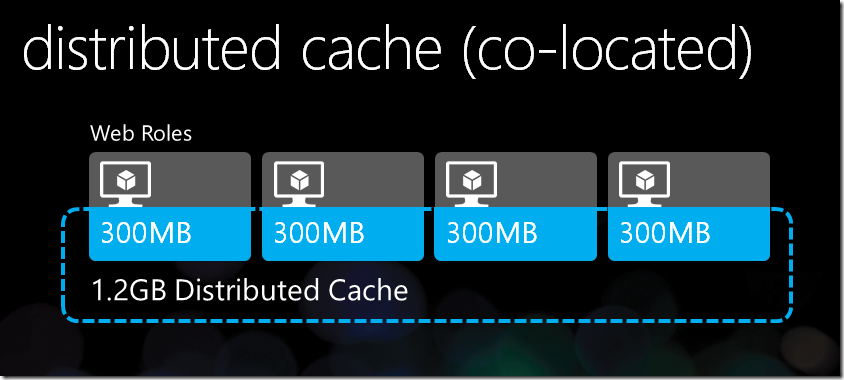
- Co-located Role(共享模式)。在共享模式中,Caching是保存在多个Web Role Instance的内存中。
- Dedicated Role(专用模式)。在专用模式中,用户需要在工程文件中新建额外的Cache Worker Role,Caching不保存在Web Role VM的内存中,而是保存在新建的Cache Worker Role中。
因为使用Dedicated Role,需要增加额外的Cache Worker Role,会增加计算成本
如何使用In-Role Cache?
1.In-Role Cache不能在Virtual Machine虚拟机中使用,只能在PaaS Cloud Service使用。
2.In-Role Cache不是通过Azure Management Portal创建的,而是安装完Azure SDK后,在Cloud Project中配置的。
注意:本章介绍的是Co-located Role(共享模式)。
Co-located Role的架构图,请参考http://weblogs.asp.net/scottgu/meet-the-new-windows-azure
1.使用管理员身份,运行Visual Studio 2013,创建一个新的Cloud Project,命名为LeiColocatedRole。图略。
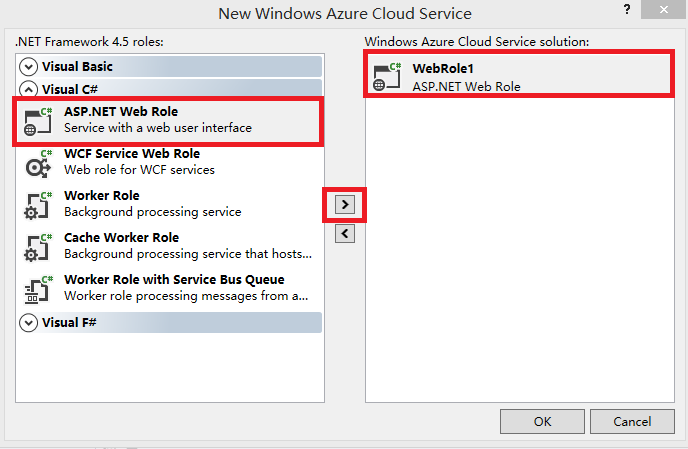
2.在New Windows Azure Cloud Service中,只需要添加ASP.NET Web Role。如下图:
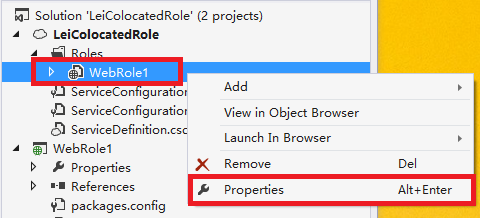
3.我们在项目文件中,选择WebRole1,右键,属性
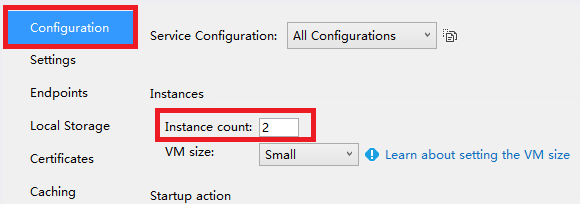
4.在Configuration栏目中,将Instance Count设置为2,设置2个Web Role Instance做高可用,如下图:
5.在Caching栏目,修改以下红色部分
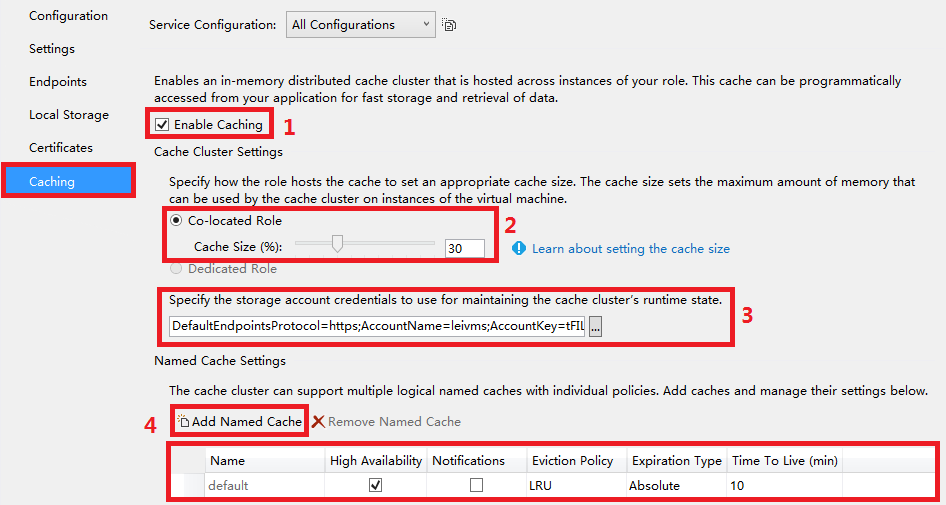
(1)勾选Enable Caching,启用In-Role Caching
(2)点击Co-located Role,并且在Cache Size中,设置内存比,即PaaS Web Role Instance的30%内存用来保存Caching信息
(3)设置Storage Account,因为Cache Cluster(PaaS Web Role Instance)会将Runtime的信息保存在Storage,所以这里一定要设置正确
(4)Named Cache默认是default,我们可以通过Add Named Cache,增加新的Cache Name。
另外,笔者在步骤4设置了Instance Count=2,所以我们可以勾选High Availability,保证高可用。这样不会因为某台Web Role Instance因为故障宕机导致Caching丢失
(如果Instance Count=1的话,是无法勾选High Availability)
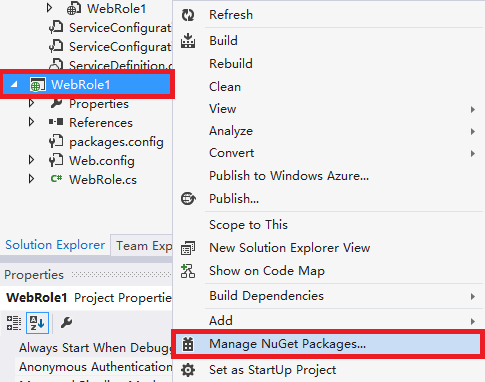
6.然后我们点击WebRole1,右键,Manage NuGet Packages
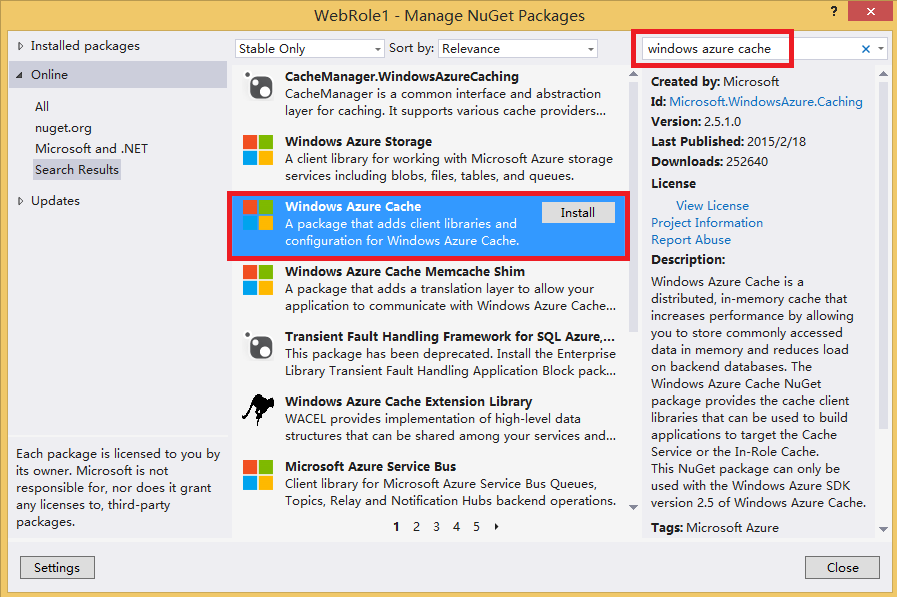
7.查找关键字Windows Azure Cache,查询到结果后,点击下图的Install进行安装
8.安装完NuGet之后,会发现WebRole1项目下,增加了以下的引用:

如果你使用ASP.NET,还会增加引用:Microsoft.Web.DistributedCache.dll
9.我们修改WebRole1下的Web.config,找到autoDiscover节点,如下图:

将上图中的[Cache role name or Service Endpoint]中的节点,修改为项目文件的RoleName,在笔者的Sample Code中,我们设置为WebRole1
设置完毕后的结果如下图:

10.将ASP.NET的Session指向Cache
最后我们在Web.Config节点中,将sessionState节点的注释去掉。如下图:

注意:如果在步骤5中,修改了默认的Named Cache "default",我们需要在上面的XML节点中,将dataCacheClientName的节点,修改为我们自定义的Cache Name。如上图红色部分:
11.使用In-Role Cache
在C#代码中,增加using语句:
using Microsoft.ApplicationServer.Caching;
声明DataCache
static DataCache myCache;
实例化
myCache = new DataCache("default");
写Cache
myCache.Put("MyKey", TextBox1.Text);
读Cache
string outputFromCache = myCache.Get("MyKey") as string;
参考资料:http://blog.sanc.idv.tw/2012/06/windows-azure-windows-azure-co-located.html
Windows Azure Cloud Service (42) 使用Azure In-Role Cache缓存(1)Co-located Role的更多相关文章
- Windows Azure Cloud Service (43) 使用Azure In-Role Cache缓存(2)Dedicated Role
<Windows Azure Platform 系列文章目录> Update 2016-01-12 https://azure.microsoft.com/zh-cn/documentat ...
- Windows Azure Cloud Service (36) 在Azure Cloud Service配置SSL证书
<Windows Azure Platform 系列文章目录> 在某些时候,我们需要在Azure PaaS Cloud Service配置HTTPS连接.本章将介绍如何在本地创建证书,然后 ...
- Windows Azure Cloud Service (11) PaaS之Web Role, Worker Role(上)
<Windows Azure Platform 系列文章目录> 本文是对Windows Azure Platform (六) Windows Azure应用程序运行环境内容的补充. 我们知 ...
- [SDK2.2]Windows Azure Cloud Service (35) 使用VS2013发布Azure Cloud Service
<Windows Azure Platform 系列文章目录> 好久没有更新BLOG了,今天我们继续Windows Azure相关的内容. 笔者最近把Visual Studio升级到了20 ...
- Windows Azure Cloud Service (38) 微软IaaS与PaaS比较
<Windows Azure Platform 系列文章目录> 最近一直想总结Azure IaaS和PaaS的区别与比较,写个博文详细说明一下.建议读者在阅读之前,先熟悉微软PaaS和Ia ...
- Windows Azure Cloud Service (39) 如何将现有Web应用迁移到Azure PaaS平台
<Windows Azure Platform 系列文章目录> 本文将简单介绍,如何将企业内现有的ASP.NET应用程序迁移到Azure PaaS平台. 因为在迁移过程中,可能需要对现有的 ...
- Windows Azure Cloud Service (44) 将Cloud Service加入Virtual Network Subnet,并固定Virtual IP Address(VIP)
<Windows Azure Platform 系列文章目录> 在之前的文章中,笔者已经详细介绍了如何将Virtual Machine加入Virtual Network,并且绑定固定的Pr ...
- Windows Azure Cloud Service (47) 修改Cloud Service时区
<Windows Azure Platform 系列文章目录> 本文介绍内容适合于Azure Global和Azure China 我们在使用Cloud Service的时候,会发现默认的 ...
- 如何使用 OneAPM 监控微软 Azure Cloud Service ?
不知不觉微软 Azure 已经进入中国市场近两年的时间.那么 Azure 平台的性能究竟如何?资源加载的延迟.虚拟机的稳定性等问题是否切实满足客户期许.这些都是大家对微软 Azure 这个国外的云服务 ...
随机推荐
- 关于FluentNhibernate数据库连接配置,请教
在用FluentNHibernate映射数据库,出现这个问题,一天多了也没解决,求各位大神支招 问题是与map对应的表已成功创建,出错的地方是最后的 .BuildSessionFactory(); ...
- 【Win10 UWP】URI Scheme(二):自定义协议的处理和适用场景
上一篇提到Windows Store协议的使用,其实Windows Store协议仅是系统内建的一种协议规则.我们也可以自己定义一套规范的URI-Scheme,除了可以给其他App调用外,本应用也可以 ...
- 从 Android 静音看正确的查bug的姿势?
0.写在前面 没抢到小马哥的红包,无心回家了,回公司写篇文章安慰下自己TT..话说年关难过,bug多多,时间久了难免头昏脑热,不辨朝暮,难识乾坤...艾玛,扯远了,话说谁没踩过坑,可视大家都是如何从坑 ...
- git版本管理策略及相关技巧(A)
公司几乎所有的项目都是使用 git 仓库来管理代码,以前对 git 只有些肤浅的了解,每次提交代码或者上线的时候总是会提心吊胆,生怕出现一些未知的问题.经过三个月的踩坑和填坑, git 操作颇显成熟. ...
- Properties
java.util 类 Properties 因为 Properties 继承于 Hashtable,所以可对 Properties 对象应用 put 和 putAll 方法.但强烈反对使用这两个方法 ...
- DDD~领域事件应用篇(订单处理变得更清晰)
回到目录 上一讲主要说了领域事件和领域总线,这并不是一个很容易理解的文章,所以本讲实例篇主要是为了补充上一讲的理论知识,本讲实例关注的是实际中的订单处理模块,我们知道,订单处理是电子商务的核心,往往在 ...
- WebApi系列~按需序列化字段~Hot
回到目录 起初只是一个想法,一次讨论,一个设想,但相信一定可以实现,具体的事情是这样的,有个对外的API项目,它为一些终端设备提供数据,如手机,平板,PC,当然你也可以说它为很多平台提供数据win32 ...
- atitit 短信验证码的源码实现 .docx
atitit 短信验证码的源码实现 .docx 参考 Atitit usrQBM1603短信验证码规范1 主要方法1 源码实现1 参考 Atitit usrQBM1603短信验证码规范 主要方法 L ...
- Atitit J2EE平台相关规范--39个 3.J2SE平台相关规范--42个
Atitit J2EE平台相关规范--39个 3.J2SE平台相关规范--42个 2.J2EE平台相关规范--39个5 XML Parsing Specification16 J2EE Conne ...
- Netty权威指南
Netty权威指南(异步非阻塞通信领域的经典之作,国内首本深入剖析Netty的著作,全面系统讲解原理.实战和源码,带你完美进阶Netty工程师.) 李林锋 著 ISBN 978-7-121-233 ...