
Windows Azure Cloud Service (42) 使用Azure In-Role Cache缓存(1)Co-located Role
《Windows Azure Platform 系列文章目录》
Update 2016-01-12
https://azure.microsoft.com/zh-cn/documentation/articles/cache-dotnet-how-to-use-in-role/
微软宣布Azure Managed Cache Service和Azure In-Role Cache会在2016年11月30日下线,建议所有的用户采用Redis Cache。
有关Redis Cache的内容,请参考:
http://www.cnblogs.com/threestone/category/741409.html
笔者很早以前就想写这篇文章了,昨天晚上项目正好遇到,今天记录下来。
为什么要使用In-Role Cache?
我们在开发PaaS Cloud Service的时候,PaaS VM都是无状态的。而且默认的Load Balancer是5要素(source IP, source port, destination IP, destination port, protocol type)
http://azure.microsoft.com/blog/2014/04/08/microsoft-azure-load-balancing-services/
如果遇到需要保留Session,使用Cache的时候,就会遇到一些问题。这时候,我们就可以使用In-Role Cache了。
In-Role Cache介绍
In-Role Cache分为两种方式:
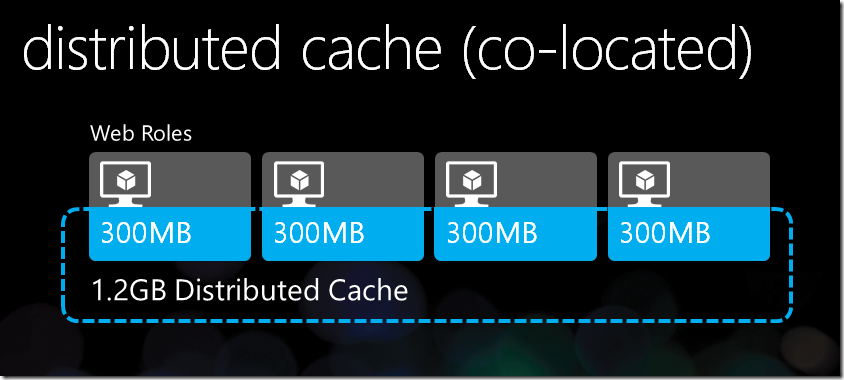
- Co-located Role(共享模式)。在共享模式中,Caching是保存在多个Web Role Instance的内存中。
- Dedicated Role(专用模式)。在专用模式中,用户需要在工程文件中新建额外的Cache Worker Role,Caching不保存在Web Role VM的内存中,而是保存在新建的Cache Worker Role中。
因为使用Dedicated Role,需要增加额外的Cache Worker Role,会增加计算成本
如何使用In-Role Cache?
1.In-Role Cache不能在Virtual Machine虚拟机中使用,只能在PaaS Cloud Service使用。
2.In-Role Cache不是通过Azure Management Portal创建的,而是安装完Azure SDK后,在Cloud Project中配置的。
注意:本章介绍的是Co-located Role(共享模式)。
Co-located Role的架构图,请参考http://weblogs.asp.net/scottgu/meet-the-new-windows-azure
1.使用管理员身份,运行Visual Studio 2013,创建一个新的Cloud Project,命名为LeiColocatedRole。图略。
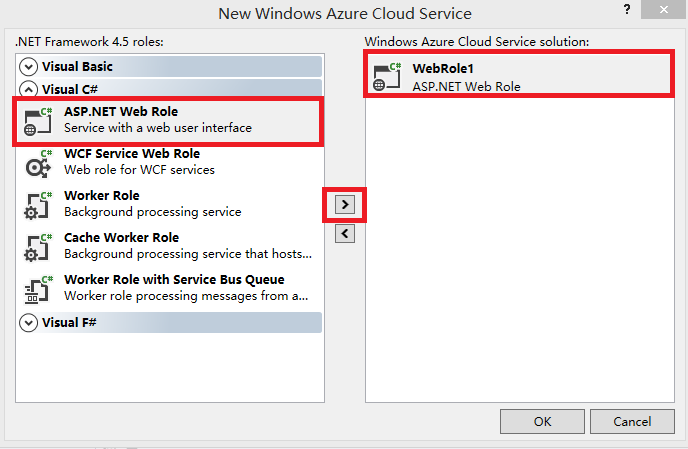
2.在New Windows Azure Cloud Service中,只需要添加ASP.NET Web Role。如下图:
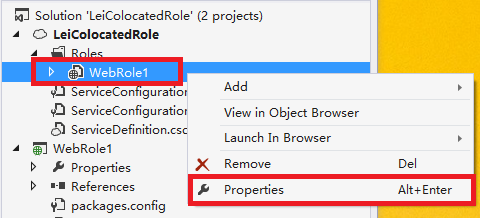
3.我们在项目文件中,选择WebRole1,右键,属性
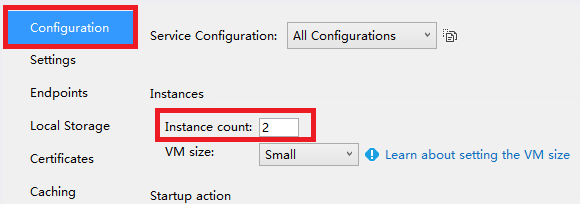
4.在Configuration栏目中,将Instance Count设置为2,设置2个Web Role Instance做高可用,如下图:
5.在Caching栏目,修改以下红色部分
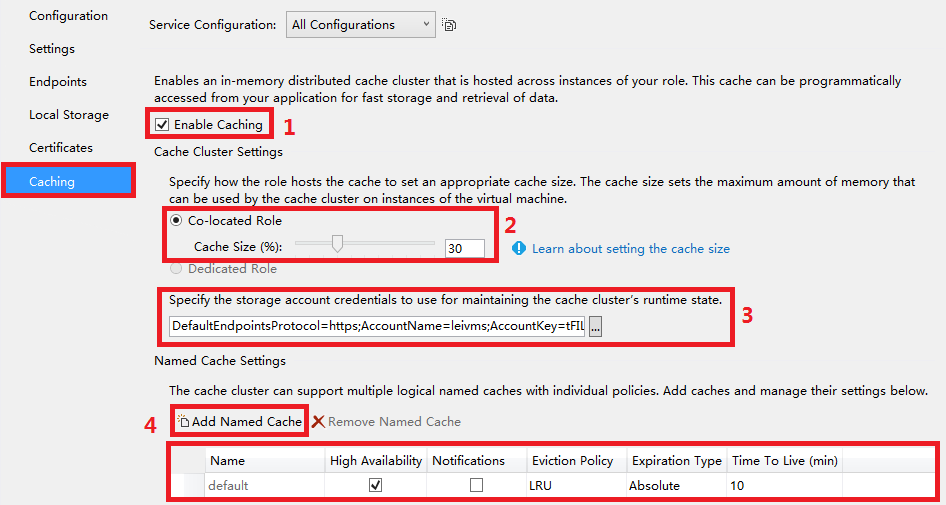
(1)勾选Enable Caching,启用In-Role Caching
(2)点击Co-located Role,并且在Cache Size中,设置内存比,即PaaS Web Role Instance的30%内存用来保存Caching信息
(3)设置Storage Account,因为Cache Cluster(PaaS Web Role Instance)会将Runtime的信息保存在Storage,所以这里一定要设置正确
(4)Named Cache默认是default,我们可以通过Add Named Cache,增加新的Cache Name。
另外,笔者在步骤4设置了Instance Count=2,所以我们可以勾选High Availability,保证高可用。这样不会因为某台Web Role Instance因为故障宕机导致Caching丢失
(如果Instance Count=1的话,是无法勾选High Availability)
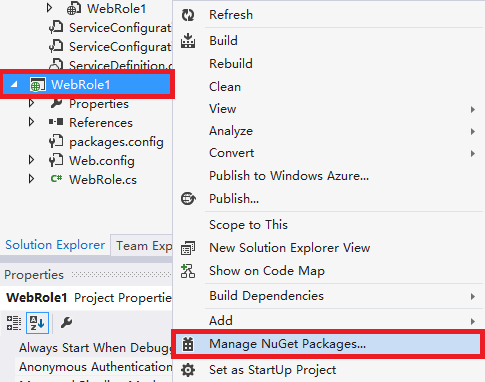
6.然后我们点击WebRole1,右键,Manage NuGet Packages
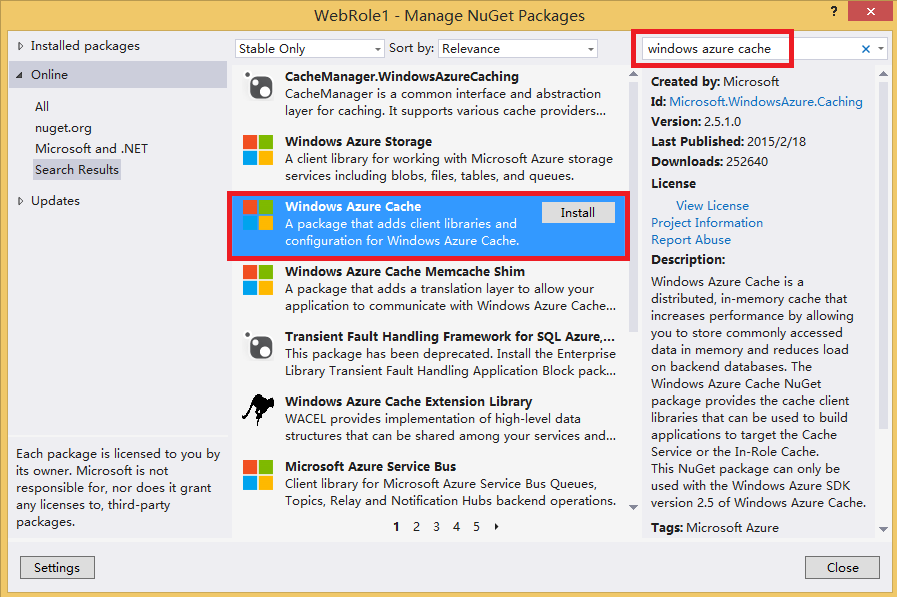
7.查找关键字Windows Azure Cache,查询到结果后,点击下图的Install进行安装
8.安装完NuGet之后,会发现WebRole1项目下,增加了以下的引用:

如果你使用ASP.NET,还会增加引用:Microsoft.Web.DistributedCache.dll
9.我们修改WebRole1下的Web.config,找到autoDiscover节点,如下图:

将上图中的[Cache role name or Service Endpoint]中的节点,修改为项目文件的RoleName,在笔者的Sample Code中,我们设置为WebRole1
设置完毕后的结果如下图:

10.将ASP.NET的Session指向Cache
最后我们在Web.Config节点中,将sessionState节点的注释去掉。如下图:

注意:如果在步骤5中,修改了默认的Named Cache "default",我们需要在上面的XML节点中,将dataCacheClientName的节点,修改为我们自定义的Cache Name。如上图红色部分:
11.使用In-Role Cache
在C#代码中,增加using语句:
using Microsoft.ApplicationServer.Caching;
声明DataCache
static DataCache myCache;
实例化
myCache = new DataCache("default");
写Cache
myCache.Put("MyKey", TextBox1.Text);
读Cache
string outputFromCache = myCache.Get("MyKey") as string;
参考资料:http://blog.sanc.idv.tw/2012/06/windows-azure-windows-azure-co-located.html
Windows Azure Cloud Service (42) 使用Azure In-Role Cache缓存(1)Co-located Role的更多相关文章
- Windows Azure Cloud Service (43) 使用Azure In-Role Cache缓存(2)Dedicated Role
<Windows Azure Platform 系列文章目录> Update 2016-01-12 https://azure.microsoft.com/zh-cn/documentat ...
- Windows Azure Cloud Service (36) 在Azure Cloud Service配置SSL证书
<Windows Azure Platform 系列文章目录> 在某些时候,我们需要在Azure PaaS Cloud Service配置HTTPS连接.本章将介绍如何在本地创建证书,然后 ...
- Windows Azure Cloud Service (11) PaaS之Web Role, Worker Role(上)
<Windows Azure Platform 系列文章目录> 本文是对Windows Azure Platform (六) Windows Azure应用程序运行环境内容的补充. 我们知 ...
- [SDK2.2]Windows Azure Cloud Service (35) 使用VS2013发布Azure Cloud Service
<Windows Azure Platform 系列文章目录> 好久没有更新BLOG了,今天我们继续Windows Azure相关的内容. 笔者最近把Visual Studio升级到了20 ...
- Windows Azure Cloud Service (38) 微软IaaS与PaaS比较
<Windows Azure Platform 系列文章目录> 最近一直想总结Azure IaaS和PaaS的区别与比较,写个博文详细说明一下.建议读者在阅读之前,先熟悉微软PaaS和Ia ...
- Windows Azure Cloud Service (39) 如何将现有Web应用迁移到Azure PaaS平台
<Windows Azure Platform 系列文章目录> 本文将简单介绍,如何将企业内现有的ASP.NET应用程序迁移到Azure PaaS平台. 因为在迁移过程中,可能需要对现有的 ...
- Windows Azure Cloud Service (44) 将Cloud Service加入Virtual Network Subnet,并固定Virtual IP Address(VIP)
<Windows Azure Platform 系列文章目录> 在之前的文章中,笔者已经详细介绍了如何将Virtual Machine加入Virtual Network,并且绑定固定的Pr ...
- Windows Azure Cloud Service (47) 修改Cloud Service时区
<Windows Azure Platform 系列文章目录> 本文介绍内容适合于Azure Global和Azure China 我们在使用Cloud Service的时候,会发现默认的 ...
- 如何使用 OneAPM 监控微软 Azure Cloud Service ?
不知不觉微软 Azure 已经进入中国市场近两年的时间.那么 Azure 平台的性能究竟如何?资源加载的延迟.虚拟机的稳定性等问题是否切实满足客户期许.这些都是大家对微软 Azure 这个国外的云服务 ...
随机推荐
- iOS图片如何按比例显示
文/罚难(简书作者)原文链接:http://www.jianshu.com/p/ec7d3f210983著作权归作者所有,转载请联系作者获得授权,并标注“简书作者”. 只需加这么一段代码,如下: im ...
- 微信公共平台开发-(.net实现)3--发送文本消息
最近,项目这边比较忙,没来得及续写,哎,先吐吐槽吧,在这个周六还得来上班,以后每个周六多要上,一天的滋味真有点受不鸟呀.还不习惯ing... 嗯,别的不说了现在开始接着上次http://www.cnb ...
- 一次与51aspx客服MM谈话 -- 坑是怎么发展的
GG从发布以来,我每次版本更新都会同步到51aspx源码网站,这次在同步更新GG V3.2版本到51aspx时,出了点小状况: 上传3.2版本几个小时后,我再次上去查看,发现其状态变成了“退回”,于是 ...
- Hadoop日记Day18---MapReduce排序分组
本节所用到的数据下载地址为:http://pan.baidu.com/s/1bnfELmZ MapReduce的排序分组任务与要求 我们知道排序分组是MapReduce中Mapper端的第四步,其中分 ...
- 每天一个linux命令(59):rcp命令
rcp代表“remote file copy”(远程文件拷贝).该命令用于在计算机之间拷贝文件.rcp命令有两种格式.第一种格式用于文件到文件的拷贝:第二种格式用于把文件或目录拷贝到另一个目录中. 1 ...
- 大叔也说Xamarin~Android篇~Activity之间传递数组
回到目录 我们在开发应用程序时,不可能只使用一个Layout或者一个Activity,比如你个管理系统,要求用户先登陆然后再使用,这时你至少要有两个activity吧,先登陆一个,然后成功后需要跳到别 ...
- MVVM架构~knockoutjs系列之数组的$index和$data
返回目录 已经写了很多knockoutjs的文章了,今天在review代码时,忽然看到一个问题,在knockout环境下,如何遍历一个简单的数组?对于遍历对象组件的数组来说,很容易,直接foreach ...
- struts2学习笔记之十一:struts2的类型转换器
Struts2的类型转换器 如何实现Struts2的类型转换器? * 继承StrutsTypeConverter * 覆盖convertFromString和convertToString 注 ...
- 我所了解的chrome
Chrome的隐身模式 先来说说隐身模式的启用方法吧 1.键盘快捷:Ctrl + Shift + N. 2.在Windows7下的任务栏处,右击“Chrome”图标,会出一个下拉菜单,点击“新建隐身窗 ...
- js 数组
js中的数组类似与java中的容器 类型可以不同.长度可变 一.数组的声明 var arr1=new Array();//数组的声明一 var arr2=[1,2,3,true,new Dat ...