
Quartz.NET开源作业调度框架系列(五):AdoJobStore保存job到数据库
Quartz.NET 任务调度的核心元素是 scheduler, trigger 和 job,其中 trigger(用于定义调度时间的元素,即按照什么时间规则去执行任务) 和 job 是任务调度的元数据,scheduler 是实际执行调度的控制器。在Quartz.NET中主要有两种类型的 job:无状态的(stateless)和有状态的(stateful)。对于同一个 trigger 来说,有状态的 job 不能被并行执行,只有上一次触发的任务被执行完之后,才能触发下一次执行。无状态任务一般指可以并发的任务,即任务之间是独立的,不会互相干扰。一个 job 可以被多个 trigger 关联,但是一个 trigger 只能关联一个 job。某些任务需要对数据库中的数据进行增删改处理 , 这些任务不能并发执行,就需要用到无状态的任务 , 否则会造成数据混乱。
另外有些情况下,我们需要将任务保存到数据库中,特别是有些任务中包含参数,例如累加的任务,如果可以保存到数据库中,即便中间断电或者程序异常重启,中间计算的结果也不会丢失,可以从断点的结果进行运算(首先恢复任务),下面介绍一下如何用AdoJobStore将任务保存到SQL Server数据库中.
事先要在数据库上新建一个QRTZ_数据库,并执行SQL建表脚本:
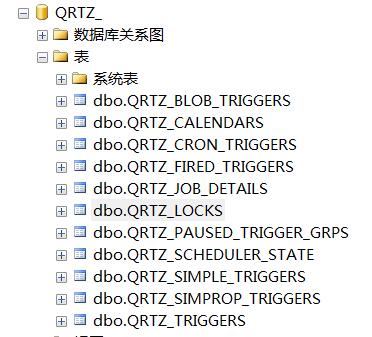
1 RecoveryJob
是一个无状态的任务,代码如下:
 using System;

 using System.Collections.Specialized;

 using System.Threading;

 using Common.Logging;

 using Quartz;

 using Quartz.Impl;

 using Quartz.Job;

 using System.Windows.Forms;

 namespace  QuartzDemo

 {

     /// <summary>

     /// 无状态的可恢复的任务

     /// </summary>

     public class RecoveryJob : IJob

     {

         private const string Count = "count";

         public virtual void Execute(IJobExecutionContext context)

         {

             JobKey jobKey = context.JobDetail.Key;

             if (isOpen("FrmConsole"))

             {

                 try

                 {

                     //获取当前Form1实例

                     __instance = (FrmConsole)Application.OpenForms["FrmConsole"];

                     // 如果任务是恢复的任务的话

                     if (context.Recovering)

                     {

                         __instance.SetInfo(string.Format("{0} RECOVERING at {1}", jobKey, DateTime.Now.ToString("r")));

                     }

                     else

                     {

                         __instance.SetInfo(string.Format("{0} starting at {1}", jobKey, DateTime.Now.ToString("r")));

                     }

                     JobDataMap data = context.JobDetail.JobDataMap;

                     int count;

                     if (data.ContainsKey(Count))

                     {

                         //是否能从数据库中恢复,如果保存Job等信息的话,程序运行突然终端(可用调试时中断运行,而不是关闭窗体来模拟)

                         count = data.GetInt(Count);

                     }

                     else

                     {

                         count = ;

                     }

                     count++;

                     data.Put(Count, count);

                     __instance.SetInfo(string.Format(" {0} Count #{1}", jobKey, count));

                 }

                 catch (Exception ex)

                 {

                     Console.WriteLine(ex.Message);

                 }

             }

         }

         private static FrmConsole __instance = null;

         /// <summary>

         /// 判断窗体是否打开

         /// </summary>

         /// <param name="appName"></param>

         /// <returns></returns>

         private bool isOpen(string appName)

         {

             FormCollection collection = Application.OpenForms;

             foreach (Form form in collection)

             {

                 if (form.Name == appName)

                 {

                     return true;

                 }

             }

             return false;

         }

     }

 }
2 RecoveryStatefulJob
是一个有状态的任务,和无状态的区别就是在任务类的上面用[PersistJobDataAfterExecution]标注任务是有状态的 , 有状态的任务不允许并发执行,也需要标注 [DisallowConcurrentExecution],代码如下:
 using System;

 using System.Collections.Specialized;

 using System.Threading;

 using Common.Logging;

 using Quartz;

 using Quartz.Impl;

 using Quartz.Job;

 using System.Windows.Forms;

 namespace  QuartzDemo

 {

     /// <summary>

     ///  用这个[PersistJobDataAfterExecution]标注任务是有状态的,

     ///  有状态的任务不允许并发执行 [DisallowConcurrentExecution]

     /// </summary>

     [PersistJobDataAfterExecution]

     [DisallowConcurrentExecution]

     public class RecoveryStatefulJob : RecoveryJob

     {

     }

 }
3 AdoJobStoreExample
用 properties["quartz.dataSource.default.connectionString"] = "Server=(local);Database=QRTZ_;Trusted_Connection=True;";定义了数据库的连接信息,程序运行时会自动将任务保存到数据库中:
 using System;

 using System.Collections.Specialized;

 using System.Threading;

 using Common.Logging;

 using Quartz;

 using Quartz.Impl;

 using Quartz.Job;

 using System.Windows.Forms;

 namespace QuartzDemo

 {

     /// <summary>

     ///  AdoJobStore的用法示例

     /// </summary>

     public class AdoJobStoreExample

     {

         public virtual void Run(bool inClearJobs, bool inScheduleJobs)

         {

             NameValueCollection properties = new NameValueCollection();

             properties["quartz.scheduler.instanceName"] = "TestScheduler";

             properties["quartz.scheduler.instanceId"] = "instance_one";

             properties["quartz.threadPool.type"] = "Quartz.Simpl.SimpleThreadPool, Quartz";

             properties["quartz.threadPool.threadCount"] = "";

             properties["quartz.threadPool.threadPriority"] = "Normal";

             properties["quartz.jobStore.misfireThreshold"] = "";

             properties["quartz.jobStore.type"] = "Quartz.Impl.AdoJobStore.JobStoreTX, Quartz";

             properties["quartz.jobStore.useProperties"] = "false";

             properties["quartz.jobStore.dataSource"] = "default";

             properties["quartz.jobStore.tablePrefix"] = "QRTZ_";

             properties["quartz.jobStore.clustered"] = "true";

             // SQLite

             // properties["quartz.jobStore.lockHandler.type"] = "Quartz.Impl.AdoJobStore.UpdateLockRowSemaphore, Quartz";

             properties["quartz.jobStore.driverDelegateType"] = "Quartz.Impl.AdoJobStore.SqlServerDelegate, Quartz";

     // 数据库连接字符串

             properties["quartz.dataSource.default.connectionString"] = "Server=(local);Database=QRTZ_;Trusted_Connection=True;";

             properties["quartz.dataSource.default.provider"] = "SqlServer-20";

             // First we must get a reference to a scheduler

             ISchedulerFactory sf = new StdSchedulerFactory(properties);

             IScheduler sched = sf.GetScheduler();

             bool b是否恢复 = false;

             if (inClearJobs)

             {

                Console.WriteLine("***** Deleting existing jobs/triggers *****");

                // sched.Clear();

             }

             if (inScheduleJobs)

             {

                 string schedId = sched.SchedulerInstanceId;

                 int count = ;

                 //定义一个无状态的任务

                 IJobDetail job = JobBuilder.Create<RecoveryJob>()

                     .WithIdentity("recoveryjob_" + count, schedId)

                     .RequestRecovery() //recovery

                     .Build();

                 ISimpleTrigger trigger = (ISimpleTrigger)TriggerBuilder.Create()

                                                               .WithIdentity("triger_" + count, schedId)

                                                               .StartAt(DateBuilder.FutureDate(, IntervalUnit.Second))

                                                               .WithSimpleSchedule(x => x.WithRepeatCount().WithInterval(TimeSpan.FromSeconds()))

                                                               .Build();

                 //可用此来查看定义的触发器触发规则

                 //log.InfoFormat("{0} will run at: {1} and repeat: {2} times, every {3} seconds",

                 //job.Key, trigger.GetNextFireTimeUtc(),

                 //trigger.RepeatCount,

                 //trigger.RepeatInterval.TotalSeconds);

                 try

                 {

                     //如果数据库已经存在同名job和trigger,则绑定失败

                     sched.ScheduleJob(job, trigger);

                 }

                 catch

                 {

                     b是否恢复 = true;

                 }

                 count++;

                 //定义一个有状态的任务***********************************************************

                 job = JobBuilder.Create<RecoveryStatefulJob>()

                     .WithIdentity("Statefuljob_" + count, schedId)

                     .RequestRecovery() // recovery

                     .Build();

                 trigger = (ISimpleTrigger)TriggerBuilder.Create()

                                                .WithIdentity("triger_" + count, schedId)

                                                .StartAt(DateBuilder.FutureDate(, IntervalUnit.Second))

                                                .WithSimpleSchedule(x => x.WithRepeatCount().WithInterval(TimeSpan.FromSeconds()))

                                                .Build();

                 try

                 {

                     sched.ScheduleJob(job, trigger);

                 }

                 catch

                 {

                     b是否恢复 = true;

                 }

             }

             //启动

             sched.Start();

             //sched.Shutdown();

         }

         public string Name

         {

             get { return GetType().Name; }

         }

         public void Run()

         {

             bool clearJobs = true;

             //clearJobs = false;

             bool scheduleJobs = true;

             AdoJobStoreExample example = new AdoJobStoreExample();

             example.Run(clearJobs, scheduleJobs);

         }

     }

 }
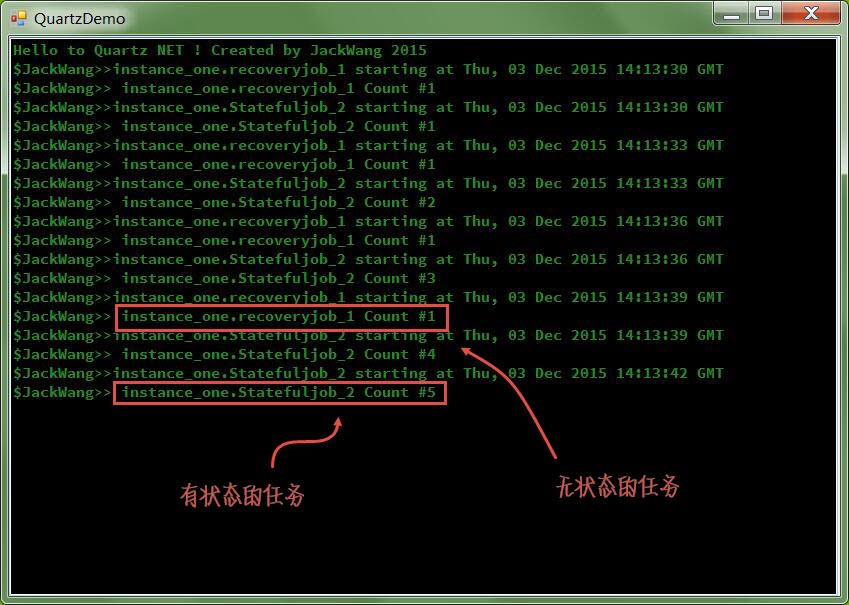
可以看到有状态的计数每次累加1,而无状态的每次执行时都会丢失累加数(新的实例),中断程序,查看数据库的QRTZ_JOB_DETAILS表,可以看见还有一个持久化的任务:

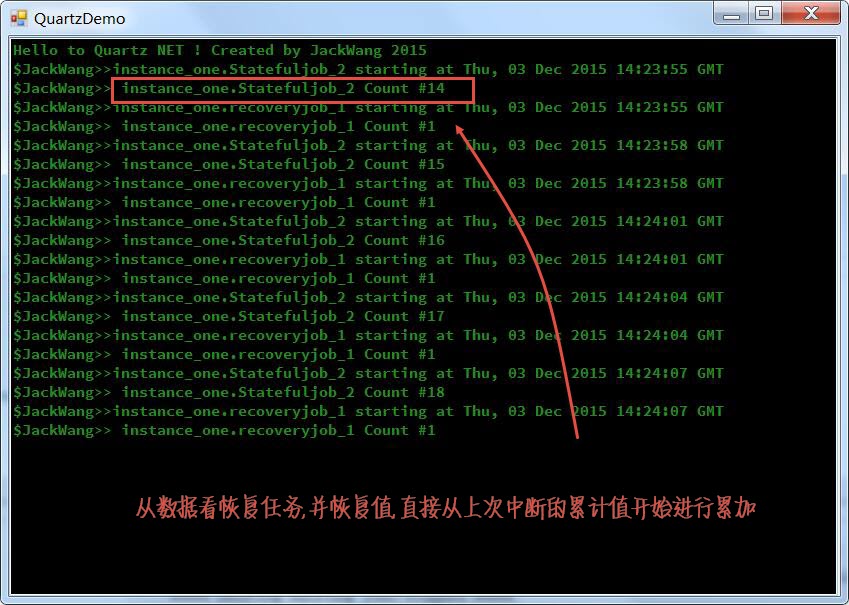
中断程序后(调试状态时不关闭窗体,而是中断调试,模拟异常关闭) ,再重新运行可以看到如下界面:
Quartz.NET开源作业调度框架系列(五):AdoJobStore保存job到数据库的更多相关文章
- Quartz.NET开源作业调度框架系列
Quartz.NET是一个被广泛使用的开源作业调度框架 , 由于是用C#语言创建,可方便的用于winform和asp.net应用程序中.Quartz.NET提供了巨大的灵活性但又兼具简单性.开发人员可 ...
- Quartz.NET开源作业调度框架系列(三):IJobExecutionContext 参数传递
前面写了关于Quartz.NET开源作业调度框架的入门和Cron Trigger , 这次继续这个系列, 这次想讨论一下Quartz.NET中的Job如何通过执行上下文(Execution Conte ...
- Quartz.NET开源作业调度框架系列(三):IJobExecutionContext 参数传递-转
前面写了关于Quartz.NET开源作业调度框架的入门和Cron Trigger , 这次继续这个系列, 这次想讨论一下Quartz.NET中的Job如何通过执行上下文(Execution Conte ...
- Quartz.NET开源作业调度框架系列(一):快速入门step by step
Quartz.NET是一个被广泛使用的开源作业调度框架 , 由于是用C#语言创建,可方便的用于winform和asp.net应用程序中.Quartz.NET提供了巨大的灵活性但又兼具简单性.开发人员可 ...
- Quartz.NET开源作业调度框架系列(一):快速入门step by step-转
Quartz.NET是一个被广泛使用的开源作业调度框架 , 由于是用C#语言创建,可方便的用于winform和asp.net应用程序中.Quartz.NET提供了巨大的灵活性但又兼具简单性.开发人员可 ...
- Quartz.NET开源作业调度框架系列(四):Plugin Job
如果在Quartz.NET作业运行时我们想动态修改Job和Trigger的绑定关系,同时修改一些参数那么该怎么办呢?Quartz.NET提供了插件技术,可以通过在XML文件中对Job和Trigger的 ...
- Quartz.NET开源作业调度框架系列(四):Plugin Job-转
如果在Quartz.NET作业运行时我们想动态修改Job和Trigger的绑定关系,同时修改一些参数那么该怎么办呢?Quartz.NET提供了插件技术,可以通过在XML文件中对Job和Trigger的 ...
- Quartz.NET开源作业调度框架系列(二):CronTrigger
CronTriggers比SimpleTrigger更加的灵活和有用,对于比较复杂的任务触发规则,例如"每个星期天的晚上12:00"进行备份任务,SimpleTrigger就不能胜 ...
- Quartz.NET开源作业调度框架系列(二):CronTrigger-转
CronTriggers比SimpleTrigger更加的灵活和有用,对于比较复杂的任务触发规则,例如"每个星期天的晚上12:00"进行备份任务,SimpleTrigger就不能胜 ...
随机推荐
- Android开发之网络
很多初学Android开发的人员对网络这一点感觉很高大上,现在我就和大家分享一下我的学习心得. 就目前的Android手机来说,可能存在5种网络状态: ----无网络(这种状态可能是因为手机停机,网络 ...
- Android控件之WebView
如何在Android应用中打开Web网站呢?谷歌为我们提供了解决方案,现在就让我们一起看一下WebView控件吧. 为了方便总结,就以实现下面这个效果为主线,进行总结: 首先我们先看一下它的布局文件吧 ...
- Kubernetes如何使用kube-dns实现服务发现
大纲: • Kubernetes中如何发现服务 • 如何发现Pod提供的服务 • 如何使用Service发现服务 • 如何使用kube-dns发现服务 ...
- Testing - 质量保证与质量控制
QA QC QM 概念 Quality Assurance (质量保证) Quality Control (质量控制) Quality Manage (质量管理) 定义 为达到质量要求所采取的作业技术 ...
- Android图片加载库的理解
前言 这是“基础自测”系列的第三篇文章,以Android开发需要熟悉的20个技术点为切入点,本篇重点讲讲Android中的ImageLoader这个库的一些理解,在Android上最让人头疼是 ...
- Python 3.0(一) 简介
Python 3.0(一) 简介 [目录] 1.简介 2.python特点 3.安装 简介: Python是可以称得上即简单又功能强大的少有的语言中的一种.你将会惊喜地发现,专注于问题的解决方案而不是 ...
- Git:错误:error:src refspec master does not match any
新建立了一个远程仓库,想着把项目放上去.于是在项目目录上: git init 然后就添加远程库 git remote add origin xxxx.git 然后就想push: git push -u ...
- Elasticsearch增删改查 之 —— mget多文档查询
之前说过了针对单一文档的增删改查,基本也算是达到了一个基本数据库的功能.本篇主要描述的是多文档的查询,通过这个查询语法,可以根据多个文档的查询条件,返回多个文档集合. 更多内容可以参考我整理的ELK文 ...
- Django之路由、模板和模型系统
一.路由系统 浏览器会自动给url后加一个"/" django会自动给路由的正则表达式前面加一个"/" django会给任何不带"/"结尾的 ...
- 使用Tuple来实现多个Model传送至视图
前面Insus.NET实现过<使用ViewModel来实现多个Model传送至视图>http://www.cnblogs.com/insus/p/5594134.html 和<使用E ...