
Quartz.NET开源作业调度框架系列(三):IJobExecutionContext 参数传递-转
前面写了关于Quartz.NET开源作业调度框架的入门和Cron Trigger , 这次继续这个系列, 这次想讨论一下Quartz.NET中的Job如何通过执行上下文(Execution Contex)进行参数传递 , 有些参数想保存状态该如何处理 . 在Quartz.NET中可以用JobDataMap进行参数传递.本例用Quartz.NET的任务来定期轮询数据库表,当数据库的条目达到一定的数目后,进行预警.(其实可以将读取的表和预警条件配置到数据库中的预警条件表中,这样就可以简单实现一个自动预警提醒的小平台).
1 JobWithParametersExample

 1 using System;

 2 using System.Threading;

 3

 4 using Common.Logging;

 5 using Quartz;

 6 using Quartz.Impl;

 7 using Quartz.Job;

 8 using Quartz.Impl.Calendar;

 9 using Quartz.Impl.Matchers;

10 namespace QuartzDemo

11 {

12

13     public class JobWithParametersExample

14     {

15         public string Name

16         {

17             get { return GetType().Name; }

18         }

19         private IScheduler sched = null;

20         public JobWithParametersExample(IScheduler _sched)

21         {

22             sched = _sched;

23         }

24         public virtual void Run()

25         {

26

27             //2S后执行

28             DateTimeOffset startTime = DateBuilder.NextGivenSecondDate(null, 2);

29             IJobDetail job1 = JobBuilder.Create<JobWithParameters>()

30                 .WithIdentity("job1", "group1")

31                 .Build();

32

33             ISimpleTrigger trigger1 = (ISimpleTrigger)TriggerBuilder.Create()

34                                                            .WithIdentity("trigger1", "group1")

35                                                            .StartAt(startTime)

36                                                            .WithSimpleSchedule(x => x.WithIntervalInSeconds(5).WithRepeatCount(100))

37                                                            .Build();

38

39             // 设置初始参数

40             job1.JobDataMap.Put(JobWithParameters.tSQL, "SELECT * FROM [ACT_ID_USER]");

41             job1.JobDataMap.Put(JobWithParameters.ExecutionCount, 1);

42

43             // 设置监听器

44             JobListener listener = new JobListener();

45             IMatcher<JobKey> matcher = KeyMatcher<JobKey>.KeyEquals(job1.Key);

46             sched.ListenerManager.AddJobListener(listener, matcher);

47

48             // 绑定trigger和job

49             sched.ScheduleJob(job1, trigger1);

50             //启动

51             sched.Start();

52

53         }

54     }

55 }
JobWithParametersExample用来配置job和trigger,同时定义了一个监听器,来监听定义的job.
2 JobWithParameters
 1 using System;

 2 using Common.Logging;

 3 using Quartz;

 4 using Quartz.Impl;

 5 using Quartz.Job;

 6 using System.Windows.Forms;

 7 namespace QuartzDemo

 8 {

 9

10     [PersistJobDataAfterExecution]

11     [DisallowConcurrentExecution]

12     public class JobWithParameters : IJob

13     {

14

15         // 定义参数常量

16         public const string tSQL = "tSQL";

17         public const string ExecutionCount = "count";

18         public const string RowCount = "rowCount";

19         public const string tableAlert = "tAlert";

20         //  Quartz 每次执行时都会重新实例化一个类, 因此Job类中的非静态变量不能存储状态信息

21          private int counter = 1;//都为1

22         //private static  int counter = 1;//可以保存状态

23         public virtual void Execute(IJobExecutionContext context)

24         {

25

26             JobKey jobKey = context.JobDetail.Key;

27             // 获取传递过来的参数

28             JobDataMap data = context.JobDetail.JobDataMap;

29             string SQL = data.GetString(tSQL);

30             int count = data.GetInt(ExecutionCount);

31

32             if (isOpen("FrmConsole"))

33             {

34                 try

35                 {

36                     //获取当前Form1实例

37                     __instance = (FrmConsole)Application.OpenForms["FrmConsole"];

38                     //获取当前执行的线程ID

39                     __instance.SetInfo(jobKey + "Thread ID " + System.Threading.Thread.CurrentThread.ManagedThreadId.ToString());

40                     //数据库操作

41                     System.Data.DataTable tAlert = SqlHelper.getDateTable(SQL, null);

42                     //回写条数

43                     data.Put(RowCount, tAlert.Rows.Count);

44                     //通过方法更新消息

45                     __instance.SetInfo(string.Format("{0} exec {1} = {2} get {3} rows\r\n           execution count (from job map) is {4}\r\n           execution count (from job member variable) is {5}",

46                     jobKey,

47                     tSQL,

48                     SQL,

49                     tAlert.Rows.Count,

50                     count, counter));

51                     //怎么取出Datatable ? json to datatable

52                     //data.Put(tableAlert, tAlert);

53                 }

54                 catch (Exception ex)

55                 {

56                     Console.WriteLine(ex.Message);

57                 }

58             }

59             // 修改执行计数并回写到job data map中

60             count++;

61             data.Put(ExecutionCount, count);

62             // 修改本地变量,如果是非静态变量,不能存储状态

63             counter++;

64         }

65

66         private static FrmConsole __instance = null;

67

68         /// <summary>

69         /// 判断窗体是否打开

70         /// </summary>

71         /// <param name="appName"></param>

72         /// <returns></returns>

73         private bool isOpen(string appName)

74         {

75             FormCollection collection = Application.OpenForms;

76             foreach (Form form in collection)

77             {

78                 if (form.Name == appName)

79                 {

80                     return true;

81                 }

82             }

83             return false;

84         }

85

86     }

87 }
Quartz 每次执行时都会重新实例化一个类, 因此Job类中的非静态变量不能存储状态信息.如何要保存状态信息可以用静态变量进行处理,也可以用参数值进行传入传出来实现.
3 JobListener
 1 using System;

 2 using Common.Logging;

 3 using Quartz;

 4 using Quartz.Impl;

 5 using Quartz.Job;

 6 namespace QuartzDemo

 7 {

 8     public class JobListener : IJobListener

 9     {

10

11         public virtual string Name

12         {

13             get { return "JobListener"; }

14         }

15

16         public virtual void JobToBeExecuted(IJobExecutionContext inContext)

17         {

18             //执行前执行

19             Console.WriteLine("JobToBeExecuted");

20         }

21

22         public virtual void JobExecutionVetoed(IJobExecutionContext inContext)

23         {

24             //否决时执行

25             Console.WriteLine("JobExecutionVetoed");

26         }

27

28         public virtual void JobWasExecuted(IJobExecutionContext inContext, JobExecutionException inException)

29         {

30             JobKey jobKey = inContext.JobDetail.Key;

31             // 获取传递过来的参数

32             JobDataMap data = inContext.JobDetail.JobDataMap;

33             //获取回传的数据库表条目数

34             int rowCount = data.GetInt(JobWithParameters.RowCount);

35

36             try

37             {

38                 if (rowCount > 9)

39                 {

40                     inContext.Scheduler.PauseAll();

41                     System.Windows.Forms.MessageBox.Show("预警已超9条");

42                     inContext.Scheduler.ResumeAll();

43

44                 }

45                 Console.WriteLine(rowCount.ToString());

46             }

47             catch (SchedulerException e)

48             {

49

50                 Console.Error.WriteLine(e.StackTrace);

51             }

52         }

53

54     }

55 }
4 效果
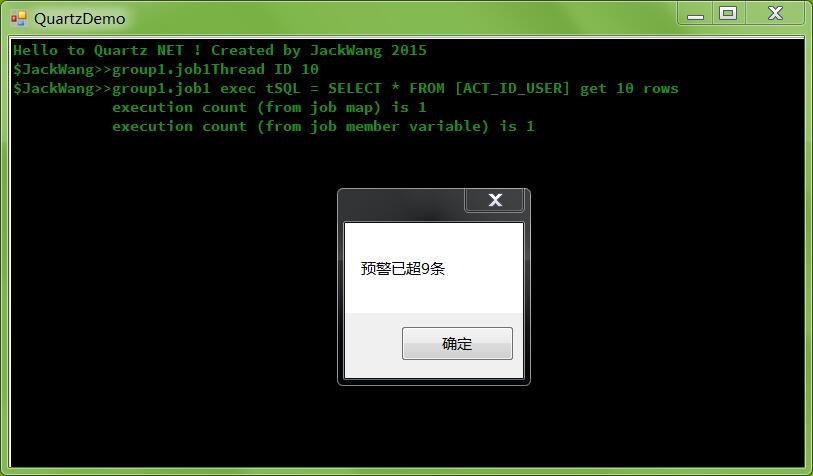
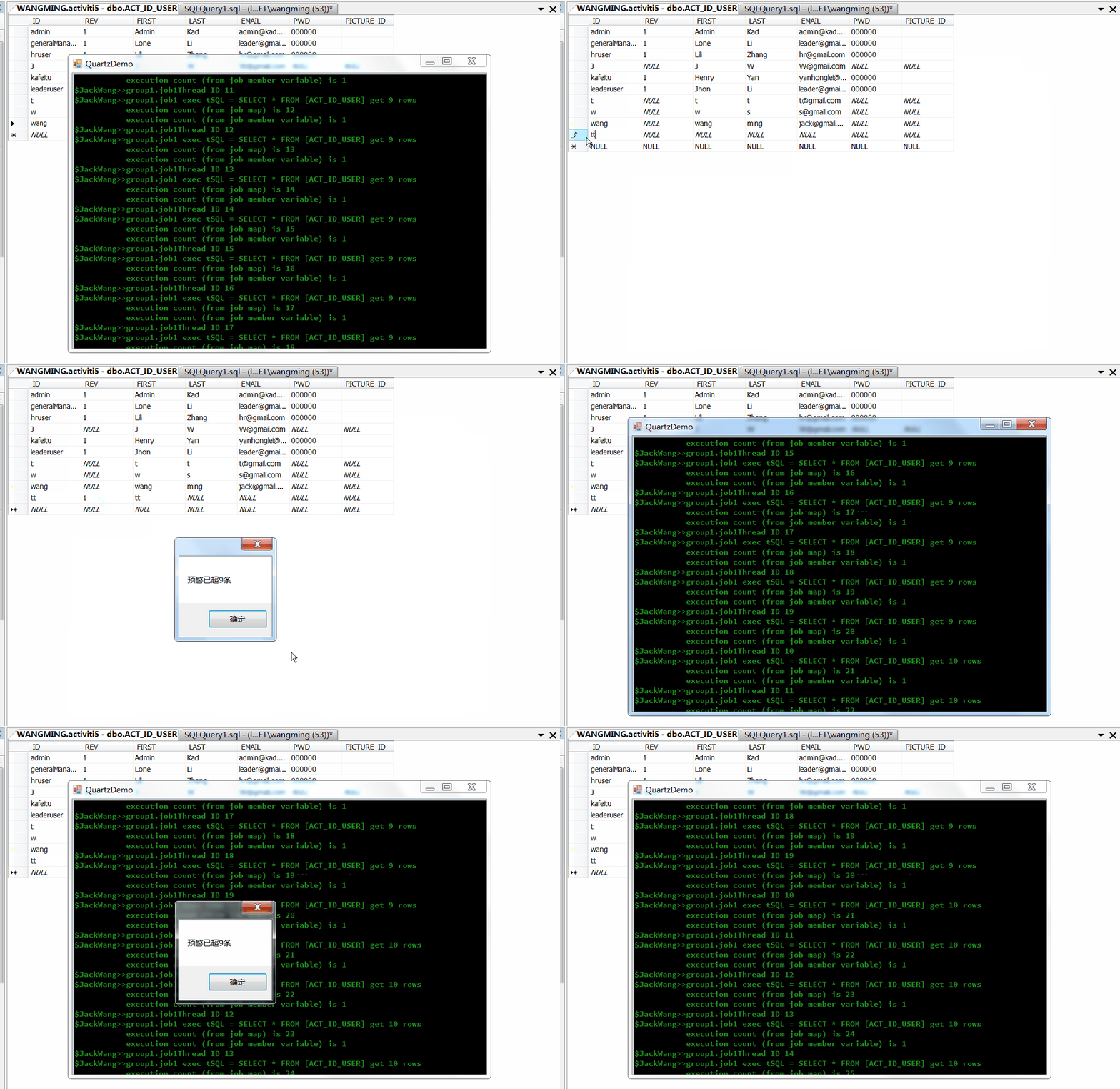
出处:http://www.cnblogs.com/isaboy/
声明:本文版权归作者和博客园共有,欢迎转载,但未经作者同意必须保留此段声明,且在文章页面明显位置给出原文连接,否则保留追究法律责任的权利。
Quartz.NET开源作业调度框架系列(三):IJobExecutionContext 参数传递-转的更多相关文章
- Quartz.NET开源作业调度框架系列(三):IJobExecutionContext 参数传递
前面写了关于Quartz.NET开源作业调度框架的入门和Cron Trigger , 这次继续这个系列, 这次想讨论一下Quartz.NET中的Job如何通过执行上下文(Execution Conte ...
- Quartz.NET开源作业调度框架系列
Quartz.NET是一个被广泛使用的开源作业调度框架 , 由于是用C#语言创建,可方便的用于winform和asp.net应用程序中.Quartz.NET提供了巨大的灵活性但又兼具简单性.开发人员可 ...
- Quartz.NET开源作业调度框架系列(一):快速入门step by step
Quartz.NET是一个被广泛使用的开源作业调度框架 , 由于是用C#语言创建,可方便的用于winform和asp.net应用程序中.Quartz.NET提供了巨大的灵活性但又兼具简单性.开发人员可 ...
- Quartz.NET开源作业调度框架系列(一):快速入门step by step-转
Quartz.NET是一个被广泛使用的开源作业调度框架 , 由于是用C#语言创建,可方便的用于winform和asp.net应用程序中.Quartz.NET提供了巨大的灵活性但又兼具简单性.开发人员可 ...
- Quartz.NET开源作业调度框架系列(五):AdoJobStore保存job到数据库
Quartz.NET 任务调度的核心元素是 scheduler, trigger 和 job,其中 trigger(用于定义调度时间的元素,即按照什么时间规则去执行任务) 和 job 是任务调度的元数 ...
- Quartz.NET开源作业调度框架系列(四):Plugin Job
如果在Quartz.NET作业运行时我们想动态修改Job和Trigger的绑定关系,同时修改一些参数那么该怎么办呢?Quartz.NET提供了插件技术,可以通过在XML文件中对Job和Trigger的 ...
- Quartz.NET开源作业调度框架系列(四):Plugin Job-转
如果在Quartz.NET作业运行时我们想动态修改Job和Trigger的绑定关系,同时修改一些参数那么该怎么办呢?Quartz.NET提供了插件技术,可以通过在XML文件中对Job和Trigger的 ...
- Quartz.NET开源作业调度框架系列(二):CronTrigger
CronTriggers比SimpleTrigger更加的灵活和有用,对于比较复杂的任务触发规则,例如"每个星期天的晚上12:00"进行备份任务,SimpleTrigger就不能胜 ...
- Quartz.NET开源作业调度框架系列(二):CronTrigger-转
CronTriggers比SimpleTrigger更加的灵活和有用,对于比较复杂的任务触发规则,例如"每个星期天的晚上12:00"进行备份任务,SimpleTrigger就不能胜 ...
随机推荐
- Arcgis ArcMap 10 如何生成msd地图文档定义【 arcgis mxd怎么转换成msd】
.mxd是arcgis 的地图文档后缀名. .msd是arcgis 的地图服务定义文件,是 map service definition 的缩写. 基于 MSD 的服务支持 Maplex.制图表达和新 ...
- svn“Previous operation has not finished; run 'cleanup' if it was interrupted“报错的解决方法
今天碰到了个郁闷的问题,svn执行clean up命令时报错“Previous operation has not finished; run 'cleanup' if it was interrup ...
- 【Spark】Spark-空RDD判断与处理
Spark-空RDD判断与处理 SparkKafkaDemo - Streaming Statistics rdd isempty count_百度搜索 Spark RDD.isEmpty costs ...
- fastText、TextCNN、TextRNN……这里有一套NLP文本分类深度学习方法库供你选择
https://mp.weixin.qq.com/s/_xILvfEMx3URcB-5C8vfTw 这个库的目的是探索用深度学习进行NLP文本分类的方法. 它具有文本分类的各种基准模型,还支持多标签分 ...
- List 转 ObservableCollection
ObservableCollection<UserInfo> oc = new ObservableCollection<UserInfo>(); ls.ForEach(x = ...
- THINKPHP 验证码不显示
最近同事将我之前使用Thinkphp做的一个项目从香港服务器迁移到国内,但却遇到了图片验证码不显示的问题 但我确认了以下可能的问题后还是没有解决 PHP是否已经安装GD库支持: 输出之前是否有任何的输 ...
- VS2013开发一个简单的asmx接口程序
一.开发和调试 1:创建一个ASP.NET web应用程序 2:选择空的模板 3:系统生成项目目录 4:右键项目-添加项-新建项 5:选择Web 服务(ASMX) 6:选择之后项目中会有一个Test ...
- (转)总结使用Unity 3D优化游戏运行性能的经验
http://www.199it.com/archives/147913.html 流畅的游戏玩法来自流畅的帧率,而我们即将推出的动作平台游戏<Shadow Blade>已经将在标准iPh ...
- mysql 批量数据循环插入
双重循环插入 DELIMITER ;; CREATE PROCEDURE test_insert() BEGIN DECLARE a INT DEFAULT 1; DECLARE b TINYINT ...
- springmvc-servlet.xml中use-default-filters的作用
1.<!-- 启用注解扫描,并定义组件查找规则 ,mvc层只负责扫描@Controller --> [java] view plain copy <context:component ...