
TabHost的使用
Android中的选项卡是用TabHost实现的。
首先,定义TabHost的布局文件:
<?xml version="1.0" encoding="utf-8"?>

<TabHost xmlns:android="http://schemas.android.com/apk/res/android"

	android:id="@android:id/tabhost" android:layout_width="fill_parent"

	android:layout_height="fill_parent">

	<LinearLayout android:orientation="vertical"

		android:layout_width="fill_parent" android:layout_height="fill_parent">

		<TabWidget android:id="@android:id/tabs"

			android:layout_alignParentBottom="true"

			android:layout_width="fill_parent"

			android:layout_height="wrap_content"/>

		<FrameLayout

		    android:id="@android:id/tabcontent"

		    android:layout_width="fill_parent"

		    android:layout_height="fill_parent" />

	</LinearLayout>

</TabHost>
其中,TabWidget即是选项卡上面的标签,FrameLayout是选项卡的内容。
在Java类文件中定义如下:
public class MainActivity extends TabActivity {

	private TabHost my_tabhost;

	private TabWidget my_tabwidget;

	private int i,k;

	private TextView tv;

	private String[] tabMenu = { "系统", "硬件", "操作"};

	private Intent intent0, intent1, intent2;

	private Intent[] intents = { intent0, intent1, intent2};

	private TabHost.TabSpec tabSpec0, tabSpec1, tabSpec2, tabSpec3;

	private TabHost.TabSpec[] tabSpecs = { tabSpec0, tabSpec1, tabSpec2, tabSpec3};

	public static Context mContext;

	@Override

	protected void onCreate(Bundle savedInstanceState) {

		super.onCreate(savedInstanceState);

                // 不要窗体标题

               requestWindowFeature(Window.FEATURE_NO_TITLE);

               setContentView(R.layout.activity_main);

		setContentView(R.layout.activity_main);

		my_tabhost = getTabHost();

		intent0 = new Intent(this, system.class);

		intent1 = new Intent(this, hardware.class);

		intent2 = new Intent(this, operation.class);

		tabSpec0 = my_tabhost.newTabSpec("system").setIndicator(tabMenu[0],null).

				setContent(intent0);

		tabSpec1 = my_tabhost.newTabSpec("hardware").setIndicator(tabMenu[1],null).

				setContent(intent1);

		tabSpec2 = my_tabhost.newTabSpec("operation").setIndicator(tabMenu[2],null).

				setContent(intent2);

		my_tabhost.addTab(tabSpec1);

		my_tabhost.addTab(tabSpec0);

		my_tabhost.addTab(tabSpec2);


                 // 设置默认选中的选项卡为第2个

                     my_tabhost.setCurrentTab(1);

	}

}
每一个选项卡对应一个Intent,每一个Intent又对应一个类,选中这个选项卡时,就显示对应的类。
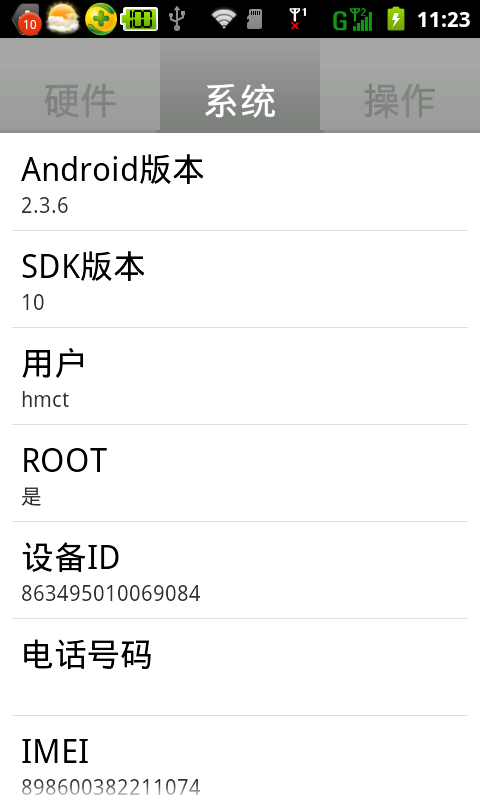
运行结果如下:
TabHost的使用的更多相关文章
- android 使用Tabhost 发生could not create tab content because could not find view with id 错误
使用Tabhost的时候经常报:could not create tab content because could not find view with id 错误. 总结一下发生错误的原因,一般的 ...
- Android 轮换页面+TabHost 实例
最终效果展示: 首先我们需要一个ViewPager控件,不过可以发现在左侧的控件列表中并没有这个控件 这时我们要去升级包中查看 然后在厘米找到 ViewPager.class 这时我们双击这个发现不能 ...
- tabhost 下 setOnItemClickListener失效的问题
分析了一下代码,应该是tabhost 的ontabchangedListener接管了下面应该由setOnItemClickListener接管的部分,导致不能相应setOnItemClickList ...
- 安卓初級教程(5):TabHost的思考
package com.myhost; import android.os.Bundle; import android.view.LayoutInflater; import android.wid ...
- Android 实现分页(使用TabWidget/TabHost)
注:本文为转载,但该内容本人已亲身尝试,确认该方法可行,代码有点小的改动,转载用作保存与分享. 原作者地址:http://gundumw100.iteye.com/blog/853967 个人吐嘈:据 ...
- 安卓TabHost页面
<?xml version="1.0" encoding="UTF-8"?> <!-- TabHost组件id值不可变--> <T ...
- Android TabHost使用
TabHost是Android中自带的选项卡控件,效果图如下: 主布局文件 <RelativeLayout xmlns:android="http://schemas.android. ...
- tabhost使用
Tabhost用法 使用方法一:使用同一个布局文件 在xml中如此定义tabhost: <RelativeLayout xmlns:android="http://schemas.an ...
- tab使用 TabActivity TabHost Tabspec常用方法
本文是参考Android官方提供的sample里面的ApiDemos的学习总结. TabActivity 首先Android里面有个名为TabActivity来给我们方便使用.其中有以下可以关 ...
- Android工作学习第5天之TabHost实现菜单栏底部显示
TabHost是一个装载选项卡窗口的容器,实现分模块显示的效果.像新浪微博客户端.微信客户端都是使用tabehost组件来开发的. TabHost的组成: |---TabWidget:实现标签栏,可供 ...
随机推荐
- iOS-SDWebImage
我之前写过一篇博客,介绍缓存处理的三种方式,其中最难,最麻烦,最占内存资源的还是图片缓存,最近做的项目有大量的图片处理,还是采用了SDWebImage来处理,但是发现之前封装好的代码报错了.研究发现, ...
- CCNA网络工程师学习进程(5)路由器和交换机的登录安全配置和vlan划分
本节详细介绍路由器和交换机的登录安全配置以及VLAN划分的原理. (1)登录安全配置: 路由器登录有两种验证方式:有本地验证方式和远程验证方式.本地登录验证方式可以配置用户名和密码也可 ...
- 菜鸟级别的WCF入门学习
这两天学习WCF,看了MSDN上的入门教程,和查找了一些网上给的例子,简单的实现了一下,感觉应该很适合我这种菜鸟级的选手看了. 1.新建一个项目--WCF--WCF服务应用程序 用的是MSDN上的加减 ...
- IO流-概览
一. 抽象类InputStream和OutputStream构成了了IO类的基础 因为面向字节流的对象不便于处理Unicode形式储存的信息,所以从抽象类Reader和Writer中继承出专门用于处理 ...
- 使用NPOI从Excel中提取图片及图片位置信息
问题背景: 话说,在ExcelReport的开发过程中,有一个比较棘手的问题:怎么复制图片呢? 当然,解决这个问题的第一步是:能使用NPOI提取到图片及图片的位置信息.到这里,一切想法都很顺利.但NP ...
- CSS3入门之转换
CSS3入门之转换 *:first-child { margin-top: 0 !important; } body>*:last-child { margin-bottom: 0 !impor ...
- Floyd算法(一)之 C语言详解
本章介绍弗洛伊德算法.和以往一样,本文会先对弗洛伊德算法的理论论知识进行介绍,然后给出C语言的实现.后续再分别给出C++和Java版本的实现. 目录 1. 弗洛伊德算法介绍 2. 弗洛伊德算法图解 3 ...
- nginx反向代理docker registry报”blob upload unknown"解决办法
问题症状:keepalived+nginx反向代理后端docker registry群集时,使用docker客户机向registry push镜像时出现 "blob upload unkno ...
- LeetCode:Ransom Note_383
LeetCode:Ransom Note [问题再现] Given an arbitrary ransom note string and another string contai ...
- Pillow实现图片对比
在编写Web自动化测试用例的时候,如何写断言使新手不解,严格意义上来讲,没有断言的自动化脚本不能叫测试用例.就像功能测试一样,当测试人员做了一些操作之后必然会判断实际结果是否等于预期结果,只不过,这个 ...