
Android 实现分页(使用TabWidget/TabHost)
注:本文为转载,但该内容本人已亲身尝试,确认该方法可行,代码有点小的改动,转载用作保存与分享。
原作者地址:http://gundumw100.iteye.com/blog/853967
个人吐嘈:据说TabWidget已经过时了,取而代之的是Fragment,但关于这个Fragment暂时还没时间研讨,现使用的是TabWidget方法,个人感觉实现出来的效果还是很不错的。
自定义TabHost:不用继承TabActivity,具体代码如下:
定义布局文件:activity_main.xml
<?xml version="1.0" encoding="utf-8"?>

<TabHost xmlns:android="http://schemas.android.com/apk/res/android"

 android:id="@+id/TabHost01" android:layout_width="fill_parent"

 android:layout_height="fill_parent">

 <LinearLayout android:layout_width="fill_parent"

 android:orientation="vertical" android:layout_height="fill_parent">

 <TabWidget android:id="@android:id/tabs"

 android:layout_width="fill_parent"

 android:layout_height="wrap_content" />

 <FrameLayout android:id="@android:id/tabcontent"

 android:layout_width="fill_parent"

 android:layout_height="fill_parent">

 <LinearLayout android:id="@+id/LinearLayout1"

 android:layout_width="fill_parent"

 android:layout_height="wrap_content">

 <TextView android:text="two"

 android:id="@+id/TextView02" android:layout_width="fill_parent"

 android:layout_height="wrap_content">

 </TextView>

 </LinearLayout>

 <LinearLayout android:id="@+id/LinearLayout2"

 android:layout_width="fill_parent"

 android:layout_height="wrap_content">

 <ScrollView

 android:id="@+id/Scroll01"

 android:layout_width="fill_parent"

 android:layout_height="fill_parent"

 android:scrollbars="vertical"

 android:background="@android:color/white" >

 <LinearLayout

 android:layout_width="fill_parent"

 android:layout_height="wrap_content"

 android:orientation="vertical"

 android:padding="2dp">

 <TextView

 android:id="@+id/title01"

 android:layout_width="fill_parent"

 android:layout_height="wrap_content"

 android:gravity="center_horizontal"

 android:textSize="20sp"

 android:text="员工信息查询测试"

 android:padding="5dp"/>

 <TextView

 android:layout_width="fill_parent"

 android:layout_height="wrap_content"

 android:padding="4dp"

 android:textSize="20sp"

 android:text="测试\n测试\n测试\n测试\n测试\n测试\n测试\n测试\n测试\n测试\n测试\n测试\n测试\n测试\n测试\n测试\n测试\n测试\n测试\n测试\n测试\n测试\n测试\n测试\n测试\n测试\n"

 android:layout_weight="1"/>

 </LinearLayout>

 </ScrollView>

 </LinearLayout>

 <LinearLayout android:id="@+id/LinearLayout3"

 android:layout_width="wrap_content"

 android:layout_height="wrap_content">

 <TextView android:text="three"

 android:id="@+id/TextView03" android:layout_width="fill_parent"

 android:layout_height="wrap_content">

 </TextView>

 </LinearLayout>

 </FrameLayout>

 </LinearLayout>

</TabHost>
编写Java代码:
package com.example.test2;

import android.app.Activity;

import android.os.Bundle;

import android.util.Log;

import android.view.LayoutInflater;

import android.widget.TabHost;

public class MainActivity extends Activity {

 /** Called when the activity is first created. */

 private TabHost tabHost;

 @Override

 public void onCreate(Bundle savedInstanceState) {

 super.onCreate(savedInstanceState);

 setContentView(R.layout.activity_main);

 try{

 tabHost = (TabHost) this.findViewById(R.id.TabHost01);

 tabHost.setup();

 tabHost.addTab(tabHost.newTabSpec("tab_1")

 .setContent(R.id.LinearLayout1)

 //.setIndicator("TAB1",this.getResources().getDrawable(R.drawable.img01)));

 .setIndicator("TAB1"));

 tabHost.addTab(tabHost.newTabSpec("tab_2")

 .setContent(R.id.LinearLayout2)

 //.setIndicator("TAB2",this.getResources().getDrawable(R.drawable.img01)));

 .setIndicator("TAB2"));

 tabHost.addTab(tabHost.newTabSpec("tab_3")

 .setContent(R.id.LinearLayout3)

 //.setIndicator("TAB3",this.getResources().getDrawable(R.drawable.img01)));

 .setIndicator("TAB3"));

 tabHost.setCurrentTab(1);

 }catch(Exception ex){

 ex.printStackTrace();

 Log.d("EXCEPTION", ex.getMessage());

 }

 }

 }
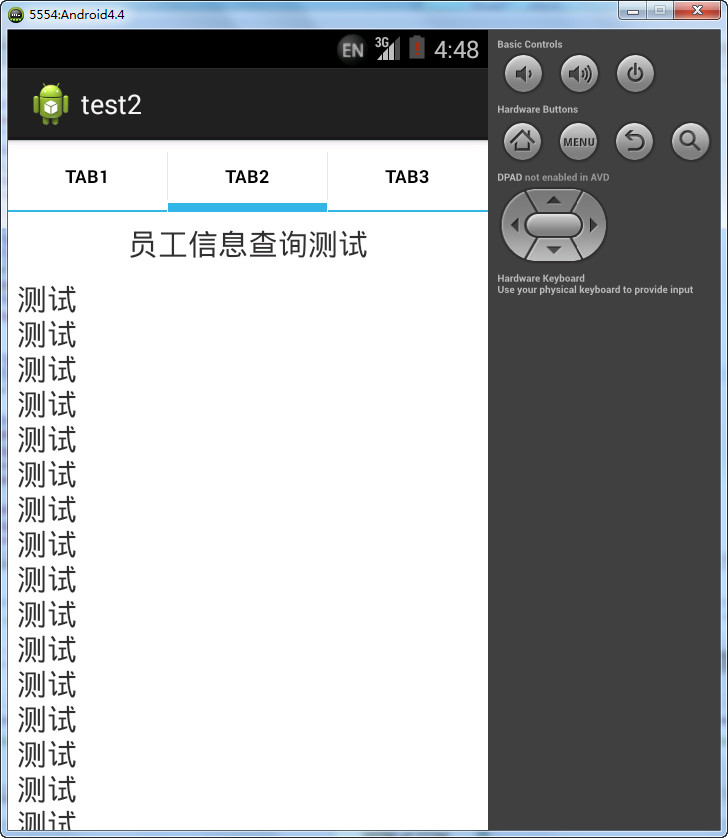
运行图:
本人提供Demo下载:点击此处下载Demo
-全文完-
Android 实现分页(使用TabWidget/TabHost)的更多相关文章
- Android:简单实现ViewPager+TabHost+TabWidget实现导航栏导航和滑动切换
viewPager是v4包里的一个组件,可以实现滑动显示多个界面. android也为viewPager提供了一个adapter,此adapter最少要重写4个方法: public int getCo ...
- Android使用Fragment来实现TabHost的功能(解决切换Fragment状态不保存)以及各个Fragment之间的通信
以下内容为原创,转载请注明:http://www.cnblogs.com/tiantianbyconan/p/3360938.html 如新浪微博下面的标签切换功能,我以前也写过一篇博文(http:/ ...
- Android --ListView分页
参考博客:Android ListView分页加载(服务端+android端)Demo 监听OnScrollListener事件 class OnListScrollListener implemen ...
- Android ListView分页载入(服务端+android端)Demo
Android ListView分页载入功能 在实际开发中经经常使用到,是每一个开发人员必须掌握的内容,本Demo给出了服务端+Android端的两者的代码,并成功通过了測试. 服务端使用MyEcli ...
- android开发之如何使TabHost的TabWidget位于屏幕下方
更改TabHost里的第一个LinearLayout为RelativeLayout.并在TabWidget中添加android:layout_alignParentBottom="true& ...
- 【Android基础篇】TabWidget设置背景和字体
在使用TabHost实现底部导航栏时,底部导航栏的三个导航button无法在布局文件中进行定制.比方设置点击时的颜色.字体的大小及颜色等,这里提供了一个解决的方法.就是在代码里进行定制. 思路是在Ac ...
- Android studio 中的TabWidget
1.TabWidget 的 layout文件 <?xml version="1.0" encoding="utf-8"?> <TabHost ...
- Android开发之自己定义TabHost文字及背景(源码分享)
使用TabHost 能够在一个屏幕间进行不同版面的切换,而系统自带的tabhost界面较为朴素,我们应该怎样进行自己定义改动优化呢 MainActivity的源码 package com.dream. ...
- Android之分页加载数据
基本的原理和我的上一篇随笔“Android之下拉刷新ListView”差不多,代码里面有注释,这里就不废话了,直接上代码. 自定义的分页显示ListView——PagedListView.java代码 ...
随机推荐
- [WPF系列]Button 自定义
A Simple Cross Button for WPF CREATING MORE COMPLEX BUTTONS IN XAML WPF Custom Controls - Withou ...
- RS-232, RS-422, RS-485 Serial Communication General Concepts(转载)
前面转载的几篇文章重点介绍了UART及RS-232.在工控领域除了RS-232以外,常用的串行通信还有RS-485.本文转载的文章重点介绍了RS-232.RS-422和RS-485. Overview ...
- HashMap,Hashtable,TreeMapMap
package com.wzy.list; import java.util.HashMap; import java.util.Hashtable; import java.util.Iterato ...
- [No000054] Windows 下Python3.5, NoteBook增强版安装
接着上周继续,没看的童鞋.请移步: http://www.cnblogs.com/Chary/p/No00004B.html 这里,假设你已经能够看到这个画面了: 接下来,我们继续 给药 : 安装no ...
- 关于Advanced Installer 11.0打包软件过程一些记录
1.想要安装后在默认网站下为一个虚拟目录,IIs,Web应用程序,选中虚拟目录是一个Web应用程序.同时修改常规>文件夹,重新指向网站文件所在目录,不然会少一级目录 2.如果想单独的应用程序池, ...
- mybatis 使用经验小结
一.多数据源问题 主要思路是把dataSource.sqlSesstionFactory.MapperScannerConfigurer在配置中区分开,各Mapper对应的包名.类名区分开 <? ...
- Mvc视图引擎、寻址规则
目前MVC中用的较多的视图引擎应该是WebFormViewEngine和RazorViewEngine了. 一个Request请求首先会进入Routing进行判断,对于错误的url是不能被路由匹配到的 ...
- SpringBoot源码分析:spring的基本架构
在深入了解springboot之前,我们需要了解spring,springboot本身就是基于spring而构建:是微服务架构中一个比较流行的框架:类似spring提供了一套完整的微服务方案如spri ...
- SQL查询语句 常用示例
SQL语言的应用 1. 找出姓李的读者姓名和所在单位. 2. 列出图书库中所有藏书的书名及出版单位. 3. 查找高等教育出版社的 所有图书及单价,结果按单价降序排序. 4. ...
- shell知识点小结
目录 引言 shell中的数组 数组的定义 数组的使用 实际的例子 shell中大小的比较 shell中的括号 shell中函数的定义 杂项知识点 字符串转数组 常用判断标志 linux后台运行相关 ...