
Android 常用数据适配器SimpleAdapter
在《Android 常用数据适配器ArrayAdapter》中介绍了ArrayAdapter数据适配器。但是存在一个缺陷,那就是条目的图标都固定相同,要显示每个条目的图标都不相同,那么使用SimpleAdapter
新建项目后,在layout文件夹下新建list_item.xml文件,接着编辑布局,代码如下:
<?xml version="1.0" encoding="utf-8"?>

<LinearLayout xmlns:android="http://schemas.android.com/apk/res/android"

    android:layout_width="match_parent"

    android:layout_height="wrap_content"

    android:gravity="center_vertical"

    android:orientation="horizontal" >

    <ImageView

        android:id="@+id/iv"

        android:layout_width="wrap_content"

        android:layout_height="wrap_content" />

    <TextView

        android:id="@+id/tv"

        android:layout_width="wrap_content"

        android:layout_height="wrap_content" />

</LinearLayout>
activity_main.xml中的代码如下:
<RelativeLayout xmlns:android="http://schemas.android.com/apk/res/android"

    xmlns:tools="http://schemas.android.com/tools"

    android:layout_width="match_parent"

    android:layout_height="match_parent"

    android:paddingBottom="@dimen/activity_vertical_margin"

    tools:context=".MainActivity" >

    <ListView

        android:id="@+id/lv"

        android:layout_width="fill_parent"

        android:layout_height="fill_parent" />

</RelativeLayout>
从……\sdk\platforms\android-18\data\res\drawable-hdpi中随便拷贝几个图片,放到drawable-hdpi文件夹中
代码如下:
package com.wuyudong.simpleadapter;

import java.util.ArrayList;

import java.util.HashMap;

import java.util.List;

import java.util.Map;

import android.os.Bundle;

import android.app.Activity;

import android.view.Menu;

import android.widget.ListView;

import android.widget.SimpleAdapter;

public class MainActivity extends Activity {

    @Override

    protected void onCreate(Bundle savedInstanceState) {

        super.onCreate(savedInstanceState);

        setContentView(R.layout.activity_main);

        ListView lv = (ListView) findViewById(R.id.lv);

        List<Map<String, Object>> data = new ArrayList<Map<String, Object>>();

        Map<String, Object> map1 = new HashMap<String, Object>();

        map1.put("nametext", "我是第1个功能");

        map1.put("iconid", R.drawable.btn_radio_off_disabled_focused_holo_dark);

        Map<String, Object> map2 = new HashMap<String, Object>();

        map2.put("nametext", "我是第2个功能");

        map2.put("iconid", R.drawable.btn_radio_off_disabled_focused_holo_light);

        Map<String, Object> map3 = new HashMap<String, Object>();

        map3.put("nametext", "我是第3个功能");

        map3.put("iconid", R.drawable.btn_radio_off_focused_holo_dark);

        Map<String, Object> map4 = new HashMap<String, Object>();

        map4.put("nametext", "我是第4个功能");

        map4.put("iconid", R.drawable.btn_radio_off_focused_holo_light);

        Map<String, Object> map5 = new HashMap<String, Object>();

        map5.put("nametext", "我是第5个功能");

        map5.put("iconid", R.drawable.btn_radio_off_holo);

        data.add(map1);

        data.add(map2);

        data.add(map3);

        data.add(map4);

        data.add(map5);

        //data绑定的数据.  list集合

        //R.layout.list_item.  数据显示对应的布局

        //要让数据里的view对象建立一个映射关系

        //from[]  map集合里面数据的key

        //to[]    布局文件里面的 id

        lv.setAdapter(new SimpleAdapter(this, data, R.layout.list_item,

                new String[] { "nametext", "iconid" }, new int[]{R.id.tv, R.id.iv}));

    }

}
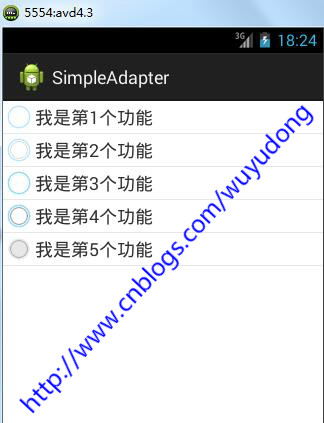
运行后的效果如下:
Android 常用数据适配器SimpleAdapter的更多相关文章
- Android 常用数据适配器ArrayAdapter
接着上篇文章<Android 采用Layout Inflater创建一个View对象>,本文采用常用数据适配器ArrayAdapter 新建项目后,在layout文件夹下新建list_it ...
- 无废话Android之listview入门,自定义的数据适配器、采用layoutInflater打气筒创建一个view对象、常用数据适配器ArrayAdapter、SimpleAdapter、使用ContentProvider(内容提供者)共享数据、短信的备份、插入一条记录到系统短信应用(3)
1.listview入门,自定义的数据适配器 <RelativeLayout xmlns:android="http://schemas.android.com/apk/res/and ...
- Android 常用数据操作封装类案例
1.DbHelper类 继承自SQLiteOpenHelper类,实现对数据库的基本操作 package com.example.utils; import android.content.Conte ...
- Android常用数据类型转换
String转int.float.double.byte[].bitmap Int i = Integer.parseInt(str); Float f = Float.parseFloat(str) ...
- Android开发工程师文集-Fragment,适配器,轮播图,ScrollView,Gallery 图片浏览器,Android常用布局样式
Android开发工程师文集-Fragment,适配器,轮播图,ScrollView,Gallery 图片浏览器,Android常用布局样式 Fragment FragmentManager frag ...
- Android学习之适配器ArrayAdapter SimpleAdapter
Adapter是个什么角色呢?其实它的作用就是View界面和数据之间的桥梁.我们可以看作是界面数据绑定的一种理解,它所操纵的数据一般都是一些比较复杂的数据,如数组,链表,数据库,集合等. 常用的适配器 ...
- android 适配器simpleadapter和baseadapter区别
android 适配器 simpleadapter 和 baseadapter 设计网络程序或者数据处理显示程序的时候,常常会使用 simpleadapter 和baseadapter 来实现. ad ...
- Android 数据适配器
把复杂的数据(数组.链表.数据库.集合等)填充到指定的视图界面上. arrayAdapter(数组适配器): 用于绑定一些格式单一的数据,数据源:数据或者集合. private Li ...
- [置顶] Android常用适配器控件
Android常用适配器控件 列表控件用于显示数据集合,Android不是使用一种类型的控件管理显示和数据,而是将这两项功能分布用列表控件和适配器来实现.列表控件扩展了android.widget.A ...
随机推荐
- 【Swift学习】Swift编程之旅---集合类型之Sets(七)
Sets是存储无序的相同类型的值,你可以在顺序不重要的情况下使用Sets来替代数组,或者当你需要同一个值在集合中只出现一次时. 一.Sets类型语法 写作Set<Element>,Ele ...
- 选择排序---堆排序算法(Javascript版)
堆排序分为两个过程: 1.建堆. 堆实质上是完全二叉树,必须满足:树中任一非叶子结点的关键字均不大于(或不小于)其左右孩子(若存在)结点的关键字. 堆分为:大根堆和小根堆,升序排序采用大根堆,降序排序 ...
- 基于ListBox的相关操作
Winform中两个listbox的操作是平时比较常用的操作. 本次将以一个Winform实例来分享一下两个listbox的操作,包括:listbox添加项,项的上移下移等操作. 假设有两个listb ...
- linux下的C语言开发
在很多人的眼里,C语言和linux常常是分不开的.这其中的原因很多,其中最重要的一部分我认为是linux本身就是C语言的杰出作品.当然,linux操作系统本身对C语言的支持也是相当到位的.作为一个真正 ...
- UML - 类图
在UML类图中,有以下几种常见关系: 泛化 - Generalization "is-a",继承关系,表示一般与特殊的关系: 子类(接口)特化父类(接口)的所有特征和行为,是对象之 ...
- MSCRM 获取列表所选记录相关信息
问题:如何通过JS获取列表中所选记录信息? 解决办法: The CRM2011 Ribbon has a special set of parameters called 'CrmParameters ...
- aspNet各种模块介绍
For browsers that do not support HTML5, you can use Modernizr. Modernizr is an open-source JavaScrip ...
- C++11学习笔记
C++11 1.long long新类型 2.列表初始化 int t=0; int t={0}; int t(0); int t{0}; 注意:如果我们使用列表初始化有丢失信息的风险,则编译器报错 l ...
- spring3.0结合Redis在项目中的运用
推荐一个程序员的论坛网站:http://ourcoders.com/home/ 以下内容使用到的技术有:Redis缓存.SpringMVC.Maven.项目中使用了redis缓存,目的是在业务场景中, ...
- 泛函编程(26)-泛函数据类型-Monad-Applicative Functor Traversal
前面我们讨论了Applicative.Applicative 就是某种Functor,因为我们可以用map2来实现map,所以Applicative可以map,就是Functor,叫做Applicat ...