
Android 常用数据适配器SimpleAdapter
在《Android 常用数据适配器ArrayAdapter》中介绍了ArrayAdapter数据适配器。但是存在一个缺陷,那就是条目的图标都固定相同,要显示每个条目的图标都不相同,那么使用SimpleAdapter
新建项目后,在layout文件夹下新建list_item.xml文件,接着编辑布局,代码如下:
<?xml version="1.0" encoding="utf-8"?>

<LinearLayout xmlns:android="http://schemas.android.com/apk/res/android"

    android:layout_width="match_parent"

    android:layout_height="wrap_content"

    android:gravity="center_vertical"

    android:orientation="horizontal" >

    <ImageView

        android:id="@+id/iv"

        android:layout_width="wrap_content"

        android:layout_height="wrap_content" />

    <TextView

        android:id="@+id/tv"

        android:layout_width="wrap_content"

        android:layout_height="wrap_content" />

</LinearLayout>
activity_main.xml中的代码如下:
<RelativeLayout xmlns:android="http://schemas.android.com/apk/res/android"

    xmlns:tools="http://schemas.android.com/tools"

    android:layout_width="match_parent"

    android:layout_height="match_parent"

    android:paddingBottom="@dimen/activity_vertical_margin"

    tools:context=".MainActivity" >

    <ListView

        android:id="@+id/lv"

        android:layout_width="fill_parent"

        android:layout_height="fill_parent" />

</RelativeLayout>
从……\sdk\platforms\android-18\data\res\drawable-hdpi中随便拷贝几个图片,放到drawable-hdpi文件夹中
代码如下:
package com.wuyudong.simpleadapter;

import java.util.ArrayList;

import java.util.HashMap;

import java.util.List;

import java.util.Map;

import android.os.Bundle;

import android.app.Activity;

import android.view.Menu;

import android.widget.ListView;

import android.widget.SimpleAdapter;

public class MainActivity extends Activity {

    @Override

    protected void onCreate(Bundle savedInstanceState) {

        super.onCreate(savedInstanceState);

        setContentView(R.layout.activity_main);

        ListView lv = (ListView) findViewById(R.id.lv);

        List<Map<String, Object>> data = new ArrayList<Map<String, Object>>();

        Map<String, Object> map1 = new HashMap<String, Object>();

        map1.put("nametext", "我是第1个功能");

        map1.put("iconid", R.drawable.btn_radio_off_disabled_focused_holo_dark);

        Map<String, Object> map2 = new HashMap<String, Object>();

        map2.put("nametext", "我是第2个功能");

        map2.put("iconid", R.drawable.btn_radio_off_disabled_focused_holo_light);

        Map<String, Object> map3 = new HashMap<String, Object>();

        map3.put("nametext", "我是第3个功能");

        map3.put("iconid", R.drawable.btn_radio_off_focused_holo_dark);

        Map<String, Object> map4 = new HashMap<String, Object>();

        map4.put("nametext", "我是第4个功能");

        map4.put("iconid", R.drawable.btn_radio_off_focused_holo_light);

        Map<String, Object> map5 = new HashMap<String, Object>();

        map5.put("nametext", "我是第5个功能");

        map5.put("iconid", R.drawable.btn_radio_off_holo);

        data.add(map1);

        data.add(map2);

        data.add(map3);

        data.add(map4);

        data.add(map5);

        //data绑定的数据.  list集合

        //R.layout.list_item.  数据显示对应的布局

        //要让数据里的view对象建立一个映射关系

        //from[]  map集合里面数据的key

        //to[]    布局文件里面的 id

        lv.setAdapter(new SimpleAdapter(this, data, R.layout.list_item,

                new String[] { "nametext", "iconid" }, new int[]{R.id.tv, R.id.iv}));

    }

}
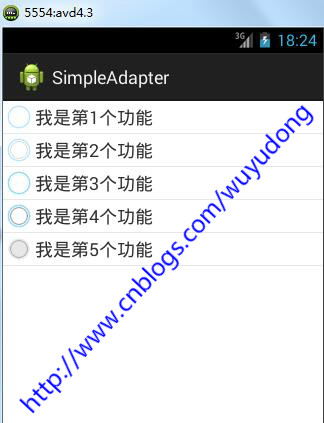
运行后的效果如下:
Android 常用数据适配器SimpleAdapter的更多相关文章
- Android 常用数据适配器ArrayAdapter
接着上篇文章<Android 采用Layout Inflater创建一个View对象>,本文采用常用数据适配器ArrayAdapter 新建项目后,在layout文件夹下新建list_it ...
- 无废话Android之listview入门,自定义的数据适配器、采用layoutInflater打气筒创建一个view对象、常用数据适配器ArrayAdapter、SimpleAdapter、使用ContentProvider(内容提供者)共享数据、短信的备份、插入一条记录到系统短信应用(3)
1.listview入门,自定义的数据适配器 <RelativeLayout xmlns:android="http://schemas.android.com/apk/res/and ...
- Android 常用数据操作封装类案例
1.DbHelper类 继承自SQLiteOpenHelper类,实现对数据库的基本操作 package com.example.utils; import android.content.Conte ...
- Android常用数据类型转换
String转int.float.double.byte[].bitmap Int i = Integer.parseInt(str); Float f = Float.parseFloat(str) ...
- Android开发工程师文集-Fragment,适配器,轮播图,ScrollView,Gallery 图片浏览器,Android常用布局样式
Android开发工程师文集-Fragment,适配器,轮播图,ScrollView,Gallery 图片浏览器,Android常用布局样式 Fragment FragmentManager frag ...
- Android学习之适配器ArrayAdapter SimpleAdapter
Adapter是个什么角色呢?其实它的作用就是View界面和数据之间的桥梁.我们可以看作是界面数据绑定的一种理解,它所操纵的数据一般都是一些比较复杂的数据,如数组,链表,数据库,集合等. 常用的适配器 ...
- android 适配器simpleadapter和baseadapter区别
android 适配器 simpleadapter 和 baseadapter 设计网络程序或者数据处理显示程序的时候,常常会使用 simpleadapter 和baseadapter 来实现. ad ...
- Android 数据适配器
把复杂的数据(数组.链表.数据库.集合等)填充到指定的视图界面上. arrayAdapter(数组适配器): 用于绑定一些格式单一的数据,数据源:数据或者集合. private Li ...
- [置顶] Android常用适配器控件
Android常用适配器控件 列表控件用于显示数据集合,Android不是使用一种类型的控件管理显示和数据,而是将这两项功能分布用列表控件和适配器来实现.列表控件扩展了android.widget.A ...
随机推荐
- OpenGL的简单研究-开端
一直想要学习的但是没有学习的东西,大学一直在等待这个时间,终于可以闲下来研究一下这个部分的内容了. 计算机图形学,让计算机处理各种图像的东西,里面也存在很多算法和数学知识,很值得研究的一个领域,之前一 ...
- js简单实现div宽度匀速增加/减小
效果类似百度首页音乐盒. 点击音乐右边的div可以变长或者变短. 代码: <!DOCTYPE html> <html lang="en"> <head ...
- HTML5使用Div标签来实现表格
当支持HTML5时,我们可以使用样式把DIV实现一个表格table. 关键样式语法:display: table,display: table-row,display: table-cell 下面例子 ...
- The conversion of a varchar data type to a datetime data type resulted in an out-of-range value
刚刚有在程序中,传递一个空值至MS SQL Server数据库,这个值的数据类型为DATETIME执行时,它却发生了如标题提示的异常:The conversion of a varchar data ...
- 基于MVC4+EasyUI的Web开发框架经验总结(1)-利用jQuery Tags Input 插件显示选择记录
最近花了不少时间在重构和进一步提炼我的Web开发框架上,力求在用户体验和界面设计方面,和Winform开发框架保持一致,而在Web上,我主要采用EasyUI的前端界面处理技术,走MVC的技术路线,在重 ...
- android 开发环境搭建
http://www.cnblogs.com/bjzhanghao/archive/2012/11/14/2769409.html http://jingyan.baidu.com/article/7 ...
- MySQL Workbench 修改快捷键
在安装根目录查到\data\main_menu.xml这个文件 例如,修改执行sql语句的快捷键为F5 <value type="object" struct-name=&q ...
- SSH服务器与Android通信(2)--Android客户端接收数据
基本原理是Android客户端通过HttpClient向服务器发出请求,服务器向Android客户端返回JSON字符串,Android客户端解析JSON字符串获得数据. 1. 新建一个Android项 ...
- Titanium Studio下载地址
http://titanium-studio.s3.amazonaws.com/latest/titanium.studio.linux.gtk.x86_64.zip http://titanium- ...
- 【LeetCode】389 Find the Difference(java)
原题 Given two strings s and t which consist of only lowercase letters. String t is generated by rando ...