
MATLAB实例:散点密度图
MATLAB实例:散点密度图
作者:凯鲁嘎吉 - 博客园http://www.cnblogs.com/kailugaji/
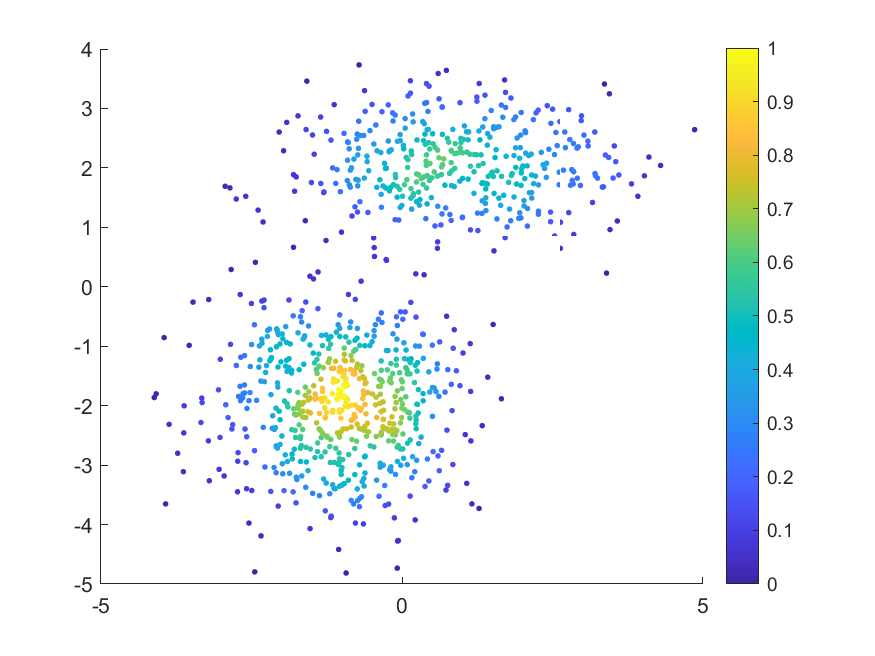
MATLAB绘制用颜色表示数据密度的散点图
数据来源:MATLAB中“fitgmdist”的用法及其GMM聚类算法,将数据保存为gauss.txt
1. demo.m
% 用颜色表示数据密度的散点图

data_load=dlmread('E:\scanplot\gauss.txt');

X=data_load(:,1:2);

scatplot(X(:,1),X(:,2),'circles', sqrt((range(X(:, 1))/30)^2 + (range(X(:,2))/30)^2), 100, 5, 1, 8);

% colormap jet

print(gcf,'-dpng','散点密度图.png');
2. scatplot.m
来自:https://www.mathworks.com/matlabcentral/fileexchange/8577-scatplot
function out = scatplot(x,y,method,radius,N,n,po,ms)

% Scatter plot with color indicating data density

% https://www.mathworks.com/matlabcentral/fileexchange/8577-scatplot

% USAGE:

%   out = scatplot(x,y,method,radius,N,n,po,ms)

%   out = scatplot(x,y,dd)

%

% DESCRIPTION:

%   Draws a scatter plot with a colorscale

%   representing the data density computed

%   using three methods

%

% INPUT VARIABLES:

%   x,y - are the data points

%   method - is the method used to calculate data densities:

%       'circles' - uses circles with a determined area

%               centered at each data point

%       'squares' - uses squares with a determined area

%               centered at each data point

%       'voronoi' - uses voronoi cells to determin data densities

%               default method is 'voronoi'

%   radius - is the radius used for the circles or squares

%       used to calculate the data densities if

%       (Note: only used in methods 'circles' and 'squares'

%           default radius is sqrt((range(x)/30)^2 + (range(y)/30)^2)

%   N - is the size of the square mesh (N x N) used to

%       filter and calculate contours

%       default is 100

%   n - is the number of coeficients used in the 2-D

%       running mean filter

%       default is 5

%       (Note: if n is length(2), n(2) is tjhe number of

%       of times the filter is applied)

%   po - plot options:

%       0 - No plot

%       1 - plots only colored data points (filtered)

%       2 - plots colored data points and contours (filtered)

%       3 - plots only colored data points (unfiltered)

%       4 - plots colored data points and contours (unfiltered)

%           default is 1

%   ms - uses this marker size for filled circles

%       default is 4

%

% OUTPUT VARIABLE:

%   out - structure array that contains the following fields:

%       dd - unfiltered data densities at (x,y)

%       ddf - filtered data densities at (x,y)

%       radius - area used in 'circles' and 'squares'

%               methods to calculate densities

%       xi - x coordenates for zi matrix

%       yi - y coordenates for zi matrix

%       zi - unfiltered data densities at (xi,yi)

%       zif - filtered data densities at (xi,yi)

%       [c,h] = contour matrix C as described in

%           CONTOURC and a handle H to a contourgroup object

%       hs = scatter points handles

%

%Copy-Left, Alejandro Sanchez-Barba, 2005

if nargin==0

    scatplotdemo

    return

end

if nargin<3 | isempty(method)

    method = 'vo';

end

if isnumeric(method)

   gsp(x,y,method,2)

   return

else

    method = method(1:2);

end

if nargin<4 | isempty(n)

    n = 5; %number of filter coefficients

end

if nargin<5 | isempty(radius)

    radius = sqrt((range(x)/30)^2 + (range(y)/30)^2);

end

if nargin<6 | isempty(po)

    po = 1; %plot option

end

if nargin<7 | isempty(ms)

    ms = 7; %markersize

end

if nargin<8 | isempty(N)

    N = 100; %length of grid

end

%Correct data if necessary

x = x(:);

y = y(:);

%Asuming x and y match

idat = isfinite(x);

x = x(idat);

y = y(idat);

holdstate = ishold;

if holdstate==0

    cla

end

hold on

%--------- Caclulate data density ---------

dd = datadensity(x,y,method,radius);

%------------- Gridding -------------------

xi = repmat(linspace(min(x),max(x),N),N,1);

yi = repmat(linspace(min(y),max(y),N)',1,N);

zi = griddata(x,y,dd,xi,yi);

%----- Bidimensional running mean filter -----

zi(isnan(zi)) = 0;

coef = ones(n(1),1)/n(1);

zif = conv2(coef,coef,zi,'same');

if length(n)>1

    for k=1:n(2)

        zif = conv2(coef,coef,zif,'same');

    end

end

%-------- New Filtered data densities --------

ddf = griddata(xi,yi,zif,x,y);

%----------- Plotting --------------------

switch po

    case {1,2}

        if po==2

            [c,h] = contour(xi,yi,zif);

            out.c = c;

            out.h = h;

        end %if

        hs = gsp(x,y,ddf,ms);

        out.hs = hs;

        colorbar

    case {3,4}

        if po>3

            [c,h] = contour(xi,yi,zi);

            out.c = c;

        end %if

        hs = gsp(x,y,dd,ms);

        out.hs = hs;

        colorbar

end %switch

%------Relocate variables and place NaN's ----------

dd(idat) = dd;

dd(~idat) = NaN;

ddf(idat) = ddf;

ddf(~idat) = NaN;

%--------- Collect variables ----------------

out.dd = dd;

out.ddf = ddf;

out.radius = radius;

out.xi = xi;

out.yi = yi;

out.zi = zi;

out.zif = zif;

if ~holdstate

    hold off

end

return

%~~~~~~~~~~~~~~~~~~~~~~~~~~~~~~~~~~~~~~

function scatplotdemo

po = 2;

method = 'squares';

radius = [];

N = [];

n = [];

ms = 5;

x = randn(1000,1);

y = randn(1000,1);

out = scatplot(x,y,method,radius,N,n,po,ms)

return

%~~~~~~~~~~ Data Density ~~~~~~~~~~~~~~

function dd = datadensity(x,y,method,r)

%Computes the data density (points/area) of scattered points

%Striped Down version

%

% USAGE:

%   dd = datadensity(x,y,method,radius)

%

% INPUT:

%   (x,y) -  coordinates of points

%   method - either 'squares','circles', or 'voronoi'

%       default = 'voronoi'

%   radius - Equal to the circle radius or half the square width

Ld = length(x);

dd = zeros(Ld,1);

switch method %Calculate Data Density

    case 'sq'  %---- Using squares ----

        for k=1:Ld

            dd(k) = sum( x>(x(k)-r) & x<(x(k)+r) & y>(y(k)-r) & y<(y(k)+r) );

        end %for

        area = (2*r)^2;

        dd = dd/area;

    case 'ci'

        for k=1:Ld

            dd(k) = sum( sqrt((x-x(k)).^2 + (y-y(k)).^2) < r );

        end

        area = pi*r^2;

        dd = dd/area;

    case 'vo'  %----- Using voronoi cells ------

        [v,c] = voronoin([x,y]);

        for k=1:length(c)

            %If at least one of the indices is 1,

            %then it is an open region, its area

            %is infinity and the data density is 0

            if all(c{k}>1)

                a = polyarea(v(c{k},1),v(c{k},2));

                dd(k) = 1/a;

            end %if

        end %for

end %switch

return

%~~~~~~~~~~ Graf Scatter Plot ~~~~~~~~~~~

function varargout = gsp(x,y,c,ms)

%Graphs scattered poits

map = colormap;

ind = fix((c-min(c))/(max(c)-min(c))*(size(map,1)-1))+1;

h = [];

%much more efficient than matlab's scatter plot

for k=1:size(map,1)

    if any(ind==k)

        h(end+1) = line('Xdata',x(ind==k),'Ydata',y(ind==k), ...

            'LineStyle','none','Color',map(k,:), ...

            'Marker','.','MarkerSize',ms);

    end

end

if nargout==1

    varargout{1} = h;

end

return
3. 结果
MATLAB实例:散点密度图的更多相关文章
- MATLAB实例:绘制折线图
MATLAB实例:绘制折线图 作者:凯鲁嘎吉 - 博客园 http://www.cnblogs.com/kailugaji/ 条形图的绘制见:MATLAB实例:绘制条形图 用MATLAB将几组不同的数 ...
- MATLAB实例:构造网络连接图(Network Connection)及计算图的代数连通度(Algebraic Connectivity)
MATLAB实例:构造网络连接图(Network Connection)及计算图的代数连通度(Algebraic Connectivity) 作者:凯鲁嘎吉 - 博客园 http://www.cnbl ...
- Matlab plotyy画双纵坐标图实例
Matlab plotyy画双纵坐标图实例 x = 0:0.01:20;y1 = 200*exp(-0.05*x).*sin(x);y2 = 0.8*exp(-0.5*x).*sin(10*x);[A ...
- MATLAB实例:求相关系数、绘制热图并找到强相关对
MATLAB实例:求相关系数.绘制热图并找到强相关对 作者:凯鲁嘎吉 - 博客园 http://www.cnblogs.com/kailugaji/ 用MATLAB编程,求给定数据不同维度之间的相关系 ...
- MATLAB实例:聚类网络连接图
MATLAB实例:聚类网络连接图 作者:凯鲁嘎吉 - 博客园 http://www.cnblogs.com/kailugaji/ 本文给出一个简单实例,先生成2维高斯数据,得到数据之后,用模糊C均值( ...
- MATLAB实例:二元高斯分布图
MATLAB实例:二元高斯分布图 作者:凯鲁嘎吉 - 博客园 http://www.cnblogs.com/kailugaji/ 1. MATLAB程序 %% demo Multivariate No ...
- Python图表数据可视化Seaborn:1. 风格| 分布数据可视化-直方图| 密度图| 散点图
conda install seaborn 是安装到jupyter那个环境的 1. 整体风格设置 对图表整体颜色.比例等进行风格设置,包括颜色色板等调用系统风格进行数据可视化 set() / se ...
- MATLAB实例:绘制条形图
MATLAB实例:绘制条形图 作者:凯鲁嘎吉 - 博客园 http://www.cnblogs.com/kailugaji/ 用MATLAB绘制条形图,自定义条形图的颜色.图例位置.横坐标名称.显示条 ...
- MATLAB实例:将批量的图片保存为.mat文件
MATLAB实例:将批量的图片保存为.mat文件 作者:凯鲁嘎吉 - 博客园 http://www.cnblogs.com/kailugaji/ 一.彩色图片 图片数据:horse.rar 1. MA ...
随机推荐
- 洛谷 题解 P1025 【数的划分】
将n个小球放到k个盒子中的情况总数 = (a)至少有一个盒子只有一个小球的情况数 + (b)没有一个盒子只有一个小球的情况数 这样写出表达式: a.因为盒子不加区分,那么=情况数与"将n-1 ...
- C和C++从零开始系列(二)
今天说一下 C和C++ 的if 条件语句. 在实际编程中,会经常有逻辑判断,比如,输入的数值参数中,如果是奇数,输出This is uneven. 如果是偶数,输出 This is even. 我们在 ...
- Python3、setuptools、Pip3安装详解
Python3.setuptools.Pip3安装详解 2017年08月19日 18:58:47 安静的技术控 阅读数:26002 版权声明:本文为博主原创文章,未经博主允许不得转载. http ...
- 【RabbitMQ】使用学习
[RabbitMQ]使用学习 转载: ============================================================= =================== ...
- 使用 Vue + TypeScript 时项目中常用的装饰器
目录 一.@Component 装饰器 1)父组件 2)子组件 二. @Emit 装饰器 1)父组件 2)子组件 三. @Model 装饰器 1)父组件 2)子组件 四. @Prop 装饰器 1)父组 ...
- CCF-CSP题解 201912-3 化学方程式
判断化学方程式是否配平. 字符串处理. 有点编译原理递归下降法的感觉. 考场源码,比较粗糙. // INFO BEGIN // // User = 201911513451(陶杨) // Group ...
- CodeForces - 556C Case of Matryoshkas (水题)
Andrewid the Android is a galaxy-famous detective. He is now investigating the case of vandalism at ...
- Python是什么?你真的了解Python吗?
一.Python是什么相信混迹IT界的很多朋友都知道,Python是近年来最火的一个热点,没有之一.从性质上来讲它和我们熟知的C.java.php等没有什么本质的区别,也是一种开发语言,而且已经进阶到 ...
- Java-50个关键字
关键字 (50个,包含2个保留字)和特殊值(3个)一.基本数据类型相关关键字(8个) 1.关键字介绍(1)byte:单字节类型(2)short:短整型(3)int:整型(4)long:长整型(5)ch ...
- JS---DOM/BOM---学习road map---7 parts
JS---DOM/BOM---学习road map---6 parts Part 1-2: Part 3-4 part 5-7: