
HBase 系列(六)——HBase Java API 的基本使用
一、简述
截至到目前 (2019.04),HBase 有两个主要的版本,分别是 1.x 和 2.x ,两个版本的 Java API 有所不同,1.x 中某些方法在 2.x 中被标识为 @deprecated 过时。所以下面关于 API 的样例,我会分别给出 1.x 和 2.x 两个版本。完整的代码见本仓库:
同时你使用的客户端的版本必须与服务端版本保持一致,如果用 2.x 版本的客户端代码去连接 1.x 版本的服务端,会抛出 NoSuchColumnFamilyException 等异常。
二、Java API 1.x 基本使用
2.1 新建Maven工程,导入项目依赖
要使用 Java API 操作 HBase,需要引入 hbase-client。这里选取的 HBase Client 的版本为 1.2.0。
<dependency>
    <groupId>org.apache.hbase</groupId>
    <artifactId>hbase-client</artifactId>
    <version>1.2.0</version>
</dependency>
2.2 API 基本使用
public class HBaseUtils {

    private static Connection connection;

    static {
        Configuration configuration = HBaseConfiguration.create();
        configuration.set("hbase.zookeeper.property.clientPort", "2181");
        // 如果是集群 则主机名用逗号分隔
        configuration.set("hbase.zookeeper.quorum", "hadoop001");
        try {
            connection = ConnectionFactory.createConnection(configuration);
        } catch (IOException e) {
            e.printStackTrace();
        }
    }

    /**
     * 创建 HBase 表
     *
     * @param tableName      表名
     * @param columnFamilies 列族的数组
     */
    public static boolean createTable(String tableName, List<String> columnFamilies) {
        try {
            HBaseAdmin admin = (HBaseAdmin) connection.getAdmin();
            if (admin.tableExists(tableName)) {
                return false;
            }
            HTableDescriptor tableDescriptor = new HTableDescriptor(TableName.valueOf(tableName));
            columnFamilies.forEach(columnFamily -> {
                HColumnDescriptor columnDescriptor = new HColumnDescriptor(columnFamily);
                columnDescriptor.setMaxVersions(1);
                tableDescriptor.addFamily(columnDescriptor);
            });
            admin.createTable(tableDescriptor);
        } catch (IOException e) {
            e.printStackTrace();
        }
        return true;
    }

    /**
     * 删除 hBase 表
     *
     * @param tableName 表名
     */
    public static boolean deleteTable(String tableName) {
        try {
            HBaseAdmin admin = (HBaseAdmin) connection.getAdmin();
            // 删除表前需要先禁用表
            admin.disableTable(tableName);
            admin.deleteTable(tableName);
        } catch (Exception e) {
            e.printStackTrace();
        }
        return true;
    }

    /**
     * 插入数据
     *
     * @param tableName        表名
     * @param rowKey           唯一标识
     * @param columnFamilyName 列族名
     * @param qualifier        列标识
     * @param value            数据
     */
    public static boolean putRow(String tableName, String rowKey, String columnFamilyName, String qualifier,
                                 String value) {
        try {
            Table table = connection.getTable(TableName.valueOf(tableName));
            Put put = new Put(Bytes.toBytes(rowKey));
            put.addColumn(Bytes.toBytes(columnFamilyName), Bytes.toBytes(qualifier), Bytes.toBytes(value));
            table.put(put);
            table.close();
        } catch (IOException e) {
            e.printStackTrace();
        }
        return true;
    }

    /**
     * 插入数据
     *
     * @param tableName        表名
     * @param rowKey           唯一标识
     * @param columnFamilyName 列族名
     * @param pairList         列标识和值的集合
     */
    public static boolean putRow(String tableName, String rowKey, String columnFamilyName, List<Pair<String, String>> pairList) {
        try {
            Table table = connection.getTable(TableName.valueOf(tableName));
            Put put = new Put(Bytes.toBytes(rowKey));
            pairList.forEach(pair -> put.addColumn(Bytes.toBytes(columnFamilyName), Bytes.toBytes(pair.getKey()), Bytes.toBytes(pair.getValue())));
            table.put(put);
            table.close();
        } catch (IOException e) {
            e.printStackTrace();
        }
        return true;
    }

    /**
     * 根据 rowKey 获取指定行的数据
     *
     * @param tableName 表名
     * @param rowKey    唯一标识
     */
    public static Result getRow(String tableName, String rowKey) {
        try {
            Table table = connection.getTable(TableName.valueOf(tableName));
            Get get = new Get(Bytes.toBytes(rowKey));
            return table.get(get);
        } catch (IOException e) {
            e.printStackTrace();
        }
        return null;
    }

    /**
     * 获取指定行指定列 (cell) 的最新版本的数据
     *
     * @param tableName    表名
     * @param rowKey       唯一标识
     * @param columnFamily 列族
     * @param qualifier    列标识
     */
    public static String getCell(String tableName, String rowKey, String columnFamily, String qualifier) {
        try {
            Table table = connection.getTable(TableName.valueOf(tableName));
            Get get = new Get(Bytes.toBytes(rowKey));
            if (!get.isCheckExistenceOnly()) {
                get.addColumn(Bytes.toBytes(columnFamily), Bytes.toBytes(qualifier));
                Result result = table.get(get);
                byte[] resultValue = result.getValue(Bytes.toBytes(columnFamily), Bytes.toBytes(qualifier));
                return Bytes.toString(resultValue);
            } else {
                return null;
            }

        } catch (IOException e) {
            e.printStackTrace();
        }
        return null;
    }

    /**
     * 检索全表
     *
     * @param tableName 表名
     */
    public static ResultScanner getScanner(String tableName) {
        try {
            Table table = connection.getTable(TableName.valueOf(tableName));
            Scan scan = new Scan();
            return table.getScanner(scan);
        } catch (IOException e) {
            e.printStackTrace();
        }
        return null;
    }

    /**
     * 检索表中指定数据
     *
     * @param tableName  表名
     * @param filterList 过滤器
     */

    public static ResultScanner getScanner(String tableName, FilterList filterList) {
        try {
            Table table = connection.getTable(TableName.valueOf(tableName));
            Scan scan = new Scan();
            scan.setFilter(filterList);
            return table.getScanner(scan);
        } catch (IOException e) {
            e.printStackTrace();
        }
        return null;
    }

    /**
     * 检索表中指定数据
     *
     * @param tableName   表名
     * @param startRowKey 起始 RowKey
     * @param endRowKey   终止 RowKey
     * @param filterList  过滤器
     */

    public static ResultScanner getScanner(String tableName, String startRowKey, String endRowKey,
                                           FilterList filterList) {
        try {
            Table table = connection.getTable(TableName.valueOf(tableName));
            Scan scan = new Scan();
            scan.setStartRow(Bytes.toBytes(startRowKey));
            scan.setStopRow(Bytes.toBytes(endRowKey));
            scan.setFilter(filterList);
            return table.getScanner(scan);
        } catch (IOException e) {
            e.printStackTrace();
        }
        return null;
    }

    /**
     * 删除指定行记录
     *
     * @param tableName 表名
     * @param rowKey    唯一标识
     */
    public static boolean deleteRow(String tableName, String rowKey) {
        try {
            Table table = connection.getTable(TableName.valueOf(tableName));
            Delete delete = new Delete(Bytes.toBytes(rowKey));
            table.delete(delete);
        } catch (IOException e) {
            e.printStackTrace();
        }
        return true;
    }

    /**
     * 删除指定行的指定列
     *
     * @param tableName  表名
     * @param rowKey     唯一标识
     * @param familyName 列族
     * @param qualifier  列标识
     */
    public static boolean deleteColumn(String tableName, String rowKey, String familyName,
                                          String qualifier) {
        try {
            Table table = connection.getTable(TableName.valueOf(tableName));
            Delete delete = new Delete(Bytes.toBytes(rowKey));
            delete.addColumn(Bytes.toBytes(familyName), Bytes.toBytes(qualifier));
            table.delete(delete);
            table.close();
        } catch (IOException e) {
            e.printStackTrace();
        }
        return true;
    }

}
2.3 单元测试
以单元测试的方式对上面封装的 API 进行测试。
public class HBaseUtilsTest {

    private static final String TABLE_NAME = "class";
    private static final String TEACHER = "teacher";
    private static final String STUDENT = "student";

    @Test
    public void createTable() {
        // 新建表
        List<String> columnFamilies = Arrays.asList(TEACHER, STUDENT);
        boolean table = HBaseUtils.createTable(TABLE_NAME, columnFamilies);
        System.out.println("表创建结果:" + table);
    }

    @Test
    public void insertData() {
        List<Pair<String, String>> pairs1 = Arrays.asList(new Pair<>("name", "Tom"),
                new Pair<>("age", "22"),
                new Pair<>("gender", "1"));
        HBaseUtils.putRow(TABLE_NAME, "rowKey1", STUDENT, pairs1);

        List<Pair<String, String>> pairs2 = Arrays.asList(new Pair<>("name", "Jack"),
                new Pair<>("age", "33"),
                new Pair<>("gender", "2"));
        HBaseUtils.putRow(TABLE_NAME, "rowKey2", STUDENT, pairs2);

        List<Pair<String, String>> pairs3 = Arrays.asList(new Pair<>("name", "Mike"),
                new Pair<>("age", "44"),
                new Pair<>("gender", "1"));
        HBaseUtils.putRow(TABLE_NAME, "rowKey3", STUDENT, pairs3);
    }

    @Test
    public void getRow() {
        Result result = HBaseUtils.getRow(TABLE_NAME, "rowKey1");
        if (result != null) {
            System.out.println(Bytes
                    .toString(result.getValue(Bytes.toBytes(STUDENT), Bytes.toBytes("name"))));
        }

    }

    @Test
    public void getCell() {
        String cell = HBaseUtils.getCell(TABLE_NAME, "rowKey2", STUDENT, "age");
        System.out.println("cell age :" + cell);

    }

    @Test
    public void getScanner() {
        ResultScanner scanner = HBaseUtils.getScanner(TABLE_NAME);
        if (scanner != null) {
            scanner.forEach(result -> System.out.println(Bytes.toString(result.getRow()) + "->" + Bytes
                    .toString(result.getValue(Bytes.toBytes(STUDENT), Bytes.toBytes("name")))));
            scanner.close();
        }
    }

    @Test
    public void getScannerWithFilter() {
        FilterList filterList = new FilterList(FilterList.Operator.MUST_PASS_ALL);
        SingleColumnValueFilter nameFilter = new SingleColumnValueFilter(Bytes.toBytes(STUDENT),
                Bytes.toBytes("name"), CompareOperator.EQUAL, Bytes.toBytes("Jack"));
        filterList.addFilter(nameFilter);
        ResultScanner scanner = HBaseUtils.getScanner(TABLE_NAME, filterList);
        if (scanner != null) {
            scanner.forEach(result -> System.out.println(Bytes.toString(result.getRow()) + "->" + Bytes
                    .toString(result.getValue(Bytes.toBytes(STUDENT), Bytes.toBytes("name")))));
            scanner.close();
        }
    }

    @Test
    public void deleteColumn() {
        boolean b = HBaseUtils.deleteColumn(TABLE_NAME, "rowKey2", STUDENT, "age");
        System.out.println("删除结果: " + b);
    }

    @Test
    public void deleteRow() {
        boolean b = HBaseUtils.deleteRow(TABLE_NAME, "rowKey2");
        System.out.println("删除结果: " + b);
    }

    @Test
    public void deleteTable() {
        boolean b = HBaseUtils.deleteTable(TABLE_NAME);
        System.out.println("删除结果: " + b);
    }
}
三、Java API 2.x 基本使用
3.1 新建Maven工程,导入项目依赖
这里选取的 HBase Client 的版本为最新的 2.1.4。
<dependency>
    <groupId>org.apache.hbase</groupId>
    <artifactId>hbase-client</artifactId>
    <version>2.1.4</version>
</dependency>
3.2 API 的基本使用
2.x 版本相比于 1.x 废弃了一部分方法,关于废弃的方法在源码中都会指明新的替代方法,比如,在 2.x 中创建表时:HTableDescriptor 和 HColumnDescriptor 等类都标识为废弃,取而代之的是使用 TableDescriptorBuilder 和 ColumnFamilyDescriptorBuilder 来定义表和列族。
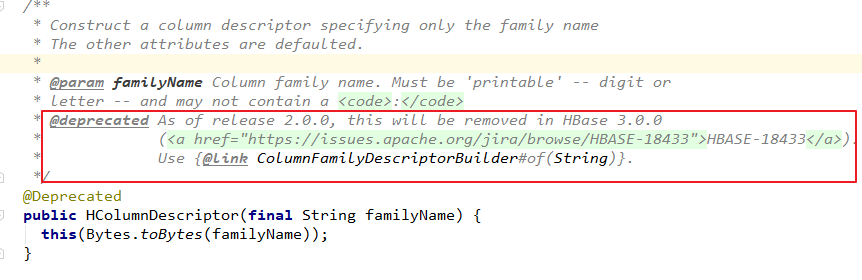
以下为 HBase 2.x 版本 Java API 的使用示例:
public class HBaseUtils {

    private static Connection connection;

    static {
        Configuration configuration = HBaseConfiguration.create();
        configuration.set("hbase.zookeeper.property.clientPort", "2181");
        // 如果是集群 则主机名用逗号分隔
        configuration.set("hbase.zookeeper.quorum", "hadoop001");
        try {
            connection = ConnectionFactory.createConnection(configuration);
        } catch (IOException e) {
            e.printStackTrace();
        }
    }

    /**
     * 创建 HBase 表
     *
     * @param tableName      表名
     * @param columnFamilies 列族的数组
     */
    public static boolean createTable(String tableName, List<String> columnFamilies) {
        try {
            HBaseAdmin admin = (HBaseAdmin) connection.getAdmin();
            if (admin.tableExists(TableName.valueOf(tableName))) {
                return false;
            }
            TableDescriptorBuilder tableDescriptor = TableDescriptorBuilder.newBuilder(TableName.valueOf(tableName));
            columnFamilies.forEach(columnFamily -> {
                ColumnFamilyDescriptorBuilder cfDescriptorBuilder = ColumnFamilyDescriptorBuilder.newBuilder(Bytes.toBytes(columnFamily));
                cfDescriptorBuilder.setMaxVersions(1);
                ColumnFamilyDescriptor familyDescriptor = cfDescriptorBuilder.build();
                tableDescriptor.setColumnFamily(familyDescriptor);
            });
            admin.createTable(tableDescriptor.build());
        } catch (IOException e) {
            e.printStackTrace();
        }
        return true;
    }

    /**
     * 删除 hBase 表
     *
     * @param tableName 表名
     */
    public static boolean deleteTable(String tableName) {
        try {
            HBaseAdmin admin = (HBaseAdmin) connection.getAdmin();
            // 删除表前需要先禁用表
            admin.disableTable(TableName.valueOf(tableName));
            admin.deleteTable(TableName.valueOf(tableName));
        } catch (Exception e) {
            e.printStackTrace();
        }
        return true;
    }

    /**
     * 插入数据
     *
     * @param tableName        表名
     * @param rowKey           唯一标识
     * @param columnFamilyName 列族名
     * @param qualifier        列标识
     * @param value            数据
     */
    public static boolean putRow(String tableName, String rowKey, String columnFamilyName, String qualifier,
                                 String value) {
        try {
            Table table = connection.getTable(TableName.valueOf(tableName));
            Put put = new Put(Bytes.toBytes(rowKey));
            put.addColumn(Bytes.toBytes(columnFamilyName), Bytes.toBytes(qualifier), Bytes.toBytes(value));
            table.put(put);
            table.close();
        } catch (IOException e) {
            e.printStackTrace();
        }
        return true;
    }

    /**
     * 插入数据
     *
     * @param tableName        表名
     * @param rowKey           唯一标识
     * @param columnFamilyName 列族名
     * @param pairList         列标识和值的集合
     */
    public static boolean putRow(String tableName, String rowKey, String columnFamilyName, List<Pair<String, String>> pairList) {
        try {
            Table table = connection.getTable(TableName.valueOf(tableName));
            Put put = new Put(Bytes.toBytes(rowKey));
            pairList.forEach(pair -> put.addColumn(Bytes.toBytes(columnFamilyName), Bytes.toBytes(pair.getKey()), Bytes.toBytes(pair.getValue())));
            table.put(put);
            table.close();
        } catch (IOException e) {
            e.printStackTrace();
        }
        return true;
    }

    /**
     * 根据 rowKey 获取指定行的数据
     *
     * @param tableName 表名
     * @param rowKey    唯一标识
     */
    public static Result getRow(String tableName, String rowKey) {
        try {
            Table table = connection.getTable(TableName.valueOf(tableName));
            Get get = new Get(Bytes.toBytes(rowKey));
            return table.get(get);
        } catch (IOException e) {
            e.printStackTrace();
        }
        return null;
    }

    /**
     * 获取指定行指定列 (cell) 的最新版本的数据
     *
     * @param tableName    表名
     * @param rowKey       唯一标识
     * @param columnFamily 列族
     * @param qualifier    列标识
     */
    public static String getCell(String tableName, String rowKey, String columnFamily, String qualifier) {
        try {
            Table table = connection.getTable(TableName.valueOf(tableName));
            Get get = new Get(Bytes.toBytes(rowKey));
            if (!get.isCheckExistenceOnly()) {
                get.addColumn(Bytes.toBytes(columnFamily), Bytes.toBytes(qualifier));
                Result result = table.get(get);
                byte[] resultValue = result.getValue(Bytes.toBytes(columnFamily), Bytes.toBytes(qualifier));
                return Bytes.toString(resultValue);
            } else {
                return null;
            }

        } catch (IOException e) {
            e.printStackTrace();
        }
        return null;
    }

    /**
     * 检索全表
     *
     * @param tableName 表名
     */
    public static ResultScanner getScanner(String tableName) {
        try {
            Table table = connection.getTable(TableName.valueOf(tableName));
            Scan scan = new Scan();
            return table.getScanner(scan);
        } catch (IOException e) {
            e.printStackTrace();
        }
        return null;
    }

    /**
     * 检索表中指定数据
     *
     * @param tableName  表名
     * @param filterList 过滤器
     */

    public static ResultScanner getScanner(String tableName, FilterList filterList) {
        try {
            Table table = connection.getTable(TableName.valueOf(tableName));
            Scan scan = new Scan();
            scan.setFilter(filterList);
            return table.getScanner(scan);
        } catch (IOException e) {
            e.printStackTrace();
        }
        return null;
    }

    /**
     * 检索表中指定数据
     *
     * @param tableName   表名
     * @param startRowKey 起始 RowKey
     * @param endRowKey   终止 RowKey
     * @param filterList  过滤器
     */

    public static ResultScanner getScanner(String tableName, String startRowKey, String endRowKey,
                                           FilterList filterList) {
        try {
            Table table = connection.getTable(TableName.valueOf(tableName));
            Scan scan = new Scan();
            scan.withStartRow(Bytes.toBytes(startRowKey));
            scan.withStopRow(Bytes.toBytes(endRowKey));
            scan.setFilter(filterList);
            return table.getScanner(scan);
        } catch (IOException e) {
            e.printStackTrace();
        }
        return null;
    }

    /**
     * 删除指定行记录
     *
     * @param tableName 表名
     * @param rowKey    唯一标识
     */
    public static boolean deleteRow(String tableName, String rowKey) {
        try {
            Table table = connection.getTable(TableName.valueOf(tableName));
            Delete delete = new Delete(Bytes.toBytes(rowKey));
            table.delete(delete);
        } catch (IOException e) {
            e.printStackTrace();
        }
        return true;
    }

    /**
     * 删除指定行指定列
     *
     * @param tableName  表名
     * @param rowKey     唯一标识
     * @param familyName 列族
     * @param qualifier  列标识
     */
    public static boolean deleteColumn(String tableName, String rowKey, String familyName,
                                          String qualifier) {
        try {
            Table table = connection.getTable(TableName.valueOf(tableName));
            Delete delete = new Delete(Bytes.toBytes(rowKey));
            delete.addColumn(Bytes.toBytes(familyName), Bytes.toBytes(qualifier));
            table.delete(delete);
            table.close();
        } catch (IOException e) {
            e.printStackTrace();
        }
        return true;
    }

}
四、正确连接Hbase
在上面的代码中,在类加载时就初始化了 Connection 连接,并且之后的方法都是复用这个 Connection,这时我们可能会考虑是否可以使用自定义连接池来获取更好的性能表现?实际上这是没有必要的。
首先官方对于 Connection 的使用说明如下:
Connection Pooling For applications which require high-end multithreaded
access (e.g., web-servers or  application servers  that may serve many
application threads in a single JVM), you can pre-create a Connection,
as shown in the following example:

对于高并发多线程访问的应用程序(例如,在单个 JVM 中存在的为多个线程服务的 Web 服务器或应用程序服务器),
您只需要预先创建一个 Connection。例子如下:

// Create a connection to the cluster.
Configuration conf = HBaseConfiguration.create();
try (Connection connection = ConnectionFactory.createConnection(conf);
     Table table = connection.getTable(TableName.valueOf(tablename))) {
  // use table as needed, the table returned is lightweight
}
之所以能这样使用,这是因为 Connection 并不是一个简单的 socket 连接,接口文档 中对 Connection 的表述是:
A cluster connection encapsulating lower level individual connections to actual servers and a
connection to zookeeper.  Connections are instantiated through the ConnectionFactory class.
The lifecycle of the connection is managed by the caller,  who has to close() the connection
to release the resources.

Connection 是一个集群连接,封装了与多台服务器(Matser/Region Server)的底层连接以及与 zookeeper 的连接。
连接通过 ConnectionFactory  类实例化。连接的生命周期由调用者管理,调用者必须使用 close() 关闭连接以释放资源。
之所以封装这些连接,是因为 HBase 客户端需要连接三个不同的服务角色:
- Zookeeper :主要用于获取
meta表的位置信息,Master 的信息; - HBase Master :主要用于执行 HBaseAdmin 接口的一些操作,例如建表等;
- HBase RegionServer :用于读、写数据。
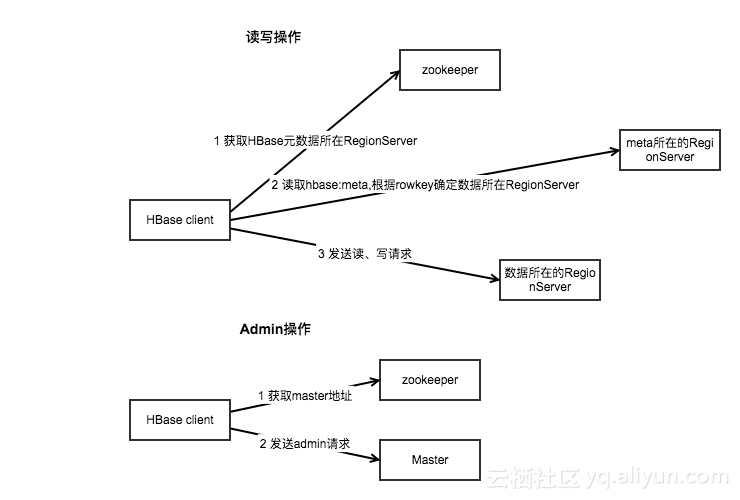
Connection 对象和实际的 Socket 连接之间的对应关系如下图:
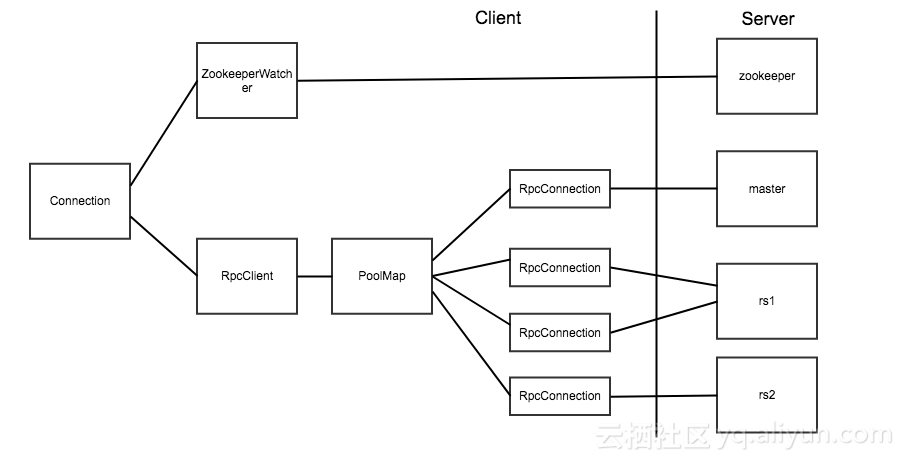
上面两张图片引用自博客:连接 HBase 的正确姿势
在 HBase 客户端代码中,真正对应 Socket 连接的是 RpcConnection 对象。HBase 使用 PoolMap 这种数据结构来存储客户端到 HBase 服务器之间的连接。PoolMap 的内部有一个 ConcurrentHashMap 实例,其 key 是 ConnectionId(封装了服务器地址和用户 ticket),value 是一个 RpcConnection 对象的资源池。当 HBase 需要连接一个服务器时,首先会根据 ConnectionId 找到对应的连接池,然后从连接池中取出一个连接对象。
@InterfaceAudience.Private
public class PoolMap<K, V> implements Map<K, V> {
  private PoolType poolType;

  private int poolMaxSize;

  private Map<K, Pool<V>> pools = new ConcurrentHashMap<>();

  public PoolMap(PoolType poolType) {
    this.poolType = poolType;
  }
  .....
HBase 中提供了三种资源池的实现,分别是 Reusable,RoundRobin 和 ThreadLocal。具体实现可以通 hbase.client.ipc.pool.type 配置项指定,默认为 Reusable。连接池的大小也可以通过 hbase.client.ipc.pool.size 配置项指定,默认为 1,即每个 Server 1 个连接。也可以通过修改配置实现:
config.set("hbase.client.ipc.pool.type",...);
config.set("hbase.client.ipc.pool.size",...);
connection = ConnectionFactory.createConnection(config);
由此可以看出 HBase 中 Connection 类已经实现了对连接的管理功能,所以我们不必在 Connection 上在做额外的管理。
另外,Connection 是线程安全的,但 Table 和 Admin 却不是线程安全的,因此正确的做法是一个进程共用一个 Connection 对象,而在不同的线程中使用单独的 Table 和 Admin 对象。Table 和 Admin 的获取操作 getTable() 和 getAdmin() 都是轻量级,所以不必担心性能的消耗,同时建议在使用完成后显示的调用 close() 方法来关闭它们。
参考资料
更多大数据系列文章可以参见 GitHub 开源项目: 大数据入门指南
HBase 系列(六)——HBase Java API 的基本使用的更多相关文章
- 六、Java API操作zookeeper节点
目录 前文 pom.xml文件增加依赖 新建java文件:ZookeeperTest GitHub文件下载 前文 一.CentOS7 hadoop3.3.1安装(单机分布式.伪分布式.分布式 二.JA ...
- HBase 二次开发 java api和demo
1. 试用thrift python/java以及hbase client api.结论例如以下: 1.1 thrift的安装和公布繁琐.可能会遇到未知的错误,且hbase.thrift的版本 ...
- Ubuntu下搭建Hbase单机版并实现Java API访问
工具:Ubuntu12.04 .Eclipse.Java.Hbase 1.在Ubuntu上安装Eclipse,可以在Ubuntu的软件中心直接安装,也可以通过命令安装,第一次安装失败了,又试了一次,开 ...
- HBase 增删改查Java API
1. 创建NameSpaceAndTable package com.HbaseTest.hdfs; import java.io.IOException; import org.apache.had ...
- HBase里的官方Java API
见 https://hbase.apache.org/apidocs/index.html
- kafka系列六、java管理kafka Topic
package com.example.demo.topic; import kafka.admin.AdminUtils; import kafka.admin.RackAwareMode; imp ...
- Java NIO学习系列六:Java中的IO模型
前文中我们总结了linux系统中的5中IO模型,并且着重介绍了其中的4种IO模型: 阻塞I/O(blocking IO) 非阻塞I/O(nonblocking IO) I/O多路复用(IO multi ...
- HBase 学习之路(六)——HBase Java API 的基本使用
一.简述 截至到目前(2019.04),HBase 有两个主要的版本,分别是1.x 和 2.x ,两个版本的Java API有所不同,1.x 中某些方法在2.x中被标识为@deprecated过时.所 ...
- Hbase框架原理及相关的知识点理解、Hbase访问MapReduce、Hbase访问Java API、Hbase shell及Hbase性能优化总结
转自:http://blog.csdn.net/zhongwen7710/article/details/39577431 本blog的内容包含: 第一部分:Hbase框架原理理解 第二部分:Hbas ...
随机推荐
- Intel FPGA 专用时钟引脚是否可以用作普通输入,输出或双向IO使用?
原创 by DeeZeng FPGA 的 CLK pin 是否可以用作普通输入 ,输出或双向IO 使用? 这些专用Clock input pin 是否可以当作 inout用,需要看FPGA是否支 ...
- 《VR入门系列教程》之2---VR头显
什么是虚拟现实? 虚拟现实的目标:让人们相信真实地处于一个虚拟世界中.要达到这个目标就得让人们的大脑(负责视觉和运动感知部分)欺骗他们.不同技术合在一起才可以创造这种幻觉,包括: 全立 ...
- 爬虫之解析库pyquery
初始化 安装: pip install pyquery 字符串的形式初始化 html = """ <html lang="en"> < ...
- spring中获取容器中的Bean为什么前转成接口而不是实现类
简单介绍一下上下文,userService是服务层接口有一个save方法,userServiceImpl是该接口的实现类重写了save方法. applicationContext.xml如图: 后台代 ...
- SpringBoot底层原理及分析
一,Spring Boot简介 1.什么是Spring Boot: SpringBoot是由Pivotal团队提供的框架,其设计目的是用来简化新Spring应用的初始搭建以及开发过程. 该框架使用了特 ...
- Rust写时复制Cow<T>
写时复制(Copy on Write)技术是一种程序中的优化策略,多应用于读多写少的场景.主要思想是创建对象的时候不立即进行复制,而是先引用(借用)原有对象进行大量的读操作,只有进行到少量的写操作的时 ...
- Asp.Net Core 发布到 Docker(Linux Centos 虚拟机,使用Dockerfile)
实践一下 Asp.Net Core (基于.net core 2.2)部署到Docker 一.准备工作: 1. 使用Virtualbox创建一个Centos系统的虚拟机,并安装docker和vim 2 ...
- spark shuffle写操作之SortShuffleWriter
提出问题 1. spark shuffle的预聚合操作是如何做的,其中底层的数据结构是什么?在数据写入到内存中有预聚合,在读溢出文件合并到最终的文件时是否也有预聚合操作? 2. shuffle数据的排 ...
- swift 分享share页面封装(功能按钮不同)
关于分享功能的页面应该有很多,写这篇swift版本的分享页面,根据不同模块可能分享的功能按钮不一样,引言: 想必大家都使用微博右上角更多按钮,会弹出如下的界面: 在开发中,可能针对同一个app的不同按 ...
- log4net服务启动后没有记录日志
有时候在用log4net的时候,调试或执行是ok的,但是安装服务后没有记录日志. 这是因为服务启动是在C盘启动,而程序放的位置在别的目录. 这时候需要指定读取配置文件的位置为程序所在的目录 strin ...