
路由器静态IP的配置及其备份静态路由缺省路由
静态路由时管理员手动配置并维护的路由。静态路由配置简单,被广泛应用于网络中。静态路由还可以实现负载均衡和路由备份。学习掌握好静态路由的配置是很重要的。
如下图,
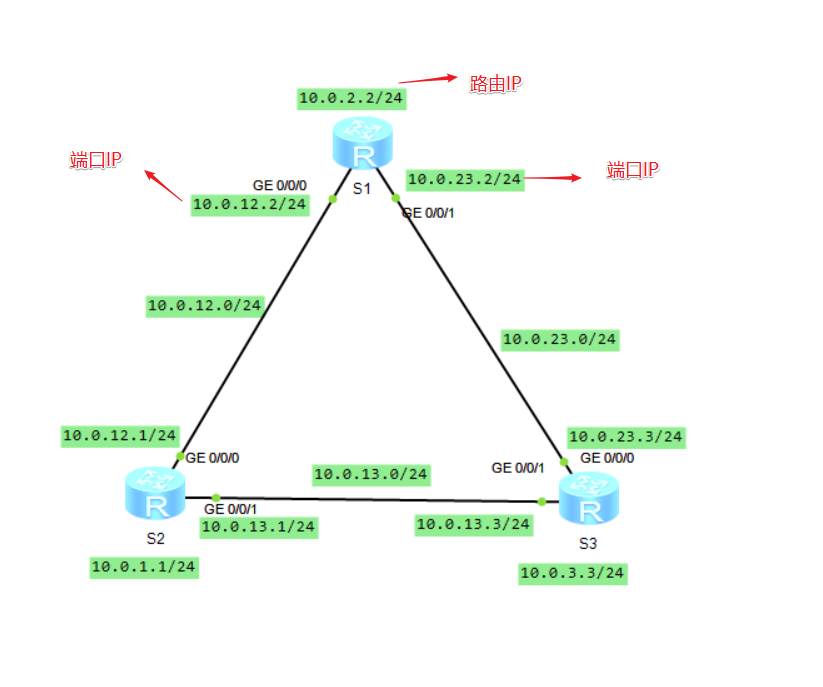
首先进入路由器的命令视图,(sys)
配置各个接口的ip地址
[Huawei]interface LoopBack 0
[Huawei-LoopBack0]ip address 10.0.2.2 24
[Huawei-LoopBack0]q
[Huawei]interface GigabitEthernet 0/0/0
[Huawei-GigabitEthernet0/0/0]ip address 10.0.12.2 24
Oct 10 2019 21:55:49-08:00 Huawei %%01IFNET/4/LINK_STATE(l)[0]:The line protocol
IP on the interface GigabitEthernet0/0/0 has entered the UP state.
[Huawei-GigabitEthernet0/0/0]q
[Huawei]interface GigabitEthernet 0/0/1
[Huawei-GigabitEthernet0/0/1]ip address 10.0.23.2 24
配置静态路由,指向S3与S2配置格式为:ip route-static 路由器地址 掩码 接口地址
[Huawei]ip route-static 10.0.3.3 24 10.0.23.3
Info: The destination address and mask of the configured static route mismatched
, and the static route 10.0.3.0/24 was generated.
[Huawei]ip route-static 10.0.1.1 24 10.0.12.1
Info: The destination address and mask of the configured static route mismatched
, and the static route 10.0.1.0/24 was generated.
与上步格式相同,改变参数即可,此段代码配置的为S3的端口ip与静态路由
[Huawei-LoopBack0]ip address 10.0.3.3 24
[Huawei-LoopBack0]q
[Huawei]interface g
[Huawei]interface GigabitEthernet 0/0/0
[Huawei-GigabitEthernet0/0/0]ip a
[Huawei-GigabitEthernet0/0/0]ip accounting
[Huawei-GigabitEthernet0/0/0]ip address 10.0.23.3 24
Oct 10 2019 22:13:37-08:00 Huawei %%01IFNET/4/LINK_STATE(l)[0]:The line protocol
IP on the interface GigabitEthernet0/0/0 has entered the UP state.
[Huawei-GigabitEthernet0/0/0]q
[Huawei]interface g
[Huawei]interface GigabitEthernet 0/0/1
[Huawei-GigabitEthernet0/0/1]ip a
[Huawei-GigabitEthernet0/0/1]ip accounting
[Huawei-GigabitEthernet0/0/1]ip address 10.0.13.3 24
Oct 10 2019 22:14:26-08:00 Huawei %%01IFNET/4/LINK_STATE(l)[1]:The line protocol
IP on the interface GigabitEthernet0/0/1 has entered the UP state.
[Huawei-GigabitEthernet0/0/1]q
[Huawei]ip route
[Huawei]ip route
[Huawei]ip route-static 10.0.2.2 24 10.0.23.2
Info: The destination address and mask of the configured static route mismatched
, and the static route 10.0.2.0/24 was generated.
[Huawei]ip route
[Huawei]ip route
[Huawei]ip route-static 10.0.1.1 24 10.0.13.1
Info: The destination address and mask of the configured static route mismatched
, and the static route 10.0.1.0/24 was generated.
与上步格式相同,改变参数即可,此段代码配置的为S2的端口ip与静态路由
<Huawei>sys
Enter system view, return user view with Ctrl+Z.
[Huawei]interface loop
[Huawei]interface LoopBack 0
[Huawei-LoopBack0]ip a
[Huawei-LoopBack0]ip address 10.0.1.1 24
[Huawei-LoopBack0]q
[Huawei]interface g
[Huawei]interface GigabitEthernet 0/0/0
[Huawei-GigabitEthernet0/0/0]ip a
[Huawei-GigabitEthernet0/0/0]ip accounting
[Huawei-GigabitEthernet0/0/0]ip address 10.0.12.1 24
Oct 10 2019 22:18:41-08:00 Huawei %%01IFNET/4/LINK_STATE(l)[0]:The line protocol
IP on the interface GigabitEthernet0/0/0 has entered the UP state.
[Huawei-GigabitEthernet0/0/0]q
[Huawei]interface g
[Huawei]interface GigabitEthernet 0/0/1
[Huawei-GigabitEthernet0/0/1]ip a
[Huawei-GigabitEthernet0/0/1]ip accounting
[Huawei-GigabitEthernet0/0/1]ip address 10.0.13.1 24
Oct 10 2019 22:19:32-08:00 Huawei %%01IFNET/4/LINK_STATE(l)[1]:The line protocol
IP on the interface GigabitEthernet0/0/1 has entered the UP state.
[Huawei-GigabitEthernet0/0/1]q
[Huawei]ip route
[Huawei]ip route
[Huawei]ip route-static 10.0.2.2 24 10.0.12.2
Info: The destination address and mask of the configured static route mismatched
, and the static route 10.0.2.0/24 was generated.
[Huawei]ip route
[Huawei]ip route
[Huawei]ip route-static 10.0.3.3 24 10.0.13.3
Info: The destination address and mask of the configured static route mismatched
, and the static route 10.0.3.0/24 was generated.
测试是否ping通,经过测试发现都能实现互通,静态路由配置完毕
[Huawei]ping 10.0.1.1
PING 10.0.1.1: 56 data bytes, press CTRL_C to break
Reply from 10.0.1.1: bytes=56 Sequence=1 ttl=255 time=20 ms
Reply from 10.0.1.1: bytes=56 Sequence=2 ttl=255 time=30 ms
Reply from 10.0.1.1: bytes=56 Sequence=3 ttl=255 time=20 ms
Reply from 10.0.1.1: bytes=56 Sequence=4 ttl=255 time=30 ms
Reply from 10.0.1.1: bytes=56 Sequence=5 ttl=255 time=30 ms
--- 10.0.1.1 ping statistics ---
5 packet(s) transmitted
5 packet(s) received
0.00% packet loss
round-trip min/avg/max = 20/26/30 ms
[Huawei]ping 10.0.3.3
PING 10.0.3.3: 56 data bytes, press CTRL_C to break
Reply from 10.0.3.3: bytes=56 Sequence=1 ttl=255 time=30 ms
Reply from 10.0.3.3: bytes=56 Sequence=2 ttl=255 time=20 ms
Reply from 10.0.3.3: bytes=56 Sequence=3 ttl=255 time=20 ms
Reply from 10.0.3.3: bytes=56 Sequence=4 ttl=255 time=30 ms
Reply from 10.0.3.3: bytes=56 Sequence=5 ttl=255 time=30 ms
--- 10.0.3.3 ping statistics ---
5 packet(s) transmitted
5 packet(s) received
0.00% packet loss
round-trip min/avg/max = 20/26/30 ms
模拟网络发生故障,关闭S3的GE0/0/0端口并配置备份静态路由
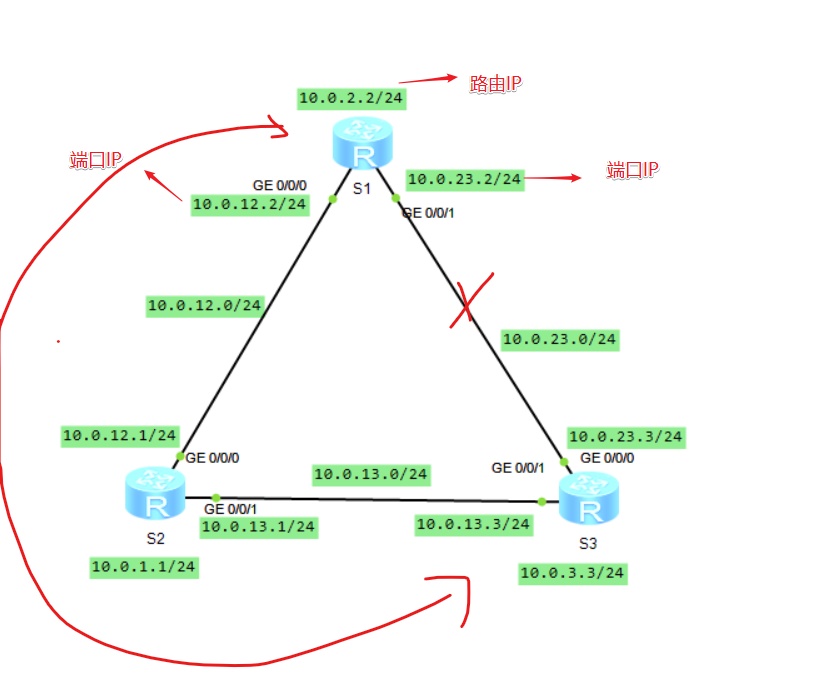
S3指向S1的备份静态路由
[Huawei]interface g
[Huawei]interface GigabitEthernet 0/0/0
[Huawei-GigabitEthernet0/0/0]shutdown ####关闭0/0/0端口
Oct 10 2019 22:30:26-08:00 Huawei %%01IFPDT/4/IF_STATE(l)[0]:Interface GigabitEt
hernet0/0/0 has turned into DOWN state.
[Huawei-GigabitEthernet0/0/0]
[Huawei-GigabitEthernet0/0/0]
Oct 10 2019 22:30:26-08:00 Huawei %%01IFNET/4/LINK_STATE(l)[1]:The line protocol
IP on the interface GigabitEthernet0/0/0 has entered the DOWN state.
[Huawei-GigabitEthernet0/0/0]q
[Huawei]ip rou
[Huawei]ip route
[Huawei]ip route-static 10.0.2.2 24 10.0.13.1
Info: The destination address and mask of the configured static route mismatched
, and the static route 10.0.2.0/24 was generated.
[Huawei]ip rou
[Huawei]ip route
[Huawei]ip route-static 10.0.12.2 24 10.0.13.1
Info: The destination address and mask of the configured static route mismatched
, and the static route 10.0.12.0/24 was generated.
实现互通,ping命令测试
[Huawei]ping 10.0.2.2
PING 10.0.2.2: 56 data bytes, press CTRL_C to break
Reply from 10.0.2.2: bytes=56 Sequence=1 ttl=254 time=30 ms
Reply from 10.0.2.2: bytes=56 Sequence=2 ttl=254 time=30 ms
Reply from 10.0.2.2: bytes=56 Sequence=3 ttl=254 time=20 ms
Reply from 10.0.2.2: bytes=56 Sequence=4 ttl=254 time=30 ms
Reply from 10.0.2.2: bytes=56 Sequence=5 ttl=254 time=30 ms
--- 10.0.2.2 ping statistics ---
5 packet(s) transmitted
5 packet(s) received
0.00% packet loss
round-trip min/avg/max = 20/28/30 ms
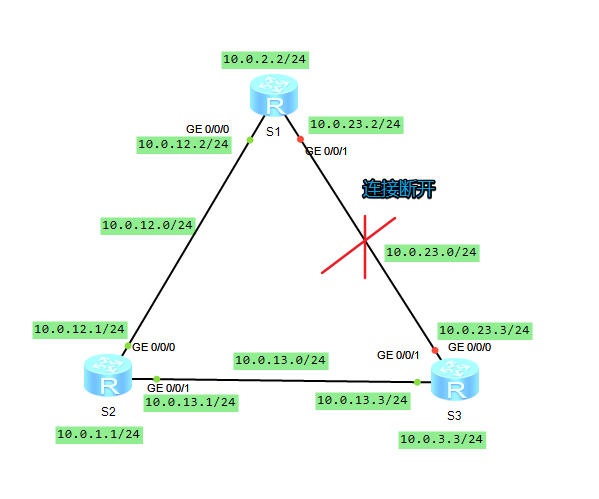
缺省路由配置,ip route-static 0.0.0.0 0 nextHop
[Huawei]ip route-static 0.0.0.0 0 10.0.13.1
路由器静态IP的配置及其备份静态路由缺省路由的更多相关文章
- VirtualBox 下 CentOS7 静态 IP 的配置 → 多次踩坑总结,蚌埠住了!
开心一刻 一个消化不良的病人向医生抱怨:我近来很不正常,吃什么拉什么,吃黄瓜拉黄瓜,吃西瓜拉西瓜,怎样才能恢复正常呢? 医生沉默片刻:那你只能吃屎了 环境准备 VirtualBox 6.1 网络连接方 ...
- Ubuntu Server 12.04 静态IP简洁配置
PS:很长时间没使用Ubuntu了,刚才安装个Ubuntu Server 12.04做测试.Ubuntu的网络设置跟Redhat系是不一样的,配置IP时发现跟以前的Ubuntu桌面版本也有所不同,记录 ...
- ubuntn 虚拟机NAT 静态IP 网络配置
在虚拟机安装ubuntu12.04自动获取IP 一切都没有问题 ssh连接也正常.关机重启后郁闷的发现网络已经不通了,于是开始了以下的摸索. 1.配置静态IP 网关: ip段: 命令: Vim /et ...
- 【转】Ubuntu Server 12.04 静态IP简洁配置
原文网址:http://blog.csdn.net/njchenyi/article/details/8715417 1.配置静态IP地址: # vim /etc/network/interfaces ...
- Ubuntu Server 12.04(14.04) 静态IP简洁配置
1.配置静态IP地址: # vim /etc/network/interfaces 原内容有如下4行:auto loiface lo inet loopback auto eth0iface eth0 ...
- 虚拟机设置静态IP与配置网络
不废话,直接上图 一:先配置虚拟机的网络 二:配置win10-VM8网络 三:查看以太网的ip信息,直接在管理员命令中输入 ipconfig /all可以到连接信息 四:如果在上面找不到VM8的网络信 ...
- centos7 安装后静态ip的配置
centos7 想到于centos6.5来说界面上看起来更加炫一点,但是在配置静态ip上来说是差不多的 首先看一下centos7的安装界面,相对来说简洁好看一些 先打开终端 可以看到centos7默认 ...
- VMWare虚拟机NAT模式静态IP联网配置
1.网络连接 vmnet8右键属性ipv4,设置ip为192.168.10.100.如下图: 2.设置虚拟机的网络适配器采用NAT模式 3.vmware工具栏的编辑->虚拟网络编辑器 ...
- Hyper-V 下linux虚拟机静态IP上网配置的两种方式(2)
工作需要,搭建linux环境,网上搜了两种Hyper-V配置linux静态IP及上网的方式,记录一下,方便查阅,如下设置网络共享方式: win10下使用hyper-v在本机安装linux虚拟机后,网络 ...
随机推荐
- 即时聊天APP(一)
最新写了一个即时聊天的安卓Demo,是基于Bmob后端开发的app,由于Bmob有较大局限性,因此,我并没有按照开发文档来进行开发,只是简单写了一个基本的文字聊天,以后有时间我会自己写一个带服务端的即 ...
- Charles 修改请求/compose和Compose New
本文参考:撰写工具/compose和Compose New 撰写工具/compose和Compose New compose 是在原有的请求基础上,修改: 可以写各种状态: – URL: – Meth ...
- Xshell无法连接到虚拟机Linux系统(桥接方式)
一. 查看主机上网网卡网络配置信息 1. 查看本机所用网卡名称(适用于win10系统) 操作步骤: 1) 状态栏右键“WiFi连接图标” 2) 点击“打开“网络和Internet”设置” 3) ...
- px、em、rem、%、vw、vh、vm这些单位的区别
1.px px就是像素,也是我们现在经常使用的基本单位,比如常常听到的电脑像素是1024x768的,表示的是水平方向是1024个像素点,垂直方向是768个像素点. 2.em em参考物是父元素的fon ...
- 《Java7并发编程实战手册》读书笔记
一.线程管理 1.线程的创建和运行 创建线程的2种方式: 继承Thread类,并覆盖run()方法 创建一个实现Runnable接口的类.使用带参数的Thread构造器来创建Thread对象 每个Ja ...
- Java 截取字符串中指定数据及之后数据
String resCallBackJson="12556{1{{{456858585{"; resCallBackJson = resCallBackJson.su ...
- Linux入门基础之 下
八.Linux 管道.重定向及文本处理 8.1.Linux 多命令协作:管道及重定向 8.1.1 开源文化 开源文化的核心理念之一就是不要重复发明轮子,很多的开源软件都是现有软件.代码.功能的重新组合 ...
- 【linux】【ELK】搭建Elasticsearch+Logstash+Kibana+Filebeat日志收集系统
前言 ELK是Elasticsearch.Logstash.Kibana的简称,这三者是核心套件,但并非全部. Elasticsearch是实时全文搜索和分析引擎,提供搜集.分析.存储数据三大功能:是 ...
- win10 更新之后,软件路径被改为*
win 10 更新到最新版之后,软件安装盘符被改为* ,导致软件打开失败,截图如下: 1. 首先先下载一个RegistryWorkshop 地址:https://sm.myapp.com/origin ...
- CentOS7 搭建php环境
1,先安装apache: yum install httpd 配置ServerName,进入httpd.conf文件: vi /etc/httpd/conf/httpd.conf 将#ServerNa ...