
QQ第三方登录-python_web开发_django框架
准备工作
1. 成为QQ互联的开发者 参考链接:
<http://wiki.connect.qq.com/%E6%88%90%E4%B8%BA%E5%BC%80%E5%8F%91%E8%80%85>
2. 审核通过后,创建应用,即获取本项目对应与QQ互联的应用ID 参考链接:http://wiki.connect.qq.com/__trashed-2
3. 在 models.py 中定义QQ身份(openid)与用户模型类User的关联关系
class OAuthQQUser(models.Model):
    """
    QQ登录用户数据
    """
    user = models.ForeignKey('users.User', on_delete=models.CASCADE, verbose_name='用户')
    openid = models.CharField(max_length=64, verbose_name='openid', db_index=True)
    create_time = models.DateTimeField(auto_now_add=True, verbose_name="创建时间")
    update_time = models.DateTimeField(auto_now=True, verbose_name="更新时间")
    class Meta:
        db_table = 'tb_oauth_qq'
        verbose_name = 'QQ登录用户数据'
        verbose_name_plural = verbose_name  # 单复数同名
4. QQ登录SDK使用
初始化OAuthQQ对象
oauth = OAuthQQ(client_id=settings.QQ_CLIENT_ID,   client_secret=settings.QQ_CLIENT_SECRET,
redirect_uri=settings.QQ_REDIRECT_URI, state=next)
获取QQ登录扫码页面,扫码后得到Authorization Code
login_url = oauth.get_qq_url()
通过Authorization Code获取Access Token
access_token = oauth.get_access_token(code)
通过Access Token获取OpenID
openid = oauth.get_open_id(access_token)
实现流程
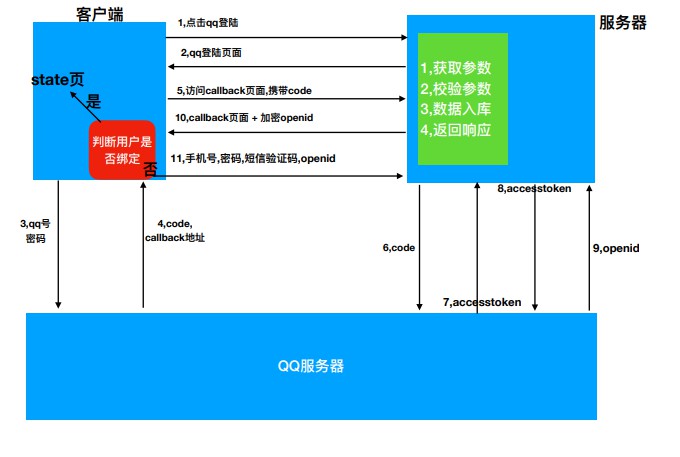
具体流程
返回QQ登录网址的视图
1.1 在配置文件中添加关于QQ登录的应用开发信息
# QQ登录参数
QQ_CLIENT_ID = 'xxxx'  # ID
QQ_CLIENT_SECRET = 'xxxxxxxxxxxx'  # 密钥
QQ_REDIRECT_URI = 'http://www.xxxx.xxx/oauth_callback.html'  # 回调域
1.2 接口设计
请求方式:GET /oauth/qq/statues/?state=xxx
请求参数:查询字符串参数
参数名 类型 是否必须 说明 state str 否 用户QQ登录成功后进入的网址 返回数据:JSON
{"login_url": oauth.get_qq_url()}返回值 类型 是否必须 说明 login_url str 是 qq登录网址
1.3 逻辑实现
class QQAuthURLView(APIView):
"""
提供QQ登录页面网址
"""
def get(self, request):
# state表示从哪个页面进入到的登录页面,将来登录成功后,就自动回到那个页面
state= request.query_params.get('state')
if not state:
state= '/'
# 获取QQ登录页面网址
oauth = OAuthQQ(client_id=settings.QQ_CLIENT_ID, client_secret=settings.QQ_CLIENT_SECRET, redirect_uri=settings.QQ_REDIRECT_URI, state=state)
login_url = oauth.get_qq_url()
return Response({'login_url': login_url})
OAuth认证
准备oauth_callback回调页,用于扫码后接受Authorization Code
通过Authorization Code获取Access Token
通过Access Token获取OpenID
2.1 接口设计
请求方式:GET /oauth/qq/users/?code=xxx
请求参数: 查询字符串参数
参数名 类型 是否必须 说明 code str 是 qq返回的授权凭证code 返回数据
{"access_token": xxxx,}
或
{
    "token": "xxx",
    "username": "python",
    "user_id": 1
}
返回值 类型 是否必须 说明 access_token str 否 用户是第一次使用QQ登录时返回,其中包含openid,用于绑定身份使用,注意这个是我们自己生成的 token str 否 用户不是第一次使用QQ登录时返回,登录成功的JWT token username str 否 用户不是第一次使用QQ登录时返回,用户名 user_id int 否 用户不是第一次使用QQ登录时返回,用户id
2.2 逻辑实现
oauth/views.py
class QQAuthUserView(GenericAPIView):
"""用户扫码登录的回调处理"""
# 指定序列化器
serializer_class = serializers.QQAuthUserSerializer
def get(self, request):
# 提取code请求参数
code = request.query_params.get('code')
if not code:
return Response({'message':'缺少code'},
status=status.HTTP_400_BAD_REQUEST)
# 创建工具对象
oauth = OAuthQQ(client_id=settings.QQ_CLIENT_ID,
client_secret=settings.QQ_CLIENT_SECRET,
redirect_uri=settings.QQ_REDIRECT_URI)
try:
access_token = oauth.get_access_token(code)
# 3,通过access_token获取openid
openid = oauth.get_open_id(access_token)
# 4,通过openid查询oauthqq对象
try:
oauth_qq_user = OAuthQQUser.objects.get(openid=openid)
except OAuthQQUser.DoesNotExist:
# ①, 没有项目用户, 也没有OAuthQQUser用户
# ②, 有项目用户, 没有OAuthQQUser用户
# 5,qq用户没有和项目用户绑定过,加密openid,并返回
access_token_openid = generate_save_user_openid(openid)
return Response({"access_token": access_token_openid})
except Exception:
return Response({"message": "请求qq服务器异常"},
status=status.HTTP_400_BAD_REQUEST)
# 6,oauth_qq_user存在,并且绑定过了美多用户
user = oauth_qq_user.user
# 7,组织数据,拼接token,返回响应
jwt_payload_handler = api_settings.JWT_PAYLOAD_HANDLER
jwt_encode_handler = api_settings.JWT_ENCODE_HANDLER
payload = jwt_payload_handler(user)
token = jwt_encode_handler(payload)
return Response({
"user_id": user.id,
"username": user.username,
"token": token
})在 oauth/utils.py** 中准备序列化 OpenID 的工具方法**
# 对openid加密
def generate_save_user_openid(openid):
#1,创建TJWSSerializer对象
serializer = TJWSSerializer(settings.SECRET_KEY,expires_in=300)
#2,加密数据
token = serializer.dumps({"openid":openid})
#3,返回
return token
OpenID绑定用户
如果用户是首次使用QQ登录,则需要绑定用户
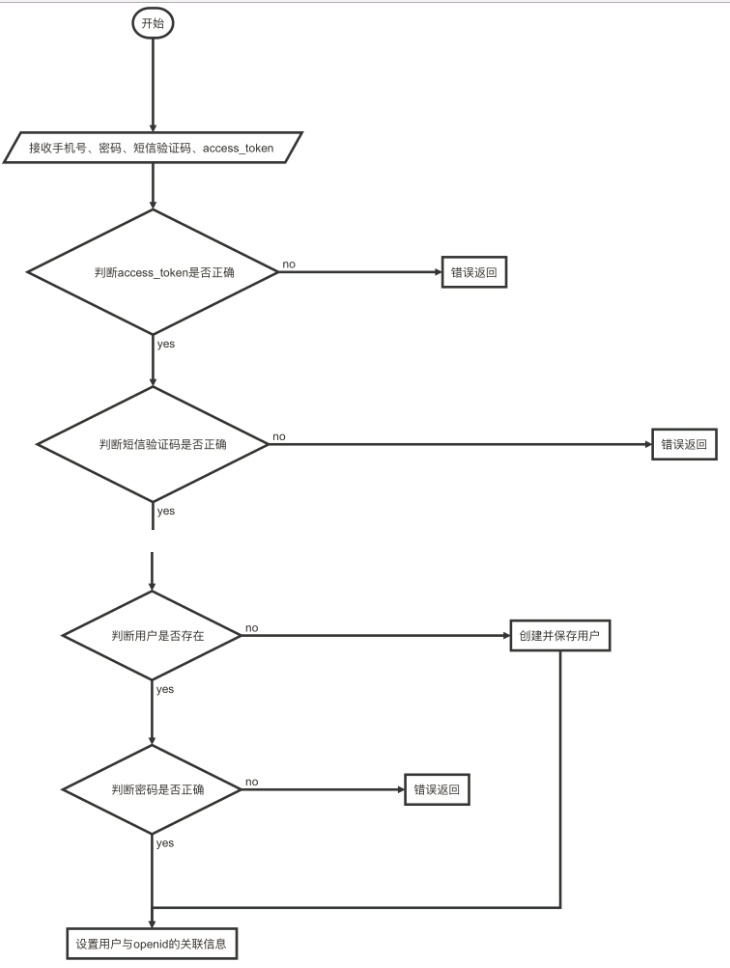
3.1 接口设计
请求方式:POST /oauth/qq/users/
请求参数:JSON 或 表单
参数名 类型 是否必须 说明 mobile str 是 手机号 password str 是 密码 sms_code str 是 短信验证码 access_token str 是 凭据(包含openid) 返回数据:JSON
返回值 类型 是否必须 说明 token str 是 JWT token id int 是 用户id username str 是 用户名
3.2 逻辑实现
oauth/views.py
def post(self, request):
# 1,获取数据
dict_data = request.data
# 2,获取序列化器,校验数据
serializer = self.get_serializer(data=dict_data)
serializer.is_valid(raise_exception=True)
# 3,数据入库
oauth_qq = serializer.save()
# 4,组织,数据返回响应
user = oauth_qq.user
jwt_payload_handler = api_settings.JWT_PAYLOAD_HANDLER
jwt_encode_handler = api_settings.JWT_ENCODE_HANDLER
payload = jwt_payload_handler(user)
token = jwt_encode_handler(payload)
return Response({
"user_id": user.id,
"username": user.username,
"token": token
})新建 oauth/serializers.py 文件
from rest_framework import serializers
from .utils import check_save_user_openid
from django_redis import get_redis_connection
from users.models import User
from .models import OAuthQQUser
class QQAuthUserSerializer(serializers.Serializer):
mobile = serializers.RegexField(label="手机号",regex=r"1[3-9]\d{9}")
password = serializers.CharField(label="密码",min_length=8,max_length=20)
sms_code = serializers.CharField(label="短信",min_length=6,max_length=6)
access_token = serializers.CharField(label="token",min_length=1)
def validate(self, attrs):
"""多字段校验"""
#1,获取加密的openid
access_token = attrs["access_token"]
#2,调用方法解密openid,判断是否存在
openid = check_save_user_openid(access_token)
if not openid:
raise serializers.ValidationError("openid失效")
#3,获取redis中的短信,判断为空,正确性
sms_code = attrs["sms_code"]
mobile = attrs["mobile"]
redis_conn = get_redis_connection("code")
redis_sms_code = redis_conn.get("sms_%s"%mobile)
if not redis_sms_code:
raise serializers.ValidationError("短信验证码过期")
if sms_code != redis_sms_code.decode():
raise serializers.ValidationError("短信验证码错误")
#4,通过手机号查询美多用户是否存在,判断密码正确性
user = None
try:
user = User.objects.get(mobile=mobile)
except User.DoesNotExist:
pass
else:
#5,表示用户存在,判断密码正确性
if not user.check_password(attrs["password"]):
raise serializers.ValidationError("密码错误")
#6,返回校验之后的内容
attrs["openid"] = openid
attrs["user"] = user
return attrs
#重写create方法,创建qq用户
def create(self, validated_data):
"""validated_data,就上面返回的attrs"""
#1,创建qq用户
oauth_qq = OAuthQQUser()
#2,判断用户是否存在,如果存在设置属性,如果不存在直接创建
user = validated_data["user"]
if not user:
user = User.objects.create(
username=validated_data["mobile"],
mobile=validated_data["mobile"],
)
user.set_password(validated_data["password"])
user.save()
#3,设置qq用户属性
oauth_qq.openid = validated_data["openid"]
oauth_qq.user = user
oauth_qq.save()
#4,返回
return oauth_qq在 oauth/utils.py 中准备序列化 OpenID 的工具方法
# 对openid解密
def check_save_user_openid(access_token):
#1,创建serializer对象
serializer = TJWSSerializer(settings.SECRET_KEY,expires_in=300)
#2,解密openid
dict_data = serializer.loads(access_token)
#3,返回
return dict_data.get("openid")
figure:first-child { margin-top: -20px; }
#write ol, #write ul { position: relative; }
img { max-width: 100%; vertical-align: middle; }
button, input, select, textarea { color: inherit; font-style: inherit; font-variant: inherit; font-weight: inherit; font-stretch: inherit; font-size: inherit; line-height: inherit; font-family: inherit; }
input[type="checkbox"], input[type="radio"] { line-height: normal; padding: 0px; }
*, ::after, ::before { box-sizing: border-box; }
#write h1, #write h2, #write h3, #write h4, #write h5, #write h6, #write p, #write pre { width: inherit; }
#write h1, #write h2, #write h3, #write h4, #write h5, #write h6, #write p { position: relative; }
h1, h2, h3, h4, h5, h6 { break-after: avoid-page; break-inside: avoid; orphans: 2; }
p { orphans: 4; }
h1 { font-size: 2rem; }
h2 { font-size: 1.8rem; }
h3 { font-size: 1.6rem; }
h4 { font-size: 1.4rem; }
h5 { font-size: 1.2rem; }
h6 { font-size: 1rem; }
.md-math-block, .md-rawblock, h1, h2, h3, h4, h5, h6, p { margin-top: 1rem; margin-bottom: 1rem; }
.hidden { display: none; }
.md-blockmeta { color: rgb(204, 204, 204); font-weight: 700; font-style: italic; }
a { cursor: pointer; }
sup.md-footnote { padding: 2px 4px; background-color: rgba(238, 238, 238, 0.7); color: rgb(85, 85, 85); border-radius: 4px; cursor: pointer; }
sup.md-footnote a, sup.md-footnote a:hover { color: inherit; text-transform: inherit; text-decoration: inherit; }
#write input[type="checkbox"] { cursor: pointer; width: inherit; height: inherit; }
figure { overflow-x: auto; margin: 1.2em 0px; max-width: calc(100% + 16px); padding: 0px; }
figure > table { margin: 0px !important; }
tr { break-inside: avoid; break-after: auto; }
thead { display: table-header-group; }
table { border-collapse: collapse; border-spacing: 0px; width: 100%; overflow: auto; break-inside: auto; text-align: left; }
table.md-table td { min-width: 32px; }
.CodeMirror-gutters { border-right: 0px; background-color: inherit; }
.CodeMirror { text-align: left; }
.CodeMirror-placeholder { opacity: 0.3; }
.CodeMirror pre { padding: 0px 4px; }
.CodeMirror-lines { padding: 0px; }
div.hr:focus { cursor: none; }
#write pre { white-space: pre-wrap; }
#write.fences-no-line-wrapping pre { white-space: pre; }
#write pre.ty-contain-cm { white-space: normal; }
.CodeMirror-gutters { margin-right: 4px; }
.md-fences { font-size: 0.9rem; display: block; break-inside: avoid; text-align: left; overflow: visible; white-space: pre; background: inherit; position: relative !important; }
.md-diagram-panel { width: 100%; margin-top: 10px; text-align: center; padding-top: 0px; padding-bottom: 8px; overflow-x: auto; }
#write .md-fences.mock-cm { white-space: pre-wrap; }
.md-fences.md-fences-with-lineno { padding-left: 0px; }
#write.fences-no-line-wrapping .md-fences.mock-cm { white-space: pre; overflow-x: auto; }
.md-fences.mock-cm.md-fences-with-lineno { padding-left: 8px; }
.CodeMirror-line, twitterwidget { break-inside: avoid; }
.footnotes { opacity: 0.8; font-size: 0.9rem; margin-top: 1em; margin-bottom: 1em; }
.footnotes + .footnotes { margin-top: 0px; }
.md-reset { margin: 0px; padding: 0px; border: 0px; outline: 0px; vertical-align: top; background: 0px 0px; text-decoration: none; text-shadow: none; float: none; position: static; width: auto; height: auto; white-space: nowrap; cursor: inherit; -webkit-tap-highlight-color: transparent; line-height: normal; font-weight: 400; text-align: left; box-sizing: content-box; direction: ltr; }
li div { padding-top: 0px; }
blockquote { margin: 1rem 0px; }
li .mathjax-block, li p { margin: 0.5rem 0px; }
li { margin: 0px; position: relative; }
blockquote > :last-child { margin-bottom: 0px; }
blockquote > :first-child, li > :first-child { margin-top: 0px; }
.footnotes-area { color: rgb(136, 136, 136); margin-top: 0.714rem; padding-bottom: 0.143rem; white-space: normal; }
#write .footnote-line { white-space: pre-wrap; }
@media print {
body, html { border: 1px solid transparent; height: 99%; break-after: avoid; break-before: avoid; }
#write { margin-top: 0px; padding-top: 0px; border-color: transparent !important; }
.typora-export * { -webkit-print-color-adjust: exact; }
html.blink-to-pdf { font-size: 13px; }
.typora-export #write { padding-left: 32px; padding-right: 32px; padding-bottom: 0px; break-after: avoid; }
.typora-export #write::after { height: 0px; }
@page { margin: 20mm 0px; }
}
.footnote-line { margin-top: 0.714em; font-size: 0.7em; }
a img, img a { cursor: pointer; }
pre.md-meta-block { font-size: 0.8rem; min-height: 0.8rem; white-space: pre-wrap; background: rgb(204, 204, 204); display: block; overflow-x: hidden; }
p > .md-image:only-child:not(.md-img-error) img, p > img:only-child { display: block; margin: auto; }
p > .md-image:only-child { display: inline-block; width: 100%; }
#write .MathJax_Display { margin: 0.8em 0px 0px; }
.md-math-block { width: 100%; }
.md-math-block:not(:empty)::after { display: none; }
[contenteditable="true"]:active, [contenteditable="true"]:focus { outline: 0px; box-shadow: none; }
.md-task-list-item { position: relative; list-style-type: none; }
.task-list-item.md-task-list-item { padding-left: 0px; }
.md-task-list-item > input { position: absolute; top: 0px; left: 0px; margin-left: -1.2em; margin-top: calc(1em - 10px); border: none; }
.math { font-size: 1rem; }
.md-toc { min-height: 3.58rem; position: relative; font-size: 0.9rem; border-radius: 10px; }
.md-toc-content { position: relative; margin-left: 0px; }
.md-toc-content::after, .md-toc::after { display: none; }
.md-toc-item { display: block; color: rgb(65, 131, 196); }
.md-toc-item a { text-decoration: none; }
.md-toc-inner:hover { text-decoration: underline; }
.md-toc-inner { display: inline-block; cursor: pointer; }
.md-toc-h1 .md-toc-inner { margin-left: 0px; font-weight: 700; }
.md-toc-h2 .md-toc-inner { margin-left: 2em; }
.md-toc-h3 .md-toc-inner { margin-left: 4em; }
.md-toc-h4 .md-toc-inner { margin-left: 6em; }
.md-toc-h5 .md-toc-inner { margin-left: 8em; }
.md-toc-h6 .md-toc-inner { margin-left: 10em; }
@media screen and (max-width: 48em) {
.md-toc-h3 .md-toc-inner { margin-left: 3.5em; }
.md-toc-h4 .md-toc-inner { margin-left: 5em; }
.md-toc-h5 .md-toc-inner { margin-left: 6.5em; }
.md-toc-h6 .md-toc-inner { margin-left: 8em; }
}
a.md-toc-inner { font-size: inherit; font-style: inherit; font-weight: inherit; line-height: inherit; }
.footnote-line a:not(.reversefootnote) { color: inherit; }
.md-attr { display: none; }
.md-fn-count::after { content: "."; }
code, pre, samp, tt { font-family: var(--monospace); }
kbd { margin: 0px 0.1em; padding: 0.1em 0.6em; font-size: 0.8em; color: rgb(36, 39, 41); background: rgb(255, 255, 255); border: 1px solid rgb(173, 179, 185); border-radius: 3px; box-shadow: rgba(12, 13, 14, 0.2) 0px 1px 0px, rgb(255, 255, 255) 0px 0px 0px 2px inset; white-space: nowrap; vertical-align: middle; }
.md-comment { color: rgb(162, 127, 3); opacity: 0.8; font-family: var(--monospace); }
code { text-align: left; vertical-align: initial; }
a.md-print-anchor { white-space: pre !important; border-width: initial !important; border-style: none !important; border-color: initial !important; display: inline-block !important; position: absolute !important; width: 1px !important; right: 0px !important; outline: 0px !important; background: 0px 0px !important; text-decoration: initial !important; text-shadow: initial !important; }
.md-inline-math .MathJax_SVG .noError { display: none !important; }
.html-for-mac .inline-math-svg .MathJax_SVG { vertical-align: 0.2px; }
.md-math-block .MathJax_SVG_Display { text-align: center; margin: 0px; position: relative; text-indent: 0px; max-width: none; max-height: none; min-height: 0px; min-width: 100%; width: auto; overflow-y: hidden; display: block !important; }
.MathJax_SVG_Display, .md-inline-math .MathJax_SVG_Display { width: auto; margin: inherit; display: inline-block !important; }
.MathJax_SVG .MJX-monospace { font-family: var(--monospace); }
.MathJax_SVG .MJX-sans-serif { font-family: sans-serif; }
.MathJax_SVG { display: inline; font-style: normal; font-weight: 400; line-height: normal; zoom: 90%; text-indent: 0px; text-align: left; text-transform: none; letter-spacing: normal; word-spacing: normal; word-wrap: normal; white-space: nowrap; float: none; direction: ltr; max-width: none; max-height: none; min-width: 0px; min-height: 0px; border: 0px; padding: 0px; margin: 0px; }
.MathJax_SVG * { transition: none; }
.MathJax_SVG_Display svg { vertical-align: middle !important; margin-bottom: 0px !important; }
.os-windows.monocolor-emoji .md-emoji { font-family: "Segoe UI Symbol", sans-serif; }
.md-diagram-panel > svg { max-width: 100%; }
[lang="mermaid"] svg, [lang="flow"] svg { max-width: 100%; }
[lang="mermaid"] .node text { font-size: 1rem; }
table tr th { border-bottom: 0px; }
video { max-width: 100%; display: block; margin: 0px auto; }
iframe { max-width: 100%; width: 100%; border: none; }
.highlight td, .highlight tr { border: 0px; }
.CodeMirror { height: auto; }
.CodeMirror.cm-s-inner { background: inherit; }
.CodeMirror-scroll { overflow-y: hidden; overflow-x: auto; z-index: 3; }
.CodeMirror-gutter-filler, .CodeMirror-scrollbar-filler { background-color: rgb(255, 255, 255); }
.CodeMirror-gutters { border-right: 1px solid rgb(221, 221, 221); background: inherit; white-space: nowrap; }
.CodeMirror-linenumber { padding: 0px 3px 0px 5px; text-align: right; color: rgb(153, 153, 153); }
.cm-s-inner .cm-keyword { color: rgb(119, 0, 136); }
.cm-s-inner .cm-atom, .cm-s-inner.cm-atom { color: rgb(34, 17, 153); }
.cm-s-inner .cm-number { color: rgb(17, 102, 68); }
.cm-s-inner .cm-def { color: rgb(0, 0, 255); }
.cm-s-inner .cm-variable { color: rgb(0, 0, 0); }
.cm-s-inner .cm-variable-2 { color: rgb(0, 85, 170); }
.cm-s-inner .cm-variable-3 { color: rgb(0, 136, 85); }
.cm-s-inner .cm-string { color: rgb(170, 17, 17); }
.cm-s-inner .cm-property { color: rgb(0, 0, 0); }
.cm-s-inner .cm-operator { color: rgb(152, 26, 26); }
.cm-s-inner .cm-comment, .cm-s-inner.cm-comment { color: rgb(170, 85, 0); }
.cm-s-inner .cm-string-2 { color: rgb(255, 85, 0); }
.cm-s-inner .cm-meta { color: rgb(85, 85, 85); }
.cm-s-inner .cm-qualifier { color: rgb(85, 85, 85); }
.cm-s-inner .cm-builtin { color: rgb(51, 0, 170); }
.cm-s-inner .cm-bracket { color: rgb(153, 153, 119); }
.cm-s-inner .cm-tag { color: rgb(17, 119, 0); }
.cm-s-inner .cm-attribute { color: rgb(0, 0, 204); }
.cm-s-inner .cm-header, .cm-s-inner.cm-header { color: rgb(0, 0, 255); }
.cm-s-inner .cm-quote, .cm-s-inner.cm-quote { color: rgb(0, 153, 0); }
.cm-s-inner .cm-hr, .cm-s-inner.cm-hr { color: rgb(153, 153, 153); }
.cm-s-inner .cm-link, .cm-s-inner.cm-link { color: rgb(0, 0, 204); }
.cm-negative { color: rgb(221, 68, 68); }
.cm-positive { color: rgb(34, 153, 34); }
.cm-header, .cm-strong { font-weight: 700; }
.cm-del { text-decoration: line-through; }
.cm-em { font-style: italic; }
.cm-link { text-decoration: underline; }
.cm-error { color: red; }
.cm-invalidchar { color: red; }
.cm-constant { color: rgb(38, 139, 210); }
.cm-defined { color: rgb(181, 137, 0); }
div.CodeMirror span.CodeMirror-matchingbracket { color: rgb(0, 255, 0); }
div.CodeMirror span.CodeMirror-nonmatchingbracket { color: rgb(255, 34, 34); }
.cm-s-inner .CodeMirror-activeline-background { background: inherit; }
.CodeMirror { position: relative; overflow: hidden; }
.CodeMirror-scroll { height: 100%; outline: 0px; position: relative; box-sizing: content-box; background: inherit; }
.CodeMirror-sizer { position: relative; }
.CodeMirror-gutter-filler, .CodeMirror-hscrollbar, .CodeMirror-scrollbar-filler, .CodeMirror-vscrollbar { position: absolute; z-index: 6; display: none; }
.CodeMirror-vscrollbar { right: 0px; top: 0px; overflow: hidden; }
.CodeMirror-hscrollbar { bottom: 0px; left: 0px; overflow: hidden; }
.CodeMirror-scrollbar-filler { right: 0px; bottom: 0px; }
.CodeMirror-gutter-filler { left: 0px; bottom: 0px; }
.CodeMirror-gutters { position: absolute; left: 0px; top: 0px; padding-bottom: 30px; z-index: 3; }
.CodeMirror-gutter { white-space: normal; height: 100%; box-sizing: content-box; padding-bottom: 30px; margin-bottom: -32px; display: inline-block; }
.CodeMirror-gutter-wrapper { position: absolute; z-index: 4; background: 0px 0px !important; border: none !important; }
.CodeMirror-gutter-background { position: absolute; top: 0px; bottom: 0px; z-index: 4; }
.CodeMirror-gutter-elt { position: absolute; cursor: default; z-index: 4; }
.CodeMirror-lines { cursor: text; }
.CodeMirror pre { border-radius: 0px; border-width: 0px; background: 0px 0px; font-family: inherit; font-size: inherit; margin: 0px; white-space: pre; word-wrap: normal; color: inherit; z-index: 2; position: relative; overflow: visible; }
.CodeMirror-wrap pre { word-wrap: break-word; white-space: pre-wrap; word-break: normal; }
.CodeMirror-code pre { border-right: 30px solid transparent; width: fit-content; }
.CodeMirror-wrap .CodeMirror-code pre { border-right: none; width: auto; }
.CodeMirror-linebackground { position: absolute; left: 0px; right: 0px; top: 0px; bottom: 0px; z-index: 0; }
.CodeMirror-linewidget { position: relative; z-index: 2; overflow: auto; }
.CodeMirror-wrap .CodeMirror-scroll { overflow-x: hidden; }
.CodeMirror-measure { position: absolute; width: 100%; height: 0px; overflow: hidden; visibility: hidden; }
.CodeMirror-measure pre { position: static; }
.CodeMirror div.CodeMirror-cursor { position: absolute; visibility: hidden; border-right: none; width: 0px; }
.CodeMirror div.CodeMirror-cursor { visibility: hidden; }
.CodeMirror-focused div.CodeMirror-cursor { visibility: inherit; }
.cm-searching { background: rgba(255, 255, 0, 0.4); }
@media print {
.CodeMirror div.CodeMirror-cursor { visibility: hidden; }
}
.cm-s-inner .cm-variable, .cm-s-inner .cm-operator, .cm-s-inner .cm-property { color: rgb(184, 191, 198); }
.cm-s-inner .cm-keyword { color: rgb(200, 143, 208); }
.cm-s-inner .cm-tag { color: rgb(125, 244, 106); }
.cm-s-inner .cm-attribute { color: rgb(117, 117, 228); }
.CodeMirror div.CodeMirror-cursor { border-left: 1px solid rgb(184, 191, 198); z-index: 3; }
.cm-s-inner .cm-string { color: rgb(210, 107, 107); }
.cm-s-inner .cm-comment, .cm-s-inner.cm-comment { color: rgb(218, 146, 74); }
.cm-s-inner .cm-header, .cm-s-inner .cm-def, .cm-s-inner.cm-header, .cm-s-inner.cm-def { color: rgb(141, 141, 240); }
.cm-s-inner .cm-quote, .cm-s-inner.cm-quote { color: rgb(87, 172, 87); }
.cm-s-inner .cm-hr { color: rgb(216, 213, 213); }
.cm-s-inner .cm-link { color: rgb(211, 211, 239); }
.cm-s-inner .cm-negative { color: rgb(217, 80, 80); }
.cm-s-inner .cm-positive { color: rgb(80, 230, 80); }
.cm-s-inner .cm-string-2 { color: rgb(255, 85, 0); }
.cm-s-inner .cm-meta, .cm-s-inner .cm-qualifier { color: rgb(183, 179, 179); }
.cm-s-inner .cm-builtin { color: rgb(243, 179, 248); }
.cm-s-inner .cm-bracket { color: rgb(153, 153, 119); }
.cm-s-inner .cm-atom, .cm-s-inner.cm-atom { color: rgb(132, 182, 203); }
.cm-s-inner .cm-number { color: rgb(100, 171, 143); }
.cm-s-inner .cm-variable { color: rgb(184, 191, 198); }
.cm-s-inner .cm-variable-2 { color: rgb(159, 186, 213); }
.cm-s-inner .cm-variable-3 { color: rgb(28, 198, 133); }
.CodeMirror-selectedtext, .CodeMirror-selected { background: rgb(74, 137, 220); text-shadow: none; color: rgb(255, 255, 255) !important; }
.CodeMirror-gutters { border-right: none; }
:root { --bg-color: #363B40; --side-bar-bg-color: #2E3033; --text-color: #b8bfc6; --select-text-bg-color:#4a89dc; --control-text-color: #b7b7b7; --control-text-hover-color: #eee; --window-border: 1px solid #555; --active-file-bg-color: rgb(34, 34, 34); --active-file-border-color: #8d8df0; --active-file-text-color: white; --item-hover-bg-color: #70717d; --item-hover-text-color: white; --primary-color: #6dc1e7; --rawblock-edit-panel-bd: #4B535A; }
html { font-size: 16px; }
html, body { text-size-adjust: 100%; background: var(--bg-color); fill: currentcolor; }
#write { max-width: 914px; }
html, body, button, input, select, textarea, div.code-tooltip-content { color: rgb(184, 191, 198); border-color: transparent; }
div.code-tooltip, .md-hover-tip .md-arrow::after { background: rgb(75, 83, 90); }
.popover.bottom > .arrow::after { border-bottom-color: rgb(75, 83, 90); }
html, body, button, input, select, textarea { font-style: normal; line-height: 1.625rem; font-family: "Helvetica Neue", Helvetica, Arial, sans-serif; }
hr { height: 2px; border: 0px; margin: 24px 0px !important; }
h1, h2, h3, h4, h5, h6 { font-family: "Lucida Grande", Corbel, sans-serif; font-weight: normal; clear: both; word-wrap: break-word; margin: 0px; padding: 0px; color: rgb(222, 222, 222); }
h1 { font-size: 2.5rem; line-height: 2.75rem; margin-bottom: 1.5rem; letter-spacing: -1.5px; }
h2 { font-size: 1.63rem; line-height: 1.875rem; margin-bottom: 1.5rem; letter-spacing: -1px; font-weight: bold; }
h3 { font-size: 1.17rem; line-height: 1.5rem; margin-bottom: 1.5rem; letter-spacing: -1px; font-weight: bold; }
h4 { font-size: 1.12rem; line-height: 1.375rem; margin-bottom: 1.5rem; color: white; }
h5 { font-size: 0.97rem; line-height: 1.25rem; margin-bottom: 1.5rem; font-weight: bold; }
h6 { font-size: 0.93rem; line-height: 1rem; margin-bottom: 0.75rem; color: white; }
@media (min-width: 980px) {
h3.md-focus::before, h4.md-focus::before, h5.md-focus::before, h6.md-focus::before { color: rgb(221, 221, 221); border: 1px solid rgb(221, 221, 221); border-radius: 3px; position: absolute; left: -1.64286rem; top: 0.357143rem; float: left; font-size: 9px; padding-left: 2px; padding-right: 2px; vertical-align: bottom; font-weight: normal; line-height: normal; }
h3.md-focus::before { content: "h3"; }
h4.md-focus::before { content: "h4"; }
h5.md-focus::before { content: "h5"; top: 0px; }
h6.md-focus::before { content: "h6"; top: 0px; }
}
a { text-decoration: none; outline: 0px; }
a:hover { outline: 0px; }
a:focus { outline: dotted thin; }
sup.md-footnote { background-color: rgb(85, 85, 85); color: rgb(221, 221, 221); }
p { word-wrap: break-word; }
p, ul, dd, ol, hr, address, pre, table, iframe, .wp-caption, .wp-audio-shortcode, .wp-video-shortcode { margin-top: 0px; margin-bottom: 1.5rem; }
li > blockquote { margin-bottom: 0px; }
audio:not([controls]) { display: none; }
[hidden] { display: none; }
.in-text-selection, ::selection { background: rgb(74, 137, 220); color: rgb(255, 255, 255); text-shadow: none; }
ul, ol { padding: 0px 0px 0px 1.875rem; }
ul { list-style: square; }
ol { list-style: decimal; }
ul ul, ol ol, ul ol, ol ul { margin: 0px; }
b, th, dt, strong { font-weight: bold; }
i, em, dfn, cite { font-style: italic; }
blockquote { margin: 35px 0px 1.875rem 1.875rem; border-left: 2px solid rgb(71, 77, 84); padding-left: 30px; }
pre, code, kbd, tt, var { background: rgba(0, 0, 0, 0.05); font-size: 0.875rem; font-family: Monaco, Consolas, "Andale Mono", "DejaVu Sans Mono", monospace; }
kbd { padding: 2px 4px; font-size: 90%; color: rgb(255, 255, 255); background-color: rgb(51, 51, 51); border-radius: 3px; box-shadow: rgba(0, 0, 0, 0.25) 0px -1px 0px inset; }
pre.md-fences { padding: 10px 30px; margin-bottom: 20px; border: 1px solid; }
.md-fences .code-tooltip { bottom: -3.2em; }
.enable-diagrams pre.md-fences[lang="sequence"] .code-tooltip, .enable-diagrams pre.md-fences[lang="flow"] .code-tooltip, .enable-diagrams pre.md-fences[lang="mermaid"] .code-tooltip { bottom: -2.2em; right: 4px; }
code, kbd, tt, var { padding: 2px 5px; }
table { max-width: 100%; width: 100%; border-collapse: collapse; border-spacing: 0px; }
th, td { padding: 5px 10px; vertical-align: top; }
a { transition: all 0.2s ease-in-out; }
hr { background: rgb(71, 77, 84); }
h1 { margin-top: 2em; }
a { color: rgb(224, 224, 224); text-decoration: underline; }
a:hover { color: rgb(255, 255, 255); }
.md-inline-math script { color: rgb(129, 177, 219); }
b, th, dt, strong { color: rgb(222, 222, 222); }
mark { background: rgb(211, 212, 14); }
blockquote { color: rgb(157, 162, 166); }
table a { color: rgb(222, 222, 222); }
th, td { border: 1px solid rgb(71, 77, 84); }
.task-list { padding-left: 0px; }
.md-task-list-item { padding-left: 1.25rem; }
.md-task-list-item > input { top: auto; }
.md-task-list-item > input::before { content: ""; display: inline-block; width: 0.875rem; height: 0.875rem; vertical-align: middle; text-align: center; border: 1px solid rgb(184, 191, 198); background-color: rgb(54, 59, 64); margin-top: -0.4rem; }
.md-task-list-item > input:checked::before, .md-task-list-item > input[checked]::before { content: "√"; font-size: 0.625rem; line-height: 0.625rem; color: rgb(222, 222, 222); }
.CodeMirror-gutters { background: var(--bg-color); border-right: 1px solid transparent; }
.auto-suggest-container { border: 0px; background-color: rgb(82, 92, 101); }
#typora-quick-open { background-color: rgb(82, 92, 101); }
#typora-quick-open input { background-color: rgb(82, 92, 101); border-width: 0px 0px 1px; border-top-style: initial; border-right-style: initial; border-left-style: initial; border-top-color: initial; border-right-color: initial; border-left-color: initial; border-image: initial; border-bottom-style: solid; border-bottom-color: grey; }
.typora-quick-open-item { background-color: inherit; color: inherit; }
.typora-quick-open-item.active, .typora-quick-open-item:hover { background-color: rgb(77, 139, 219); color: white; }
.typora-quick-open-item:hover { background-color: rgba(77, 139, 219, 0.8); }
.typora-search-spinner > div { background-color: rgb(255, 255, 255); }
#write pre.md-meta-block { border-bottom: 1px dashed rgb(204, 204, 204); background: transparent; padding-bottom: 0.6em; line-height: 1.6em; }
.btn, .btn .btn-default { background: transparent; color: rgb(184, 191, 198); }
.ty-table-edit { border-top: 1px solid gray; background-color: rgb(54, 59, 64); }
.popover-title { background: transparent; }
.md-image > .md-meta { color: rgb(187, 187, 187); background: transparent; }
.md-expand.md-image > .md-meta { color: rgb(221, 221, 221); }
#write > h3::before, #write > h4::before, #write > h5::before, #write > h6::before { border: none; border-radius: 0px; color: rgb(136, 136, 136); text-decoration: underline; left: -1.4rem; top: 0.2rem; }
#write > h3.md-focus::before { top: 2px; }
#write > h4.md-focus::before { top: 2px; }
.md-toc-item { color: rgb(168, 194, 220); }
#write div.md-toc-tooltip { background-color: rgb(54, 59, 64); }
.dropdown-menu .btn:hover, .dropdown-menu .btn:focus, .md-toc .btn:hover, .md-toc .btn:focus { color: white; background: black; }
#toc-dropmenu { background: rgba(50, 54, 59, 0.93); border: 1px solid rgba(253, 253, 253, 0.15); }
#toc-dropmenu .divider { background-color: rgb(155, 155, 155); }
.outline-expander::before { top: 2px; }
#typora-sidebar { box-shadow: none; border-right: none; }
.sidebar-tabs { border-bottom: 0px; }
#typora-sidebar:hover .outline-title-wrapper { border-left: 1px dashed; }
.outline-title-wrapper .btn { color: inherit; }
.outline-item:hover { border-color: rgb(54, 59, 64); background-color: rgb(54, 59, 64); color: white; }
h1.md-focus .md-attr, h2.md-focus .md-attr, h3.md-focus .md-attr, h4.md-focus .md-attr, h5.md-focus .md-attr, h6.md-focus .md-attr, .md-header-span .md-attr { color: rgb(140, 142, 146); display: inline; }
.md-comment { color: rgb(90, 149, 227); opacity: 1; }
.md-inline-math g, .md-inline-math svg { stroke: rgb(184, 191, 198) !important; fill: rgb(184, 191, 198) !important; }
[md-inline="inline_math"] { color: rgb(156, 178, 233); }
#math-inline-preview .md-arrow::after { background: black; }
.modal-content { background: var(--bg-color); border: 0px; }
.modal-title { font-size: 1.5em; }
.modal-content input { background-color: rgba(26, 21, 21, 0.51); color: white; }
.modal-content .input-group-addon { background-color: rgba(0, 0, 0, 0.17); color: white; }
.modal-backdrop { background-color: rgba(174, 174, 174, 0.7); }
.modal-content .btn-primary { border-color: var(--primary-color); }
.md-table-resize-popover { background-color: rgb(75, 83, 90); }
.form-inline .input-group .input-group-addon { color: white; }
#md-searchpanel { border-bottom: 1px dashed grey; }
.context-menu, #spell-check-panel, #footer-word-count-info { background-color: rgb(66, 70, 74); }
.context-menu.dropdown-menu .divider, .dropdown-menu .divider { background-color: rgb(119, 119, 119); }
footer { color: inherit; }
@media (max-width: 1000px) {
footer { border-top: none; }
footer:hover { color: inherit; }
}
#file-info-file-path .file-info-field-value:hover { background-color: rgb(85, 85, 85); color: rgb(222, 222, 222); }
.megamenu-content, .megamenu-opened header { background: var(--bg-color); }
.megamenu-menu-panel h2, .megamenu-menu-panel h1, .long-btn { color: inherit; }
.megamenu-menu-panel input[type="text"] { background: inherit; border-width: 0px 0px 1px; border-top-style: initial; border-right-style: initial; border-left-style: initial; border-color: initial; border-image: initial; border-bottom-style: solid; }
#recent-file-panel-action-btn { background: inherit; border: 1px solid grey; }
.megamenu-menu-panel .dropdown-menu > li > a { color: inherit; background-color: rgb(47, 53, 58); text-decoration: none; }
.megamenu-menu-panel table td:nth-child(1) { color: inherit; font-weight: bold; }
.megamenu-menu-panel tbody tr:hover td:nth-child(1) { color: white; }
.modal-footer .btn-default, .modal-footer .btn-primary, .modal-footer .btn-default:not(:hover) { border: 1px solid transparent; }
.btn-default:hover, .btn-default:focus, .btn-default.focus, .btn-default:active, .btn-default.active, .open > .dropdown-toggle.btn-default { color: white; border: 1px solid rgb(221, 221, 221); background-color: inherit; }
.modal-header { border-bottom: 0px; }
.modal-footer { border-top: 0px; }
#recent-file-panel tbody tr:nth-child(2n-1) { background-color: transparent !important; }
.megamenu-menu-panel tbody tr:hover td:nth-child(2) { color: inherit; }
.megamenu-menu-panel .btn { border: 1px solid rgb(238, 238, 238); background: transparent; }
.mouse-hover .toolbar-icon.btn:hover, #w-full.mouse-hover, #w-pin.mouse-hover { background-color: inherit; }
.typora-node::-webkit-scrollbar { width: 5px; }
.typora-node::-webkit-scrollbar-thumb:vertical { background: rgba(250, 250, 250, 0.3); }
.typora-node::-webkit-scrollbar-thumb:vertical:active { background: rgba(250, 250, 250, 0.5); }
#w-unpin { background-color: rgb(65, 130, 196); }
#top-titlebar, #top-titlebar * { color: var(--item-hover-text-color); }
.typora-sourceview-on #toggle-sourceview-btn, #footer-word-count:hover, .ty-show-word-count #footer-word-count { background: rgb(51, 51, 51); }
#toggle-sourceview-btn:hover { color: rgb(238, 238, 238); background: rgb(51, 51, 51); }
.on-focus-mode .md-end-block:not(.md-focus):not(.md-focus-container) * { color: rgb(104, 104, 104) !important; }
.on-focus-mode .md-end-block:not(.md-focus) img, .on-focus-mode .md-task-list-item:not(.md-focus-container) > input { }
.on-focus-mode li[cid]:not(.md-focus-container) { color: rgb(104, 104, 104); }
.on-focus-mode .md-fences.md-focus .CodeMirror-code > :not(.CodeMirror-activeline) *, .on-focus-mode .CodeMirror.cm-s-inner:not(.CodeMirror-focused) * { color: rgb(104, 104, 104) !important; }
.on-focus-mode .md-focus, .on-focus-mode .md-focus-container { color: rgb(255, 255, 255); }
.on-focus-mode #typora-source .CodeMirror-code > :not(.CodeMirror-activeline) * { color: rgb(104, 104, 104) !important; }
#write .md-focus .md-diagram-panel { border: 1px solid rgb(221, 221, 221); margin-left: -1px; width: calc(100% + 2px); }
#write .md-focus.md-fences-with-lineno .md-diagram-panel { margin-left: auto; }
.md-diagram-panel-error { color: rgb(241, 144, 142); }
.active-tab-files #info-panel-tab-file, .active-tab-files #info-panel-tab-file:hover, .active-tab-outline #info-panel-tab-outline, .active-tab-outline #info-panel-tab-outline:hover { color: rgb(238, 238, 238); }
.sidebar-footer-item:hover, .footer-item:hover { background: inherit; color: white; }
.ty-side-sort-btn.active, .ty-side-sort-btn:hover, .selected-folder-menu-item a::after { color: white; }
#sidebar-files-menu { border: 1px solid; box-shadow: rgba(0, 0, 0, 0.79) 4px 4px 20px; background-color: var(--bg-color); }
.file-list-item { border-bottom: none; }
.file-list-item-summary { opacity: 1; }
.file-list-item.active:first-child { border-top: none; }
.file-node-background { height: 32px; }
.file-library-node.active > .file-node-content, .file-list-item.active { color: var(--active-file-text-color); }
.file-library-node.active > .file-node-background { background-color: var(--active-file-bg-color); }
.file-list-item.active { background-color: var(--active-file-bg-color); }
#ty-tooltip { background-color: black; color: rgb(238, 238, 238); }
.md-task-list-item > input { margin-left: -1.3em; margin-top: 0.3rem; -webkit-appearance: none; }
.md-mathjax-midline { background-color: rgb(87, 97, 107); border-bottom: none; }
footer.ty-footer { border-color: rgb(101, 101, 101); }
.typora-export li, .typora-export p, .typora-export, .footnote-line {white-space: normal;}
-->
QQ第三方登录-python_web开发_django框架的更多相关文章
- 利用JS_SDK实现QQ第三方登录
前言 现如今,第三方登录已成为大部分网站必备的一项基础技能,引入时髦的第三方登录不仅能帮你吸引更多的用户,也让你的网站可以充分利用其他大型网站的用户资源.本次教程将让你的网站最快捷便利地引入QQ登录. ...
- thinkphp5.0 QQ第三方登录详解
一.前期准备工作 到QQ互联官网进行开发资质认证,并创建网站应用.获取到appid和appkey后,下载demo文件. demo文件下载方式:QQ互联>文档资料>SDK及资源下载>p ...
- QQ第三方登录
QQ第三方登录 在Android应用程序的开发过程中,很多时候需要加入用户登录/注册模块.除了自己动手设计登录界面并实现相应功能外,现在还可以借助百度.腾讯等开发者平台提供的第三方账号登录模块.最近研 ...
- web实现QQ第三方登录
开放平台-web实现QQ第三方登录 应用场景 web应用通过QQ登录授权实现第三方登录. 操作步骤 1 注册成为QQ互联平台开发者,http://connect.qq.com ...
- Android 实现QQ第三方登录
Android 实现QQ第三方登录 在项目中需要实现QQ第三方登录,经过一番努力算是写出来了,现在总结以下,以防以后遗忘,能帮到其他童鞋就更好了. 首先肯定是去下载SDK和DEMO http://wi ...
- Android应用之——最新版本号SDK V2.4实现QQ第三方登录
为什么要写这篇博客呢?由于.我在做这个第三方登录的时候,找了非常多资料,发现要么就是过时了.要么就是说的非常不清楚.非常罗嗦.并且非常多都是一些小demo,不是什么实例.甚至连腾讯官方的文档都有这个问 ...
- 使用QQ第三方登录时,手机应用和网站应用对同一个QQ号,获取到的openid不一样
使用QQ第三方登录时,手机应用和网站应用对同一个QQ号,获取到的openid不一样openid生成是根据应用的appid和QQ号的一些信息加密生成,对于一个appid和QQ号来说,openid是唯一的 ...
- 【第三方登录】之QQ第三方登录
最近公司做了个网站,需要用到第三方登录的东西.有QQ第三方登录,微信第三方登录.先把QQ第三方登录的代码列一下吧. public partial class QQBack : System.Web.U ...
- PHP实现QQ第三方登录
PHP实现QQ第三方登录 学习之前,请大家先看一下oAuth协议. 首先呢,我们进入QQ互联的官方网站 http://connect.qq.com登入我们自己的QQ号,没有QQ号的小伙伴可以忽略本篇博 ...
随机推荐
- Linux使用BIND提供域名解析服务
DNS(Domain Name System,域名系统)用于管理和解析域名与IP地址对应关系的技术. 主服务器:在特定区域内具有唯一性,负责维护该区域内的域名与IP地址之间的对应关系. 从服务器:从主 ...
- 纯CSS实现自动轮播,CSS变量的定义与使用,计算属性的使用
先来看一下实现的效果: 实现原理: HTML中使用ul>li存放图片 CSS使用CSS3的animation来完成动画 <!-- HTML --> <section class ...
- 201871010101-陈来弟《面向对象程序设计(java)》第一周学习总结
项目 内容 这个作业属于哪个课程 <任课教师博客主页链接>https://www.cnblogs.com/nwnu-daizh/ 这个作业的要求在哪里 <作业链接地址>http ...
- 【西北师大-2108Java】第八次作业成绩汇总
[西北师大-2108Java]第八次作业成绩汇总 作业题目 面向对象程序设计(JAVA)--第10周学习指导及要求 实验目的与要求 (1)掌握java异常处理技术: (2)了解断言的用法: (3)了解 ...
- 【洛谷4173】残缺的字符串(重拾FFT)
点此看题面 大致题意: 有一个长度为\(n\)的字符串\(A\)和一个长度为\(m\)的字符串\(B\),其中存在一些字符'*'可以与任意字符匹配.求\(B\)中所有满足条件的位置,使得从这一位置开始 ...
- servlet重点知识总结
Servlet Java Servlet 是运行在 Web 服务器或应用服务器上的程序,它是作为来自 Web 浏览器或其他 HTTP 客户端的请求和 HTTP 服务器上的数据库或应用程序之间的中间层. ...
- Java连载40-参数传递、this关键字
一.对象和引用 1.对象:目前在使用new运算符在堆内存中开辟的内存空间成为对象. 2.引用:是一个变量,不一定是局部变量,好可能是成员变量,引用保存了内存地址,指向了堆内存中对象.所有访问实例的相关 ...
- iOS: 本地通知的前后变化(iOS10)
一.介绍 通知和推送是应用程序中很重要的组成部分.本地通知可以为应用程序注册一些定时任务,例如闹钟.定时提醒等.远程推送则更强大,提供了一种通过服务端主动推送消息到客户端的方式,服务端可以更加灵活地 ...
- pyqt5多线程-简单例子
一.主要代码逻辑 from PyQt5 import QtWidgets, QtCore from testqt.TEST_QT_FROM import Ui_Dialog import sys fr ...
- Seven Kinds of Testers - 七种类型的测试
最近读了James大叔的一篇总结Tester类型的文章,获益良多.原文叫做Seven Kinds of Testers(链接:http://www.satisfice.com/blog/archive ...