
Java Virtual Machine (JVM), Difference JDK, JRE & JVM – Core Java
By Chaitanya Singh | Filed Under: Learn Java
Java is a high level programming language. A program written in high level language cannot be run on any machine directly. First, it needs to be translated into that particular machine language. The javac compiler does this thing, it takes java program (.java file containing source code) and translates it into machine code (referred as byte code or .class file).
Java Virtual Machine (JVM) is a virtual machine that resides in the real machine (your computer) and the machine language for JVM is byte code. This makes it easier for compiler as it has to generate byte code for JVM rather than different machine code for each type of machine. JVM executes the byte code generated by compiler and produce output. JVM is the one that makes java platform independent.
So, now we understood that the primary function of JVM is to execute the byte code produced by compiler. Each operating system has different JVM, however the output they produce after execution of byte code is same across all operating systems. Which means that the byte code generated on Windows can be run on Mac OS and vice versa. That is why we call java as platform independent language. The same thing can be seen in the diagram below: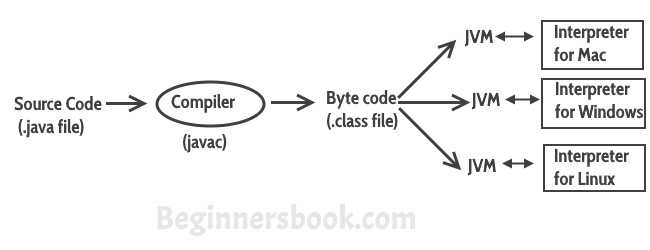
So to summarise everything: The Java Virtual machine (JVM) is the virtual machine that runs on actual machine (your computer) and executes Java byte code. The JVM doesn’t understand Java source code, that’s why we need to have javac compiler that compiles *.java files to obtain *.class files that contain the byte codes understood by the JVM. JVM makes java portable (write once, run anywhere). Each operating system has different JVM, however the output they produce after execution of byte code is same across all operating systems.
JVM Architecture
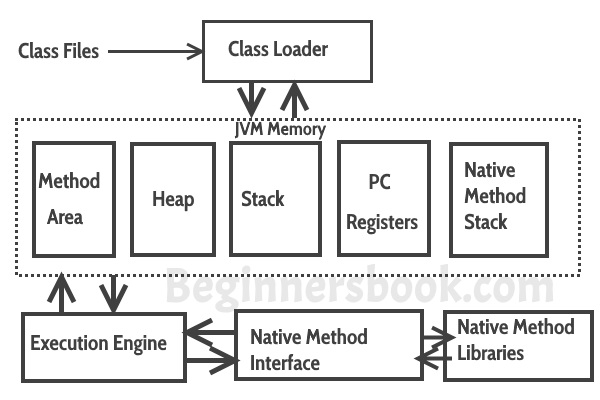 Lets see how JVM works:
Class Loader: The class loader reads the .class file and save the byte code in the method area.
Method Area: There is only one method area in a JVM which is shared among all the classes. This holds the class level information of each .class file.
Heap: Heap is a part of JVM memory where objects are allocated. JVM creates a Class object for each .class file.
Stack: Stack is a also a part of JVM memory but unlike Heap, it is used for storing temporary variables.
PC Registers: This keeps the track of which instruction has been executed and which one is going to be executed. Since instructions are executed by threads, each thread has a separate PC register.
Native Method stack: A native method can access the runtime data areas of the virtual machine.
Native Method interface: It enables java code to call or be called by native applications. Native applications are programs that are specific to the hardware and OS of a system.
Garbage collection: A class instance is explicitly created by the java code and after use it is automatically destroyed by garbage collection for memory management.
JVM Vs JRE Vs JDK
JRE: JRE is the environment within which the java virtual machine runs. JRE contains Java virtual Machine(JVM), class libraries, and other files excluding development tools such as compiler and debugger.
Which means you can run the code in JRE but you can’t develop and compile the code in JRE.
JVM: As we discussed above, JVM runs the program by using class, libraries and files provided by JRE.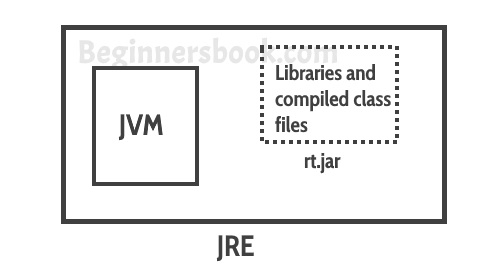 JDK: JDK is a superset of JRE, it contains everything that JRE has along with development tools such as compiler, debugger etc.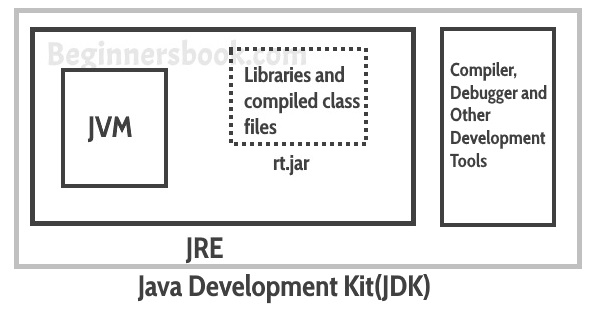
https://beginnersbook.com/2013/05/jvm/
Java Virtual Machine (JVM), Difference JDK, JRE & JVM – Core Java的更多相关文章
- JVM Specification 9th Edition (4) Chapter 3. Compiling for the Java Virtual Machine
Chapter 3. Compiling for the Java Virtual Machine 内容列表 3.1. Format of Examples 3.2. Use of Constants ...
- 60年代进程 80年代线程 IPC How the Java Virtual Machine (JVM) Works
小结: 1. To facilitate communication between processes, most operating systems support Inter Process C ...
- JVM Specification 9th Edition (3) Chapter 2. The Structure of the Java Virtual Machine
Chapter 2. The Structure of the Java Virtual Machine 内容列表 2.1. The class File Format (class文件的格式) 2. ...
- The Structure of the Java Virtual Machine Java虚拟机结构 虚拟机内存模型
小结: 1.实现一台Java虚拟机,只需正确读取class文件中的每一条字节码指令且能正确执行这些指令所蕴含的操作. 2.设计者决定:运行时数据区的内存如何布局,选择哪种垃圾收集算法,是否对虚拟机字节 ...
- What is the difference between JRE,JVM and JDK?
If you are a Java developer, it is very often that you think about understanding the JRE,JVM and JDK ...
- Java初学者不得不知的概念,JDK,JRE,JVM的区别?(转)
JVM(Java Virtual Machine Java虚拟机)可以理解为是一个虚拟出来的计算机,具备着计算机的基本运算方式,它主要负责将java程序生成的字节码文件解释成具体系统平台上的机器指令. ...
- JVM常用命令和性能调优建议 [Could not create the Java virtual machine]
一.查看jvm常用命令jinfo:可以输出并修改运行时的java 进程的opts. jps:与unix上的ps类似,用来显示本地的java进程,可以查看本地运行着几个java程序,并显示他们的进程号. ...
- java的概念了解(jdk,jre,jvm,javase,javaee,javame)
jvm jvm:java virtual machine,俗称:java虚拟机,只认识xxx.class这类文件 jre jre:java runtime environment,俗称java运行环境 ...
- 1、Java语言概述与开发环境——JDK JRE JVM理解
一.理解概念: 1.JDK(Java Development Kit Java开发工具包) JDK是提供给Java开发人员使用的,其中包含Java的开发工具,也包括JRE,所以安装了JDK,就不用单独 ...
随机推荐
- 《一头扎进》系列之Python+Selenium框架设计篇4- 价值好几K的框架,呵!这个框架有点意思啊
1.简介 前面文章,我们实现了框架的一部分功能,包括日志类和浏览器引擎类的封装,今天我们继续封装一个基类和介绍如何实现POM.关于基类,是这样定义的:把一些常见的页面操作的selenium封装到bas ...
- 知识图谱推理与实践(3) -- jena自定义builtin
在第2篇里,介绍了jena的The general purpose rule engine(通用规则引擎)及其使用,本篇继续探究,如何自定义builtin. builtin介绍 先回顾builtin为 ...
- sql手工注入1
手工注入常规思路 1.判断是否存在注入,注入是字符型还是数字型 2.猜解 SQL 查询语句中的字段数 3.确定显示的字段顺序 4.获取当前数据库 5.获取数据库中的表 6.获取表中的字段名 7.查询到 ...
- IOS弓箭传说的插件开发
1.导出ipa进行解压后,定位到执行程序archero,ida加载后,发现很多都是sub_xxx开头的. 2.搜索资料后,原来Unity编写的程序,可以使用Il2CppDumper进行符号表还原. 下 ...
- iOS---OBJC_ASSOCIATION_ASSIGN可能引起的Crash
//OBJC_ASSOCIATION_ASSIGN类似于我们常用的assign,assign策略的特点就是在对象释放以后,不会主动将应用的对象置为nil,这样会有访问僵尸对象导致应用崩溃的风险.为了解 ...
- JQuery 表单textarea控制字数
/** *textarea 字数限制 *obj textarea * maxlength 限制的最大字数 */ function textarealength(obj,maxlength){ var ...
- [20191218]降序索引疑问4.txt
[20191218]降序索引疑问4.txt --//前几天优化一个项目,我发现许多表里面有有隐含字段,一般开发很少建立函数索引.我自己检查发现里面存在大量的降序索引.--//我感觉有点奇怪,为什么开发 ...
- 用python爬虫简单爬取 笔趣网:类“起点网”的小说
首先:文章用到的解析库介绍 BeautifulSoup: Beautiful Soup提供一些简单的.python式的函数用来处理导航.搜索.修改分析树等功能. 它是一个工具箱,通过解析文档为用户提供 ...
- django中使用原生的sql查询实例
在app文件夹下创建database_operations.py文件,写如下内容: import pymysql from 项目名.settings import DATABASES class Da ...
- 工厂模式-C#改良实现
参考了下网上的工厂模式实现,总的来说例子还是OK得,但是示例太单一了,因此我做了下优化的改良实现. namespace DP { public interface ICreditCard { stri ...