
IOS开发基础知识--碎片35
1:iOS视图控制对象生命周期
init-初始化程序
viewDidLoad-加载视图
viewWillAppear-UIViewController对象的视图即将加入窗口时调用;
viewDidApper-UIViewController对象的视图已经加入到窗口时调用;
viewWillDisappear-UIViewController对象的视图即将消失、被覆盖或是隐藏时调用;
viewDidDisappear-UIViewController对象的视图已经消失、被覆盖或是隐藏时调用;
执行时间顺序
15:51:44.811inHyron[483:b903] init
15:51:54.081inHyron[483:b903] viewDidLoad
15:51:54.082inHyron[483:b903] viewVillAppear
15:51:54.084 inHyron[483:b903] viewDidAppear
很明显,先执行init、然后执行viewDidLoad,然后是viewWillAppear最后是viewDidAppear,这样视图就创建好了,当视图消失或者被覆盖的时候:
15:54:14.557inHyron[483:b903] viewWillDisappear
15:54:14.558inHyron[483:b903] viewDidDisappear
这样一来视图就消失了
2:初始化一个有默认值实例类
userManager.h文件内容:

#import <Foundation/Foundation.h>

@interface userManager : NSObject

@property(nonatomic,copy)NSString *userName;

@property(nonatomic,copy)NSString *passWord;

@property (assign, nonatomic) NSInteger type;

+(userManager *)userManagerWithType:(NSInteger)type;

-(NSString *)toGetParams;

-(void)configWithObj:(userManager *)userManagerInfo;

@end

userManager.m文件内容:

#import "userManager.h"

@implementation userManager

- (instancetype)init

{

    self = [super init];

    if (self) {

        _userName=@"root";

        _passWord=@"";

        _type = ;

    }

    return self;

}

+(userManager *)userManagerWithType:(NSInteger)type

{

    userManager *myManager=[[userManager alloc]init];

    myManager.type=type;

    return myManager;

}

-(void)configWithObj:(userManager *)userManagerInfo

{

    self.userName=userManagerInfo.userName;

    self.passWord=userManagerInfo.passWord;

    self.type=userManagerInfo.type;

}

-(NSString *)toGetParams

{

    return [NSString stringWithFormat:@"当前用户:%@ 密码:%@",self.userName,self.passWord];

}

@end

调用代码:

userManager *myManager=[userManager userManagerWithType:];

NSLog(@"用户信息:%@",myManager.toGetParams);
3:NSHTTPCookieStorage(获取和删除cookie)
取出cookie

NSArray *cookiesArray = [[NSHTTPCookieStorage sharedHTTPCookieStorage] cookies];

NSDictionary *cookieDict = [NSHTTPCookie requestHeaderFieldsWithCookies:cookiesArray];

NSString *cookie = [cookieDict objectForKey:@"Cookie"];

//设置http的header的cookie

[urlRequest setValue:cookie forHTTPHeaderField:@"Cookie”];

删除cookie

NSArray *cookiesArray = [[NSHTTPCookieStorage sharedHTTPCookieStorage] cookies];

for (NSHTTPCookie *cookie in cookiesArray) {

    [[NSHTTPCookieStorage sharedHTTPCookieStorage] deleteCookie:cookie];

}
4:iOS关于在UITableView中,实现多个cell中不同的倒计时实现
//所有剩余时间数组

NSMutableArray *totalLastTime;

在网络请求到的所有数据中,根据需要将其中要进行倒计时显示的数据中的剩余时间单独保存出来,如果这里是所有的数据都需要倒计时,则只需要保存时间即可,如果是有部分数据才需要倒计时,则可以保存字典,两个键值对分别为其在UITableView的indexPath和剩余时间:num默认从0开始

NSDictionary *dic = @{@"indexPath":[NSStrin stringWithFormat:@"%i",num],@"lastTime": order.payLastTime};

 [totalLastTime addObject:dic];

开启定时器方法:

- (void)startTimer

{

    timer = [NSTimer scheduledTimerWithTimeInterval: target:selfselector:@selector(refreshLessTime) userInfo:@"" repeats:YES];

如果不添加下面这条语句,在UITableView拖动的时候,会阻塞定时器的调用

    [[NSRunLoop currentRunLoop] addTimer:timer forMode:UITrackingRunLoopMode];

}

主要的定时器中的方法,在该方法中,遍历totalLastTime,取出其中保存的lasttime和indexpath,time用来显示,在显示完后自减,indexpath代表对应显示的位置,在一次循环后,将新的time和没有改变的indexpath从新替换totalLastTime 中对应位置的元素,以此保证每一秒执行时,显示time都是最新的。

- (void)refreshLessTime

{

    NSUInteger time;

    for (int i = ; i < totalLastTime.count; i++) {

        time = [[[totalLastTime objectAtIndex:i] objectForKey:@"lastTime"]integerValue];

        NSIndexPath *indexPath = [NSIndexPath indexPathForItem: inSection:[[[totalLastTime objectAtIndex:i] objectForKey:@"indexPath"] integerValue]];

        WLServiceOrderTableViewCell *cell = (WLServiceOrderTableViewCell *)[_tableView cellForRowAtIndexPath:indexPath];

        cell.remainingTimeLabel.text = [NSString stringWithFormat:@"剩余支付时间:%@",[self lessSecondToDay:--time]];

        NSDictionary *dic = @{@"indexPath": [NSStringstringWithFormat:@"%i",indexPath.section],@"lastTime": [NSStringstringWithFormat:@"%i",time]};

        [totalLastTime replaceObjectAtIndex:i withObject:dic];

    }

}

- (NSString *)lessSecondToDay:(NSUInteger)seconds

{

    NSUInteger day  = (NSUInteger)seconds/(*);

    NSUInteger hour = (NSUInteger)(seconds%(*))/;

    NSUInteger min  = (NSUInteger)(seconds%())/;

    NSUInteger second = (NSUInteger)(seconds%);

    NSString *time = [NSString stringWithFormat:@"%lu日%lu小时%lu分钟%lu秒",(unsigned long)day,(unsigned long)hour,(unsigned long)min,(unsigned long)second];

    return time;

}
项目中运用中的代码:

- (void)startTimer

{

    self.timer = [NSTimer scheduledTimerWithTimeInterval: target:self selector:@selector(refreshLessTime) userInfo:@"" repeats:YES];

    [[NSRunLoop currentRunLoop] addTimer:self.timer forMode:UITrackingRunLoopMode];

}

- (void)refreshLessTime

{

    NSInteger time;

    for (int i = ; i < self.totalLastTime.count; i++) {

        time = [[[self.totalLastTime objectAtIndex:i] objectForKey:@"lastTime"]integerValue];

        NSIndexPath *indexPath = [NSIndexPath indexPathForItem:[[[self.totalLastTime objectAtIndex:i] objectForKey:@"indexPath"] integerValue] inSection:];

        BDFindActivityCell *cell = (BDFindActivityCell *)[_tableView cellForRowAtIndexPath:indexPath];

        if (time==) {

            [cell setCellData:@"活动中"];

            cell.myLabel.text=@"正在抢单中";

            cell.clockImageView.hidden=YES;

//            [self.tableView reloadRowsAtIndexPaths:[NSArray arrayWithObject:indexPath] withRowAnimation:UITableViewRowAnimationFade];

            --time;

        }

        else if(time>)

        {

            cell.myLabel.text = [NSString stringWithFormat:@"%@",[self lessSecondToDay:--time]];

        }

        NSDictionary *dic = @{@"indexPath": [NSString stringWithFormat:@"%ld",indexPath.row],@"lastTime": [NSString stringWithFormat:@"%li",time]};

        [self.totalLastTime replaceObjectAtIndex:i withObject:dic];

    }

}

- (NSString *)lessSecondToDay:(NSUInteger)seconds

{

    NSUInteger hour = (NSUInteger)(seconds%(*))/;

    NSUInteger min  = (NSUInteger)(seconds%())/;

    NSUInteger second = (NSUInteger)(seconds%);

    NSString *time = [NSString stringWithFormat:@"去抢单 %02lu:%02lu:%02lu",(unsigned long)hour,(unsigned long)min,(unsigned long)second];

    return time;

}
5:如何运用Method Swizzling动态插入一些操作
假设工程中有很多ViewController,但有个操作每个页面都有,以前都是每个页面都去编写相同的代码,其实用Method Swizzling就可以解决这个问题,比如RDVTabBarController这个只在四个首页才显示出来,其它页面都进行隐藏;
a:创建一个扩展类:UIViewController+Swizzle
.h文件的内容:
#import <UIKit/UIKit.h>

#import <objc/runtime.h>

#import "RDVTabBarController.h"

@interface UIViewController (Swizzle)

@end
.m文件的内容:
#import "UIViewController+Swizzle.h"

@implementation UIViewController (Swizzle)

+ (void)load

{

    SEL origSel = @selector(viewDidAppear:);

    SEL swizSel = @selector(swiz_viewDidAppear:);

    [UIViewController swizzleMethods:[self class] originalSelector:origSel swizzledSelector:swizSel];

    SEL vcWillAppearSel=@selector(viewWillAppear:);

    SEL swizWillAppearSel=@selector(swiz_viewWillAppear:);

    [UIViewController swizzleMethods:[self class] originalSelector:vcWillAppearSel swizzledSelector:swizWillAppearSel];

}

+ (void)swizzleMethods:(Class)class originalSelector:(SEL)origSel swizzledSelector:(SEL)swizSel

{

    Method origMethod = class_getInstanceMethod(class, origSel);

    Method swizMethod = class_getInstanceMethod(class, swizSel);

    //class_addMethod will fail if original method already exists

    BOOL didAddMethod = class_addMethod(class, origSel, method_getImplementation(swizMethod), method_getTypeEncoding(swizMethod));

    if (didAddMethod) {

        class_replaceMethod(class, swizSel, method_getImplementation(origMethod), method_getTypeEncoding(origMethod));

    } else {

        //origMethod and swizMethod already exist

        method_exchangeImplementations(origMethod, swizMethod);

    }

}

- (void)swiz_viewDidAppear:(BOOL)animated

{

    //可以对控制器名称做过滤 达到过滤哪些是不操作

    NSString *curClassName=NSStringFromClass([self class]);

    if (curClassName.length>&&([curClassName isEqualToString:@"BDCustomerListViewController"]||[curClassName isEqualToString:@"BDOrdersViewController"]||[curClassName isEqualToString:@"BDDiscoverViewController"]||[curClassName isEqualToString:@"BDMineInfoViewController"])) {

        [self.rdv_tabBarController setTabBarHidden:NO animated:YES];

    }

    //需要注入的代码写在此处

    [self swiz_viewDidAppear:animated];

}

-(void)swiz_viewWillAppear:(BOOL)animated

{

    if ([[self.navigationController childViewControllers] count] > ) {

        [self.rdv_tabBarController setTabBarHidden:YES animated:YES];

    }

    [self swiz_viewWillAppear:animated];

}

@end
说明:+ (void)load 方法是一个类方法,当某个类的代码被读到内存后,runtime会给每个类发送 + (void)load 消息。因此 + (void)load 方法是一个调用时机相当早的方法,而且不管父类还是子类,其 + (void)load 方法都会被调用到,很适合用来插入swizzling方法
b:调用在main.m引入这个扩展类
#import <UIKit/UIKit.h>

#import "AppDelegate.h"

#import "UIViewController+Swizzle.h"

int main(int argc, char * argv[]) {

    @autoreleasepool {

        return UIApplicationMain(argc, argv, nil, NSStringFromClass([AppDelegate class]));

    }

 }
6:IOS关于UIImageView的拉伸问题
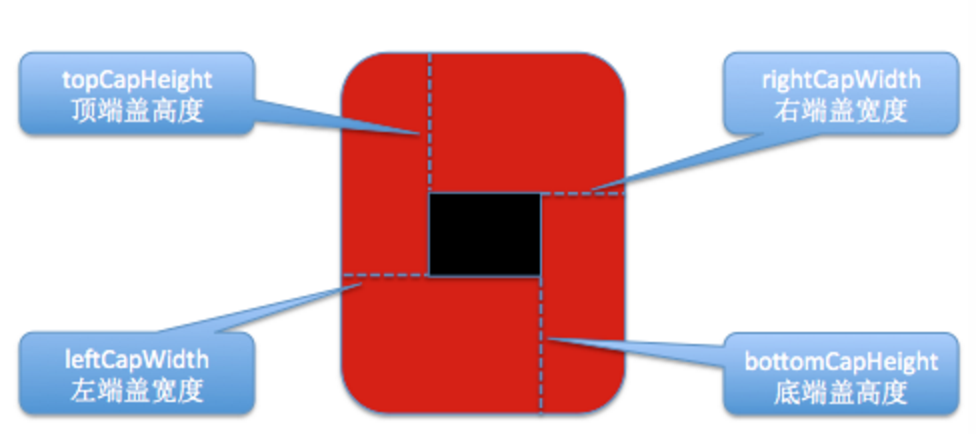
指定这4个宽度后 会形成黑色模块 直白点就是 这块内容就是拉伸后中间那块不断填充的部分
UIImage* img=[UIImage imageNamed:@"2.png"];//原图

UIEdgeInsets edge=UIEdgeInsetsMake(, , ,);

     //UIImageResizingModeStretch:拉伸模式,通过拉伸UIEdgeInsets指定的矩形区域来填充图片 上下左右都会

     //UIImageResizingModeTile:平铺模式,通过重复显示UIEdgeInsets指定的矩形区域来填充图

img= [img resizableImageWithCapInsets:edge resizingMode:UIImageResizingModeStretch];

self.imageView.image=img;

项目中的运用:

        self.myImageView=[[UIImageView alloc]initWithFrame:CGRectMake(, , , )];

        UIImage *curImage=[UIImage imageNamed:@"form_no_selected_icon"];

        UIEdgeInsets edge=UIEdgeInsetsMake(, , ,);

        curImage= [curImage resizableImageWithCapInsets:edge resizingMode:UIImageResizingModeStretch];

        self.myImageView.image=curImage;

        [self.view addSubview:self.myImageView];
如果只是左右拉伸就用UIImageResizingModeStretch,关于edge的值左右自个根据实际的大小进行确定,把以这块进行拉伸,特别要注意2X跟3X的图片;
7:AppDelegate各个事件及一些相应的通知运用
a 活动-》不活动 使用applicationWillResignActive:/UIApplicationWillResignActiveNotification来“暂停”应用程序的显示。确保工作中不需要及时的用户输入,因为应用程序在一段时间内不会获得任何用户输入。
b 不活动-》后台 使用applicationDidEnterBackground:/UIApplicationDidEnterBackgroundNotification释放在应用程序处于后台状态时不需要保留的任何资源(比如缓存的图像或者其他可以轻松加载的数据),或者无法保存在后台的任何资源(比如网络连接)。在这里避免过度的使用内存使用将应用程序的最终的暂停快照更小,从而减小了应用程序从RAM整个清楚的风险。还可以通过此机会保存任何必要的应用数据,这些数据将有助于用户在下一次重新启动时候找到上次离开时的进度。
c 后台-》不活动 使用applicationDidBecomeActive:/UIApplicationDidBecomeActiveNotification恢复从后台状态切换到不活动状态时候所执行的任何操作。例如,在这里可以重新建立持久网络连接。
d不活动-》活动 使用applicationDidBecomeActive:/UIApplicationDidBecomeActiveNotification恢复从不活动到活动状态时候所做的任何操作。这个方法和通知在应用程序全新启动时使用,所以在这里执行的任何操作也必须在该上下文有效。 注意:在此过度过程中,系统不会提供大量时间来保存这里的更改,仅提供5秒的时间。如果超过5秒,应用程序将立刻从内存中清楚并进入未运行状态!
以UIApplicationDidBecomeActiveNotification通知为例子,在页面上创建一个通知,并实现其代码:
@interface FirstViewController ()

@end

@implementation FirstViewController

- (void)viewDidLoad {

    [super viewDidLoad];

    self.view.backgroundColor=[UIColor redColor];

    [[NSNotificationCenter defaultCenter] addObserver:self

                                             selector:@selector(didBecomeActiveNotification:)

                                                 name:UIApplicationDidBecomeActiveNotification

                                               object:nil];

}

- (void)didReceiveMemoryWarning {

    [super didReceiveMemoryWarning];

    // Dispose of any resources that can be recreated.

}

- (void)didBecomeActiveNotification:(NSNotification *)note

{

    NSLog(@"哈哈我进入了");

}

@end
上面执行的时间为程序运行在这一页,然后退到后台,又进入APP到这个页面进行唤醒,就会执行上面那个didBecomeActiveNotification方法;如果没在这个页面,就算唤醒也是不会执行
8:Aspects运用它进行面向切面编程
Aspects插件地址:https://github.com/steipete/Aspects
创建一个SwizzleManager类:
.h文件内容:

#import <Foundation/Foundation.h>

#import "Aspects/Aspects.h"

@interface SwizzleManager : NSObject

+ (void)createAllHooks;

@end

.m文件内容:

#import "SwizzleManager.h"

#import <UIKit/UIKit.h>

@implementation SwizzleManager

+ (void)createAllHooks

{

    [UIViewController aspect_hookSelector:@selector(viewDidLoad)

                              withOptions:AspectPositionBefore

                               usingBlock:^(id<AspectInfo> info){

                                   //用户统计代码写在此处

                                   NSLog(@"[ASPECT] inject in class instance:%@", [info instance]);

                               }

                                    error:NULL];

    //other hooks ... goes here

    //...

}

@end

然后在AppDelegate文件:

- (BOOL)application:(UIApplication *)application didFinishLaunchingWithOptions:(NSDictionary *)launchOptions {

    // Override point for customization after application launch.

    //在程序启动的第一时间内创建

    [SwizzleManager createAllHooks];

    return YES;

}
不错的文章:http://tech.glowing.com/cn/method-swizzling-aop/ 里面的实例可以记录每个页面,及每个按键的事件
9:怎么改变UITextfield placeholder的颜色和位置?
继承UITextfield,重写这个方法
- (void) drawPlaceholderInRect:(CGRect)rect {

    [[UIColor blueColor] setFill];

    [self.placeholder drawInRect:rect withFont:self.font lineBreakMode:UILineBreakModeTailTruncation alignment:self.textAlignment];

}
10:怎么把tableview里cell的小对勾的颜色改成别的颜色?
_mTableView.tintColor = [UIColor redColor];
IOS开发基础知识--碎片35的更多相关文章
- IOS开发基础知识碎片-导航
1:IOS开发基础知识--碎片1 a:NSString与NSInteger的互换 b:Objective-c中集合里面不能存放基础类型,比如int string float等,只能把它们转化成对象才可 ...
- IOS开发基础知识--碎片33
1:AFNetworking状态栏网络请求效果 直接在AppDelegate里面didFinishLaunchingWithOptions进行设置 [[AFNetworkActivityIndicat ...
- IOS开发基础知识--碎片42
1:报thread 1:exc_bad_access(code=1,address=0x70********) 闪退 这种错误通常是内存管理的问题,一般是访问了已经释放的对象导致的,可以开启僵尸对象( ...
- IOS开发基础知识--碎片50
1:Masonry 2个或2个以上的控件等间隔排序 /** * 多个控件固定间隔的等间隔排列,变化的是控件的长度或者宽度值 * * @param axisType 轴线方向 * @param fi ...
- IOS开发基础知识--碎片3
十二:判断设备 //设备名称 return [UIDevice currentDevice].name; //设备型号,只可得到是何设备,无法得到是第几代设备 return [UIDevice cur ...
- IOS开发基础知识--碎片11
1:AFNetwork判断网络状态 #import “AFNetworkActivityIndicatorManager.h" - (BOOL)application:(UIApplicat ...
- IOS开发基础知识--碎片14
1:ZIP文件压缩跟解压,使用ZipArchive 创建/添加一个zip包 ZipArchive* zipFile = [[ZipArchive alloc] init]; //次数得zipfilen ...
- IOS开发基础知识--碎片16
1:Objective-C语法之动态类型(isKindOfClass, isMemberOfClass,id) 对象在运行时获取其类型的能力称为内省.内省可以有多种方法实现. 判断对象类型 -(BOO ...
- IOS开发基础知识--碎片19
1:键盘事件顺序 UIKeyboardWillShowNotification // 键盘显示之前 UIKeyboardDidShowNotification // 键盘显示完成后 UIKeyboar ...
随机推荐
- 通过setTimeout来取消因大量计算造成的网页卡顿
js是单线程的,所以有些大量计算的操作会占用线程资源,导致页面卡住. 今天遇到这样一个场景,选择一个下拉框之后,对数据进行筛选,这个过程中有大量计算,点了selecte的option之后,option ...
- iOS开发之ImageView复用实现图片无限轮播
在上篇博客中iOS开发之多图片无缝滚动组件封装与使用给出了图片无限轮播的实现方案之一,下面在给出另一种解决方案.今天博客中要说的就是在ScrollView上贴两个ImageView, 把ImageVi ...
- 关于JqueryEasyUI集合Kindeditor
写在前面 上一篇<初试JqueryEasyUI(附Demo)>: 在上一篇说过,下面要试下easyui集合编辑器,关于编辑器网上有很多,ckeditor.ueditor.kindedito ...
- Lua 学习笔记(八)错误(error)
Lua所遇到的任何未预期条件都会引发一个错误.因此在发生错误时不能简单的崩溃或着退出,而是结束当前程序块并返回应用程序.当错误引发时进行恰当的处理是最合适的,然而这个阶段伴随着错误的捕获.错误的处理. ...
- PowerDesigner导出Report通用报表
PowerDesigner导出Report通用报表 通用模板下载地址:http://pan.baidu.com/s/1c0NDphm
- 1Z0-053 争议题目解析470
1Z0-053 争议题目解析470 考试科目:1Z0-053 题库版本:V13.02 题库中原题为: 470.Which NLS parameter can be used to change the ...
- (十九)WebGIS中I查询的原理及设计(包含AGS、GeoServer、Supermap)
文章版权由作者李晓晖和博客园共有,若转载请于明显处标明出处:http://www.cnblogs.com/naaoveGIS/. 1.背景 我们在使用arcmap时,经常会用到被称为I查询的工具.具体 ...
- 【十大经典数据挖掘算法】k-means
[十大经典数据挖掘算法]系列 C4.5 K-Means SVM Apriori EM PageRank AdaBoost kNN Naïve Bayes CART 1. 引言 k-means与kNN虽 ...
- WPF老矣,尚能饭否——且说说WPF今生未来(下):安心
在前面的上.中篇中,我们已经可以看到园子里朋友的点评“后山见! WPF就比winform好! 激情对决”.看到大家热情洋溢的点评,做技术的我也很受感动.老实说,如何在本文收笔--WPF系列文章,我很紧 ...
- serviceStack.Redis 在PooledRedisClientManager 中设置密码
ServiceStack.Redis 是一个C#访问Redis的客户端,可以说可以通过它实现所有需要Redis-Cli的功能.但是今天我在主Redis 实例设置了访问密码,而在slave 上没有设置, ...