
Matlab filter常用函数
Filtering and Analysis Functions
Filtering
Filter Analysis
| Function | Description |
|---|---|
|
Casts the coefficients of a |
|
|
Generates a Simulink® filter block corresponding to a |
|
|
Returns the filter order of a |
|
|
Returns the type (1, 2, 3, or 4) of an FIR |
|
|
Returns or plots the frequency response of a |
|
|
Opens the Filter Visualization Tool and displays the magnitude response of a |
|
|
Returns or plots the group delay response of a |
|
|
Returns or plots the impulse response of a |
|
|
Returns the length of the impulse response of a |
|
|
Returns a character array with information about a |
|
|
Returns |
|
|
Returns |
|
|
Returns |
|
|
Returns |
|
|
Returns |
|
|
Returns |
|
|
Returns |
|
|
Returns |
|
|
Returns or plots the phase delay response of a |
|
|
Returns or plots the (unwrapped) phase response of a |
|
|
Casts the coefficients of a |
|
|
Returns the state-space representation of a |
|
|
Returns or plots the step response of a |
|
|
Returns the transfer function representation of a |
|
|
Returns or plots the zero-phase response of a |
|
|
Returns the zero-pole-gain representation of a |
|
|
Displays the poles and zeros of the transfer function represented by a |
1.zero,pole-->transfer function form
[b,a] = zp2tf(zer,pol,1);

fvtool(b,a)

2.transform function-->zero/polo
fvtool(b,a,'Analysis','polezero')

zplane(b,a)

3.Z-transform frequency response of a digital filter.
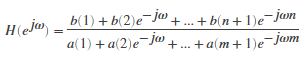
[h,w] = freqz(b,a,p)
returns the p-point complex frequency response, H(ejω), of the digital filter.
For example, a ninth-order Butterworth lowpass filter with a cutoff frequency of 400 Hz, based on a 2000 Hz sampling frequency, is
[b,a] = butter(9,400/1000);
To calculate the 256-point complex frequency response for this filter, and plot the magnitude and phase with freqz, use
freqz(b,a,256,2000)

4.filter
Use filter in the form y = filter(d,x) to filter an input signal, x, with a digitalFilter, d, and obtain output data, y.
5.designfilt(https://ww2.mathworks.cn/help/signal/ref/designfilt.html)
Use designfilt in the form d = designfilt(resp,Name,Value) to design a digital filter, d, with response type resp. Specify the filter further using a set of Name,Value pairs.
Type d.Coefficients to obtain the coefficients of a digitalFilter, d. For IIR filters, the coefficients are expressed as second-order sections.
Lowpass IIR Filter
Design a lowpass IIR filter with order 8, passband frequency 35 kHz, and passband ripple 0.2 dB. Specify a sample rate of 200 kHz. Visualize the magnitude response of the filter. Use it to filter a 1000-sample random signal.
lpFilt = designfilt('lowpassiir','FilterOrder',8, ...

         'PassbandFrequency',35e3,'PassbandRipple',0.2, ...

         'SampleRate',200e3);

fvtool(lpFilt)

dataIn = randn(1000,1);

dataOut = filter(lpFilt,dataIn);
Output the filter coefficients, expressed as second-order sections.
sos = lpFilt.Coefficients
sos = 4×6

    0.2666    0.5333    0.2666    1.0000   -0.8346    0.9073

    0.1943    0.3886    0.1943    1.0000   -0.9586    0.7403

    0.1012    0.2023    0.1012    1.0000   -1.1912    0.5983

    0.0318    0.0636    0.0318    1.0000   -1.3810    0.5090
Bandpass FIR Filter
Design a 20th-order bandpass FIR filter with lower cutoff frequency 500 Hz and higher cutoff frequency 560 Hz. The sample rate is 1500 Hz. Visualize the magnitude response of the filter. Use it to filter a random signal containing 1000 samples.
bpFilt = designfilt('bandpassfir','FilterOrder',20, ...

         'CutoffFrequency1',500,'CutoffFrequency2',560, ...

         'SampleRate',1500);

fvtool(bpFilt)

dataIn = randn(1000,1);

dataOut = filter(bpFilt,dataIn);
Output the filter coefficients.
b = bpFilt.Coefficients
b = 1×21

   -0.0113    0.0067    0.0125   -0.0445    0.0504    0.0101   -0.1070    0.1407   -0.0464   -0.1127    0.1913   -0.1127   -0.0464    0.1407   -0.1070    0.0101    0.0504   -0.0445    0.0125    0.0067   -0.0113 ⋯
6.fvtool
fvtool(b,a)
fvtool(sos)
fvtool(d)
fvtool(b1,a1,b2,a2,...,bN,aN)
fvtool(sos1,sos2,...,sosN)
fvtool(Hd)
fvtool(Hd1,Hd2,...,HdN)
h = fvtool(...)
Use fvtool to visualize a digitalFilter, d.
Matlab filter常用函数的更多相关文章
- MATLAB中常用函数及语法
zeros() 1 zeros(n):n*n 全零矩阵 2 zeros(m,n):m*n全零矩阵 3 zeros(d1,d2,d3……dn):生成 d1*d2*d3*……*dn 全零矩阵或数组. 4 ...
- matlab 图像常用函数
Canny function [ canny ] = canny( rgb ) temp=rgb2gray(rgb); canny=edge(temp,'canny'); end 灰度 temp=rg ...
- 【Matlab】常用函数
1.取整函数 ceil(x)返回不小于x的最小整数值.floor(x)返回不大于x的最大整数值.round(x)返回x的四舍五入整数值.
- Matlab GUI设计中的一些常用函数
Matlab GUI常用函数总结 % — 文件的打开.读取和关闭% — 文件的保存% — 创建一个进度条% — 在名为display的axes显示图像,然后关闭% — 把数字转化为时间格式% — ch ...
- matlab进阶:常用功能的实现,常用函数的说明
常用功能的实现 获取当前脚本所在目录 current_script_dir = fileparts(mfilename('fullpath')); % 结尾不带'/' 常用函数的说明 bsxfun m ...
- matlab 常用函数
Matlab常用函数 Matlab的内部常数 eps 浮点相对精度 pi 圆周率 exp 自然对数的底数e i 或j 虚数单位 Inf或 inf 无穷大 Matlab概率密度函数 ...
- Matlab常用函数集锦
ndims(A)返回A的维数size(A)返回A各个维的最大元素个数length(A)返回max(size(A))[m,n]=size(A)如果A是二维数组,返回行数和列数nnz(A)返回A中非0元素 ...
- MATLAB算术运算符和常用函数
1 算术运算符 Matlab中的算术运算符按优先级由高到低为: (1) ^ 幂 (2) * 乘 / 右除(正常除) ...
- MATLAB常用函数
Matlab的内部常数 pi 圆周率 exp(1) 自然对数的底数e i 或j 虚数单位 Inf或 inf ...
随机推荐
- CTF长久练习平台
0x01 XCTF(攻防世界) 攻防世界是ctf爱好者很喜欢的一个平台,不仅是界面风格像大型游戏闯关,里面的各类题目涵盖的ctf题型很广,还分为新手区和进阶区两块: 并且可以在里面组队,做一道题还有相 ...
- commons-dbutils实现增删改查
1.maven依赖 <?xml version="1.0" encoding="UTF-8"?> <project xmlns="h ...
- python scraping webs - python取得NIPS oral paper列表
from lxml import html import requests # using xpath # page = requests.get('http://econpy.pythonanywh ...
- 1级搭建类106-Oracle 19c 单实例 FS(华为云)公开
项目文档引子系列是根据项目原型,制作的测试实验文档,目的是为了提升项目过程中的实际动手能力,打造精品文档AskScuti. 项目文档引子系列除特定项目目前不对外发布,仅作为博客记录,其他公开.如学员在 ...
- 0级搭建类009-Fedora 30 安装(F30) 公开
项目文档引子系列是根据项目原型,制作的测试实验文档,目的是为了提升项目过程中的实际动手能力,打造精品文档AskScuti. 项目文档引子系列目前不对外发布,仅作为博客记录.如学员在实际工作过程中需提前 ...
- 在linux系统中配置NVMe over FC
在linux系统中配置NVMe over FC与配置NVMe over TCP类似,前5步操作请参考<在linux系统中配置NVMe over TCP>,网页连接如下: https://w ...
- 记录 Docker 的学习过程 (安装基础篇)
docker 通过内核来实现 特点是效率高 1. centos7 三台(推荐2c 4g 最低 1c1g)2. 关闭防火墙 selinux3. 做好主机名解析,三台能互相ping通主机名host参考文件 ...
- Vue中封装axios
参考: https://www.jianshu.com/p/7a9fbcbb1114 https://www.cnblogs.com/dreamcc/p/10752604.html 一.安装axios ...
- Harris角点检测理论
这样想象一下,直线上的一个点在垂直于直线的方向上有最强的梯度.沿着直线的方向梯度较低,意思是直线上的像素点与它周围的像素点看起来相似.我们进行的角点检测是梯度强度明显高于其他像素的点,可能就是目标处 ...
- day06_类与对象、封装、构造方法
02_面向对象与常用类 01_面向对象思想的概述 面向过程:当需要实现一个功能的时候,每个具体的步骤都需要亲力亲为,详细处理每一个细节. 面向对象:当需要实现一个功能的时候,不关心具体步骤,而是找一个 ...