
ubuntu系统搭建(jdk1.8+mysql5.7.28+Hadoop2.7.7+hive3.1.2)
一不小心电脑没电关机之后虚拟机就挂了,然后下定决心重新搭一个虚拟机。
以下是几天安装过程的记录以及一些小提示,包括在ubuntu中安装jdk1.8+mysql5.7.28+Hadoop2.7.7+hive3.1.2
一. 安装jdk1.8
首先记住不要搜java之后进入oracle官网!不然后续hive会报错!
进入官网选择对应的安装包
https://www.oracle.com/technetwork/java/javase/downloads/jdk8-downloads-2133151.html
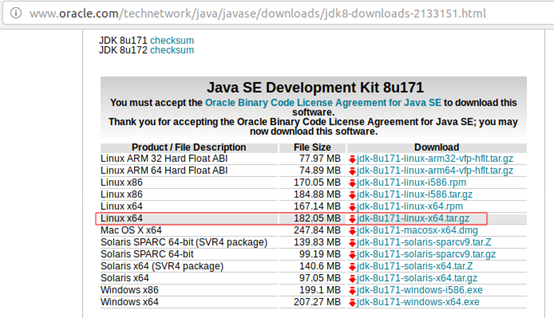
具体操作:https://www.cnblogs.com/luoli-/p/9247952.html
二. 安装hadoop
具体操作:https://www.cnblogs.com/sench/p/8542175.html
hadoop和hive的安装包下载时建议不要上官网下载!速度慢到不行!
可以选择清华镜像进行下载:
- Hadoop: https://mirrors.tuna.tsinghua.edu.cn/apache/hadoop/common/
- hive: https://mirrors.tuna.tsinghua.edu.cn/apache/hive/
三. 安装mysql
1.下载安装包
sudo apt-get install mysql-server mysql-client
2.下载驱动包

解压后把jar包扔到/usr/local/hive/lib(Hive的安装路径)下边,后续有用(可以先不管,后边安装hive时记得放进去不然会报错)
3.进入mysql
mysql -uroot -p+root的密码
etc: mysql -uroot -p000000
4.创建hive数据库
mysql>create database hive;
mysql>grant all privileges on *.* to root@localhost identified by “设置的密码”;
mysql>flush privileges;
四. 安装hive(亲测有效!)
1.下载安装包
2.解压
sudo tar -zxvf apache-hive-3.1.2-bin.tar.gz -C /usr/local/
- 第一处标红为下载的安装包名称
- 第二处标红为Hive的安装目录
3.切换到/usr/local
4.改路径名字(非必须)
sudo mv apache-hive-3.1.2 hive
5.修改系统配置文件
sudo vi ~/.bashrc

6.修改hive配置文件
cd /usr/local/hive/conf
sudo cp hive-env.sh.template hive-env.sh
添加以下内容:

sudo touch hive-site.xml
sudo chmod 777 hive-site.xml
sudo vi hive-site.xml
添加以下内容:
<?xml version="1.0"?>

<?xml-stylesheet type="text/xsl" href="configuration.xsl"?>

<configuration>

  <property>

<name>javax.jdo.option.ConnectionURL</name>    <value>jdbc:mysql://hadoop102:3306/metastore?createDatabaseI fNotExist=true</value>

<description>JDBC connect string for a JDBC metastore</description>

</property>

 <property>

<name>javax.jdo.option.ConnectionDriverName</name>    <value>com.mysql.jdbc.Driver</value>

<description>Driver class name for a JDBC metastore</description>

</property>

 <property>

<name>javax.jdo.option.ConnectionUserName</name>

<value>root</value>

<description>username to use against metastore database</description>  </property>

 <property>

<name>javax.jdo.option.ConnectionPassword</name>

<value>000000</value>

<description>password to use against metastore database</description>

</property>

<property>

<name>hive.cli.print.header</name>

<value>true</value>

  </property>

  <property>

<name>hive.cli.print.current.db</name>

<value>true</value>

</property>

</configuration>
7.初始化数据库(重要)
schematool -dbType mysql -initSchema
8.输入hive即可开启
ubuntu系统搭建(jdk1.8+mysql5.7.28+Hadoop2.7.7+hive3.1.2)的更多相关文章
- Ubuntu系统搭建SVN服务器
Ubuntu系统搭建SVN服务器 参考地址:http://git.devzeng.com/blog/aliyun-ubuntu-svn-server.html 安装软件 依次在终端中执行下面的命令安装 ...
- 本地虚拟机在ubuntu系统搭建nexus服务器
本地虚拟机在ubuntu系统上搭建nexus服务器 本地虚拟机在ubuntu系统上搭建nexus服务器所需软件: 虚拟机:VM或者Oracle VM VirtualBox 系统:ubuntu-14.0 ...
- mysql高可用架构MHA搭建(centos7+mysql5.7.28)
无论是传统行业,还是互联网行业,数据可用性都是至关重要的,虽然现在已经步入大数据时代,nosql比较流行,但是作为数据持久化及事务性的关系型数据库依然是项目首选,比如mysql. 现在几乎所有的公司项 ...
- Ubuntu 系统搭建php服务器 用ssh 远程操作
一:在桌面下载xshell客户端连接 ,vmavar 上的 Ubuntu系统,遇到的问题跟大家分享一下,希望大家少走弯路 Ubuntu系统默认没有ssh server 要安装 apt-get inst ...
- 【转】阿里云Ubuntu系统搭建SVN服务器
##SVN服务器相关软件安装 1.使用SSH远程服务器 (1)对于MAC OS/Liunx的用户直接打开终端输入 ssh 用户名@实例名,例如 ssh root@192.168.1.100 执行上面 ...
- 阿里云服务器Ubuntu系统搭建LNMP环境
目录 一.Nginx 安装 二.MySQL安装 三.PHP安装 四.配置Nginx 五.环境测试 六.服务器常用路径 一.Nginx 安装 更新软件源 sudo apt-get update 安装 N ...
- Ubuntu系统搭建PPTP,VPN
1.先安装pptp apt-get install pptpd 2.打开pptp的DNS vim /etc/ppp/option.pptpd 去掉下面两行内容前的# ms-dns 8.8.8.8 ms ...
- ubuntu系统搭建以太坊私有链
1.安装curl.git apt-get update apt-get install git apt-get install curl 2.安装go curl -O https://storage. ...
- Ubuntu系统搭建django+nginx+uwsgi
1. 在开发机上的准备工作 2. 在服务器上的准备工作 3.安装uwsgi 4.编写uwsgi配置文件,使用配置文件启动uwsgi 5. 安装nginx 6. 收集静态文件 7. 编写nginx配置文 ...
随机推荐
- 【codeforces 766B】Mahmoud and a Triangle
time limit per test2 seconds memory limit per test256 megabytes inputstandard input outputstandard o ...
- Promise的封装
要封装Promise,首先要了解Promise的使用. Promise有以下几个特点:1.Promise是一个构造函数 2.实例化Promise时有两个回调函数,resolve,reject ,成功执 ...
- PHP mysql扩展整理,操作数据库的实现过程分析
相关文章:PHP mysqli扩展整理,包括面向过程和面向对象的比较\事务控制\批量执行\预处理 PHPmysqli扩展整理,包括面向过程和面向对象的比较\事务控制\批量执行\预处理 从某种程度上 ...
- vue 使用webpack打包后路径报错以及 alias 的使用
一.vue 使用webpack打包后路径报错(两步解决) 1. config文件夹 ==> index.js ==> 把assetsPublicPath的 '/ '改为 './' 2. b ...
- ASP.NET MVC 实现页落网资源分享网站+充值管理+后台管理(13)之会员登录注册
源码下载地址:http://www.yealuo.com/Sccnn/Detail?KeyValue=c891ffae-7441-4afb-9a75-c5fe000e3d1c 会员中心,是我们与用户交 ...
- 【t056】智力问答(multiset做法)
Time Limit: 1 second Memory Limit: 128 MB [问题描述] 新年联欢会上,G.Sha负责组织智力问答节目.G.Sha建立了一个很大很大的超级题库,并衡量了每道题的 ...
- 【2016常州一中夏令营Day4】
小 W 走迷宫[问题描述]小 W 被小 M 困在了一个方格矩阵迷宫里,矩阵边界在无穷远处,我们做出如下的假设:a. 每走一步时,只能从当前方格移动一格,走到某个相邻的方格上:b. 走过的格子立即塌陷无 ...
- 【37.74%】【codeforces 725D】Contest Balloons
time limit per test3 seconds memory limit per test256 megabytes inputstandard input outputstandard o ...
- C# struct和class
文字说明 值类型,存储于堆栈,存在于计算机内存逻辑区域中 引用类型,存储在堆中,位于计算机的不同逻辑位置 struct是值类型 推荐较小的数据类型使用,因为结构的大小会影响应用程序的性能 修改实际上是 ...
- C++虚继承初识
struct Employee { ... }; struct Manager : Employee { ... }; struct Worker : Employee { ... }; struct ...