
吴裕雄--天生自然TensorFlow2教程:损失函数及其梯度
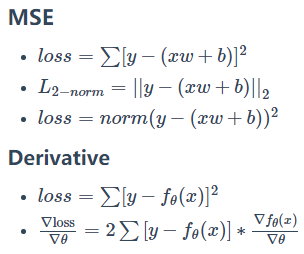
import tensorflow as tf

x = tf.random.normal([2, 4])

w = tf.random.normal([4, 3])

b = tf.zeros([3])

y = tf.constant([2, 0])
with tf.GradientTape() as tape:

    tape.watch([w, b])

    prob = tf.nn.softmax(x @ w + b, axis=1)

    loss = tf.reduce_mean(tf.losses.MSE(tf.one_hot(y, depth=3), prob))
grads = tape.gradient(loss, [w, b])

grads[0]
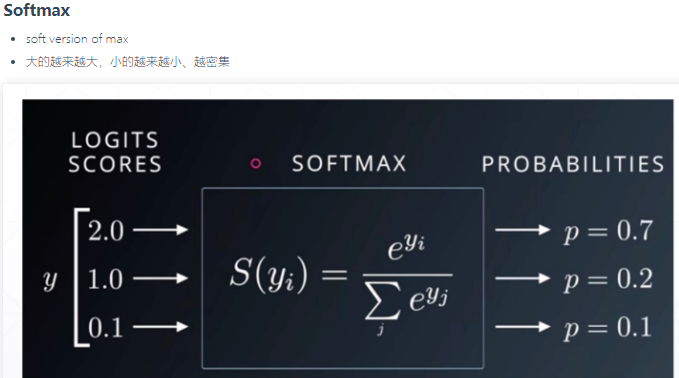

x = tf.random.normal([2, 4])

w = tf.random.normal([4, 3])

b = tf.zeros([3])

y = tf.constant([2, 0])
with tf.GradientTape() as tape:

    tape.watch([w, b])

    logits =x @ w + b

    loss = tf.reduce_mean(

        tf.losses.categorical_crossentropy(tf.one_hot(y, depth=3),logits,from_logits=True))
grads = tape.gradient(loss, [w, b])

grads[0]
吴裕雄--天生自然TensorFlow2教程:损失函数及其梯度的更多相关文章
- 吴裕雄--天生自然TensorFlow2教程:手写数字问题实战
import tensorflow as tf from tensorflow import keras from keras import Sequential,datasets, layers, ...
- 吴裕雄--天生自然TensorFlow2教程:函数优化实战
import numpy as np import matplotlib.pyplot as plt from mpl_toolkits.mplot3d import Axes3D def himme ...
- 吴裕雄--天生自然TensorFlow2教程:反向传播算法
- 吴裕雄--天生自然TensorFlow2教程:链式法则
import tensorflow as tf x = tf.constant(1.) w1 = tf.constant(2.) b1 = tf.constant(1.) w2 = tf.consta ...
- 吴裕雄--天生自然TensorFlow2教程:多输出感知机及其梯度
import tensorflow as tf x = tf.random.normal([2, 4]) w = tf.random.normal([4, 3]) b = tf.zeros([3]) ...
- 吴裕雄--天生自然TensorFlow2教程:单输出感知机及其梯度
import tensorflow as tf x = tf.random.normal([1, 3]) w = tf.ones([3, 1]) b = tf.ones([1]) y = tf.con ...
- 吴裕雄--天生自然TensorFlow2教程:激活函数及其梯度
import tensorflow as tf a = tf.linspace(-10., 10., 10) a with tf.GradientTape() as tape: tape.watch( ...
- 吴裕雄--天生自然TensorFlow2教程:梯度下降简介
import tensorflow as tf w = tf.constant(1.) x = tf.constant(2.) y = x * w with tf.GradientTape() as ...
- 吴裕雄--天生自然TensorFlow2教程:误差计算
import tensorflow as tf y = tf.constant([1, 2, 3, 0, 2]) y = tf.one_hot(y, depth=4) # max_label=3种 y ...
随机推荐
- 软件工程2020第一次作业(by cybersa)
1 作业描述 作业属于哪个课程 2020春福大软工实践W班 这个作业要求在哪里 寒假作业(1/2) 这个作业的目标 建立博客.掌握markdown语法,学习写博客,回顾,总结,展望自己的学习历程 作业 ...
- IntelliJ IDEA 2017.3尚硅谷-----显示行号和方法分隔符
- L3-010 是否完全二叉搜索树 (30分)
题解 判断一棵树是否是完全二叉树: 取队列的头,将头的左右孩子入队,循环每次判断是否为空,如果为空节点,此时退出循环. 然后检查队列中的元素是否全部为空,如果是则说明是完全二叉树,否则不是. 代码 # ...
- ModelSerializer,序列化与反序列化整合
复习 """ 1.解析模块:全局局部配置 REST_FRAMEWORK = { # 全局解析类配置 'DEFAULT_PARSER_CLASSES': [ 'rest_f ...
- 树莓派学习之路-GPIO Zero
原来用的都是RPi.GPIO模式开发,写程序 今天看到了GPIOZERO的资料,觉得这个API还是很好用的, 唯一的缺点就是官方资料是英文的,而且目前这方面的资料也不多, 所以开始写这篇博文,将自己学 ...
- Java - 闭包
概述 简单介绍 闭包 1. 聚合关系 概述 常见的 类间关系 场景 类 A 主要类 持有 类B 的实例 有点行为, 需要 类 B 的介入 类 B 有自己的行为 A 会在某些时候调用 B 的行为 代码示 ...
- Git - 06. git checkout
1. 概述 已经学会查看 提交记录 尝试在 提交记录 之间做跳转 2. 命令 跳转到提交 概述 跳转到 日志 里的某次提交 命令 # 撤销 工作区的所有改动, 返回 当前分支 的 上一个提交 > ...
- HTML5学习(7)多媒体元素
视频元素video <video src="./media/xxx.mp4" controls autoplay muted loop></video> 音 ...
- 为什么安装了淘宝镜像,永用cnpm安装依赖包会报错,而用npm就不会?报错:cnpm : 无法加载文件 C:\Users\93457\AppData\Roaming\npm\cnpm.ps1。。。。
cnpm - 解决 " cnpm : 无法加载文件 C:\Users\93457\AppData\Roaming\npm\cnpm.ps1,因为在此系统上禁止运行脚本.有关详细信息 ... ...
- 给footer标签设置padding:7px auto;失效
margin:auto可以做到水平居中,前提条件就是,这个标签是块状元素,并且有个确定的宽度,百分比的宽度也行: padding的话, 设置成auto它会自动继承浏览器的padding值, 当设置pa ...