
Git提交时提示“Please make sure you have the correct access rights and the repository exists.”的解决方法
1.首先打开Git Bash设置名字和邮箱:
git config --global user.name "你的名字"
git config --global user.email“你的邮箱"

2.删除.SSH文件下的known_hosts(.SSH在C:\Users\Windows用户名目录下)
3.生成ssh公钥认证所需的公钥和私钥文件
ssh-keygen -t rsa -C "你的名字/你的邮箱"
然后会出现以下内容
Generating public/private rsa key pair.
Enter file in which to save the key (/c/Users/Administrator/.ssh/id_rsa):
/c/Users/Administrator/.ssh/id_rsa already exists.
Overwrite (y/n)? y(输入y)
Enter passphrase (empty for no passphrase):(回车)
Enter same passphrase again:(回车)
然后系统会自动在.ssh文件夹下生成两个文件,id_rsa和id_rsa.pub,用记事本打开id_rsa.pub,将里面的内容复制到下面这里

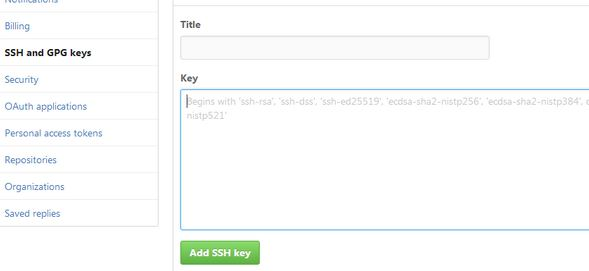
4.在Git中输入ssh -T git@github.com验证与github连接是否成功时
The authenticity of host 'github.com (13.250.177.223)' can't be established.
RSA key fingerprint is SHA256:nThbg6kXUpJWGl7E1IGOCspRomTxdCARLviKw6E5SY8.
Are you sure you want to continue connecting (yes/no)? yes(输入yes)
Warning: Permanently added 'github.com,13.250.177.223' (RSA) to the list of known hosts.
Hi XXX! You've successfully authenticated, but GitHub does not provide shell access.
最后再试着拉取一下项目,就成了。。
Git提交时提示“Please make sure you have the correct access rights and the repository exists.”的解决方法的更多相关文章
- Git clone时出现Please make sure you have the correct access rights and the repository exists.问题已解决。
看了好多资料终于搞定了git 中clone命令报错这个问题,废话不多说直接上步骤希望对大家有帮助. 1 删除.ssh文件夹(直接搜索该文件夹)下的known_hosts(手动删除即可,不需要git ...
- 使用git时出现Please make sure you have the correct access rights and the repository exists.问题已解决。
使用git时,出现Please make sure you have the correct access rights and the repository exists.问题已解决. 今天我在使用 ...
- Git push提交时报错Permission denied(publickey)...Please make sure you have the correct access rights and the repository exists.
一.git push origin master 时出错 错误信息为: Permission denied(publickey). fatal: Could not read from remote ...
- git遇到的问题之“Please make sure you have the correct access rights and the repository exists.”
对于git的提交一直很小心翼翼,感觉一不小心就会踩到莫名的坑. 这不, 某天commit 就遇到了On branch master nothing to commit (working directo ...
- windows 部署 git 服务器报 Please make sure you have the correct access rights and the repository exists.错误
这两天在阿里云上弄windows 服务器,顺便部署了一个git服务.根据网上教程一步步操作下来,最后在 remote远程仓库的时候提示 fatal: 'yourpath/test.git' does ...
- git pull 出错 fatal: Could not read from remote repository.Please make sure you have the correct access rights.and the repository exists.
Warning: Permanently added the RSA host key for IP address '192.30.252.131' to the list of known hos ...
- [Git]Please make sure you have the correct access rights and the repository exists
这个问题是这样,需要在已有github账号的A机器上,再创建一个github账号,新账号创建完毕,将代码通过机器A push上之后,再另一台机器B,clone 这个项目时报出了如下错误: Permis ...
- 报错 Please make sure you have the correct access rights and the repository exists (git 添加ssh密钥 )
1.设置Git的user name和email $ git config --global user.name "wubaiwan" $ git config --global u ...
- Git出错:“Please make sure you have the correct access rights and the repository exists.”
此问题是需要重置ssh密钥 解决步骤如下: 1.重置用户名和邮箱: 打开Git Bash 进入Git命令,输入以下命令 git config --global user.name "你的用户 ...
随机推荐
- 目标检测,主要问题发展,非极大值抑制中阈值也作为参数去学习更满足end2end,最近发展趋势和主要研究思路方向
目标检测,主要问题发展,非极大值抑制中阈值也作为参数去学习更满足end2end,最近发展趋势和主要研究思路方向 待办 目标检测问题时间线 特征金字塔加滑窗 对象框推荐 回归算法回归对象框 多尺度检测 ...
- 【C语言】两个乒乓球队进行比赛,各出三人。甲队为a,b,c三人,乙队为x,y,z三人。已抽签决定比赛名单。有人向队员打听比赛的名单,a说他不和x比,c说他不和x,z比,编写程序找出三对赛手名单。
问题分析:假设a是A的对手,b是B的对手,c是C的对手,a,b,c分别是x,y,z之一,且a,b,c互不相等,同时还要满足条件a!= 'x'&&c != 'x'&&c ...
- 154.Ajax处理csrf防御
在普通的form表单中采用post请求提交数据,可以在form表单的method=post的form标签下面,添加一个csrf_token标签{% csrf_token %},或者是直接手动的添加一个 ...
- 动态生成sku组合输入列表
<!DOCTYPE html> <html> <head> <title></title> <meta http-equiv=&quo ...
- git命令全景图
- 16day 逻辑符号系列
&& 与逻辑符号 前一个命令执行成功, 再执行后面的命令 || 或逻辑符号 前一个命令执行失败, 再执行后面的命令 &&符号实践操作: [root@oldboyedu ...
- 安装python3并新建python3的虚拟环境
安装依赖 yum install openssl-devel bzip2-devel expat-devel gdbm-devel readline-devel sqlite-devel -y 下载P ...
- 训练20191009 2018-2019 ACM-ICPC, Asia East Continent Finals
2018-2019 ACM-ICPC, Asia East Continent Finals 总体情况 本次训练共3小时20分钟,通过题数4. 解题报告 D. Deja vu of - Go Play ...
- 01-Java基本语法【前言、入门程序、常量、变量】
重点知识记录: 1.java语言是美国Sun公司在1995年推出的高级编程语言. 2.java语言主要应用在互联网程序的开发领域. 3.二进制转换 1)十进制数据转换成二进制数据:使用除以2获取余数的 ...
- dyt说反话(注意字符串输入)
题目内容: dyt喜欢对lrh说的话说反话,现给出lrh说的k句话,输出dyt所说的反话. 输入格式 第一行是样例个数k(k<10) 接下来k行,每行包含lrh说的一句话(每句话长度不超过50, ...