
git遇到的问题之“Please make sure you have the correct access rights and the repository exists.”
对于git的提交一直很小心翼翼,感觉一不小心就会踩到莫名的坑。
这不,
某天commit 就遇到了On branch master nothing
to commit (working directory clean)
一查意思。你的分支很干净?
干净?excuse me?
然后git push origin master一下,漫长等待了弹出了fail:#¥%@(此处省略,我们看重点)
Please make sure you have the correct access rights and the repository exists.
然后谷歌了一下,原来是ssh key有问题,连接不上服务器~~
然后我开始了死胡同~~

参阅了很多的答案,发现写的都不是很完整,自己东摸索西摸索搞定了,怕忘记,记录一下
1、首先我得重新在git设置一下身份的名字和邮箱(因为当初都忘了设置啥了,因为遇到坑了)进入到需要提交的文件夹底下(因为直接打开git Bash,在没有路径的情况下,根本没!法!改!刚使用git时遇到的坑。。。)
git config --global user.name "yourname"
git config --global user.email“your@email.com"
注:yourname是你要设置的名字,your@email是你要设置的邮箱。
2、删除.ssh文件夹(直接搜索该文件夹)下的known_hosts(手动删除即可,不需要git)
3、git输入命令
$ ssh-keygen -t rsa -C "your@email.com"(请填你设置的邮箱地址)
接着出现:
Generating public/private rsa key pair.
Enter file in which to save the key (/Users/your_user_directory/.ssh/id_rsa):
请直接按下回车
然后系统会自动在.ssh文件夹下生成两个文件,id_rsa和id_rsa.pub,用记事本打开id_rsa.pub
将全部的内容复制
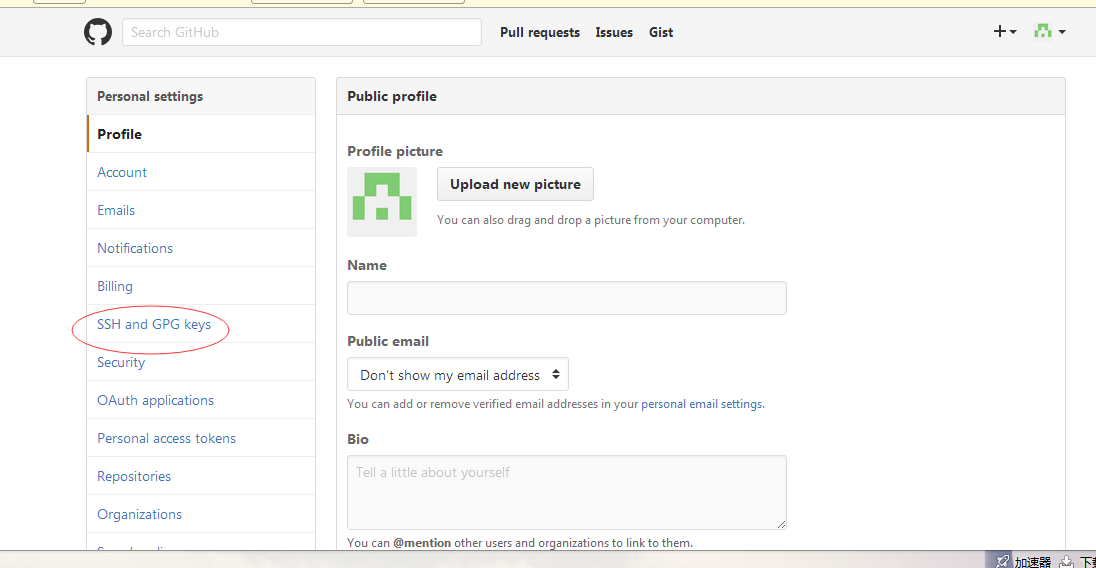
4、打开https://github.com/,登陆你的账户,进入设置
进入ssh设置

在key中将刚刚复制的粘贴进去
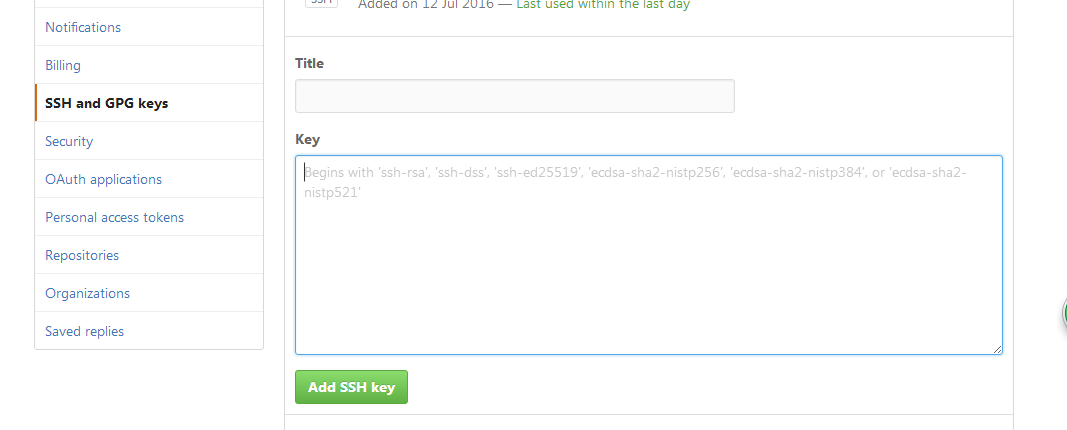
点击add ssh key,
ok!
5、在git中输入命令:
ssh -T git@github.com
然后会跳出一堆话。。
输入命令:yes
回车
然后就会提示你成功了~~
泪牛满面~~

最后退出git重新进入路径提交一下就可以了~~
转载----https://blog.csdn.net/jingtingfengguo/article/details/51892864
git遇到的问题之“Please make sure you have the correct access rights and the repository exists.”的更多相关文章
- windows 部署 git 服务器报 Please make sure you have the correct access rights and the repository exists.错误
这两天在阿里云上弄windows 服务器,顺便部署了一个git服务.根据网上教程一步步操作下来,最后在 remote远程仓库的时候提示 fatal: 'yourpath/test.git' does ...
- git pull 出错 fatal: Could not read from remote repository.Please make sure you have the correct access rights.and the repository exists.
Warning: Permanently added the RSA host key for IP address '192.30.252.131' to the list of known hos ...
- Git push提交时报错Permission denied(publickey)...Please make sure you have the correct access rights and the repository exists.
一.git push origin master 时出错 错误信息为: Permission denied(publickey). fatal: Could not read from remote ...
- 使用git时出现Please make sure you have the correct access rights and the repository exists.问题已解决。
使用git时,出现Please make sure you have the correct access rights and the repository exists.问题已解决. 今天我在使用 ...
- [Git]Please make sure you have the correct access rights and the repository exists
这个问题是这样,需要在已有github账号的A机器上,再创建一个github账号,新账号创建完毕,将代码通过机器A push上之后,再另一台机器B,clone 这个项目时报出了如下错误: Permis ...
- Git clone时出现Please make sure you have the correct access rights and the repository exists.问题已解决。
看了好多资料终于搞定了git 中clone命令报错这个问题,废话不多说直接上步骤希望对大家有帮助. 1 删除.ssh文件夹(直接搜索该文件夹)下的known_hosts(手动删除即可,不需要git ...
- 报错 Please make sure you have the correct access rights and the repository exists (git 添加ssh密钥 )
1.设置Git的user name和email $ git config --global user.name "wubaiwan" $ git config --global u ...
- Git提交时提示“Please make sure you have the correct access rights and the repository exists.”的解决方法
1.首先打开Git Bash设置名字和邮箱: git config --global user.name "你的名字" git config --global user.email ...
- Git出错:“Please make sure you have the correct access rights and the repository exists.”
此问题是需要重置ssh密钥 解决步骤如下: 1.重置用户名和邮箱: 打开Git Bash 进入Git命令,输入以下命令 git config --global user.name "你的用户 ...
随机推荐
- asp.net Checkbox 绑定自定义属性
var chkSelect = e.Row.FindControl("chkSelect") as CheckBox; chkSelect.InputAttributes.Add( ...
- 简单webpack plugin 开发
重要是学习下怎么开发webpack plugin,同时记录下 插件模型 webpack 是一个插件,可以是javascript class ,或者具名 class 定义apply 方法 指定一个绑定到 ...
- Pushpin How it works
转自:https://pushpin.org/docs/about/#how-it-works Introduction Pushpin is a reverse proxy server that ...
- nexus 私有 maven 仓库的搭建
下载地址 页面 : https://help.sonatype.com/repomanager3/download 首先需要安装jdk .安装棒法我 前面的文章有写.https://www.cnblo ...
- 在linux环境下,php语法出错,怎样让php编译后提示编译错误,错误在哪?
如果不具备修改php.ini的权限,可以如下:ini_set("display_errors", "On"); error_reporting(E_ALL | ...
- Jmeter性能监测及安装插件(推荐)
本文部分理论转自Jmeter官网:https://jmeter-plugins.org/wiki/PerfMon/ ,并结合个人实践编写 一.介绍 在负载测试期间,了解加载服务器的运行状况很重要.如 ...
- 利用ST MCU内部基准参考电压监测电源电压及其它
在使用ST MCU开发过程中,有人问如果电源电压是变动的,询问有无办法用比较简洁的办法对电源电压进行监测,或者说电源电压波动情况下能否检测出其它待测的AD输入电压. 这里跟大家分享交流一个方法.就是在 ...
- STM32的优先级的理解及其使用
1 组只代表主优先级和副优先级数量的配比,组之间没有优先级的概念. 2 不同的主优先级中断之间,高优先级中断可以打断正在执行的低优先级中断,即可以形成中断嵌套. 3 主优先级相同的中断,高副优先级中断 ...
- const引用返回值
一.引用 引用是别名 必须在定义引用时进行初始化.初始化是指明引用指向哪个对象的唯一方法. const 引用是指向 const 对象的引用: ; const int &refVal = iva ...
- php结合phantomjs实现网页截屏、抓取js渲染的页面
首先PhantomJS快速入门 PhantomJS是一个基于 WebKit 的服务器端 JavaScript API.它全面支持web而不需浏览器支持,其快速,原生支持各种Web标准: DOM 处理, ...