
Spring注解驱动开发(三)-----自动装配
自动装配
概念
Spring利用依赖注入(DI),完成对IOC容器中中各个组件的依赖关系赋值。
@Autowired-----自动注入
1、默认优先按照类型去容器中找对应的组件
applicationContext.getBean(BookDao.class);
找到就赋值
2、如果找到多个相同类型的组件,再将属性的名称作为组件的id去容器中查找
applicationContext.getBean("bookDao");
3、@Qualifier("bookDao")
使用@Qualifier指定需要装配的组件的id,而不是使用属性名。
4、自动装配默认一定要将属性赋值好,没有就会报错
可以使用@Autowired(required=false);
5、@Primary
让Spring进行自动装配的时候,默认使用首选的bean;也可以继续使用@Qualifier指定需要装配的bean的名字。
注入示例:
BookService{

    @Autowired

    BookDao bookDao;

}
@Resource & @Inject-----Spring支持使用@Resource(JSR250)和@Inject(JSR330)[java规范的注解]
@Resource
可以和@Autowired一样实现自动装配功能;默认是按照组件名称进行装配的;没有能支持@Primary功能没有支持@Autowired(reqiured=false);
@Inject
需要导入javax.inject的包,和Autowired的功能一样。没有required=false的功能;
注:@Autowired:Spring定义的; @Resource、@Inject都是java规范
package com.atguigu.service;

import javax.annotation.Resource;

import javax.inject.Inject;

import org.springframework.beans.factory.annotation.Autowired;

import org.springframework.beans.factory.annotation.Qualifier;

import org.springframework.stereotype.Service;

import com.atguigu.dao.BookDao;

@Service

public class BookService {

    //@Qualifier("bookDao")

    //@Autowired(required=false)

    //@Resource(name="bookDao2")

    @Inject

    private BookDao bookDao;

    public void print(){

        System.out.println(bookDao);

    }

    @Override

    public String toString() {

        return "BookService [bookDao=" + bookDao + "]";

    }

}
原理:AutowiredAnnotationBeanPostProcessor:解析完成自动装配功能;
方法、构造器位置的自动装配-----@Autowired
[标注在方法位置]-----@Bean+方法参数;参数从容器中获取;默认不写@Autowired效果是一样的;都能自动装配
package com.atguigu.bean;

import org.springframework.beans.factory.annotation.Autowired;

import org.springframework.stereotype.Component;

//默认加在ioc容器中的组件,容器启动会调用无参构造器创建对象,再进行初始化赋值等操作

@Component

public class Boss {

    private Car car;

 public Car getCar() {

        return car;

    }

    @Autowired

    //标注在方法,Spring容器创建当前对象,就会调用方法,完成赋值;

    //方法使用的参数,自定义类型的值从ioc容器中获取

    public void setCar(Car car) {

        this.car = car;

    }

    @Override

    public String toString() {

        return "Boss [car=" + car + "]";

    }

}

[标在构造器上]-----如果组件只有一个有参构造器,这个有参构造器的@Autowired可以省略,参数位置的组件还是可以自动从容器中获取
package com.atguigu.bean;

import org.springframework.beans.factory.annotation.Autowired;

import org.springframework.stereotype.Component;

//默认加在ioc容器中的组件,容器启动会调用无参构造器创建对象,再进行初始化赋值等操作

@Component

public class Boss {

    private Car car;

    //构造器要用的组件,都是从容器中获取

    @Autowired

    public Boss(Car car){

        this.car = car;

        System.out.println("Boss...有参构造器");

    }

    public Car getCar() {

        return car;

    }

    public void setCar(Car car) {

        this.car = car;

    }

    @Override

    public String toString() {

        return "Boss [car=" + car + "]";

    }

}
Aware注入spring底层组件以及原理
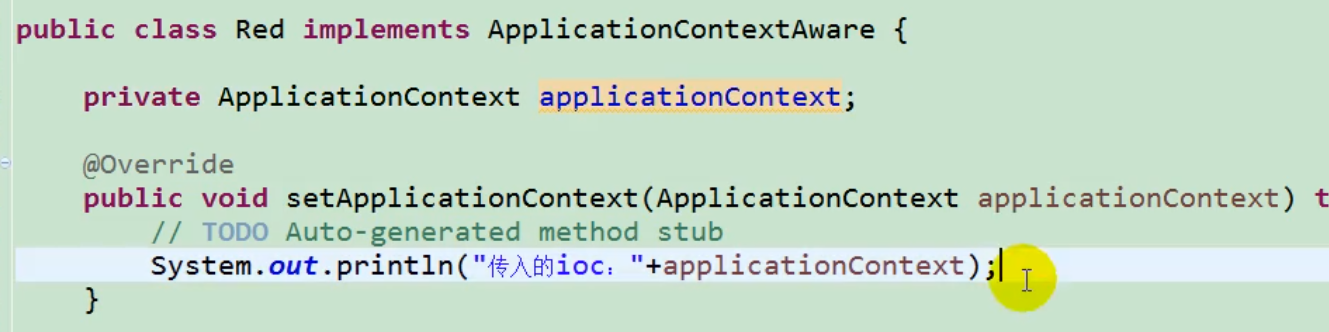
自定义组件想要使用Spring容器底层的一些组件(ApplicationContext,BeanFactory,xxx);自定义组件实现xxxAware;在创建对象的时候,会调用接口规定的方法注入相关组件;Aware;把Spring底层一些组件注入到自定义的Bean中;
规则:xxxAware:功能使用xxxProcessor
ApplicationContextAware==》ApplicationContextAwareProcessor;
Profile-----Spring为我们提供的可以根据当前环境,动态的激活和切换一系列组件的功能;
正常的企业级项目一般都会有开发环境、测试环境、生产环境;数据源:(/A)(/B)(/C);
@Profile:指定组件在哪个环境的情况下才能被注册到容器中,不指定,任何环境下都能注册这个组件
示例:不同环境使用不同数据源,不用更改代码-----数据源使用c3p0、mysql数据库
1、dbconfig.properties
db.user=root

db.password=123456

db.driverClass=com.mysql.jdbc.Driver
2、MainConfigOfProfile
package com.atguigu.config;

import javax.sql.DataSource;

import org.springframework.beans.factory.annotation.Value;

import org.springframework.context.EmbeddedValueResolverAware;

import org.springframework.context.annotation.Bean;

import org.springframework.context.annotation.Configuration;

import org.springframework.context.annotation.Profile;

import org.springframework.context.annotation.PropertySource;

import org.springframework.util.StringValueResolver;

import com.atguigu.bean.Yellow;

import com.mchange.v2.c3p0.ComboPooledDataSource;

/**

 * @Profile:指定组件在哪个环境的情况下才能被注册到容器中,不指定,任何环境下都能注册这个组件

 *

 * 1)、加了环境标识的bean,只有这个环境被激活的时候才能注册到容器中。默认是default环境

 * 2)、写在配置类上,只有是指定的环境的时候,整个配置类里面的所有配置才能开始生效

 * 3)、没有标注环境标识的bean在,任何环境下都是加载的;

 */

@PropertySource("classpath:/dbconfig.properties")

@Configuration

public class MainConfigOfProfile implements EmbeddedValueResolverAware{

    @Value("${db.user}")

    private String user;

    private StringValueResolver valueResolver;

    private String  driverClass;

    //这个bean没有环境标识,因此任何环境下都是加载的;如果设置了环境,那么只有在对应环境下才会被加载

    @Bean

    public Yellow yellow(){

        return new Yellow();

    }

    @Profile("test")

    @Bean("testDataSource")

    public DataSource dataSourceTest(@Value("${db.password}")String pwd) throws Exception{

        ComboPooledDataSource dataSource = new ComboPooledDataSource();

        dataSource.setUser(user);

        dataSource.setPassword(pwd);

        dataSource.setJdbcUrl("jdbc:mysql://localhost:3306/test");

        dataSource.setDriverClass(driverClass);

        return dataSource;

    }

    @Profile("dev")

    @Bean("devDataSource")

    public DataSource dataSourceDev(@Value("${db.password}")String pwd) throws Exception{

        ComboPooledDataSource dataSource = new ComboPooledDataSource();

        dataSource.setUser(user);

        dataSource.setPassword(pwd);

        dataSource.setJdbcUrl("jdbc:mysql://localhost:3306/ssm_crud");

        dataSource.setDriverClass(driverClass);

        return dataSource;

    }

    @Profile("prod")

    @Bean("prodDataSource")

    public DataSource dataSourceProd(@Value("${db.password}")String pwd) throws Exception{

        ComboPooledDataSource dataSource = new ComboPooledDataSource();

        dataSource.setUser(user);

        dataSource.setPassword(pwd);

        dataSource.setJdbcUrl("jdbc:mysql://localhost:3306/scw_0515");

        dataSource.setDriverClass(driverClass);

        return dataSource;

    }

    //这个是spring提供的值解析器,通过StringValueResolver可以直接从配置文件中解析${db.driverClass}

    @Override

    public void setEmbeddedValueResolver(StringValueResolver resolver) {

        this.valueResolver = resolver;

        driverClass = valueResolver.resolveStringValue("${db.driverClass}");

    }

}
3、测试类-----IOCTest_Profile
package com.atguigu.test;

import javax.sql.DataSource;

import org.junit.Test;

import org.springframework.context.annotation.AnnotationConfigApplicationContext;

import com.atguigu.bean.Boss;

import com.atguigu.bean.Car;

import com.atguigu.bean.Color;

import com.atguigu.bean.Red;

import com.atguigu.bean.Yellow;

import com.atguigu.config.MainConfigOfProfile;

import com.atguigu.config.MainConifgOfAutowired;

import com.atguigu.dao.BookDao;

import com.atguigu.service.BookService;

public class IOCTest_Profile {

    //1、使用命令行动态参数: 在虚拟机参数位置加载 -Dspring.profiles.active=test

    //2、代码的方式激活某种环境;

    @Test

    public void test01(){

        AnnotationConfigApplicationContext applicationContext = new AnnotationConfigApplicationContext();

        //1、创建一个applicationContext

        //2、设置需要激活的环境

        applicationContext.getEnvironment().setActiveProfiles("dev");

        //3、注册主配置类

        applicationContext.register(MainConfigOfProfile.class);

        //4、启动刷新容器

        applicationContext.refresh();

    }

}
注:
1、类上的@Profile大于方法中的@Profile;-----如果当前环境为"dev",而配置类上@Profile为test,那么相当于整个类作废。
2、如何更改运行环境?-----a、直接通过-D spring.profiles.active=dev b、通过applicaitonContext去设置
Spring注解驱动开发(三)-----自动装配的更多相关文章
- 【Spring注解驱动开发】如何实现方法、构造器位置的自动装配?我这样回答让面试官很满意!
在 冰河技术 微信公众号前面的文章中,我们介绍了如何使用注解来自动装配Spring组件.之前将的都是在来的字段上添加注解,那有没有什么方法可以实现方法.构造器位置的自动装配吗?今天我们就一起来探讨下如 ...
- 【spring 注解驱动开发】spring自动装配
尚学堂spring 注解驱动开发学习笔记之 - 自动装配 自动装配 1.自动装配-@Autowired&@Qualifier&@Primary 2.自动装配-@Resource& ...
- 【Spring注解驱动开发】你还不会使用@Resource和@Inject注解?那你就out了!!
写在前面 我在 冰河技术 微信公众号中发表的<[Spring注解驱动开发]使用@Autowired@Qualifier@Primary三大注解自动装配组件,你会了吗?>一文中,介绍了如何使 ...
- 【spring 注解驱动开发】Spring AOP原理
尚学堂spring 注解驱动开发学习笔记之 - AOP原理 AOP原理: 1.AOP原理-AOP功能实现 2.AOP原理-@EnableAspectJAutoProxy 3.AOP原理-Annotat ...
- 0、Spring 注解驱动开发
0.Spring注解驱动开发 0.1 简介 <Spring注解驱动开发>是一套帮助我们深入了解Spring原理机制的教程: 现今SpringBoot.SpringCloud技术非常火热,作 ...
- 【Spring注解驱动开发】组件注册-@ComponentScan-自动扫描组件&指定扫描规则
写在前面 在实际项目中,我们更多的是使用Spring的包扫描功能对项目中的包进行扫描,凡是在指定的包或子包中的类上标注了@Repository.@Service.@Controller.@Compon ...
- 【spring 注解驱动开发】spring ioc 原理
尚学堂spring 注解驱动开发学习笔记之 - Spring容器创建 Spring容器创建 1.Spring容器创建-BeanFactory预准备 2.Spring容器创建-执行BeanFactory ...
- 【Spring注解驱动开发】聊聊Spring注解驱动开发那些事儿!
写在前面 今天,面了一个工作5年的小伙伴,面试结果不理想啊!也不是我说,工作5年了,问多线程的知识:就只知道继承Thread类和实现Runnable接口!问Java集合,竟然说HashMap是线程安全 ...
- 【Spring注解驱动开发】使用@Scope注解设置组件的作用域
写在前面 Spring容器中的组件默认是单例的,在Spring启动时就会实例化并初始化这些对象,将其放到Spring容器中,之后,每次获取对象时,直接从Spring容器中获取,而不再创建对象.如果每次 ...
随机推荐
- (转)SQL盲注攻击的简单介绍
转:http://hi.baidu.com/duwang1104/item/65a6603056aee780c3cf2968 1 简介 1.1 普通SQL注入技术概述 目前没有对SQL ...
- 使用Navicat连接管理远程linux服务器上的mysql数据库
第一步:选择连接,选择mysql 第二步:填写下面弹出框的信息:连接名随便写,主机名或IP地址:写上服务器的ip. 端口不变 用户名不变. 密码:输入服务器数据库的密码12345678. 接着测 ...
- P1305 新二叉树 /// 二叉树的先序遍历
题目大意: https://www.luogu.org/problemnew/show/P1305 由题目可知,输入首位为 子树的根 其后为其左右儿子 则除各行首位后的位置中 没有出现的那个字母肯定为 ...
- hadoop 环境下不知道yarn端口可以通过此命令查找
yarn jar hadoop-examples-2.6.0-mr1-cdh5.10.0.jar pi 1 30 hadoop-examples-2.6.0-mr1-cdh5.10.0.jar 此JA ...
- SpringCloud学习笔记《---01 概念 ---》篇
- MYSQL随笔心得1
cmd链接数据库命令: 输入密码进入 显示全部的数据库: 退出服务器连接,还有/p quit 非关系型数据库:NOSQL,not only sql 不仅仅是SQL 代表:redis,mongodb
- Python全栈开发:基本数据类型
1.数字 int(整型) 在32位机器上,整数的位数为32位,取值范围为-2**31-2**31-1,即-2147483648-2147483647 在64位系统上,整数的位数为64位,取值范围为-2 ...
- WPF 免费控件库(2)
最近在逛园子的时候发现的园友分享或提及的WPF控件库~ (1) Bootstrap WPF Style,Bootstrap风格的WPF样式 转:http://www.cnblogs.com/tsliw ...
- LoadRunner脚本编写(6)— 数据类型转换和字符串操作
LoadRunner脚本编写(6)— 数据类型转换和字符串操作 一,数据类型转换 没有使用过C编程的LoadRunner脚本编写者会发现在数据类型转化方面比较困难.下面介绍这方面的知识. 1. 相似函 ...
- 2016.8.18上午纪中初中部NOIP普及组比赛
2016.8.18上午纪中初中部NOIP普及组比赛 链接:https://jzoj.net/junior/#contest/home/1336 翻!车!啦!好吧,那是因为大神归来. 进度: 比赛:AC ...