
iOS 实现加载转圈效果
1、思路:
新建一个view,添加shape,给予一个动画实现。
2、效果图:
效果1:
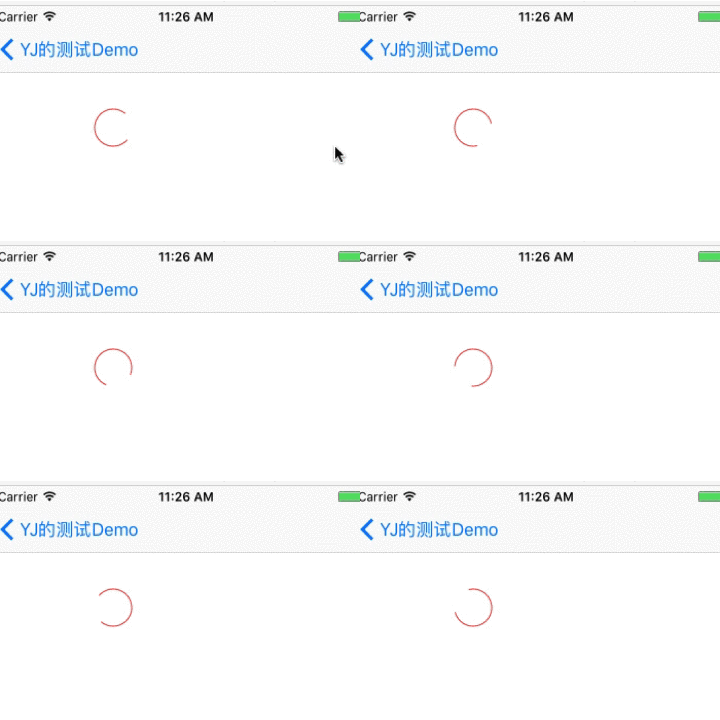
效果2:

gif有点卡,代码运行不会这样。
3、源码(整个类放进来的)
效果1源码:
//

//  YJDownloadingCircle.swift

//  k12_sl_iOS

//

//  Created by liyajun on 2017/7/13.

//

//

import UIKit

class YJDownloadingCircle: UIView {

    var loadingLayer:CAShapeLayer! = nil

    override init(frame: CGRect) {

        super.init(frame: frame)

        initViews()

    }

    required init?(coder aDecoder: NSCoder) {

        super.init(coder: aDecoder)

        initViews()

    }

    override func awakeFromNib() {

        initViews()

    }

    func initViews() {

        backgroundColor = UIColor.white

    }

    func drawHalfCircle() {

        loadingLayer = self.drawCircle()

        loadingLayer.strokeStart = 0.0

        loadingLayer.strokeEnd = 0.75

        let basicAni = CABasicAnimation(keyPath: "transform.rotation.z")

        basicAni.fromValue = 0.0

        basicAni.toValue = M_PI*

        basicAni.duration = 0.5

        basicAni.repeatCount = MAXFLOAT

        basicAni.autoreverses = false

        basicAni.fillMode = kCAFillModeForwards

        self.layer.add(basicAni, forKey: nil)

    }

    private func drawCircle() -> CAShapeLayer {

        let circleLayer = CAShapeLayer()

        let rect = CGRect(x: , y: , width: self.frame.size.width, height: self.frame.size.height)

        circleLayer.frame = rect

        circleLayer.position = CGPoint(x: self.frame.size.width/, y: self.frame.size.height/)

        circleLayer.fillColor = UIColor.clear.cgColor

        circleLayer.lineWidth =

        circleLayer.strokeColor = UIColor.colorWithHex(hex: "FF3B30").cgColor

        let bezier = UIBezierPath(ovalIn: rect)

        circleLayer.path = bezier.cgPath

        self.layer.addSublayer(circleLayer)

        return circleLayer

    }

}
使用方法
 //定义属性

 var circle:YJDownloadingCircle! = nil
   override func viewDidLoad() {

        super.viewDidLoad()

        view.backgroundColor = UIColor.white

        circle = YJDownloadingCircle(frame: CGRect(x: 100, y: 100, width: 36, height: 36))

        circle.drawHalfCircle()

        self.view.addSubview(circle)

     }
效果2源码:
//

//  LoginLoadingView.swift

//  k12_sl_iOS

//

//  Created by liyajun on 2018/5/30.

//

import UIKit

class LoginLoadingView: UIView {

    var bgShape:CAShapeLayer! = nil

    var runShape:CAShapeLayer! = nil

    var lblShape:CAShapeLayer! = nil

    let startAngle:CGFloat = ;

    let endAngle:CGFloat = CGFloat(0.67 * M_PI);

    let lineWidth:CGFloat = ;

    override init(frame: CGRect) {

        super.init(frame: frame)

        setup()

    }

    required init?(coder aDecoder: NSCoder) {

        super.init(coder: aDecoder)

        setup()

    }

    func setup() {

        bgShape = CAShapeLayer()

        let bgPath = CGMutablePath()

        bgPath.addEllipse(in: CGRect(x: , y: , width: self.width, height: self.height))

        bgShape.fillColor = UIColor.clear.cgColor

        bgShape.strokeColor = UIColor.colorWithHex("4CD964").withAlphaComponent(0.5).cgColor

        bgShape.lineWidth = lineWidth

        bgShape.lineJoin = kCALineJoinRound

        bgShape.lineDashPattern = [NSNumber(value: ),NSNumber(value:)]

        bgShape.path = bgPath

        self.layer.addSublayer(bgShape)

        runShape = CAShapeLayer()

        let runPath = UIBezierPath(arcCenter: CGPoint(x: , y: ), radius: self.width/, startAngle: startAngle, endAngle: endAngle, clockwise: false)

        runShape.fillColor = UIColor.clear.cgColor

        runShape.strokeColor = UIColor.colorWithHex("4CD964").cgColor

        runShape.lineWidth = lineWidth

        runShape.lineJoin = kCALineJoinRound

        runShape.path = runPath.cgPath

        runShape.position = CGPoint(x: self.width/, y: self.width/)

        self.layer.addSublayer(runShape)

        let anima = CABasicAnimation(keyPath: "transform.rotation.z")

        anima.fromValue =

        anima.toValue = M_PI*

        anima.repeatCount = MAXFLOAT

        anima.duration = 2.0

        anima.isRemovedOnCompletion = false

        runShape.add(anima, forKey: "rotationAnnimation")

        lblShape = CAShapeLayer()

        let gouPath = UIBezierPath()

        gouPath.move(to: CGPoint(x: self.width/-, y: self.width/-))

        gouPath.addLine(to: CGPoint(x: self.width/, y: self.width/+))

        gouPath.addLine(to: CGPoint(x: self.width/+, y: self.width/-))

        lblShape.fillColor = UIColor.clear.cgColor

        lblShape.strokeColor = UIColor.colorWithHex("4CD964").cgColor

        lblShape.lineWidth = lineWidth

        lblShape.lineJoin = kCALineJoinRound

        lblShape.path = gouPath.cgPath

        self.layer.addSublayer(lblShape)

    }

}
使用时,直接init出来就是了
以上的效果都是只有一个类文件(UIView),使用时直接拷贝即可。
其中,关于转圈的前景色、背景色等参数,我没抽出来,大家如果有这需求,可以改一下。
代码是Swift实现加载转圈效果。
如果是OC,参考代码思路即可。
enjoy~
iOS 实现加载转圈效果的更多相关文章
- ios 自定义加载动画效果
在开发过程中,可能会遇到各种不同的场景需要等待加载成功后才能显示数据.以下是自定义的一个动画加载view效果. 在UIViewController的中加载等到效果,如下 - (void)vi ...
- iOS - 落叶加载动画效果
代码下载地址:https://github.com/nLoser/LeafLoadingView 效果: 说明:效果是在网上看到的,并且自己按照效果自己实现,树叶使用CAEmitterLayer做的, ...
- iOS网络加载图片缓存策略之ASIDownloadCache缓存优化
iOS网络加载图片缓存策略之ASIDownloadCache缓存优化 在我们实际工程中,很多情况需要从网络上加载图片,然后将图片在imageview中显示出来,但每次都要从网络上请求,会严重影响用 ...
- 使用Bootstrap3和Ladda UI实现的多种按钮“加载中”效果体验
在线演示 在线演示 大家在开发基于web的网站或者web应用中,常常在AJAX调用的过程中需要提示用户并且展示相关的“加载中”效果,类似的UI设计也非常多,比如,当点击一个按钮后,在它的旁边显示一个 ...
- iOS图片加载到内存中占用内存情况
我的测试结果: 图片占用内存 图片尺寸 .png文件大小 1MB 512*512 316KB 4MB 10 ...
- jQuery8种不同的瀑布流懒加载loading效果
优化图片加载插件jQuery8种不同的瀑布流懒加载loading效果 在线预览 下载地址 实例代码 <ul class="grid effect-1" id="g ...
- 一个很酷的加载loading效果--IT蓝豹
一个很酷的加载loading效果,自定义LeafLoadingView实现,LeafLoadingView继承view, 本例子主要由以下几点构成 (1):RotateAnimation实现叶子旋转 ...
- Ladda – 把加载提示效果集成到按钮中,提升用户体验
Ladda 是一组集成了加载提示的按钮,以弥合行动和反馈之间的时间间隔,提供更好的功能使用体验.主要用于在用户点击提交之后,向用户提供即时的反馈,让他们知道浏览器正在处用户提交的任务. 您可能感兴趣的 ...
- iOS - (懒加载)
今天很坑爹,做界面的时候,tableview 明显做了复用了,数组也做了懒加载了,获取数据前也把数组给清空了,但是每次获取数据刷新表格的时候,数据确重复覆盖了(重复创建),后来给 cell 加了个白色 ...
随机推荐
- winform中RichTextBox在指定光标位置插入图片
代码如下: //获取RichTextBox控件中鼠标焦点的索引位置 int startPosition = this.richTextBox1.SelectionStart; //从鼠标焦点处开始选中 ...
- vue-自定义组件传值
项目中,我们经常会遇到自定义组件传值的问题,方法很多种,但是原理很简单,下述文档总结实际项目中使用的传值方式. 父组件传递给子组件某一值,子组件内会修改该值,然后父组件需要获取新值 在 Vue 中 ...
- iview,用render函数渲染
<Table border :columns="discountColumns" :data="discountData.rows"></Ta ...
- C# 键值对数据排序
对于键值对的数据进行排序方法总结. /*使用排序字典,默认只支持升序 SortedDictionary<DateTime, String> dd = new SortedDictionar ...
- 上机题目(0基础)- Java网络操作-打印网页(Java)
打印一个网页,熟悉Java网络编程: import java.io.BufferedReader; import java.io.IOException; import java.io.InputSt ...
- jQuery 图片裁剪插件 Jcrop
Jcrop是一个jQuery图片裁剪插件,它能为你的WEB应用程序快速简单地提供图片裁剪的功能.特点如下: 对所有图片均unobtrusively(无侵入的,保持DOM简洁) 支持宽高比例锁定 支持 ...
- Android 高级 Jackson Marshalling(serialize)/Unmarshalling(deserialize)
本文内容 高级 Jackson Marshalling 只序列化符合自定义标准的字段 把 Enums 序列化成 JSON 对象 JsonMappingException(没有找到类的序列化器) Jac ...
- eclipse,myeclipse综合
1.Myeclipse点击发布无反应 进入workspace目录,删除.metadata\.plugins\org.eclipse.core.runtime\.settings\com.genuite ...
- Swift语言精要 - 属性
1. Stored Property eg: var number: Int = 0 2. Computed Property eg: var area : Double { get { return ...
- VB 求余求整
可以直接用函数来实现: 1.用CInt()函数的范围在-32,768 至 32,767,对于小数部分四舍五入 . 2.用Int()函数和Fix()函数都会删除参数的小数部份而返回剩下的整数, 不同之处 ...