
jQuery(八):属性操作
一、获取或设置元素的属性值
attr()获取或设置匹配元素的属性值,语法如下:
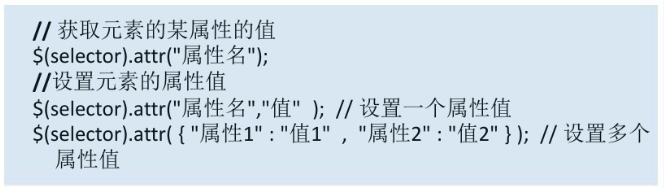
获取元素属性值示例:
<!DOCTYPE html>

<html lang="en">

<head>

    <meta charset="UTF-8">

    <meta name="viewport" content="width=device-width, initial-scale=1.0">

    <meta http-equiv="X-UA-Compatible" content="ie=edge">

    <title>属性操作</title>

    <style>

      *{

          margin: 0px;

          padding: 0px;

      }

      td{

          width: 100px;

          border: 1px solid #cccccc;

          cursor: pointer;

      }

    </style>

    <!--引入jQuery-->

    <script src="../jquery-3.3.1.js"></script>

    <!--javascript-->

    <script>

       $(function(){

           $("img").click(function(){

              // 获取属性的值

              alert($("img").attr("src")) ;

           });

       });

    </script>

</head>

<body>

    <img src="../qq.jpg" />

</body>

</html>
效果:

设置单个元素属性值示例:
<!DOCTYPE html>

<html lang="en">

<head>

    <meta charset="UTF-8">

    <meta name="viewport" content="width=device-width, initial-scale=1.0">

    <meta http-equiv="X-UA-Compatible" content="ie=edge">

    <title>属性操作</title>

    <style>

      *{

          margin: 0px;

          padding: 0px;

      }

      td{

          width: 100px;

          border: 1px solid #cccccc;

          cursor: pointer;

      }

    </style>

    <!--引入jQuery-->

    <script src="../jquery-3.3.1.js"></script>

    <!--javascript-->

    <script>

       $(function(){

           $("img").click(function(){

              // 获取属性的值

              //alert($("img").attr("src")) ;

              // 添加单个属性

              $("img").attr("alt","QQ斗地主");

              alert($("img").attr("alt")) ;

           });

       });

    </script>

</head>

<body>

    <img src="../qq.jpg" />

</body>

</html>
效果:

添加多个属性值示例:
<!DOCTYPE html>

<html lang="en">

<head>

    <meta charset="UTF-8">

    <meta name="viewport" content="width=device-width, initial-scale=1.0">

    <meta http-equiv="X-UA-Compatible" content="ie=edge">

    <title>属性操作</title>

    <style>

      *{

          margin: 0px;

          padding: 0px;

      }

      td{

          width: 100px;

          border: 1px solid #cccccc;

          cursor: pointer;

      }

    </style>

    <!--引入jQuery-->

    <script src="../jquery-3.3.1.js"></script>

    <!--javascript-->

    <script>

       $(function(){

           $("img").click(function(){

              // 获取属性的值

              //alert($("img").attr("src")) ;

              // 添加单个属性

              //$("img").attr("alt","QQ斗地主");

              //alert($("img").attr("alt")) ;

              // 添加多个属性

              $("img").attr({"alt":"QQ斗地主","title":"斗地主"});

              console.log($(this).attr("alt"));

              console.log($(this).attr("title"));

           });

       });

    </script>

</head>

<body>

    <img src="../qq.jpg" />

</body>

</html>
效果:

二、删除属性值
removeAttr()匹配的元素中删除一个属性,语法如下:

示例:
<!DOCTYPE html>

<html lang="en">

<head>

    <meta charset="UTF-8">

    <meta name="viewport" content="width=device-width, initial-scale=1.0">

    <meta http-equiv="X-UA-Compatible" content="ie=edge">

    <title>属性操作</title>

    <style>

      *{

          margin: 0px;

          padding: 0px;

      }

      td{

          width: 100px;

          border: 1px solid #cccccc;

          cursor: pointer;

      }

    </style>

    <!--引入jQuery-->

    <script src="../jquery-3.3.1.js"></script>

    <!--javascript-->

    <script>

       $(function(){

           $("img").click(function(){

              // 获取属性的值

              //alert($("img").attr("src")) ;

              // 添加单个属性

              //$("img").attr("alt","QQ斗地主");

              //alert($("img").attr("alt")) ;

              // 添加多个属性

              //$("img").attr({"alt":"QQ斗地主","title":"斗地主"});

              //console.log($(this).attr("alt"));

              //console.log($(this).attr("title"));

              // 删除属性

              $(this).removeAttr("src");

           });

       });

    </script>

</head>

<body>

    <img src="../qq.jpg" />

</body>

</html>
效果:

jQuery(八):属性操作的更多相关文章
- jquery之属性操作
jQuery之属性操作 相信属性这个词对大家都不陌生.今天我就给大家简单地介绍一下JQuery一些属性的操作 属性一共分三大类 一.基本属性 1.attr 2.removeAttr 3.prop 4. ...
- 前端 ----jQuery的属性操作
04-jQuery的属性操作 jquery的属性操作模块分为四个部分:html属性操作,dom属性操作,类样式操作和值操作 html属性操作:是对html文档中的属性进行读取,设置和移除操作.比如 ...
- python 全栈开发,Day54(jQuery的属性操作,使用jQuery操作input的value值,jQuery的文档操作)
昨日内容回顾 jQuery 宗旨:write less do more 就是js的库,它是javascript的基础上封装的一个框架 在前端中,一个js文件就是一个模块 一.用法: 1.引入包 2.入 ...
- jQuery二——属性操作、文档操作、位置属性
一.jquery的属性操作 jquery对象有它自己的属性和方法. 其中jquery的属性操作模块分为四个部分:html属性操作,dom属性操作,类样式操作和值操作. 1.html属性操作 是对htm ...
- jQuery系列(四):jQuery的属性操作
jquery的属性操作模块分为四个部分:html属性操作,dom属性操作,类样式操作和值操作 html属性操作:是对html文档中的属性进行读取,设置和移除操作.比如attr().removeAttr ...
- JQuery常用属性操作,动画,事件绑定
jQuery 的属性操作 html() 它可以设置和获取起始标签和结束标签中的内容. 跟 dom 属性 innerHTML 一样. text() 它可以设置和获取起始标签和 ...
- jquery学习--属性操作
学习jquery很长一段时间了,知道对属性操作的方式为: $("#xx1").attr("xx2"); //获取属性值 $("#xx1"). ...
- jQuery的属性操作
下面介绍jQuery属性操作: .val() 这是一个读写双用的方法,用来处理input的value,当方法没有参数的时候返回input的value值,当传递了一个参数的时候,方法修改input的va ...
- 前端jQuery之属性操作
属性操作主要分为四个部分:html属性操作,dom属性操作,类样式操作和值操作 HTML属性操作:属性的读取,设置,以及移除,如attr().removeAttr() DOM属性操作:属性的读取,设置 ...
- 19 01 16 jquery 的 属性操作 循环 jquery 事件 和事件的绑定 解绑
jquery属性操作 1.html() 取出或设置html内容 // 取出html内容 var $htm = $('#div1').html(); // 设置html内容 $('#div1').htm ...
随机推荐
- C#基础课程之四集合(ArrayList、List<泛型>)
list泛型的使用 ArrayList list = new ArrayList(); ArrayList list = ); //可变数组 list.Add("我"); //Ad ...
- go包管理工具glide
一.命令 安装 $ go get github.com/Masterminds/glide $ go install github.com/Masterminds/glide 初始化项目并在当前项目下 ...
- django -- 为model 指定数据库名
一.为model指定数据库名: django自己实现的ORM中.如果要指定一个model的表名是通过Meta类来实现的. from django.db import models # Create y ...
- 7 款顶级的开源 Web 分析软件
Web 分析无非就是 Web 流量的测量.但它并不限于测量网络流量,还包括: 分析 数据采集 为了了解和优化网页而上报网络数据 Google Analytics是最广泛使用的基于云的网络分析服务.不过 ...
- android AlertDialog设置点击button不退出(转)
转载于http://blog.csdn.net/csh159/article/details/8127280 使用的是java里面的反射机制: dialog = new AlertDialog.Bui ...
- [svc]linux文件权限
linux中,每个文件拥有三种权限 f dir权限位最佳实战 权限 对文件的影响 对文件夹的影响 r 可读取/阅读文件的内容 可以列出目录内容,无法cd,ls -l看到文件名,属性是乱码. w 可修改 ...
- vue全面介绍
Vue.js 是一个JavaScriptMVVM库,是一套构建用户界面的渐进式框架.它是以数据驱动和组件化的思想构建的,采用自底向上增量开发的设计.相比于Angular.js,Vue.js提供了更加简 ...
- 通过show variables like ‘general_log%’可以看查询日志
mysql> show variables like 'general_log%'; +------------------+-----------------------------+ | V ...
- tcp拥堵算法
http://m.blog.csdn.net/article/details?id=6739189
- 【Spring】Spring Session的简单搭建与源码阅读
搭建一个简单的Spring Session例子 引入依赖包 <dependencies> <dependency> <groupId>org.springframe ...