
springboot之登录注册
springboot之登录注册
目录结构
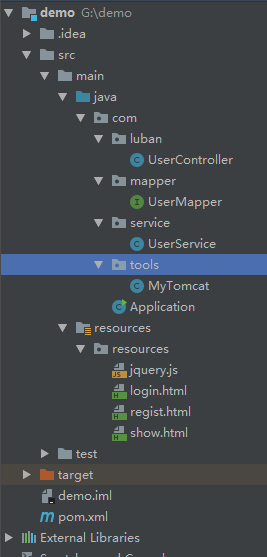
pom.xml
<?xml version="1.0" encoding="UTF-8"?>

<project xmlns="http://maven.apache.org/POM/4.0.0"

         xmlns:xsi="http://www.w3.org/2001/XMLSchema-instance"

         xsi:schemaLocation="http://maven.apache.org/POM/4.0.0 http://maven.apache.org/xsd/maven-4.0.0.xsd">

    <modelVersion>4.0.0</modelVersion>

    <groupId>lubanDemo</groupId>

    <artifactId>demo</artifactId>

    <version>1.0-SNAPSHOT</version>

    <dependencies>

        <dependency>

            <groupId>org.springframework</groupId>

            <artifactId>spring-context</artifactId>

            <version>5.1.5.RELEASE</version>

            <scope>compile</scope>

        </dependency>

        <dependency>

            <groupId>org.springframework</groupId>

            <artifactId>spring-web</artifactId>

            <version>5.1.5.RELEASE</version>

            <scope>compile</scope>

        </dependency>

        <dependency>

            <groupId>org.springframework.boot</groupId>

            <artifactId>spring-boot-starter-web</artifactId>

            <version>2.1.3.RELEASE</version>

        </dependency>

        <!-- https://mvnrepository.com/artifact/org.mybatis.spring.boot/mybatis-spring-boot-starter -->

        <dependency>

            <groupId>org.mybatis.spring.boot</groupId>

            <artifactId>mybatis-spring-boot-starter</artifactId>

            <version>2.0.0</version>

        </dependency>

        <dependency>

            <groupId>mysql</groupId>

            <artifactId>mysql-connector-java</artifactId>

            <version>8.0.15</version>

        </dependency>

    </dependencies>

</project>
Aplication
package com;

import org.springframework.boot.SpringApplication;

import org.springframework.boot.autoconfigure.SpringBootApplication;

import org.springframework.context.annotation.Bean;

import org.springframework.jdbc.datasource.DriverManagerDataSource;

import javax.sql.DataSource;

@SpringBootApplication

public class Application {

    public static void main(String[] args) {

        SpringApplication.run(Application.class,args);

    }

    //数据库连接

    @Bean

    public DataSource dataSource() {

        DriverManagerDataSource driverManagerDataSource = new DriverManagerDataSource();

        driverManagerDataSource.setUsername("root");

        driverManagerDataSource.setPassword("root");

        driverManagerDataSource.setUrl("jdbc:mysql://localhost:3306/demo?useUnicode=true&characterEncoding=utf8&serverTimezone=Asia/Shanghai");

        driverManagerDataSource.setDriverClassName("com.mysql.jdbc.Driver");

        return driverManagerDataSource;

    }

}
MyTomcat
//内嵌Tomcat

@Component

public class MyTomcat implements WebServerFactoryCustomizer<TomcatServletWebServerFactory> {

    public void customize(TomcatServletWebServerFactory factory) {

        factory.setPort(9001);

    }

}
UserController
@Controller

public class UserController {

    @Autowired

    UserService userService;

    @RequestMapping("/login")

    public String login(){

        return "login.html";

    }

    @RequestMapping("/loginsuc")

    @ResponseBody

    public String loginsuc(String name,String password){

        System.out.println(name);

        System.out.println(userService.query(name, password));

        System.out.println("login controller");

        Map<String,String> map = new HashMap<String, String>();

        map.put("success","success");

        return "success";

    }

    @RequestMapping("/regist")

    public String regist(){

        return "regist.html";

    }

    @RequestMapping("/registsuc")

    @ResponseBody

    public String registsuc(String name,String password){

        System.out.println(name);

        System.out.println(userService.add(name, password));

        System.out.println("login controller");

        Map<String,String> map = new HashMap<String, String>();

        map.put("success","success");

        return "success";

    }
UserMapper
@Mapper

public interface UserMapper {

    //写一下你的sql

    @Select("select * from user where user_name=#{uname} and pass_word=#{password}")

    public List<Map<String,Object>> query(@Param("uname") String uname, @Param("password") String password);

    @Select("insert into user(user_name,pass_word) values (#{uname},#{password})")

    public List<Map<String,Object>> add(@Param("uname") String uname, @Param("password") String password);

}
UserService
@Component

public class UserService {

    @Autowired

    UserMapper userMapper;

    public List<Map<String,Object>> query(String uname, String password){

        return  userMapper.query(uname,password);

    }

    public List<Map<String,Object>> add(String uname, String password){

        return  userMapper.add(uname,password);

    }

}
login
<!DOCTYPE html>

<html lang="en">

<head>

        <meta charset="UTF-8">

        <title>Title</title>

</head>

<script src="jquery.js"></script>

<script>

    function login() {

        $.ajax({

            url: '/loginsuc',

            type: 'get',

            dataType: 'text',

            data: {"name": $('#name').val(), "password": $('#password').val()},

            success: function (d) {

                            console.log(d)

               if (d === "success") {

                    window.location.href = 'show.html';

                } else {

                    window.location.href = 'error.html';

               }

            }

        })

    }

</script>

<body>

     <p> 请输入用户名和密码</p>

     <form>

             <table>

                 <tr>

                     <td>用户名</td>

                     <td><input type="text" id="name" ></td>

                 </tr>

                 <tr>

                     <td>密 码</td>

                     <td><input type="password" id="password" ></td>

                 </tr>

                 <tr>

                     <td colspan="2">

                         <input type="button" onclick="login()" value="登陆">

                    </td>

                 </tr>

             </table>

         </form>

</body>

</html>
springboot之登录注册的更多相关文章
- springboot+mybatis登录注册
接上上一篇博客的继续往下做,上一篇已经实现了mybatis自动生成代码,和连接数据库测试部分 本篇我们添加一些功能,实现登录注册,时间原因,前端实现的很粗糙,以后有时间再改吧 首先看一下数据库的构成, ...
- 使用SpringBoot实现登录注册的几个问题
一.用户名密码都正确的情况下被登录拦截器拦截 控制台报错:org.apache.ibatis.executor.ExecutorException: A query was run and no Re ...
- SpringBoot 拦截器--只允许进入登录注册页面,没登录不允许查看其它页面
SpringBoot注册登录(一):User表的设计点击打开链接 SpringBoot注册登录(二):注册---验证码kaptcha的实现点击打开链接 SpringBoot注册登录(三):注册--验证 ...
- spring boot1.1 idea + springboot + mybatis(mybatis-generator) +mysql +html实现简单的登录注册
前言 这两年springboot比较火,而我平时的工作中不怎么使用spring boot,所以工作之余就自己写写项目练练手,也跟大家一起学习. 打算从最开始的搭架子,登录注册,到后台管理的增删改查,业 ...
- web全栈开发之网站开发二(弹出式登录注册框前端实现-类腾讯)
这次给大家分享的是目前很多网站中流行的弹出式登录框,如下面的腾讯网登录界面,采用弹出式登录的好处是大大提升了网站的用户体验和交互性,用户不用重新跳转到指定的页面就能登录,非常方便 先来个演示地址 要实 ...
- android安卓Sqlite数据库实现用户登录注册
看了很多别人写的安卓SQlite数据的操作代码,一点也不通俗易懂,我觉得我写的不错,而且安卓项目也用上了,所以在博客园里保存分享一下!建立一个类 并继承SQLiteOpenHelper public ...
- JQuery+Ajax+Struts2+Hibernate 实现完整的登录注册
写在最前: 下午有招聘会,不想去,总觉得没有准备好,而且都是一些不对口的公司,可是又静不下心来,就来写个博客. 最近在仿造一个书城的网站:http://www.yousuu.com ,UI直接拿来用, ...
- HTML登录注册界面怎么制作?
在没有学习CSS样式的前提下,是如何做一个简单的注册界面的. 一.表单标签(form) 首先我们先写一个<form></form>的标签,form标签属于表单标签,通常我们的登 ...
- php+ajax 登录注册页面
主要是登录注册功能,前端后台验证没有什么,这个大家可以自己加上去,比如过滤啊,正则啊等 还是先放图吧 这是登录及注册界面 点击注册切换到注册界面,点击登录切换到登录界面 <!DOCTYPE h ...
随机推荐
- ansible copy file
ansible xxxip -m copy -a 'src=/localdir/file dest=/sss/xxx/basic_search/bin/'
- 使用docusaurus 搭建开发&&api && 博客站点
对于日常的开发系统以及产品一个简单,方便的api&&文档网站可以七很大的作用 docusaurus 是facebook开源的文档管理框架,使用它我们可以快速的创建专业. 完备的文档站点 ...
- log4net保存到数据库系列二:独立配置文件中配置log4net
园子里面有很多关于log4net保存到数据库的帖子,但是要动手操作还是比较不易,从头开始学习log4net数据库日志一.WebConfig中配置log4net 一.WebConfig中配置log4ne ...
- bat删除系统默认共享
在我们的系统中,有很多默认的共享是开启的,可以设置一个bat文件在每次开机的时候把共享删除. net share c$ /del net share d$ /del net share e$ /del ...
- tomcat源码阅读之StandardHost和StandardEngine
StandardHost及UML类图: 1.StandardHost类是Host接口的默认实现:其继承自ContainerBase类,说明他也是一个容器类,既然是容器类,那肯定也有管道对象PipeLi ...
- jwt 的使用
jwt 是什么 ? json web token 的 简称,是一种无状态的 认证机制 原理:客户端 向服务器端请求一个 jwt 生成的 token ,这个token 带有 一些信息,下次 客户端 ...
- LINQ TO SQL 中的join(转帖)
http://www.cnblogs.com/ASPNET2008/archive/2008/12/21/1358152.html join对于喜欢写SQL的朋友来说还是比较实用,也比较容易接受的东西 ...
- 【appium】根据UIAutomator定位元素
text属性的方法 driver.find_element_by_android_uiautomator('new UiSelector().text("Custom View") ...
- 【Active入门-2】ActiveMQ学习-生产者与消费者
1个生产者,1个消费者,使用Queue: 方式1: 生产者将消息发送到Queue中,退出: 然后运行消费者: . 可以看到,可以接收到消息. 方式2: 先运行消费者程序: 然后运行生产者: 消费者见下 ...
- windows git 清除已保存的密码
进入git目录 右键 git-bash.exe 执行命令: git config --system --unset credential.helper 然后执行git clone http://... ...