
关于clearfix和clear的讨论
本文摘自百度文库
还是提到了一个关于网页制作很古老的问题,浮动的清除。
虽然看过一些资料介绍说能不用浮动就尽量不要用,但对定位不是很熟的我来说,浮动就不能不用了;既然惹上这个麻烦,就得想个办法进行解决。
在论坛里搜索,可以看到有很多这方面的介绍,看过一些总结有一下几种方法:
1、额外增加一个容器,添加清除(clear)的标签以撑大其父容器;
2、使用:after的伪类标签;
3、在父容器设置overflow属性(其值不可为visible);
4、将父容器也设置浮动的属性,利用浮动元素的一个特征:浮动元素会闭合浮动元素;
5、使用<br clear="all" />;
...
以上大概就是几种常见的方法,我不去深究各自方法的优缺点和兼容性(有兴趣的朋友可以都试试),我只拿出其中两种方法进行比较:clear和:after,看看到底应该怎么用。
先看下面的例子:
1、一行两列,子容器进行浮动布局
<!DOCTYPE html PUBLIC "-//W3C//DTD XHTML 1.0 Transitional//EN" "http://www.w3.org/TR/xhtml1/DTD/xhtml1-transitional.dtd">

<html xmlns="http://www.w3.org/1999/xhtml">

<head>

<meta http-equiv="Content-Type" content="text/html; charset=utf-8" />

<title>关于clearfix和clear的讨论</title>

<style type="text/css">

/*<![CDATA[*/

#container {width:500px; background:#000; color:#fff;}

#content {width:300px; height:100px; background:#FFFF00; color:#000; float:left;}

#content2 {width:100px; height:100px; background:#f22; color:#000; float:left;}

/*]]>*/

</style>

</head>

<body>

<div id="container">container

<div id="content">content</div>

 <div id="content2">contenet2</div>

</div>

</body>

</html>
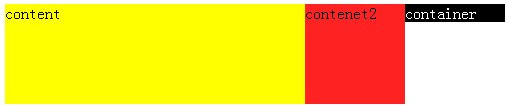
没有进行浮动清除浏览显示如下结果:
IE:

FF:
那如果我们进行清除改怎么写呢?
这里如果用clear就得加一个空白的div,如css:
.clear {clear:both;}
xhtml:
<div id="container">container

 <div id="content">content</div>

<div id="content2">contenet2</div>

<div class="clear"></div>

</div>
而使用:after,如css:
.clearfix:after { content: "."; display: block; height: 0; clear: both; visibility: hidden; }

* html>body .clearfix { display: inline-block; width: 100%; }

* html .clearfix { height: 1%; /* End hide from IE-mac */ }

/* ie7 hack*/

*+html .clearfix { min-height: 1%; }
xhtml:
<div id="container" class="clearfix ">container

<div id="content">content</div>

<div id="content2">contenet2</div>

</div>
这里我们可以看出使用:after比较方便;
2、两行两列,第一行两子容器浮动,第二行单独一个子容器
<!DOCTYPE html PUBLIC "-//W3C//DTD XHTML 1.0 Transitional//EN" "http://www.w3.org/TR/xhtml1/DTD/xhtml1-transitional.dtd">

<html xmlns="http://www.w3.org/1999/xhtml">

<head>

<meta http-equiv="Content-Type" content="text/html; charset=utf-8" />

<title>关于clearfix和clear的讨论</title>

<style type="text/css">

/*<![CDATA[*/

#container {width:500px; background:#000; color:#fff;}

#content {width:300px; height:120px; background:#FFFF00; color:#000; float:left;}

 #content2 {width:100px; height:100px; background:#f22; color:#000; float:left;}

#content3 {width:60px; background:#ccc; color:#000;}

.clear {clear:both;}

.clearfix:after { content: "."; display: block; height: 0; clear: both; visibility: hidden; }

* html>body .clearfix { display: inline-block; width: 100%; }

* html .clearfix { height: 1%; /* End hide from IE-mac */ }

/* ie7 hack*/*+html .clearfix { min-height: 1%; }

/*]]>*/

</style>

</head>

<body>

<div id="container" class="clearfix">container

<div id="content">content</div>

<div id="content2">contenet2</div>

 <div id="content3">contenet3</div>

</div>

</body>

</html>
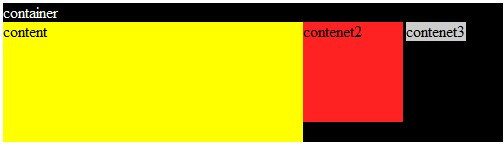
如此写法浏览显示结果如下:
IE:
FF:
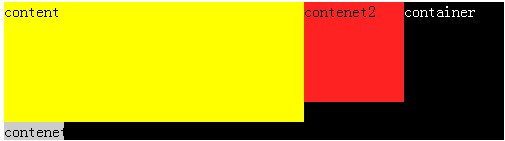
FF下显示正常,而IE下则跟随浮动靠右侧了,换种写法:
<div id="container">container

<div id="content">content</div>

<div id="content2">contenet2</div>

<div id="content3" class="clear">contenet3</div>

</div>
浏览全部显示正常。值得注意的是,这里使用class="clear"需要遵循一个原则:应该在设置浮动标签容器的同级进行清除。这里正好巧妙的应用了这一点,避免产生一个空白的div。
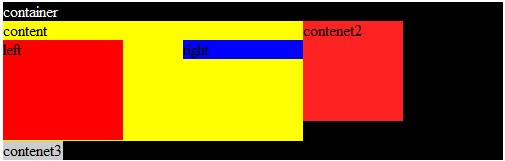
3、设置浮动的容器里再添加浮动的子容器,可以自动清除浮动。
<!DOCTYPE html PUBLIC "-//W3C//DTD XHTML 1.0 Transitional//EN" "http://www.w3.org/TR/xhtml1/DTD/xhtml1-transitional.dtd">

<html xmlns="http://www.w3.org/1999/xhtml">

<head>

<meta http-equiv="Content-Type" content="text/html; charset=utf-8" />

<title>关于clearfix和clear的讨论</title>

<style type="text/css">

/*<![CDATA[*/

#container {width:500px; background:#000; color:#fff;}

#content {width:300px; height:120px; background:#FFFF00; color:#000; float:left;}

#left {width:120px; height:100px; background:#ff0000; float:left;}

#right {width:120px; background:#0000ff; float:right;}

#content2 {width:100px; height:100px; background:#f22; color:#000; float:left;}

#content3 {width:60px; background:#ccc; color:#000;}

.clear {clear:both;}

.clearfix:after { content: "."; display: block; height: 0; clear: both; visibility: hidden; }

* html>body .clearfix { display: inline-block; width: 100%; }

* html .clearfix { height: 1%; /* End hide from IE-mac */ }

/* ie7 hack*/*+html .clearfix { min-height: 1%; }

/*]]>*/

</style>

</head>

<body>

<div id="container" class="clearfix">container

 <div id="content">content

<div id="left">left</div>

<div id="right">right</div>

</div>

<div id="content2">contenet2</div>

<div id="content3" class="clear">contenet3</div>

</div>

</body>

</html>
显示如图:
在经典论坛朋友的帮助下,对.clearfix又提出了一种写法:
.clearfix:after { content: "."; display: block; height: 0; clear: both; visibility:hidden; }

.clearfix{zoom:1;}
个人觉得这样更简单,而原理是相同的,就是对haslayout进行触发。
总结一点就是:方法不是唯一的,灵活应用才是必须的
关于clearfix和clear的讨论的更多相关文章
- css清除浮动的两种方式(clearfix和clear)
最近总是在用浮动,这两种方式总是浮现在眼前,或者说去掉父级和同级浮动样式总在思考中.两种方式怎么写都在base.css中. 在做瑞祥之旅的过程中,还是吃了一个大亏,就是清除浮动,不管是同级还是父级,都 ...
- 【css】清除浮动(clearfix 和 clear)的用法
本文主要是讲解如何在 html 中使用 clearfix 和 clear,针对那些刚开始了解 css 的童鞋.关于 clearfix 和 clear 的样式在这里我就不写了,具体样式点击此处. 下面就 ...
- 关于clearfix和clear的研究
今天领导跟我说到这个问题,我上网找了些资料,已转载一篇文章到本博客(后一篇),摘自百度文库. ps:还有一种写法就是: CSS代码: .clearfix:after { content: " ...
- clearfix清除浮动
首先在很多很多年以前我们常用的清除浮动是这样的. 1 .clear{clear:both;line-height:0;} 现在可能还可以在很多老的站点上可以看到这样的代码,相当暴力有效的解决浮动的问题 ...
- clearfix清除浮动进化史
我想大家在写CSS的时候应该都对清除浮动的用法深有体会,今天我们就还讨论下clearfix的进化史吧. clearfix清除浮动 首先在很多很多年以前我们常用的清除浮动是这样的. .clear{cle ...
- [笔记]使用clearfix清除浮动
转载自奶牛博客 .clearfix { *zoom: 1; } .clearfix:before, .clearfix:after { display: table; line-height: 0; ...
- 转载:Clear Float
众所周知,平时在写HTML代码时,难免少不了使用Float样式,这样一来,假使您没有清除浮动,那么有浮动元素的父元素容器将元素将无法自动撑 开.换句简单好理解的话来说,假如你在写CODE时,其中div ...
- Clearing Floats清除浮动--clearfix的不同方法的使用概述
清除浮动早已是一个前端开发人员必学的一课.毫无疑问,多年来,我们已经接触过多种清除浮动的方法,现在“clearfix methods”越来越被大家熟知.在深入剖析“clearfix”的多种用法之前,我 ...
- clear-fix清除浮动的两种写法
1. [代码]clearfix 清除浮动 .clearfix:after { content: "."; display: block; height: 0; font-size: ...
随机推荐
- GitLab项目迁移到Gerrit
1.在Gerrit上新建项目: 2.Gerrit项目配置权限(此处非代码): Reference:refs/* Push Annotated Tag Push Signed Tag Forge Com ...
- PHP文件上传大小设置
PHP.INI配置:文件上传功能配置教程 打开php.ini配置文件中的upload_tmp_dir.upload_max_filesize.post_max_size等选项. php.ini中文件上 ...
- Xcode C++ and Objective-C refactoring
Is there a way to refactor mixed C++/Objective-C code in Xcode ?? I am writing a game using Cocos2D ...
- tensorflow模型持久化保存和加载
模型文件的保存 tensorflow将模型保持到本地会生成4个文件: meta文件:保存了网络的图结构,包含变量.op.集合等信息 ckpt文件: 二进制文件,保存了网络中所有权重.偏置等变量数值,分 ...
- C++ 泛型 编写的 数据结构 栈
平时编程里经常需要用到数据结构,比如 栈和队列 等, 为了避免每次用到都需要重新编写的麻烦现将 C++ 编写的 数据结构 栈 记录下来,以备后用. 将 数据结构 栈 用头文件的形式 ...
- 51Nod:1134 最长递增子序列
动态规划 修改隐藏话题 1134 最长递增子序列 基准时间限制:1 秒 空间限制:131072 KB 分值: 0 难度:基础题 收藏 关注 给出长度为N的数组,找出这个数组的最长递增子序列.(递 ...
- Java8 (Function,Consumer,Predicate,Supplier)详解
1. https://blog.csdn.net/lzm18064126848/article/details/70199769 1.1 https://blog.csdn.net/turbo_zon ...
- Linux下rsync命令使用总结
一.rsync的概述 rsync是类unix系统下的数据镜像备份工具,从软件的命名上就可以看出来了——remote sync.rsync是Linux系统下的文件同步和数据传输工具,它采用“rsync” ...
- codeforces 724c Ray Tracing
好题 原题: There are k sensors located in the rectangular room of size n × m meters. The i-th sensor is ...
- subzero 基于postgrest && openresty && rabbitmq 的快速rest/graphql 开发平台
subzero是在postgrest 基础上开发的,提供了graphql 的支持,同时开发的cli 工具也很方便 集成了rabbitmq 可以让我们的应用具体实时的特性 参考架构图 使用 最简单的使用 ...