
python脚本监控获取当前Linux操作系统[内存]/[cpu]/[硬盘]/[登录用户]
此脚本应用在linux, 前提是需要有python和python的psutil模块
脚本
#!/usr/bin/env python

# coding=utf-8

import sys

import psutil

import time

import os

time_str =  time.strftime( "%Y-%m-%d", time.localtime( ) )

file_name = "./" + time_str + ".log"

if os.path.exists ( file_name ) == False :

   os.mknod( file_name )

   handle = open ( file_name , "w" )

else :

   handle = open ( file_name , "a" )

if len( sys.argv ) == 1 :

   print_type = 1

else :

   print_type = 2

def isset ( list_arr , name ) :

    if name in list_arr :

       return True

    else :

       return False

print_str = "";

if ( print_type == 1 ) or isset( sys.argv,"mem" )  :

 memory_convent = 1024 * 1024

 mem = psutil.virtual_memory()

 print_str +=  " 内存状态如下:\n"

 print_str = print_str + "   系统的内存容量为: "+str( mem.total/( memory_convent ) ) + " MB\n"

 print_str = print_str + "   系统的内存以使用容量为: "+str( mem.used/( memory_convent ) ) + " MB\n"

 print_str = print_str + "   系统可用的内存容量为: "+str( mem.total/( memory_convent ) - mem.used/( 1024*1024 )) + "MB\n"

 print_str = print_str + "   内存的buffer容量为: "+str( mem.buffers/( memory_convent ) ) + " MB\n"

 print_str = print_str + "   内存的cache容量为:" +str( mem.cached/( memory_convent ) ) + " MB\n"

if ( print_type == 1 ) or isset( sys.argv,"cpu" ) :

 print_str += " CPU状态如下:\n"

 cpu_status = psutil.cpu_times()

 print_str = print_str + "   user = " + str( cpu_status.user ) + "\n"

 print_str = print_str + "   nice = " + str( cpu_status.nice ) + "\n"

 print_str = print_str + "   system = " + str( cpu_status.system ) + "\n"

 print_str = print_str + "   idle = " + str ( cpu_status.idle ) + "\n"

 print_str = print_str + "   iowait = " + str ( cpu_status.iowait ) + "\n"

 print_str = print_str + "   irq = " + str( cpu_status.irq ) + "\n"

 print_str = print_str + "   softirq = " + str ( cpu_status.softirq ) + "\n"

 print_str = print_str + "   steal = " + str ( cpu_status.steal ) + "\n"

 print_str = print_str + "   guest = " + str ( cpu_status.guest ) + "\n"

if ( print_type == 1 ) or isset ( sys.argv,"disk" ) :

 print_str +=  " 硬盘信息如下:\n"

 disk_status = psutil.disk_partitions()

 for item in disk_status :

     print_str = print_str + "   "+ str( item ) + "\n"

if ( print_type == 1 ) or isset ( sys.argv,"user" ) :

 print_str +=  " 登录用户信息如下:\n "

 user_status = psutil.users()

 for item in  user_status :

     print_str = print_str + "   "+ str( item ) + "\n"

print_str += "---------------------------------------------------------------\n"

print ( print_str )

handle.write( print_str )

handle.close()
此时如果直接启动的话会报错(因为没有psutil模块)

下面安装psutil模块
下载
wget https://pypi.python.org/packages/source/p/psutil/psutil-2.1.3.tar.gz
解压
tar -zxvf psutil-2.1.3.tar.gz
安装
cd psutil-2.1.3/

python setup.py install
安装过程中报错
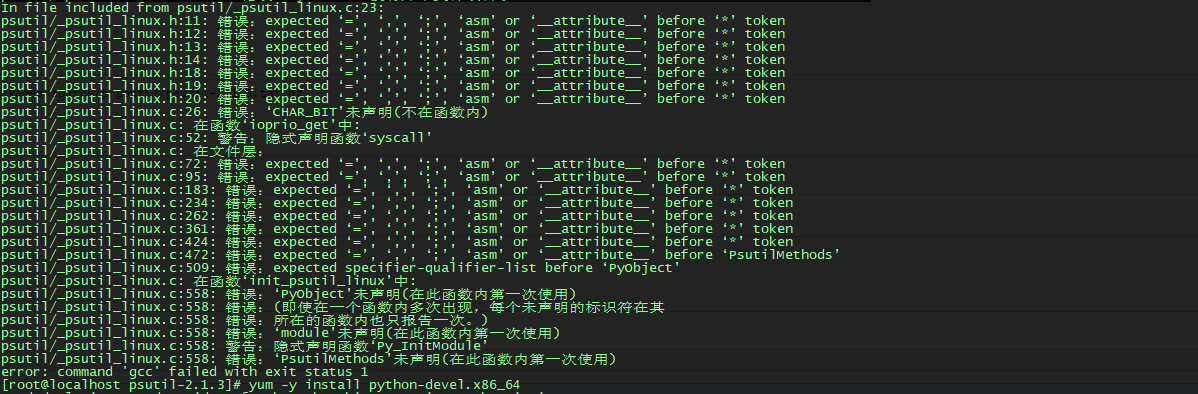
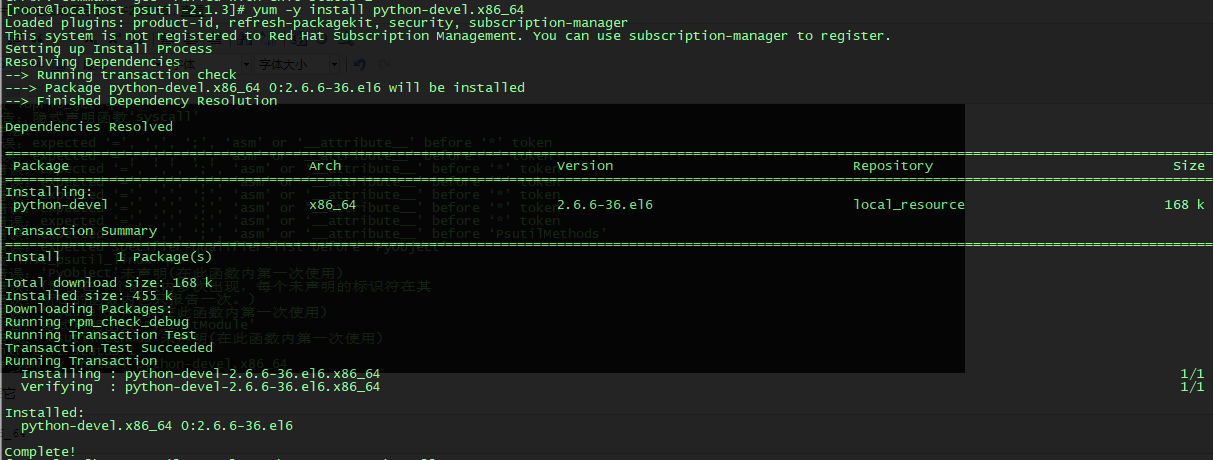
原因:缺少python-dev的依赖环境, 安装它
yum -y install python-devel.x86_64
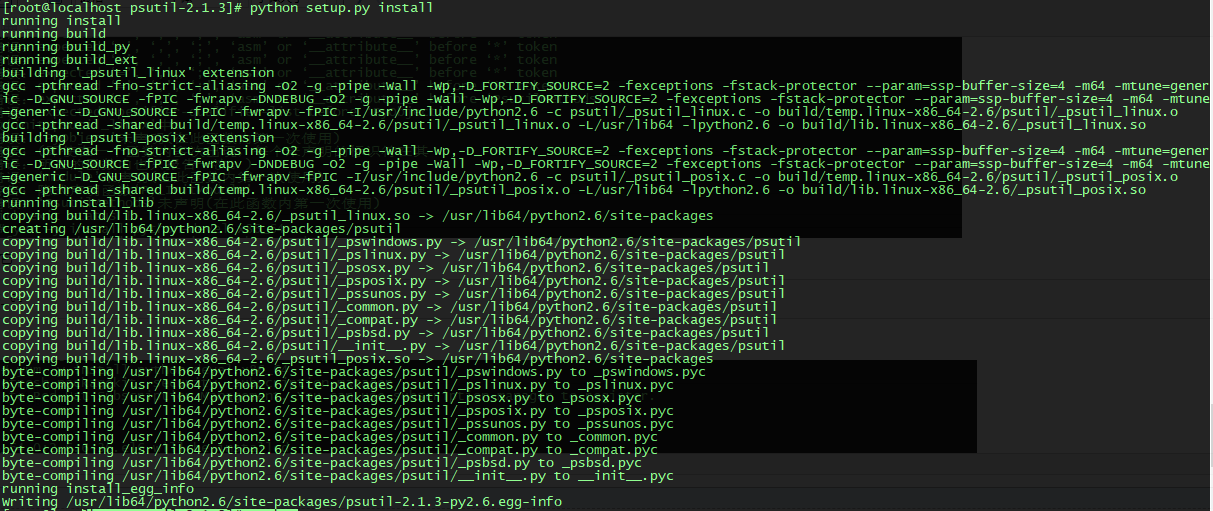
再次安装psutil
python setup.py install
安装成功
测试psutil模块是否安装成功
[root@localhost psutil-2.1.3]# python
>>> import psutil
>>> psutil.pids()

安装成功
运行脚本
./system.py
显示
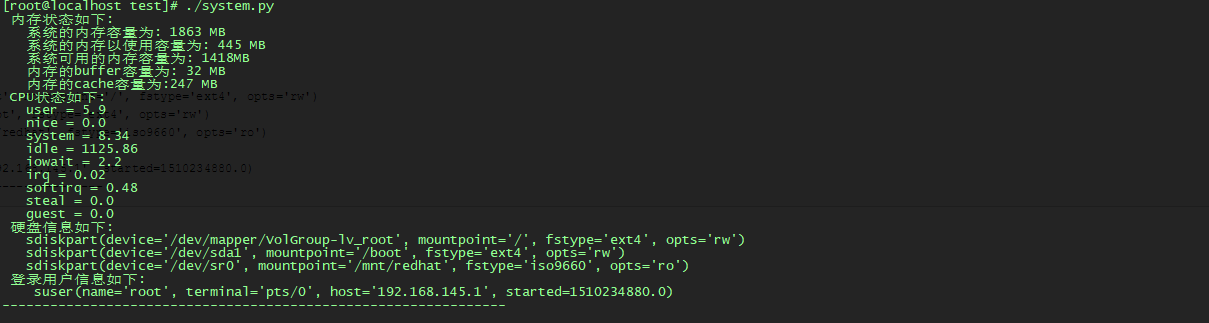
[root@localhost test]# ./system.py

 内存状态如下:

   系统的内存容量为: 1863 MB

   系统的内存以使用容量为: 445 MB

   系统可用的内存容量为: 1418MB

   内存的buffer容量为: 32 MB

   内存的cache容量为:247 MB

 CPU状态如下:

   user = 5.9

   nice = 0.0

   system = 8.34

   idle = 1125.86

   iowait = 2.2

   irq = 0.02

   softirq = 0.48

   steal = 0.0

   guest = 0.0

 硬盘信息如下:

   sdiskpart(device='/dev/mapper/VolGroup-lv_root', mountpoint='/', fstype='ext4', opts='rw')

   sdiskpart(device='/dev/sda1', mountpoint='/boot', fstype='ext4', opts='rw')

   sdiskpart(device='/dev/sr0', mountpoint='/mnt/redhat', fstype='iso9660', opts='ro')

 登录用户信息如下:

    suser(name='root', terminal='pts/0', host='192.168.145.1', started=1510234880.0)

---------------------------------------------------------------
成功!
python脚本监控获取当前Linux操作系统[内存]/[cpu]/[硬盘]/[登录用户]的更多相关文章
- windows平台下 c++获取 系统版本 网卡 内存 CPU 硬盘 显卡信息<转>
GetsysInfo.h: #ifndef _H_GETSYSINFO #define _H_GETSYSINFO #pragma once #include <afxtempl.h> c ...
- linux查看内存cpu占用
linux查看内存cpu占用top 命令 按q退出 可以添加额外选项选择按进程或按用户查看如: top -u gitu PID:进程idPR:进程的优先级别,越小越优先被执行NInice:值VIRT ...
- Linux查看和剔除当前登录用户
Linux查看和剔除当前登录用户 如何在linux下查看当前登录的用户,并且踢掉你认为应该踢掉的用户? 看了网络中的一些例子.在这里总结一下.主要用到的命令有,w,who,ps,kill,pkill ...
- Redis之使用python脚本监控队列长度
编辑python脚本redis_conn.py #!/usr/bin/env python #ending:utf-8 import redis def redis_conn(): pool = re ...
- zabbix 调用python脚本监控 磁盘剩余空间(创建模版,创建监控项,创建触发器)
主要 记录一下 使用zabbix 自己创建模版.监控项.触发器,并调用python脚本. 需求: 监控备份机磁盘剩余空间(windows系统) 一.安装zabbix_agent 比较简单 修改配置文 ...
- Java调用Python脚本并获取返回值
在Java程序中有时需要调用Python的程序,这时可以使用一般的PyFunction来调用python的函数并获得返回值,但是采用这种方法有可能出现一些莫名其妙的错误,比如ImportError.在 ...
- python脚本监控股票价格钉钉推送
关注股市,发家致富 问题:一天天盯着股市多累,尤其上班,还不能暴露,股票软件,红红绿绿,这么明显的列表页面,一看就知道在摸鱼.被领导发现饭碗就没了 解决:搞个脚本监听一下自己关注的股票,一到价格就发个 ...
- python脚本实例002- 利用requests库实现应用登录
#! /usr/bin/python # coding:utf-8 #导入requests库 import requests #获取会话 s = requests.session() #创建登录数据 ...
- Linux下查看/管理当前登录用户及用户操作历史记录
转载自: http://www.cnblogs.com/gaojun/archive/2013/10/24/3385885.html 一.查看及管理当前登录用户 1.使用w命令查看登录用户正在使用的进 ...
随机推荐
- pcl学习笔记(二):点云类型
不同的点云类型 前面所说的,pcl::PointCloud包含一个域,它作为点的容器,这个域是PointT类型的,这个域是PointT类型的是pcl::PointCloud类的模板参数,定义了点云的存 ...
- POJ - 1101 The Game dfs
题意:给你一个地图,上面有一些‘X',给你起点终点,让你输出从起点到终点的路径中转向(改变方向)次数最少的路径,注意,不能穿过别的’X'并且可以超过边界 题解:关于超过边界,只要在外围多加一圈‘ ’. ...
- 如何删除word中多余的空格和空行
去除word中多余的空格及空行 一.去掉表格和格式 为了版面的整齐,网页文档都是以表格的形式存在的,只是一般情况下表格的颜色被设为无色或表格宽度被设为0,所以我们在网页上看不到表格.另外,网 页文档中 ...
- A Bug's Life-----poj2492(关系并查集)
题目链接:http://poj.org/problem?id=2492 题意是问是否存在同性恋, 就是a喜欢b,b喜欢c,a又喜欢c,所以就有同性恋了: #include<stdio.h> ...
- paas平台
paas平台 定义:PaaS是云计算中重要的一类服务,为用户提供应用的全生命周期管理和相关的资源服务.通过PaaS,用户可以完成应用的构建.部署.运维管理,而不需要自己去搭建计算环境,如安装服务器.操 ...
- CF989C A Mist of Florescence 构造
正解:构造 解题报告: 先放传送门yep! 然后构造题我就都直接港正解了QwQ没什么可扯的QwQ 这题的话,首先这么想吼 如果我现在构造的是个4*4的 举个栗子 AABB ACBB AADB DBCA ...
- 如何用 Keynote 制作动画演示(转)
原文:如何用 Keynote 制作动画演示 Keynote 里的很多特效可以用来制作效果不错的演示,一页页的将需要演示的内容交代清楚后,直接输出成 m4v 的视频格式,为了方便贴到博客或者发布到 Tw ...
- 共享访问在.NET中的编程实现
转载:http://blog.csdn.net/zhzuo/article/details/1732937 共享访问在.NET中的编程实现 发布日期:2007-08-08 | 更新日期:2009-03 ...
- 【深入理解javascript】原型
1.一切都是对象 一切(引用类型)都是对象,对象是属性的集合 typeof函数输出的一共有几种类型,在此列出: function show(x) { console.log(typeof(x)); / ...
- 小P的故事——神奇的换零钱&&人活着系列之平方数
http://acm.sdut.edu.cn/sdutoj/showproblem.php?pid=2777&cid=1219 这题不会,看了别人的代码 #include <iostre ...