
【第二十五章】 springboot + hystrixdashboard
注意:
- hystrix基本使用:第十九章 springboot + hystrix(1)
- hystrix计数原理:附6 hystrix metrics and monitor
一、hystrixdashboard
作用:
- 监控各个hystrixcommand的各种值。
- 通过dashboards的实时监控来动态修改配置,直到满意为止
仪表盘:

二、启动hystrix
1、下载standalone-hystrix-dashboard-1.5.3-all.jar
- https://github.com/kennedyoliveira/standalone-hystrix-dashboard:该页面提供了一个很好的视频教学。
2、启动hystrix-dashboard
java -jar -DserverPort=7979 -DbindAddress=localhost standalone-hystrix-dashboard-1.5.3-all.jar- 注意:其中的serverPort、bindAddress是可选参数,若不添加,默认是7979和localhost
3、测试
- 浏览器输入http://localhost:7979/hystrix-dashboard/,出现小熊页面就是正确了。
三、代码
1、pom.xml
<dependency>
            <groupId>com.netflix.hystrix</groupId>
            <artifactId>hystrix-core</artifactId>
            <version>1.4.10</version>
        </dependency>
        <!-- http://mvnrepository.com/artifact/com.netflix.hystrix/hystrix-metrics-event-stream -->
        <dependency>
            <groupId>com.netflix.hystrix</groupId>
            <artifactId>hystrix-metrics-event-stream</artifactId>
            <version>1.4.10</version>
        </dependency>
说明:
- hystrix-core:hystrix核心接口包
- hystrix-metrics-event-stream:只要客户端连接还连着,hystrix-metrics-event-stream就会不断的向客户端以text/event-stream的形式推送计数结果(metrics)
2、配置HystrixMetricsStreamServlet
package com.xxx.firstboot.hystrix.dashboard;

import org.springframework.boot.context.embedded.ServletRegistrationBean;
import org.springframework.context.annotation.Bean;
import org.springframework.context.annotation.Configuration;

import com.netflix.hystrix.contrib.metrics.eventstream.HystrixMetricsStreamServlet;

@Configuration
public class HystrixConfig {

    @Bean
    public HystrixMetricsStreamServlet hystrixMetricsStreamServlet(){
        return new HystrixMetricsStreamServlet();
    }

    @Bean
    public ServletRegistrationBean registration(HystrixMetricsStreamServlet servlet){
        ServletRegistrationBean registrationBean = new ServletRegistrationBean();
        registrationBean.setServlet(servlet);
        registrationBean.setEnabled(true);//是否启用该registrationBean
        registrationBean.addUrlMappings("/hystrix.stream");
        return registrationBean;
    }
}
说明:以上方式是springboot注入servlet并进行配置的方式。
四、测试

说明:启动服务后,输入localhost:8001/hystrix.stream,之后点击"Add Stream",最后点击"Monitor Stream"即可。
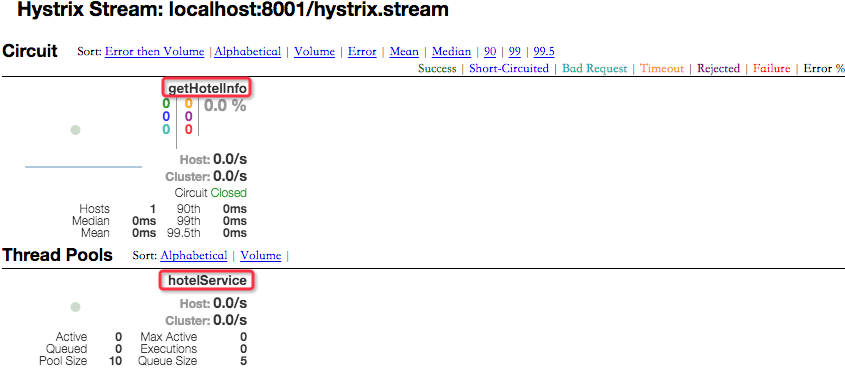
说明:
- getHotelInfo - commandKey(其实就是servicename下的一个方法)
- hotelService - ThreadPoolKey(不配置的情况下就是commandGroupKey,其实就是servicename)
【第二十五章】 springboot + hystrixdashboard的更多相关文章
- 第二十五章 springboot + hystrixdashboard
注意: hystrix基本使用:第十九章 springboot + hystrix(1) hystrix计数原理:附6 hystrix metrics and monitor 一.hystrixdas ...
- Gradle 1.12用户指南翻译——第二十五章. Scala 插件
其他章节的翻译请参见: http://blog.csdn.net/column/details/gradle-translation.html 翻译项目请关注Github上的地址: https://g ...
- “全栈2019”Java多线程第二十五章:生产者与消费者线程详解
难度 初级 学习时间 10分钟 适合人群 零基础 开发语言 Java 开发环境 JDK v11 IntelliJ IDEA v2018.3 文章原文链接 "全栈2019"Java多 ...
- “全栈2019”Java第二十五章:流程控制语句中循环语句while
难度 初级 学习时间 10分钟 适合人群 零基础 开发语言 Java 开发环境 JDK v11 IntelliJ IDEA v2018.3 文章原文链接 "全栈2019"Java第 ...
- 第二十九章 springboot + zipkin + mysql
zipkin的数据存储可以存在4个地方: 内存(仅用于测试,数据不会持久化,zipkin-server关掉,数据就没有了) 这也是之前使用的 mysql 可能是最熟悉的方式 es Cassandra ...
- SpringBoot | 第二十五章:日志管理之自定义Appender
前言 前面两章节我们介绍了一些日志框架的常见配置及使用实践.一般上,在开发过程中,像log4j2.logback日志框架都提供了很多Appender,基本上可以满足大部分的业务需求了.但在一些特殊需求 ...
- 【第二十六章】 hystrix-dashboard + turbine
一.使用turbine的意义 引入多个hystrix stream: 1.使用hystrix-dashboard的可以添加多个stream的功能 图中添加的两个stream会在真正monitor的时候 ...
- C#图解教程 第二十五章 其他主题
其他主题 概述字符串使用 StringBuilder类把字符串解析为数据值关于可空类型的更多内容 为可空类型赋值使用空接合运算符使用可空用户自定义类型 Main 方法文档注释 插入文档注释使用其他XM ...
- 第二十四章 springboot注入servlet
问:有了springMVC,为什么还要用servlet?有了servlet3的注解,为什么还要使用ServletRegistrationBean注入的方式? 使用场景:在有些场景下,比如我们要使用hy ...
随机推荐
- 前端 html input标签 placeholder属性 标签上显示内容
前端 html input标签 的placeholder属性 标签上显示内容 <!DOCTYPE html> <html lang="en"> < ...
- Linux环境下解压rar文件
可以用unrar命令解压rar后缀的文件 unrar e test.rar 解压文件到当前目录 unrar x test.rar /path/to/extract unrar l test.rar 查 ...
- jxl(Java Excel API) 使用方法 【1】
// 构建Workbook对象, 只读Workbook对象 // 直接从本地文档创建Workbook // 从输入流创建Workbook Workbook workbook = nul ...
- php截取制定长度字符串
/** +---------------------------------------------------------- * 字符串截取,支持中文和其他编码 +----------------- ...
- windows配置承载网络的一个批处理程序
@rem 这是windows中创建承载网络的相关命令title wifi热点@echo off set ssid=abcdeset key=123456789 :beginclsecho ------ ...
- mysql表空间文件
1.共享表空间文件.默认表空间文件是ibdata1,大小为10M,且可拓展.共享表空间可以由多个文件组成,一个表可以跨多个文件而存在,共享表空间的最大值限制是64T. 2.独立表空间文件.独立表空间只 ...
- NIO_2
导语 缓冲器的设计的是新IO模型中最基础的一部分.因为新IO模型中要求所有的IO操作都需要进行缓冲.在新的IO模型中,不再向输出流写入数据和从数据流中读取数据了,而是要从缓冲区中读写数据.缓冲区可是是 ...
- Kettle 学习导航帖整理
最近在学习Kettle,期间收集了很多帖子,在此整理汇总以备后续查询或分享,如果有更好的学习资源也欢迎在评论区留言,谢谢. Kettle入门: Kettle简介:百度百科https://baike.b ...
- java接口对接——别人调用我们接口获取数据
java接口对接——别人调用我们接口获取数据,我们需要在我们系统中开发几个接口,给对方接口规范文档,包括访问我们的接口地址,以及入参名称和格式,还有我们的返回的状态的情况, 接口代码: package ...
- Linux基础命令---cpio
cpio 从归档中复制文件,或者复制文件到归档中.此命令的适用范围:RedHat.RHEL.Ubuntu.CentOS.SUSE.openSUSE.Fedora. Cpio命令有三种工作模式: 1)c ...