
ClangFormat代码格式化
下载地址:https://github.com/travisjeffery/ClangFormat-Xcode
配合Xcode自带的格式化操作,就很不错了
选中内容组合操作:
第一步:ClangFormat(control+U)
第二步:XcodeFormat(control+I)
选中文件组合操作:
第一步:ClangFormat(control+shift+U)
第二步:XcodeFormat(control+A,control+I)
修改ClangFormat.xcodeproj工程里的TRVSClangFormat.m文件的内容,实现快捷键功能(control+U和control+shift+U):
 - (void)addActioningMenuItemsToFormatMenu {

   NSMenuItem *formatActiveFileItem = [[NSMenuItem alloc]

       initWithTitle:NSLocalizedString(@"Format File in Focus", nil)

              action:@selector(formatActiveFile)

       keyEquivalent:@""];

   [formatActiveFileItem setTarget:self.formatter];

   [self.formatMenu addItem:formatActiveFileItem];

   NSMenuItem *formatSelectedCharacters = [[NSMenuItem alloc]

       initWithTitle:NSLocalizedString(@"Format Selected Text", nil)

              action:@selector(formatSelectedCharacters)

       keyEquivalent:@"u"]; //modified by Kenmu

   [formatSelectedCharacters setKeyEquivalentModifierMask:NSControlKeyMask]; //created by Kenmu, in order to use shortcut key to access it.

   [formatSelectedCharacters setTarget:self.formatter];

   [self.formatMenu addItem:formatSelectedCharacters];

   NSMenuItem *formatSelectedFilesItem = [[NSMenuItem alloc]

       initWithTitle:NSLocalizedString(@"Format Selected Files", nil)

              action:@selector(formatSelectedFiles)

       keyEquivalent:@"u"]; //modified by Kenmu

   [formatSelectedFilesItem setKeyEquivalentModifierMask:NSControlKeyMask | NSShiftKeyMask]; //created by, in order to use shortcut key to access it. Kenmu

   [formatSelectedFilesItem setTarget:self.formatter];

   [self.formatMenu addItem:formatSelectedFilesItem];

 }
跟VVDocumenter规范注释生成器的安装方式一样:
下载开源工程在Xcode重新编译运行会自动安装此插件,重启Xcode就可以使用了
PS:可以使用系统偏好设置中设置键盘里针对某应用程序的快捷键,如下操作:
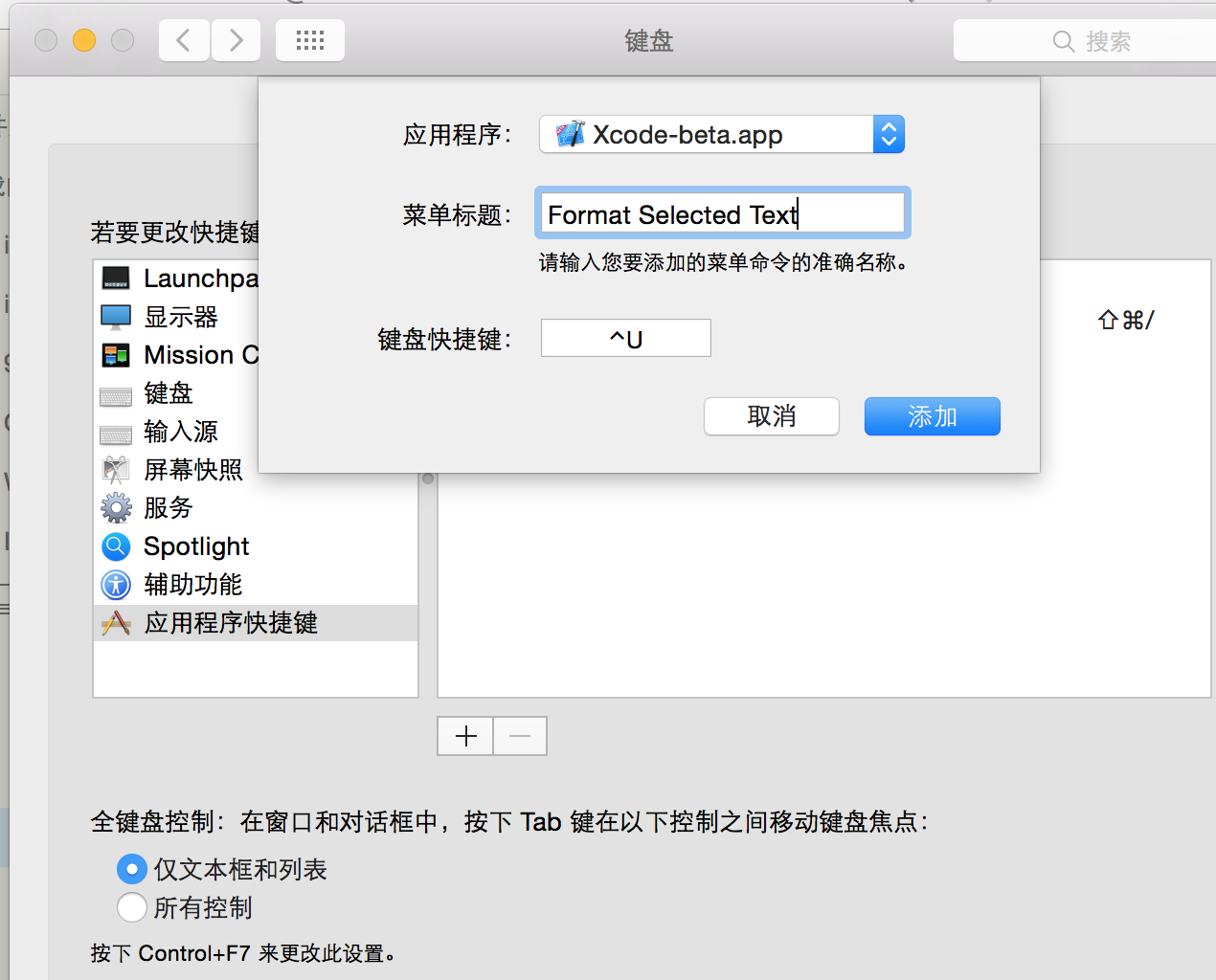
插件设置:
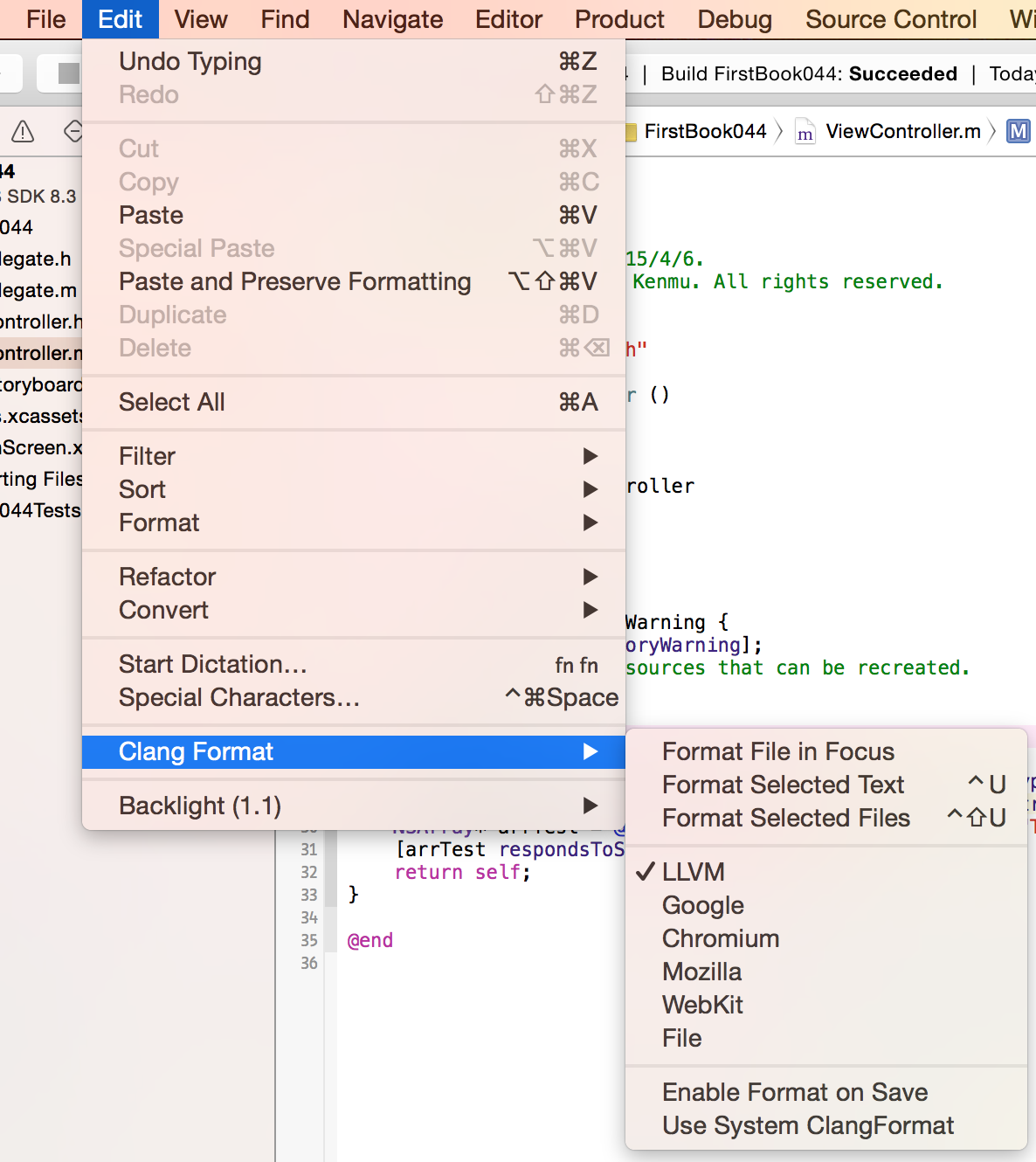
使用方式:

ClangFormat代码格式化的更多相关文章
- vim代码格式化插件clang-format
title: vim代码格式化插件clang-format date: 2017-12-12 20:28:26 tags: vim categories: 开发工具 安装vim-clang-forma ...
- 超详细的Xcode代码格式化教程,可自定义样式。
超详细的Xcode代码格式化教程,可自定义样式. 为什么要格式化代码 当团队内有多人开发的时候,每个人写的代码格式都有自己的喜好,也可能会忙着写代码而忽略了格式的问题.在之前,我们可能会写完代码后,再 ...
- ROS知识(21)----ROS C++代码格式化
这里提供两种方法. 第一种方法:clang_format 1.安装clang format sudo apt-get install -y clang-format-3.6 2.从github的ros ...
- 测试clang-format的格式化效果
我自己写的业余框架已告一段落,主体功能已完成,剩下的就是优化.第一个要优化的,就是代码格式.我一直是用编辑器写代码的,从之前的UltraEdit到notepad++到sublime text,再到现在 ...
- [No00007B]DreamweaverCC 的CSS代码格式化
Dreamweaver自带的代码格式化功能. 1.步骤:命令 -> 应用源格式. 2.你可以选择你的偏好.特别是css代码,有些人喜欢每个属性单独一行,有些人喜欢把所有属性写在同一行.步骤:编辑 ...
- code blocks 如何实现一键代码格式化
问题:code blocks 如何实现一键代码格式化 解答:直接右键,选择format use ASstyle
- 使用AStyle进行代码格式化
转自:http://www.cnblogs.com/JerryTian/archive/2012/09/20/AStyle.html 在日常的编码当中,大家经常要遵照一些设计规范,如命名规则.代码格式 ...
- iOS开发-xCode代码格式化xAlign
xCode默认是可以进行代码格式化的,能满足基础开发需求,如果想要个性一些代码对齐方式宏对齐,等号对齐,属性对齐,xAlign就提供了以上三种功能,参考文中效果~ 基础效果 等号对齐: 属性对齐: 宏 ...
- MyEclipse中防止代码格式化时出现换行的情况的设置
编辑完成代码,用MyEclipse的代码格式化后,本来不长的代码也被自动转成了多行.虽然自动换行以后在编辑器中一眼就能看到全部的代码,但是可读性却大打折扣,避免出现这种情况的办法是: 1.Java代码 ...
随机推荐
- android 中使用jwt token(json web token)--java
http://blog.csdn.net/mingzhnglei/article/details/51119836 下面贴上自己项目中的一个小小的example import com.nimbusds ...
- Java编程的逻辑 (31) - 剖析Arrays
本系列文章经补充和完善,已修订整理成书<Java编程的逻辑>,由机械工业出版社华章分社出版,于2018年1月上市热销,读者好评如潮!各大网店和书店有售,欢迎购买,京东自营链接:http: ...
- kafka生产消费原理笔记
一.什么是kafka Kafka是最初由Linkedin公司开发,是一个分布式.支持分区的(partition).多副本的(replica),基于zookeeper协调的分布式消息系统,它的最大的特性 ...
- openCV—Python(5)—— 图像几何变换
一.函数简单介绍 1.warpAffine-图像放射变换(平移.旋转.缩放) 函数原型:warpAffine(src, M, dsize, dst=None, flags=None, borderMo ...
- css table第一列 宽度
table{table-layout:fixed;}table tr td:first-child,table tr td:first-child{width:120px;} 首行第一个td定宽同列的 ...
- 再谈git的http服务
因为git服务器搬迁,需要重新安装git服务器,在网上搜索了下,发现之前的方法太复杂,复杂到自己都没彻底弄明白.其实通过git自带的git-http-backend脚本配合apache2的http服务 ...
- Python 字符串操作函数二
#-*- coding:utf-8 -*- line = "l want watch movie with you ." print(line.center(50)) print( ...
- 关于Unity中的本地存储
本地存储 在做游戏的时候,经常需要在本机存储一些数据,比如闯关类游戏要记录闯到第几关,做单机的时候要把数据保存到本地,下次启动的时候数据存在,就是把数据保存到磁盘里面或者手机的flash闪存里面. U ...
- 关于Unity中坐标系的种类
坐标空间 1:物体空间: 3D物体自己的坐标空间 一般设计时几何体以中心为原点,人物以双脚为原点; 2: 世界空间: 3D物体在场景中的世界坐标, 整个游戏场景的空间; 3: 摄像机空间: 以观察摄像 ...
- c++ 的makefile文件实例
首先声明, 感谢九哥的帮助,因为从来没写过makefile, 所以一直是手动编译, 然后有一次写了三个文件, 需要编译, 而我只编译了一个文件, 所以一直出错, 九哥告诉我用makefile更方便, ...