
安卓开发笔记——Fragment+FragmentTabHost组件(实现新浪微博底部菜单)
记得之前写过2篇关于底部菜单的实现,由于使用的是过时的TabHost类,虽然一样可以实现我们想要的效果,但作为学习,还是需要来了解下这个新引入类FragmentTabHost
之前2篇文章的链接:
安卓开发复习笔记——TabHost组件(一)(实现底部菜单导航)
安卓开发复习笔记——TabHost组件(二)(实现底部菜单导航)
关于Fragment类在之前的安卓开发复习笔记——Fragment+ViewPager组件(高仿微信界面)也介绍过,这里就不再重复阐述了。
国际惯例,先来张效果图:
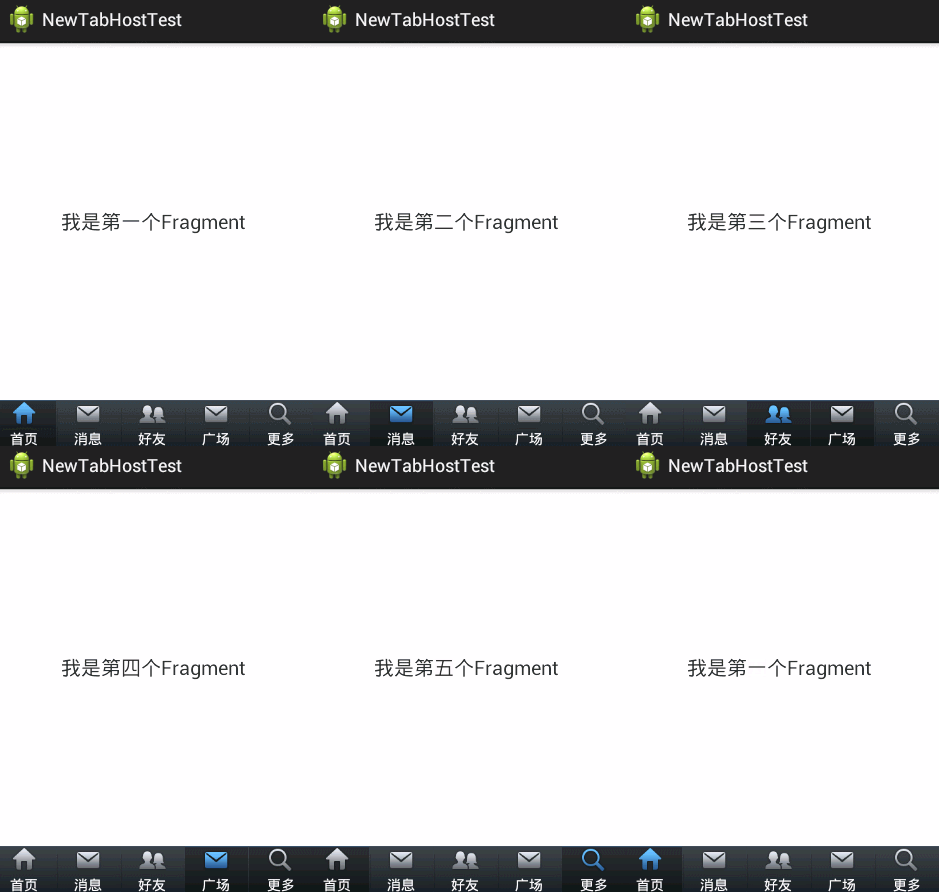
下面直接上代码了,注释很全,看过我前2篇文章的朋友,肯定秒懂的,哈哈~
activity_main.xml(主布局文件)
 <LinearLayout xmlns:android="http://schemas.android.com/apk/res/android"

     xmlns:tools="http://schemas.android.com/tools"

     android:layout_width="fill_parent"

     android:layout_height="fill_parent"

     android:orientation="vertical" >

     <!-- 存放主要页面内容 -->

     <FrameLayout

         android:id="@+id/maincontent"

         android:layout_width="fill_parent"

         android:layout_height="0dp"

         android:layout_weight="1" >

     </FrameLayout>

     <!-- 底层菜单 -->

     <android.support.v4.app.FragmentTabHost

         android:id="@android:id/tabhost"

         android:layout_width="fill_parent"

         android:layout_height="wrap_content"

         android:background="@drawable/maintab_toolbar_bg" >

         <FrameLayout

             android:id="@android:id/tabcontent"

             android:layout_width="0dp"

             android:layout_height="0dp"

             android:layout_weight="0" >

         </FrameLayout>

     </android.support.v4.app.FragmentTabHost>

 </LinearLayout>
fragment.xml(由于只有文字不同,这里只给出一个)
 <RelativeLayout xmlns:android="http://schemas.android.com/apk/res/android"

     xmlns:tools="http://schemas.android.com/tools"

     android:layout_width="fill_parent"

     android:layout_height="fill_parent"

  >

     <TextView

         android:id="@+id/text"

         android:layout_width="wrap_content"

         android:layout_height="wrap_content"

         android:layout_centerInParent="true"

         android:text="我是第一个Fragment"

         android:textSize="20dp"

         />

 </RelativeLayout>
tabcontent.xml(具体底部菜单详细布局)
 <LinearLayout xmlns:android="http://schemas.android.com/apk/res/android"

     xmlns:tools="http://schemas.android.com/tools"

     android:layout_width="wrap_content"

     android:layout_height="wrap_content"

     android:gravity="center_horizontal"

     android:orientation="vertical" >

     <ImageView

         android:id="@+id/image"

         android:layout_height="wrap_content"

         android:layout_width="wrap_content"

         />

     <TextView

         android:id="@+id/text"

         android:padding="2dp"

         android:layout_width="wrap_content"

         android:layout_height="wrap_content"

         android:textColor="@android:color/white"

         />

 </LinearLayout>
bt_selector.xml(底部菜单点击背景)
 <?xml version="1.0" encoding="utf-8"?>

 <selector xmlns:android="http://schemas.android.com/apk/res/android">

     <item android:drawable="@drawable/home_btn_bg" android:state_pressed="true"></item>

     <item android:drawable="@drawable/home_btn_bg" android:state_selected="true"></item>

 </selector>
bt_home_selector.xml(底部菜单按钮效果)
 <?xml version="1.0" encoding="utf-8"?>

 <selector xmlns:android="http://schemas.android.com/apk/res/android">

     <item android:drawable="@drawable/icon_home_sel" android:state_selected="true"></item>

     <item android:drawable="@drawable/icon_home_nor"></item>

 </selector>
FragmentPage1-FragmentPage5.java
 package com.example.newtabhosttest;

 import android.os.Bundle;

 import android.support.annotation.Nullable;

 import android.support.v4.app.Fragment;

 import android.view.LayoutInflater;

 import android.view.View;

 import android.view.ViewGroup;

 public class FragmentPage1 extends Fragment{

         @Override

         public View onCreateView(LayoutInflater inflater,

                 @Nullable ViewGroup container, @Nullable Bundle savedInstanceState) {

             return inflater.inflate(R.layout.fragment1, null);

         }

 }
MainActivity.java(主代码)
 package com.example.newtabhosttest;

 import android.os.Bundle;

 import android.support.v4.app.FragmentActivity;

 import android.support.v4.app.FragmentTabHost;

 import android.view.View;

 import android.widget.ImageView;

 import android.widget.TabHost.TabSpec;

 import android.widget.TextView;

 public class MainActivity extends FragmentActivity {

     private FragmentTabHost fragmentTabHost;

     private String texts[] = { "首页", "消息", "好友", "广场", "更多" };

     private int imageButton[] = { R.drawable.bt_home_selector,

             R.drawable.bt_message_selector, R.drawable.bt_selfinfo_selector,R.drawable.bt_square_selector ,R.drawable.bt_more_selector};

      private Class fragmentArray[] = {FragmentPage1.class,FragmentPage2.class,FragmentPage3.class,FragmentPage4.class,FragmentPage5.class};

     @Override

     protected void onCreate(Bundle savedInstanceState) {

         super.onCreate(savedInstanceState);

         setContentView(R.layout.activity_main);

         // 实例化tabhost

         fragmentTabHost = (FragmentTabHost) findViewById(android.R.id.tabhost);

         fragmentTabHost.setup(this, getSupportFragmentManager(),

                 R.id.maincontent);

         for (int i = 0; i < texts.length; i++) {

             TabSpec spec=fragmentTabHost.newTabSpec(texts[i]).setIndicator(getView(i));

             fragmentTabHost.addTab(spec, fragmentArray[i], null);

             //设置背景(必须在addTab之后,由于需要子节点(底部菜单按钮)否则会出现空指针异常)

             fragmentTabHost.getTabWidget().getChildAt(i).setBackgroundResource(R.drawable.bt_selector);

         }

     }

     private View getView(int i) {

         //取得布局实例

         View view=View.inflate(MainActivity.this, R.layout.tabcontent, null);

         //取得布局对象

         ImageView imageView=(ImageView) view.findViewById(R.id.image);

         TextView textView=(TextView) view.findViewById(R.id.text);

         //设置图标

         imageView.setImageResource(imageButton[i]);

         //设置标题

         textView.setText(texts[i]);

         return view;

     }

 }
到这里代码就结束了,要是有哪里疑惑的朋友可以给我留言,如果觉得文章对您有用的话,请给个赞,谢谢支持!^_^
安卓开发笔记——Fragment+FragmentTabHost组件(实现新浪微博底部菜单)的更多相关文章
- 转-Fragment+FragmentTabHost组件(实现新浪微博底部菜单)
http://www.cnblogs.com/lichenwei/p/3985121.html 记得之前写过2篇关于底部菜单的实现,由于使用的是过时的TabHost类,虽然一样可以实现我们想要的效果, ...
- 安卓开发笔记——Fragment+ViewPager组件(高仿微信界面)
什么是ViewPager? 关于ViewPager的介绍和使用,在之前我写过一篇相关的文章<安卓开发复习笔记——ViewPager组件(仿微信引导界面)>,不清楚的朋友可以看看,这里就不再 ...
- 安卓开发笔记——关于开源组件PullToRefresh实现下拉刷新和上拉加载(一分钟搞定,超级简单)
前言 以前在实现ListView下拉刷新和上拉加载数据的时候都是去继承原生的ListView重写它的一些方法,实现起来非常繁杂,需要我们自己去给ListView定制下拉刷新和上拉加载的布局文件,然后添 ...
- 底部菜单栏(三)Fragment+FragmentTabHost实现仿新浪微博底部菜单栏
一.实现效果图 二.项目工程结构 三.详细代码编写 1.主tab布局界面,main_tab_layout: 双击代码全选 1 2 3 4 5 6 7 8 9 10 11 12 13 14 15 16 ...
- 安卓开发笔记——自定义广告轮播Banner(实现无限循环)
关于广告轮播,大家肯定不会陌生,它在现手机市场各大APP出现的频率极高,它的优点在于"不占屏",可以仅用小小的固定空位来展示几个甚至几十个广告条,而且动态效果很好,具有很好的用户& ...
- 安卓开发笔记——丰富多彩的TextView
随手笔记,记录一些东西~ 记得之前写过一篇文章<安卓开发笔记——个性化TextView(新浪微博)>:http://www.cnblogs.com/lichenwei/p/4411607. ...
- 安卓开发笔记——关于开源项目SlidingMenu的使用介绍(仿QQ5.0侧滑菜单)
记得去年年末的时候写过这个侧滑效果,当时是利用自定义HorizontalScrollView来实现的,效果如下: 有兴趣的朋友可以看看这篇文件<安卓开发笔记——自定义HorizontalScro ...
- 安卓开发笔记——深入Activity
在上一篇文章<安卓开发笔记——重识Activity >中,我们了解了Activity生命周期的执行顺序和一些基本的数据保存操作,但如果只知道这些是对于我们的开发需求来说是远远不够的,今天我 ...
- Fragment+FragmentTabHost组件实现常见主页面(仿微信新浪)
采取的方法是Fragment+FragmentTabHost组件来实现这种常见的app主页面的效果 首先给出main.xml文件 <?xml version="1.0" en ...
随机推荐
- 为python 添加新功能-dump
一直觉得thinkphp提供的dump函数挺好用的,但是python里面没有,就一直想着写个简单的. dir是我比较常用的一个内置函数了,但是显示效果实在有点受不了,每次我都要从大量的字符串里找到我需 ...
- C++中的new、operator new与placement new
转:http://www.cnblogs.com/luxiaoxun/archive/2012/08/10/2631812.html new/delete与operator new/operator ...
- win7+php5.3.10下安装memcache (转)
因为升级到了5.3.10,所以之前的dll不能使用了,弄了好久,终于还是在老外的博客上找到了解决方法: (环境是win7+php5.3.10+win32) 1.解压附件memcached到某个目录,本 ...
- Java中LinkedList实现原理
数据结构 LinkedList是基于链表结构实现,所以在LinkedList类中包含了first和last两个指针(类型为Node).Node中包含了对prev节点.next节点的引用,这样就构成了双 ...
- 【WPF】添加自定义字体
需求:在WPF项目中使用幼圆字体. 步骤: 1.首先要有幼圆TTF字体文件.在C:\Windows\Fonts目录下找,如果系统字体库中没有,就上网下一份,如这里或这里. 2.将字体文件复制到WPF项 ...
- WPF视频会议系统资料
Android和C#实现实时视频传输Demo 视频会议及流媒体十大开源项目 WinForm二三事(三)Control.Invoke&Control.BeginInvoke
- Google工作原理
网上看到一张讲解Google工作原理的图,与大家分享一下:
- 微信中关闭网页输入内容时的安全提示 [干掉 “防盗号或诈骗,请不要输入QQ密码”]
未设置之前: 需要把域名加入白名单 设置方法:微信公共平台后台-->公众号设置--->功能设置--->填写业务域名即可.
- Java设计模式(2)单态模式(Singleton模式)
定义:Singleton模式主要作用是保证在Java应用程序中,一个类Class只有一个实例存在. 在很多操作中,比如建立目录 数据库连接都需要这样的单线程操作. 还有,singleton能够被状态化 ...
- 自定义shareSDK的验证码短信内容
应用中使用了shareSDK来做第三方登录和短信验证码的接收,但是想将短信内容修改为自己想要的内容 官方文档中并未详细提及:无GUI接口调用 默认的短信内容为: 如果只是要修改括号中的抬头,只需按照此 ...