
转-Fragment+FragmentTabHost组件(实现新浪微博底部菜单)
http://www.cnblogs.com/lichenwei/p/3985121.html
记得之前写过2篇关于底部菜单的实现,由于使用的是过时的TabHost类,虽然一样可以实现我们想要的效果,但作为学习,还是需要来了解下这个新引入类FragmentTabHost
之前2篇文章的链接:
安卓开发复习笔记——TabHost组件(一)(实现底部菜单导航)
安卓开发复习笔记——TabHost组件(二)(实现底部菜单导航)
关于Fragment类在之前的安卓开发复习笔记——Fragment+ViewPager组件(高仿微信界面)也介绍过,这里就不再重复阐述了。
国际惯例,先来张效果图:
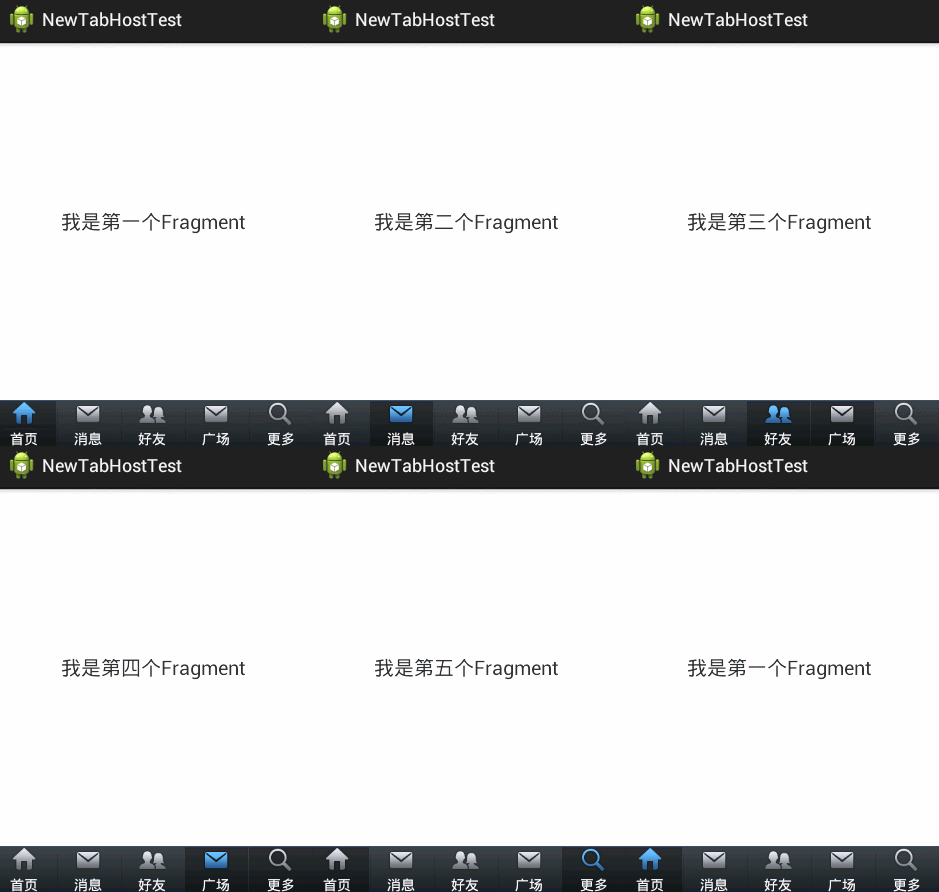
下面直接上代码了,注释很全,看过我前2篇文章的朋友,肯定秒懂的,哈哈~
activity_main.xml(主布局文件)

 1 <LinearLayout xmlns:android="http://schemas.android.com/apk/res/android"

 2     xmlns:tools="http://schemas.android.com/tools"

 3     android:layout_width="fill_parent"

 4     android:layout_height="fill_parent"

 5     android:orientation="vertical" >

 6

 7     <!-- 存放主要页面内容 -->

 8

 9     <FrameLayout

10         android:id="@+id/maincontent"

11         android:layout_width="fill_parent"

12         android:layout_height="0dp"

13         android:layout_weight="1" >

14     </FrameLayout>

15

16     <!-- 底层菜单 -->

17

18     <android.support.v4.app.FragmentTabHost

19         android:id="@android:id/tabhost"

20         android:layout_width="fill_parent"

21         android:layout_height="wrap_content"

22         android:background="@drawable/maintab_toolbar_bg" >

23

24         <FrameLayout

25             android:id="@android:id/tabcontent"

26             android:layout_width="0dp"

27             android:layout_height="0dp"

28             android:layout_weight="0" >

29         </FrameLayout>

30     </android.support.v4.app.FragmentTabHost>

31

32 </LinearLayout>
fragment.xml(由于只有文字不同,这里只给出一个)
 1 <RelativeLayout xmlns:android="http://schemas.android.com/apk/res/android"

 2     xmlns:tools="http://schemas.android.com/tools"

 3     android:layout_width="fill_parent"

 4     android:layout_height="fill_parent"

 5  >

 6

 7

 8     <TextView

 9         android:id="@+id/text"

10         android:layout_width="wrap_content"

11         android:layout_height="wrap_content"

12         android:layout_centerInParent="true"

13         android:text="我是第一个Fragment"

14         android:textSize="20dp"

15         />

16

17

18 </RelativeLayout>
tabcontent.xml(具体底部菜单详细布局)
 1 <LinearLayout xmlns:android="http://schemas.android.com/apk/res/android"

 2     xmlns:tools="http://schemas.android.com/tools"

 3     android:layout_width="wrap_content"

 4     android:layout_height="wrap_content"

 5     android:gravity="center_horizontal"

 6     android:orientation="vertical" >

 7

 8     <ImageView

 9         android:id="@+id/image"

10         android:layout_height="wrap_content"

11         android:layout_width="wrap_content"

12         />

13     <TextView

14         android:id="@+id/text"

15         android:padding="2dp"

16         android:layout_width="wrap_content"

17         android:layout_height="wrap_content"

18         android:textColor="@android:color/white"

19         />

20

21

22 </LinearLayout>
bt_selector.xml(底部菜单点击背景)
1 <?xml version="1.0" encoding="utf-8"?>

2 <selector xmlns:android="http://schemas.android.com/apk/res/android">

3

4     <item android:drawable="@drawable/home_btn_bg" android:state_pressed="true"></item>

5     <item android:drawable="@drawable/home_btn_bg" android:state_selected="true"></item>

6

7 </selector>
bt_home_selector.xml(底部菜单按钮效果)
1 <?xml version="1.0" encoding="utf-8"?>

2 <selector xmlns:android="http://schemas.android.com/apk/res/android">

3

4     <item android:drawable="@drawable/icon_home_sel" android:state_selected="true"></item>

5     <item android:drawable="@drawable/icon_home_nor"></item>

6

7 </selector>
FragmentPage1-FragmentPage5.java
 1 package com.example.newtabhosttest;

 2

 3 import android.os.Bundle;

 4 import android.support.annotation.Nullable;

 5 import android.support.v4.app.Fragment;

 6 import android.view.LayoutInflater;

 7 import android.view.View;

 8 import android.view.ViewGroup;

 9

10 public class FragmentPage1 extends Fragment{

11         @Override

12         public View onCreateView(LayoutInflater inflater,

13                 @Nullable ViewGroup container, @Nullable Bundle savedInstanceState) {

14             return inflater.inflate(R.layout.fragment1, null);

15         }

16

17 }
MainActivity.java(主代码)
 1 package com.example.newtabhosttest;

 2

 3 import android.os.Bundle;

 4 import android.support.v4.app.FragmentActivity;

 5 import android.support.v4.app.FragmentTabHost;

 6 import android.view.View;

 7 import android.widget.ImageView;

 8 import android.widget.TabHost.TabSpec;

 9 import android.widget.TextView;

10

11 public class MainActivity extends FragmentActivity {

12

13     private FragmentTabHost fragmentTabHost;

14     private String texts[] = { "首页", "消息", "好友", "广场", "更多" };

15     private int imageButton[] = { R.drawable.bt_home_selector,

16             R.drawable.bt_message_selector, R.drawable.bt_selfinfo_selector,R.drawable.bt_square_selector ,R.drawable.bt_more_selector};

17      private Class fragmentArray[] = {FragmentPage1.class,FragmentPage2.class,FragmentPage3.class,FragmentPage4.class,FragmentPage5.class};

18

19     @Override

20     protected void onCreate(Bundle savedInstanceState) {

21         super.onCreate(savedInstanceState);

22         setContentView(R.layout.activity_main);

23

24         // 实例化tabhost

25         fragmentTabHost = (FragmentTabHost) findViewById(android.R.id.tabhost);

26         fragmentTabHost.setup(this, getSupportFragmentManager(),

27                 R.id.maincontent);

28

29         for (int i = 0; i < texts.length; i++) {

30             TabSpec spec=fragmentTabHost.newTabSpec(texts[i]).setIndicator(getView(i));

31

32             fragmentTabHost.addTab(spec, fragmentArray[i], null);

33

34             //设置背景(必须在addTab之后,由于需要子节点(底部菜单按钮)否则会出现空指针异常)

35             fragmentTabHost.getTabWidget().getChildAt(i).setBackgroundResource(R.drawable.bt_selector);

36         }

37

38     }

39

40     private View getView(int i) {

41         //取得布局实例

42         View view=View.inflate(MainActivity.this, R.layout.tabcontent, null);

43

44         //取得布局对象

45         ImageView imageView=(ImageView) view.findViewById(R.id.image);

46         TextView textView=(TextView) view.findViewById(R.id.text);

47

48         //设置图标

49         imageView.setImageResource(imageButton[i]);

50         //设置标题

51         textView.setText(texts[i]);

52         return view;

53     }

54

55 }
到这里代码就结束了,要是有哪里疑惑的朋友可以给我留言,如果觉得文章对您有用的话,请给个赞,谢谢支持!^_^
转-Fragment+FragmentTabHost组件(实现新浪微博底部菜单)的更多相关文章
- 安卓开发笔记——Fragment+FragmentTabHost组件(实现新浪微博底部菜单)
记得之前写过2篇关于底部菜单的实现,由于使用的是过时的TabHost类,虽然一样可以实现我们想要的效果,但作为学习,还是需要来了解下这个新引入类FragmentTabHost 之前2篇文章的链接: 安 ...
- 底部菜单栏(三)Fragment+FragmentTabHost实现仿新浪微博底部菜单栏
一.实现效果图 二.项目工程结构 三.详细代码编写 1.主tab布局界面,main_tab_layout: 双击代码全选 1 2 3 4 5 6 7 8 9 10 11 12 13 14 15 16 ...
- Fragment+FragmentTabHost组件实现常见主页面(仿微信新浪)
采取的方法是Fragment+FragmentTabHost组件来实现这种常见的app主页面的效果 首先给出main.xml文件 <?xml version="1.0" en ...
- Android自己定义TabActivity(实现仿新浪微博底部菜单更新UI)
现在Android上非常多应用都採用底部菜单控制更新的UI这样的框架,比如新浪微博 点击底部菜单的选项能够更新界面.底部菜单能够使用TabHost来实现,只是用过TabHost的人都知道自己定义Tab ...
- [Android] Android 使用 FragmentTabHost + Fragment 实现 微信 底部菜单
Android 使用 FragmentTabHost + Fragment 实现 微信 底部菜单 利用FragmentTabHost实现底部菜单,在该底部菜单中,包括了4个TabSpec,每个TabS ...
- 用Fragment实现如新浪微博一样的底部菜单的切换
像我这个有强迫症的人来说,自从TabActivity抛弃之后,再使用看到一个个警告和一条条划着的横线,心里很不舒服,现在终于下定决心用Fragment来替换掉TabActivity了!我的研究成果如下 ...
- 转-TabHost组件(一)(实现底部菜单导航)
http://www.cnblogs.com/lichenwei/p/3974009.html 什么是TabHost? TabHost组件的主要功能是可以进行应用程序分类管理,例如:在用户使用wind ...
- Xamarin.Android 利用Fragment实现底部菜单
效果图: 第一步:添加引用 引用 Crosslight.Xamarin.Android.Support.v7.AppCompat 这个包. 第二步:绘制Main和Fragment界面 fg_home. ...
- 安卓开发笔记——TabHost组件(一)(实现底部菜单导航)
什么是TabHost? TabHost组件的主要功能是可以进行应用程序分类管理,例如:在用户使用windows操作系统的时候,经常见到如图所示的图形界面. TabHost选项卡,说到这个组件, ...
随机推荐
- ndk-build出错,错误以及解决办法如下
用NDK编译jni目录下的文件了,我的系统是Ubuntu10.04,NDK版本是android-ndk-r7b. 切换到工程的jni目录下执行:ndk-build(ndk-build的路径已经添加到系 ...
- display:none,overflow:hidden,visibility:hidden之间的区别
一,display:none; 隐藏元素,不占网页中的任何空间,让这个元素彻底消失(看不见也摸不着) 二,overflow:hidden; 让超出的元素隐藏,就是在设置该属性的时候他会根据你设置的宽高 ...
- PHP安装libevent扩展
1. 下载扩展 官方地址http://pecl.php.net/package/libevent 请根据自己的PHP脚本选择相应版本 如 wget http://pecl.php.net/get/li ...
- linux包之findutils之find和xargs命令
解释 [root@localhost ~]# rpm -qa|grep findfindutils-4.4.2-6.el6.x86_64 find 路径 测试 动作 三个步骤的处理过程查找一个或多个目 ...
- [Asp.net]说说密码框和只读框
作者:Wolfy出处:http://www.cnblogs.com/wolf-sun/ 引言 最近负责了一个公司的小项目,从前台到后代,都是自己搞的,为一个客户弄一个信息管理的小系统,虽然对界面什么的 ...
- OpenJudge计算概论-扩号匹配问题【这个用到了栈的思想】
/*====================================================================== 扩号匹配问题 总时间限制: 1000ms 内存限制: ...
- python数据类型之list
1.append:增加元素到列表尾部 L.append(object) -> None -- append object to end 2.clear:清空列表中所有元素 3.count:返回列 ...
- Innodb 表修复(转)
摘要: 突然收到MySQL报警,从库的数据库挂了,一直在不停的重启,打开错误日志,发现有张表坏了.innodb表损坏不能通过repair table 等修复myisam的命令操作.现在记录下 ...
- Angular学习(8)- directive
<!DOCTYPE html> <html ng-app="MyApp"> <head> <title>Study 9</ti ...
- 【linux】输出重定向
“>”:把正确结果输出到一个文件 [root@andon ~]# ls > 1 [root@andon ~]# cat 1 1 anaconda-ks.cfg install.log in ...