
Python的Beautiful Soup简单使用
Beautiful Soup是python的一个库,最主要的功能是从网页抓取数据
Beautiful Soup提供一些简单的、python式的函数用来处理导航、搜索、修改分析树等功能
它是一个工具箱,通过解析文档为用户提供需要抓取的数据
Beautiful Soup自动将输入文档转换为Unicode编码,输出文档转换为utf-8编码
安装
pip install bs4
创建一个字符串
html="""

<html><head><title>The Dormouse's story</title></head>

<body>

<p class="title" name="dromouse"><b>The Dormouse's story</b></p>

<p class="story">Once upon a time there were three little sisters; and their names were

<a href="http://example.com/elsie" class="sister" id="link1"><!-- Elsie --></a>,

<a href="http://example.com/lacie" class="sister" id="link2">Lacie</a> and

<a href="http://example.com/tillie" class="sister" id="link3">Tillie</a>;

and they lived at the bottom of a well.</p>

<p class="story">...</p>

"""
使用BeautifulSoup解析这段代码,能够得到一个 BeautifulSoup 的对象,并能按照标准的缩进格式的结构输出
from bs4 import BeautifulSoup

soup=BeautifulSoup(html,"html.parser")

print(soup.prettify())

也可以用本地 HTML 文件来创建对象
soup=BeautifulSoup(open("index.html"),"html.parser")
prettify()格式化输出,将Beautiful Soup的文档树格式化后以Unicode编码输出,每个XML/HTML标签都独占一行
四种Beautiful Soup对象类型
Beautiful Soup将复杂HTML文档转换成一个复杂的树形结构,每个节点都是Python对象,所有对象有4种
- Tag
HTML 中的标签
print(soup.title)

print(soup.a)

Tag的属性, name 和 attrs
name
print(soup.name)

print(soup.p.name)
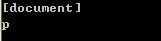
soup 对象的name 即为 [document],对于其他标签,输出的值便为标签本身的名称
attrs
print(soup.p.attrs)

print(soup.p['class'])

soup.p['class']="newClass"

print(soup.p.get('class'))

print(soup.p)

del soup.p['class']

print(soup.p)

- NavigableString
获取标签内部的文字,用 .string
print(soup.p)

print(soup.p.string)

print(type(soup.p.string))

- BeautifulSoup
BeautifulSoup 对象表示的是一个文档的全部内容.可以把它当作特殊的Tag 对象
print(type(soup.name))

print(soup.name)

print(soup.attrs)

- Comment
Comment 对象是一个特殊类型的 NavigableString 对象
用CDATA来替代注释
from bs4 import BeautifulSoup,CData

markup = "<b><!--Hey, buddy. Want to buy a used parser?--></b>"

soup = BeautifulSoup(markup,"html.parser")

print(soup.b.prettify())

comment = soup.b.string

cdata = CData("A CDATA block")

comment.replace_with(cdata)

print(soup.b.prettify())

遍历文档树
1.子孙节点
(1)contents
将tag的子节点以列表的方式输出
from bs4 import BeautifulSoup

soup=BeautifulSoup(open("index.html"),"html.parser")

head_tag = soup.head

print(len(soup.contents))

print(head_tag)

contents=head_tag.contents

print(contents)

title_tag = head_tag.contents[0]

print(title_tag)

text = title_tag.contents[0]

print(text)

说明:
字符串没有 .contents 属性,因为字符串没有子节点
(2)children
得到一个节点的迭代器,可以遍历之获取其中的元素
from bs4 import BeautifulSoup

soup=BeautifulSoup(open("index.html"),"html.parser")

head_tag = soup.head

contents=head_tag.contents

title_tag = head_tag.contents[0]

for child in title_tag.children:

    print(child)

(3)descendants
对所有tag的子孙节点进行递归循环
from bs4 import BeautifulSoup

soup=BeautifulSoup(open("index.html"),"html.parser")

head_tag = soup.head

for child in head_tag.descendants:

    print(child)

<head>标签只有一个子节点,但是有2个子孙节点
from bs4 import BeautifulSoup

soup=BeautifulSoup(open("index.html"),"html.parser")

print(len(list(soup.children)))

print(len(list(soup.descendants)))

(4)string
from bs4 import BeautifulSoup

soup=BeautifulSoup(open("index.html"),"html.parser")

head_tag = soup.head

contents=head_tag.contents

title_tag = head_tag.contents[0]
如果tag只有一个 NavigableString 类型子节点,那么这个tag可以使用 .string 得到子节点
print(title_tag.string)

如果一个tag仅有一个子节点,那么这个tag也可以使用
print(head_tag.string)

如果tag包含了多个子节点,tag就无法确定 .string 方法应该调用哪个子节点的内容, .string 的输出结果是 None
print(soup.html.string)

(4)strings
如果tag中包含多个字符串 ,可以使用 .strings 来循环获取
from bs4 import BeautifulSoup

soup=BeautifulSoup(open("index.html"),"html.parser")

for string in soup.strings:

    print(repr(string))

.stripped_strings 可以去除多余空白内容
from bs4 import BeautifulSoup

soup=BeautifulSoup(open("index.html"),"html.parser")

for string in soup.stripped_strings:

    print(repr(string))

全部是空格的行会被忽略掉,段首和段末的空白会被删除
2.父亲节点
(1)parent
获取某个元素的父节点
soup=BeautifulSoup(open("index.html"),"html.parser")

head_tag = soup.head

contents=head_tag.contents

title_tag = head_tag.contents[0]

print(title_tag)

#<head>标签是<title>标签的父节点

print(title_tag.parent)

#顶层节点比如<html>的父节点是 BeautifulSoup 对象

print(type(soup.html.parent))

#BeautifulSoup 对象的 .parent 是None

print(soup.parent)

(2).parents
递归得到元素的所有父辈节点
遍历了<a>标签到根节点的所有节点
soup=BeautifulSoup(open("index.html"),"html.parser")

link = soup.a

print(link)

for parent in link.parents:

    if parent is None:

        print(parent)

    else:

        print(parent.name)

3.兄弟节点
(1)next_sibling下一个节点
(2)previous_sibling上一个节点
sibling_soup = BeautifulSoup("<a><b>text1</b><c>text2</c></b></a>",'html.parser')

print(sibling_soup.prettify())
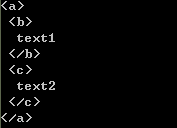
print(sibling_soup.b.next_sibling)
print(sibling_soup.c.previous_sibling)
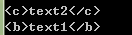
(3)next_siblings所有的后续节点
(4)previous_siblings所有之前的节点
soup=BeautifulSoup(open("index.html"),"html.parser")

for sibling in soup.a.next_siblings:

    print(repr(sibling))

for sibling in soup.find(id="link3").previous_siblings:

    print(repr(sibling))
4.前后节点
(1)next_element
下一个被解析的对象
(2)previous_element
前一个解析对象
from bs4 import BeautifulSoup

soup=BeautifulSoup(open("index.html"),"html.parser")

last_a_tag = soup.find("a", id="link3")

print(last_a_tag)

print(last_a_tag.next_element)

print(last_a_tag.previous_element)

树的搜索
(1) find_all()
搜索当前tag的所有tag子节点,并判断是否符合过滤器的条件
from bs4 import BeautifulSoup

soup=BeautifulSoup(open("index.html"),"html.parser")

print(soup.find_all("a"))

print(soup.find_all(id="link2"))

import re

print(soup.find(string=re.compile("sisters")))

#Once upon a time there were three little sisters; and their names were
格式: find_all( name , attrs , recursive , string , **kwargs )
说明:
(a)name 参数
可以查找所有名字为 name 的tag,字符串对象会被自动忽略掉
eg:soup.find_all("title")
(b)keyword 参数
指定名字的参数不是搜索内置的参数名,搜索时会把该参数当作指定名字tag的属性来搜索
如果包含一个名字为 id 的参数,Beautiful Soup会搜索每个tag的”id”属性
eg:soup.find_all(id='link2')

如果传入 href 参数,Beautiful Soup会搜索每个tag的”href”属性
eg:soup.find_all(href=re.compile("elsie"))

查找所有包含 id 属性的tag,无论 id 的值是什么
eg:soup.find_all(id=True)

有些tag属性在搜索不能使用,比如HTML5中的 data-* 属性,可以通过 find_all() 方法的 attrs 参数定义一个字典参数来搜索包含特殊属性的tag
from bs4 import BeautifulSoup

data_soup = BeautifulSoup('<div data-foo="value">foo!</div>','lxml')

print(data_soup.find_all(attrs={"data-foo": "value"}))

(c)CSS搜索
eg:soup.find_all("a", class_="sister")
(d)string参数
eg:
soup.find_all(string=["Tillie", "Elsie", "Lacie"])
(e)limit参数
限制返回结果的数量
eg:
soup.find_all("a", limit=2)
(f)recursive
只搜索tag的直接子节点,使用参数 recursive=False
(1)find()
格式: find( name , attrs , recursive , string , **kwargs )
soup.find_all('title', limit=1) #返回结果是值包含一个元素的列表,没有找到目标是返回空列表
soup.find('title') #直接返回结果,找不到目标时,返回 None
获取文档内容
get_text()
可以获取到tag中包含的所有文版内容包括子孙tag中的内容,并将结果作为Unicode字符串返回
from bs4 import BeautifulSoup

markup = '<a href="http://example.com/">\nI linked to <i>example.com</i>\n</a>'

soup = BeautifulSoup(markup,"html.parser")

print(soup.get_text())

print(soup.i.get_text())

可以通过参数指定tag的文本内容的分隔符
from bs4 import BeautifulSoup

markup = '<a href="http://example.com/">\nI linked to <i>example.com</i>\n</a>'

soup = BeautifulSoup(markup,"html.parser")

print(soup.get_text("|"))

可以去除获得文本内容的前后空白
from bs4 import BeautifulSoup

markup = '<a href="http://example.com/">\nI linked to <i>example.com</i>\n</a>'

soup = BeautifulSoup(markup,"html.parser")

print(soup.get_text("|", strip=True))

用 .stripped_strings获得文本列表
from bs4 import BeautifulSoup

markup = '<a href="http://example.com/">\nI linked to <i>example.com</i>\n</a>'

soup = BeautifulSoup(markup,"html.parser")

print([text for text in soup.stripped_strings])

安装解析器
创建 BeautifulSoup 对象
| 解析器 | 使用方法 | 优势 | 劣势 |
|---|---|---|---|
| Python标准库 | BeautifulSoup(markup, "html.parser") |
|
|
| lxml HTML 解析器 | BeautifulSoup(markup, "lxml") |
|
|
| lxml XML 解析器 |
|
|
|
| html5lib | BeautifulSoup(markup, "html5lib") |
|
|
pip install html5lib

pip install lxml
lxml解析器,效率更高
参考资料:
http://beautifulsoup.readthedocs.io/zh_CN/latest/
Python的Beautiful Soup简单使用的更多相关文章
- Python之Beautiful Soup的用法
1. Beautiful Soup的简介 简单来说,Beautiful Soup是python的一个库,最主要的功能是从网页抓取数据.官方解释如下: Beautiful Soup提供一些简单的.pyt ...
- 【python】Beautiful Soup的使用
1. Beautiful Soup的简介 简单来说,Beautiful Soup是python的一个库,最主要的功能是从网页抓取数据.官方解释如下: Beautiful Soup提供一些简单的.pyt ...
- python之Beautiful Soup库
1.简介 简单来说,Beautiful Soup是python的一个库,最主要的功能是从网页抓取数据.官方解释如下: Beautiful Soup提供一些简单的.python式的函数用来处理导航.搜索 ...
- Python之Beautiful Soup 4使用实例
Beautiful Soup 是一个可以从HTML或XML文件中提取数据的Python库,它能够通过你喜欢的转换器实现惯用的文档导航.查找.修改文档的方式.Beautiful Soup 4 官方文档: ...
- 20181223 python 使用Beautiful Soup
(这篇,没什么营养价值) 怎么说呢! 爬虫吧!把html页面进行解析得到有效数据,而beautiful soup 能快速格式化页面再进行方法对数进行提取,存入想要存入的DB中. from bs4 im ...
- Beautiful Soup的使用
Beautiful Soup简单实用,功能也算比较全,之前下载都是自己使用xpath去获取信息,以后简单的解析可以用这个,方便省事. Beautiful Soup 是用 Python 写的一个 HTM ...
- Python Beautiful Soup学习之HTML标签补全功能
Beautiful Soup是一个非常流行的Python模块.该模块可以解析网页,并提供定位内容的便捷接口. 使用下面两个命令安装: pip install beautifulsoup4 或者 sud ...
- python中html解析-Beautiful Soup
1. Beautiful Soup的简介 简单来说,Beautiful Soup是python的一个库,最主要的功能是从网页抓取数据.官方解释如下: Beautiful Soup提供一些简单的.pyt ...
- Python爬虫利器:Beautiful Soup
Beautiful Soup 是一个可以从HTML或XML文件中提取数据的Python库.使用它来处理HTML页面就像JavaScript代码操作HTML DOM树一样方便.官方中文文档地址 1. 安 ...
随机推荐
- PHPUnit 在phpstrom中composer项目的应用配置
在phpstorm的composer搭建的项目调试时出现这种错误时:是其配置的错误 'Cannot create phar '/data/AppStorm/DesignPatternsPHP/vend ...
- 【Unity】制作简易定时器(Timer)
最近开始学习Unity,也想开始学习写一些简单的博客. 在网上学习了一些关于定时器的写法,在此简单总结一下,方便自己以后用到时查阅. 需求:制作定时器,运行3秒后执行第一次,之后每隔3秒执行一次操作. ...
- PHP——大话PHP设计模式——命名空间和类的自动载入
开发工具:phpstorm phpstudy 命名空间:声明当前文件 类的自动载入
- 如何安装docker-compose
docker-compose还是挺好用的~~~~~ 这里简单介绍下两种安装docker-compose的方式,第一种方式相对简单,但是由于网络问题,常常安装不上,并且经常会断开,第二种方式略微麻烦,但 ...
- module.inc 模块
/** *加载所有已经在系统表被启用的模块. *@参数$bootstrap *是否加载在“引导模式”缓存页面加载的模块只减少集.见bootstrap.inc文件. *@return *如果$ ...
- android开发(28) 做个 指南针 应用
参考网上的资料,做了个指南针应用玩玩. 步骤: 1.获得 SensorManager. mSensorManager = (SensorManager) getSystemService(SENSOR ...
- 【常用配置】——WPS文字常用快捷键大全【史上最全面】转
WPS文字快捷键大全 Word快捷键 Excel快捷键 PPT快捷键 Office快捷键大全 WPS文字快捷键 WPS表格快捷键 WPS演示快捷键 WPS快捷键大全 用于处理WPS文档的快捷键 创建新 ...
- 客户端通过HTTP协议与服务端交换数据
客户端(包括浏览器)通过HTTP协议与服务端交换数据的描述 发起请求 header 键值对中的key大小写不敏感 Accept: application/json Content-Type: ...
- 内存映射文件(Memory-Mapped File)
Java Memory-Mapped File所使用的内存分配在物理内存而不是JVM堆内存,且分配在OS内核. 1: 内存映射文件及其应用 - 实现一个简单的消息队列 / 计算机程序的思维逻辑 在一般 ...
- 转:Java中String与byte[]的转换
原文地址:http://blog.csdn.net/llwan/article/details/7567906 String s = "fs123fdsa";//String变量 ...