
kafka_2.10-0.8.1.1.tgz的1或3节点集群的下载、安装和配置(图文详细教程)绝对干货
运行kafka ,需要依赖 zookeeper,你可以使用已有的 zookeeper 集群或者利用 kafka自带的zookeeper。
单机模式,用的是kafka自带的zookeeper,
分布式模式,用的是外部安装的zookeeper,即公共的zookeeper。
见博客
4 kafka集群部署及生产者java客户端编程 + kafka消费者java客户端编程
(这也是单节点安装)
kafka_2.10-0.8.1.1.tgz的1节点集群
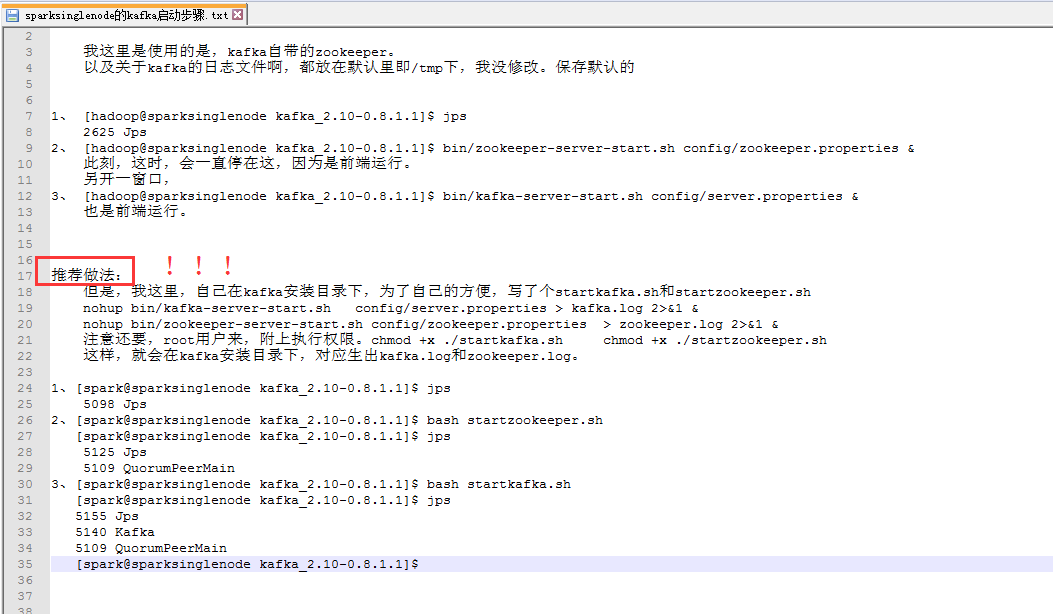
我这里是使用的是,kafka自带的zookeeper。
以及关于kafka的日志文件啊,都放在默认里即/tmp下,我没修改。保存默认的
1、 [hadoop@sparksinglenode kafka_2.10-0.8.1.1]$ jps
2625 Jps
2、 [hadoop@sparksinglenode kafka_2.10-0.8.1.1]$ bin/zookeeper-server-start.sh config/zookeeper.properties &
此刻,这时,会一直停在这,因为是前端运行。
另开一窗口,
3、 [hadoop@sparksinglenode kafka_2.10-0.8.1.1]$ bin/kafka-server-start.sh config/server.properties &
也是前端运行。
推荐做法!!!
但是,我这里,自己在kafka安装目录下,为了自己的方便,写了个startkafka.sh和startzookeeper.sh
nohup bin/kafka-server-start.sh config/server.properties > kafka.log 2>&1 &
nohup bin/zookeeper-server-start.sh config/zookeeper.properties > zookeeper.log 2>&1 &
注意还要,root用户来,附上执行权限。chmod +x ./startkafka.sh chmod +x ./startzookeeper.sh
这样,就会在kafka安装目录下,对应生出kafka.log和zookeeper.log。
1、[spark@sparksinglenode kafka_2.10-0.8.1.1]$ jps
5098 Jps
2、[spark@sparksinglenode kafka_2.10-0.8.1.1]$ bash startzookeeper.sh
[spark@sparksinglenode kafka_2.10-0.8.1.1]$ jps
5125 Jps
5109 QuorumPeerMain
3、[spark@sparksinglenode kafka_2.10-0.8.1.1]$ bash startkafka.sh
[spark@sparksinglenode kafka_2.10-0.8.1.1]$ jps
5155 Jps
5140 Kafka
5109 QuorumPeerMain
[spark@sparksinglenode kafka_2.10-0.8.1.1]$
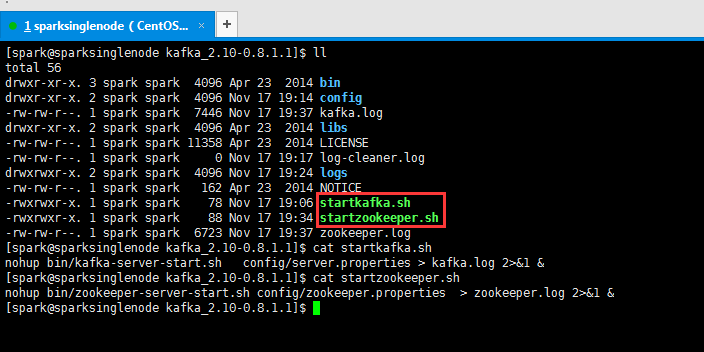
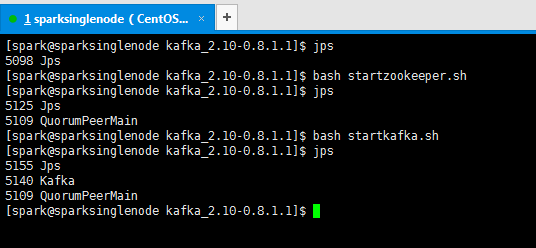
我了个去,启动是多么方便!
kafka_2.10-0.8.1.1.tgz的3节点集群
关于下载,和安装,解压,这些,我不多赘述了。见我的单节点博客。
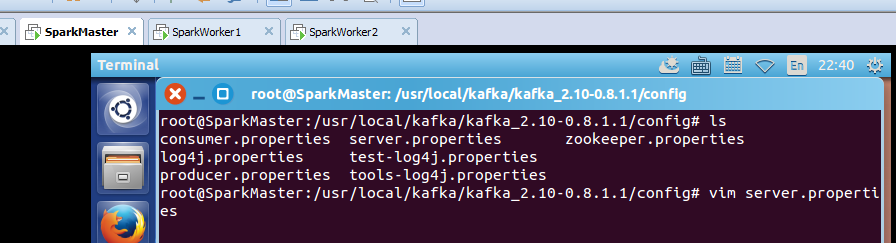

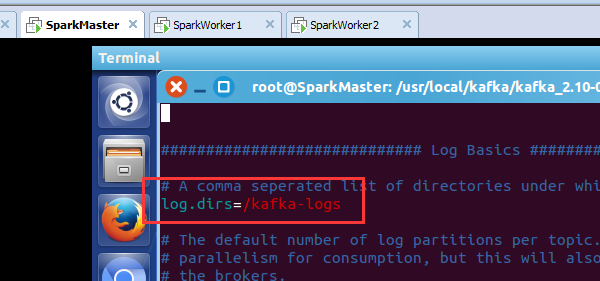

root@SparkMaster:/usr/local/kafka/kafka_2.10-0.8.1.1/config# cat server.properties
# Licensed to the Apache Software Foundation (ASF) under one or more
# contributor license agreements. See the NOTICE file distributed with
# this work for additional information regarding copyright ownership.
# The ASF licenses this file to You under the Apache License, Version 2.0
# (the "License"); you may not use this file except in compliance with
# the License. You may obtain a copy of the License at
#
# http://www.apache.org/licenses/LICENSE-2.0
#
# Unless required by applicable law or agreed to in writing, software
# distributed under the License is distributed on an "AS IS" BASIS,
# WITHOUT WARRANTIES OR CONDITIONS OF ANY KIND, either express or implied.
# See the License for the specific language governing permissions and
# limitations under the License.
# see kafka.server.KafkaConfig for additional details and defaults
############################# Server Basics #############################
# The id of the broker. This must be set to a unique integer for each broker.
broker.id=0
############################# Socket Server Settings #############################
# The port the socket server listens on
port=9092
# Hostname the broker will bind to. If not set, the server will bind to all interfaces
#host.name=localhost
# Hostname the broker will advertise to producers and consumers. If not set, it uses the
# value for "host.name" if configured. Otherwise, it will use the value returned from
# java.net.InetAddress.getCanonicalHostName().
#advertised.host.name=<hostname routable by clients>
# The port to publish to ZooKeeper for clients to use. If this is not set,
# it will publish the same port that the broker binds to.
#advertised.port=<port accessible by clients>
# The number of threads handling network requests
num.network.threads=2
# The number of threads doing disk I/O
num.io.threads=8
# The send buffer (SO_SNDBUF) used by the socket server
socket.send.buffer.bytes=1048576
# The receive buffer (SO_RCVBUF) used by the socket server
socket.receive.buffer.bytes=1048576
# The maximum size of a request that the socket server will accept (protection against OOM)
socket.request.max.bytes=104857600
############################# Log Basics #############################
# A comma seperated list of directories under which to store log files
log.dirs=/kafka-logs
# The default number of log partitions per topic. More partitions allow greater
# parallelism for consumption, but this will also result in more files across
# the brokers.
num.partitions=2
############################# Log Flush Policy #############################
# Messages are immediately written to the filesystem but by default we only fsync() to sync
# the OS cache lazily. The following configurations control the flush of data to disk.
# There are a few important trade-offs here:
# 1. Durability: Unflushed data may be lost if you are not using replication.
# 2. Latency: Very large flush intervals may lead to latency spikes when the flush does occur as there will be a lot of data to flush.
# 3. Throughput: The flush is generally the most expensive operation, and a small flush interval may lead to exceessive seeks.
# The settings below allow one to configure the flush policy to flush data after a period of time or
# every N messages (or both). This can be done globally and overridden on a per-topic basis.
# The number of messages to accept before forcing a flush of data to disk
#log.flush.interval.messages=10000
# The maximum amount of time a message can sit in a log before we force a flush
#log.flush.interval.ms=1000
############################# Log Retention Policy #############################
# The following configurations control the disposal of log segments. The policy can
# be set to delete segments after a period of time, or after a given size has accumulated.
# A segment will be deleted whenever *either* of these criteria are met. Deletion always happens
# from the end of the log.
# The minimum age of a log file to be eligible for deletion
log.retention.hours=168
# A size-based retention policy for logs. Segments are pruned from the log as long as the remaining
# segments don't drop below log.retention.bytes.
#log.retention.bytes=1073741824
# The maximum size of a log segment file. When this size is reached a new log segment will be created.
log.segment.bytes=536870912
# The interval at which log segments are checked to see if they can be deleted according
# to the retention policies
log.retention.check.interval.ms=60000
# By default the log cleaner is disabled and the log retention policy will default to just delete segments after their retention expires.
# If log.cleaner.enable=true is set the cleaner will be enabled and individual logs can then be marked for log compaction.
log.cleaner.enable=false
############################# Zookeeper #############################
# Zookeeper connection string (see zookeeper docs for details).
# This is a comma separated host:port pairs, each corresponding to a zk
# server. e.g. "127.0.0.1:3000,127.0.0.1:3001,127.0.0.1:3002".
# You can also append an optional chroot string to the urls to specify the
# root directory for all kafka znodes.
zookeeper.connect=SparkMaster:2181,SparkWorker1:2181,SparkWorker2:2181
# Timeout in ms for connecting to zookeeper
zookeeper.connection.timeout.ms=1000000
root@SparkMaster:/usr/local/kafka/kafka_2.10-0.8.1.1/config#
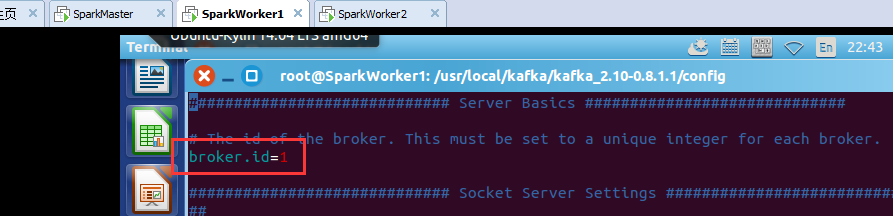
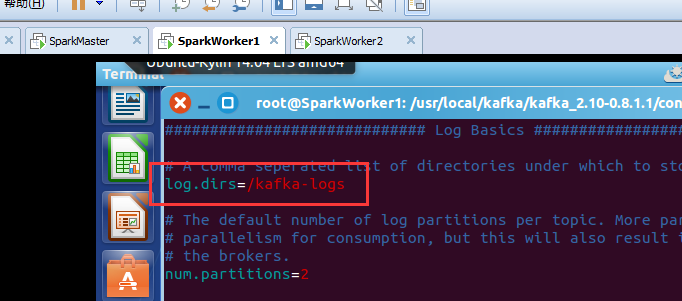
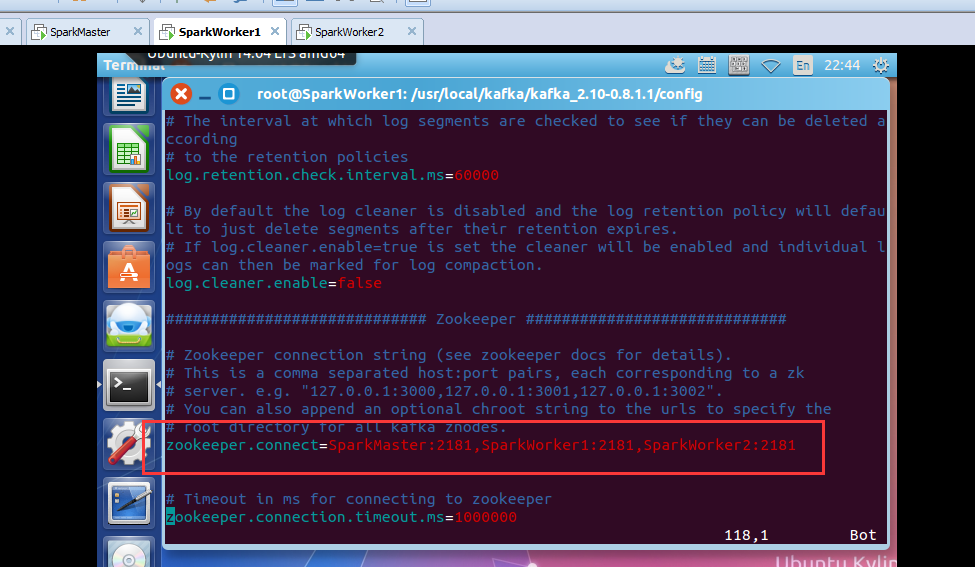
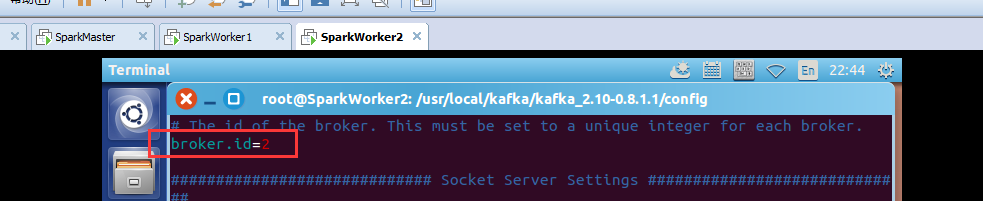
SparkWorker1和SparkWorker2分别只把 broker.id=0改成 broker.id=1 ,broker.id=2。
即SparkMaster:
broker.id=0
log.dirs=/kafka-logs
zookeeper.connect=SparkMaster:2181,SparkWorker1:2181,SparkWorker2:2181
即SparkWorker1:
broker.id=1
log.dirs=/kafka-logs
zookeeper.connect=SparkMaster:2181,SparkWorker1:2181,SparkWorker2:2181
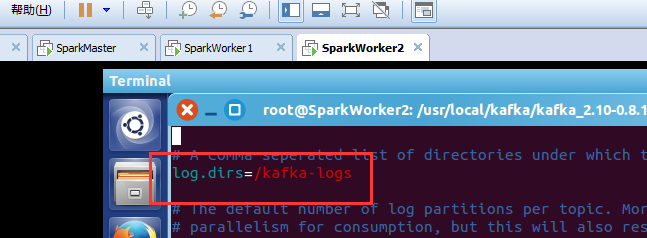
即SparkWorker2:
broker.id=2
log.dirs=/kafka-logs
zookeeper.connect=SparkMaster:2181,SparkWorker1:2181,SparkWorker2:2181



kafka的3节点如何启动
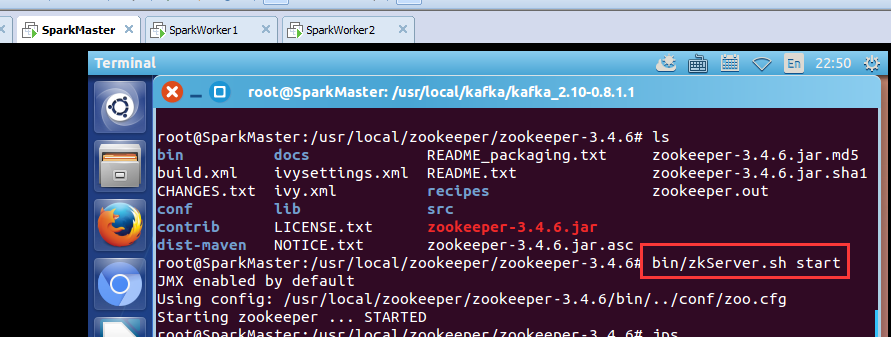
步骤一:先,分别在SparkMaster、SpakrWorker1、SparkWorker2节点上,启动zookeeper进程。
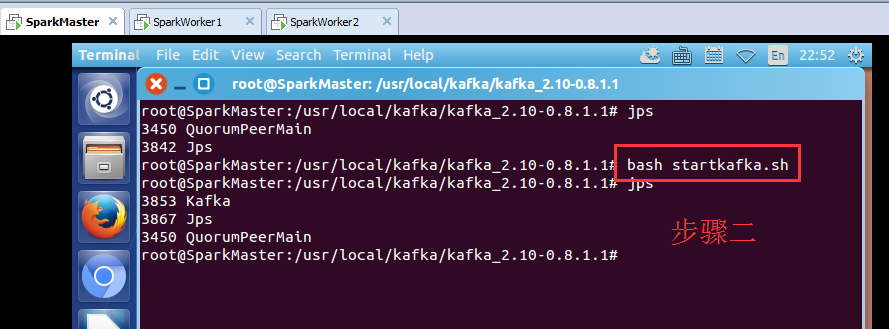
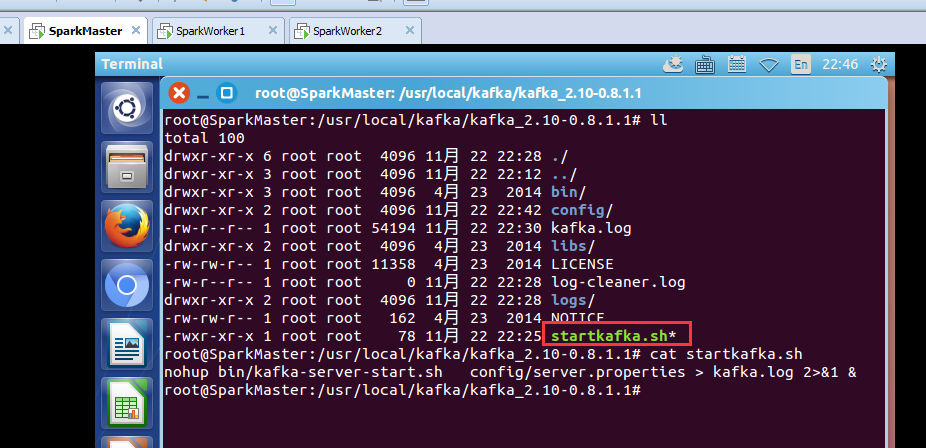
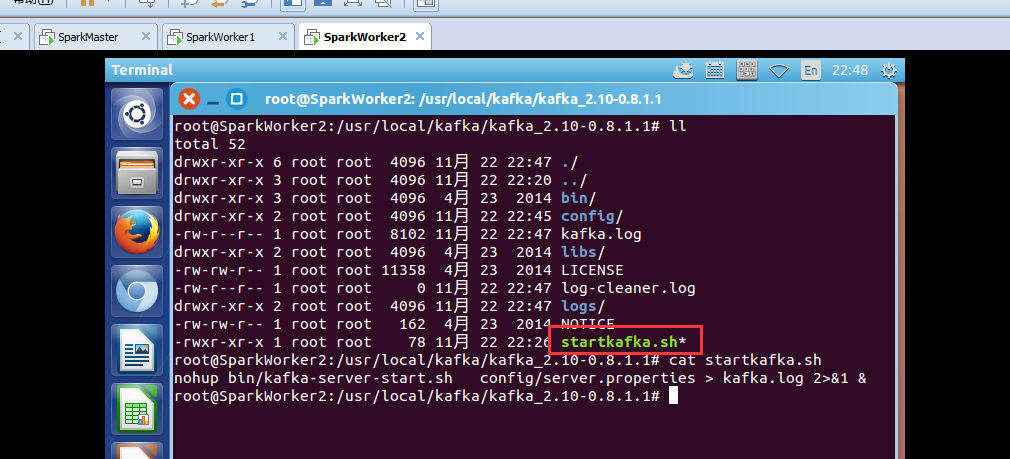
root@SparkMaster:/usr/local/kafka/kafka_2.10-0.8.1.1# bash startkafka.sh
其他,两台机器,一样的,不多赘述。
kafka_2.10-0.8.1.1.tgz的1或3节点集群的下载、安装和配置(图文详细教程)绝对干货的更多相关文章
- kafka_2.11-0.8.2.2.tgz的3节点集群的下载、安装和配置(图文详解)
kafka_2.10-0.8.1.1.tgz的1或3节点集群的下载.安装和配置(图文详细教程)绝对干货 一.安装前准备 1.1 示例机器 二. JDK7 安装 1.1 下载地址 下载地址: http: ...
- redis3.0 集群实战1 -- 安装和配置
本文主要是在centos7上安装和配置redis集群实战 参考: http://hot66hot.iteye.com/blog/2050676 集群教程: http://redisdoc.com/to ...
- Hyperledger Fabric 1.0 从零开始(九)——Fabric多节点集群生产启动
7:Fabric多节点集群生产启动 7.1.多节点服务器配置 在生产环境上,我们沿用4.1.配置说明中的服务器各节点配置方案. 我们申请了五台生产服务器,其中四台服务器运行peer节点,另外一台服务器 ...
- linux 搭建elk6.8.0集群并破解安装x-pack
一.环境信息以及安装前准备 1.组件介绍 *Filebeat是一个日志文件托运工具,在你的服务器上安装客户端后,filebeat会监控日志目录或者指定的日志文件,追踪读取这些文件(追踪文件的变化,不停 ...
- elasticsearch7.5.0+kibana-7.5.0+cerebro-0.8.5集群生产环境安装配置及通过elasticsearch-migration工具做新老集群数据迁移
一.服务器准备 目前有两台128G内存服务器,故准备每台启动两个es实例,再加一台虚机,共五个节点,保证down一台服务器两个节点数据不受影响. 二.系统初始化 参见我上一篇kafka系统初始化:ht ...
- hadoop-1.1.0 rpm + centos 6.3 64虚拟机 + JDK7 搭建分布式集群
第一步 ,环境准备. 宿主机为CentOS6.3 64位,3个虚拟机为CentOS6.3 64位. (注意:有个技巧,可以先创建一台虚拟机,在其上安装好JDK.hadoop后再克隆两台,这样省时又省 ...
- Hadoop 新生报道(二) hadoop2.6.0 集群系统版本安装和启动配置
本次基于Hadoop2.6版本进行分布式配置,Linux系统是基于CentOS6.5 64位的版本.在此设置一个主节点和两个从节点. 准备3台虚拟机,分别为: 主机名 IP地址 master 192. ...
- redis3.0 集群在windows上的配置(转)
1. 安装Redis版本:win-3.0.501https://github.com/MSOpenTech/redis/releases页面有,我下载的是zip版本的:Redis-x64-3.0.50 ...
- mongodb 3.0下载安装、配置及mongodb最新特性、基本命令教程详细介绍
mongoDB简介(本文由www.169it.com搜集整理) MongoDB是一个高性能,开源,无模式的文档型数据库,是目前在IT行业非常流行的一种非关系型数据库(NoSql).它在许多场景下可用于 ...
随机推荐
- Android 开发自己的网络收音机3——电台分类(ExpandableListView)
上一篇文章说了使用SlidingMenu开源项目实现侧滑栏,今天主要是讲解多级列表ExpandableListView的使用,以及如何使用它实现电台分类管理.ExpandableListView是An ...
- [转]获取JAVA[WEB]项目相关路径的几种方法
http://blog.csdn.net/yaerfeng/article/details/7297479/ 在jsp和class文件中调用的相对路径不同. 在jsp里,根目录是WebRoot 在cl ...
- 【Unity】使用JSONObject解析Json
为何要用JSONObject 之前已经用过JsonUtility和Newton.Json来解析Json了,为什么现在又要用一个新的JSONObject来解析Json? 使用JsonUtility:ht ...
- Winform仿制QQ微信聊天窗口气泡
因为公司业务原因,不能上传原始项目,这是简化版本. 临时设计的窗体和气泡样式,有需要可以重新设计.效果如下: 主要原理:一个TextBlock + 一个三角形 项目结构: -- Form1 窗体类 - ...
- C语言 · 最长字符串
算法训练 最长字符串 时间限制:1.0s 内存限制:512.0MB 求出5个字符串中最长的字符串.每个字符串长度在100以内,且全为小写字母. 样例输入 one two three ...
- Oracle锁表查询和解锁方法
数据库操作语句的分类 DDL:数据库模式定义语言,关键字:create DML:数据操纵语言,关键字:Insert.delete.update DCL:数据库控制语言 ,关键字:grant.remov ...
- [Timer]应用层实现sleep
转自:https://www.cnblogs.com/longbiao831/p/4556246.html Select只能做延时,可以做回调吗? 本文讲述如何使用select实现超级时钟.使用sel ...
- Flexbox的布局
http://segmentfault.com/blog/gitcafe/1190000002490633 https://css-tricks.com/snippets/css/a-guide-to ...
- mybatis中的#{}和${}区别
mybatis中的#{}和${}区别 2017年05月19日 13:59:24 阅读数:16165 1. #将传入的数据都当成一个字符串,会对自动传入的数据加一个双引号.如:order by #use ...
- 为什么Java匿名内部类访问的外部局部变量或参数需要被final修饰
大部分时候,类被定义成一个独立的程序单元.在某些情况下,也会把一个类放在另一个类的内部定义,这个定义在其他类内部的类就被称为内部类,包含内部类的类也被称为外部类. class Outer { priv ...