
ifconfig: command not found(CentOS专版,其他的可以参考)
ifconfig: command not found
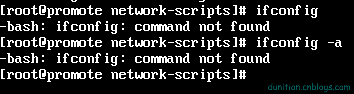
查看path配置(echo相当于c中的printf,C#中的Console.WriteLine)
echo $PATH

解决方案1:先看看是不是root用户,如果不是就 su 切换到root用户
su
解决方案2:(如果没看见 /sbin)【我们这显然不是这个问题】
这个一般都是因为配置没弄好,永久解决:
打开/etc/profile文件,在其中输入export PATH=$PATH:/sbin
解决方案3:(CentOS后来换指令了,看看我们是不是【ifconfig==>ip】)
在 /(根目录)里面查找 name(名字)是 ifconfig 的东东

说明ifconfig真的换了,淡定
看看信息
ip addr
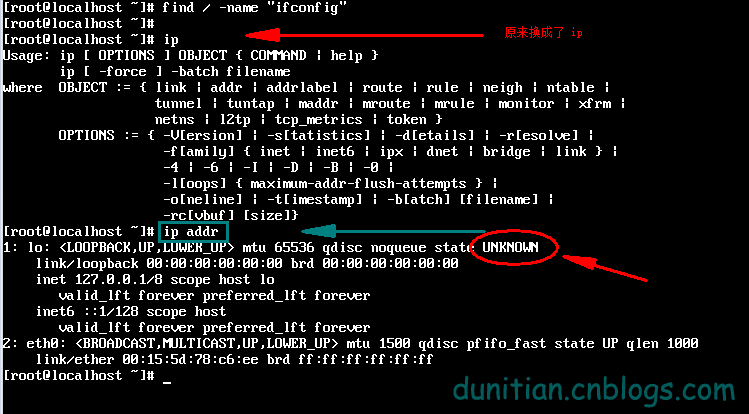
发现木有(看 2:eth0 没有ipv4)
跳转到 /etc/sysconfig/network-scripts 目录
cd /etc/sysconfig/network-scripts

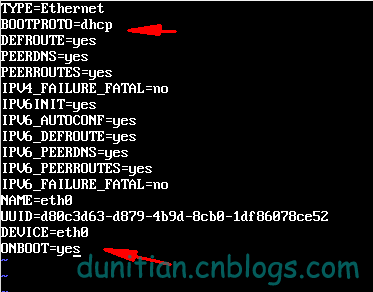
用vi打开 ifcfg-eth0 (你的可能是eth1,或者其他,不是每个电脑都是这个的)【如果想改成这个可以参考:http://jingyan.baidu.com/article/7f41ecec1b022e593d095c1e.html】

按 i 进去编辑模式 ,修改箭头处,然后按 esc 退回命令模式,输入:wq 并回车
重启一下
reboot

用root用户登陆后 输入
ip addr
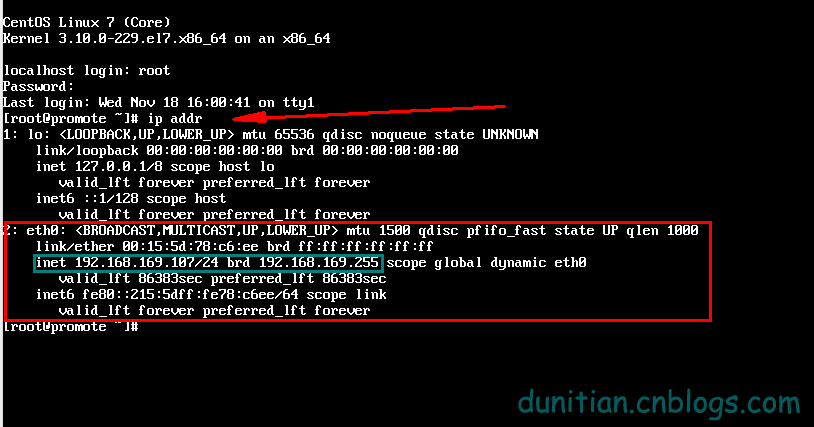
成功!!
解决方案4:(网络)
http://blog.sina.com.cn/s/blog_946cb2b70100wx2j.html
yum install setuptool安装setup,不过安装后使用运行setup只有Authentication configuration可用。
如想配置IP,安装system-config-network-tui即可。
yum install system-config-firewall-tui安装图形化Firewall配置工具。
yum list system-config* 全部安装。
参考:http://blog.csdn.net/johnstrive/article/details/5625121
ifconfig: command not found(CentOS专版,其他的可以参考)的更多相关文章
- Linux系统ifconfig命令找不到,centos ifconfig Command not found
centos ifconfig Command not found,Linux系统ifconfig命令找不到 >>>>>>>>>>>& ...
- CentOS 7.0下解决ifconfig: command not found的方法
在CentOS7.0中输入ifconfig命令会遇到-bash: ifconfig: command not found. 在CentOS最小安装时是没有附带ifconfig,我们进入sbin目录下可 ...
- ifconfig: command not found(CentOS 7,其他的可以参考)
ifconfig: command not found 查看path配置(echo相当于c中的printf,C#中的Console.WriteLine) 1 echo $PATH 解决方案1:先看看是 ...
- CentOS 7.6 最小安装 ifconfig command not found 及 yum 不可用的解决办法
问题描述 下载的是 CentOS 7.6 Everything 版本,在 VMware 12 上安装时软件选择“最小安装”后,输入 ifconfig 命令提示: bash ifconfig comma ...
- CentOS 7 ifconfig: command not found
# ifcon-bash: ifconfig: command not found谷歌了一下,整理了一下解决思路 查看ifconfig命令是否存在 查看 /sbin/ifconfig是否存在 如果if ...
- ifconfig: command not found 如何解决?
ifconfig: command not found 查看path配置(echo相当于c中的printf,C#中的Console.WriteLine) 1 echo $PATH 解决方案1:先看看是 ...
- ifconfig出现bash: ifconfig:command not found解决办法之解决连环问题
Centos7中没有安装ifconfig命令的解决方法 在这之前,centos7最小化安装默认是不能联网的,首先必须切换到root用户,再解决网络问题 一. 切换到root用户 二. ...
- CentOS7 下ifconfig command not found解决办法
今天尝鲜用VMWare安装了CentOS7,选择了最小安装包模式,安装完毕之后想查看一下本机的ip地址,发现报错 # ifcon -bash: ifconfig: command not found ...
- bash: ifconfig: command not found解决方法
1.问题: #ifconfig bash: ifconfig: command not found 2.原因:非root用户的path中没有/sbin/ifconfig ,其它的命令也可以出现这种情况 ...
随机推荐
- FFmpeg学习6:视音频同步
在上一篇文章中,视频和音频是各自独立播放的,并不同步.本文主要描述了如何以音频的播放时长为基准,将视频同步到音频上以实现视音频的同步播放的.主要有以下几个方面的内容 视音频同步的简单介绍 DTS 和 ...
- Connect() 2016 大会的主题 ---微软大法好
文章首发于微信公众号"dotnet跨平台",欢迎关注,可以扫页面左面的二维码. 今年 Connect 大会的主题是 Big possibilities. Bold technolo ...
- 线性数据结构之栈——Stack
Linear data structures linear structures can be thought of as having two ends, whose items are order ...
- iOS的ATS配置 - 2017年前ATS规定的适配
苹果规定 从2017年1月1日起,新提交的 app 不允许使用NSAllowsArbitraryLoads来绕过ATS(全称:App Transport Security)的限制. 以前为了能兼容ht ...
- SQL Server常见数据类型介绍
数据表是由多个列组成,创建表时必须明确每个列的数据类型,以下列举SQL Server常见数据类型的使用规则,方便查阅. 1.整数类型 int 存储范围是-2,147,483,648到2,147,483 ...
- ASP.NET MVC5+EF6+EasyUI 后台管理系统(70)-微信公众平台开发-成为开发者
系列目录 前言: 一.阅读这段系列之前,你必须花半天时间大致阅读微信公众平台的API文档,我尽量以简短快速的语言与大家分享一个过程 二.借助微信公众平台SDK Senparc.Weixin for C ...
- 【Reading Note】算法读书杂记
1 排序 排序基本信息 稳定性:排序前大的数在排序后,大的数依然保持不变就是稳定排序,反之不稳定 内外排序:根据待排序的记录是否放在内存里面区分的.诸如:插入排序(直接插入&希尔).交换排序( ...
- Javascript实现HashTable类
散列算法可以尽快在数据结构中找出指定的一个值,因为可以通过Hash算法求出值的所在位置,存储和插入的时候都按照Hash算法放到指定位置. <script> function HashTab ...
- Android中Activity处理返回结果的实现方式
大家在网上购物时都有这样一个体验,在确认订单选择收货人以及地址时,会跳转页面到我们存入网站内的所有收货信息(包含收货地址,收货人)的界面供我们选择,一旦我们点击其中某一条信息,则会自动跳转到订单提交界 ...
- Java中的进程与线程(总结篇)
详细文档: Java中的进程与线程.rar 474KB 1/7/2017 6:21:15 PM 概述: 几乎任何的操作系统都支持运行多个任务,通常一个任务就是一个程序,而一个程序就是一个进程.当一个进 ...