
ifconfig: command not found(CentOS 7,其他的可以参考)
ifconfig: command not found

查看path配置(echo相当于c中的printf,C#中的Console.WriteLine)
|
1
|
echo $PATH |

解决方案1:先看看是不是root用户,如果不是就 su 切换到root用户
su
解决方案2:(如果没看见 /sbin)【我们这显然不是这个问题】
这个一般都是因为配置没弄好,永久解决:
打开/etc/profile文件,在其中输入export PATH=$PATH:/sbin
解决方案3:(CentOS后来换指令了,看看我们是不是【ifconfig==>ip】)
在 /(根目录)里面查找 name(名字)是 ifconfig 的东东

说明ifconfig真的换了,淡定
看看信息
|
1
|
ip addr |
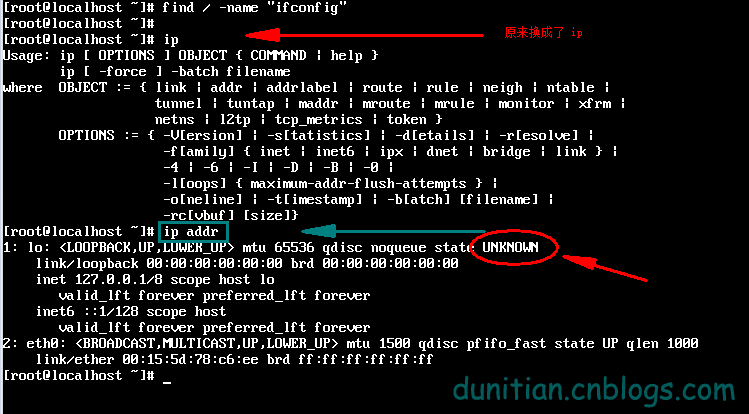
发现木有(看 2:eth0 没有ipv4)
跳转到 /etc/sysconfig/network-scripts 目录
|
1
|
cd /etc/sysconfig/network-scripts |

用vi打开 ifcfg-eth0 (你的可能是eth1,或者其他,不是每个电脑都是这个的)【如果想改成这个可以参考:http://jingyan.baidu.com/article/7f41ecec1b022e593d095c1e.html】

按 i 进去编辑模式 ,修改箭头处,然后按 esc 退回命令模式,输入:wq 并回车
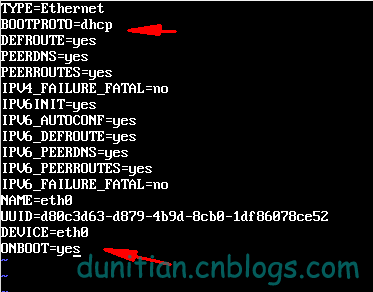
重启一下
|
1
|
reboot |

用root用户登陆后 输入
|
1
|
ip addr |
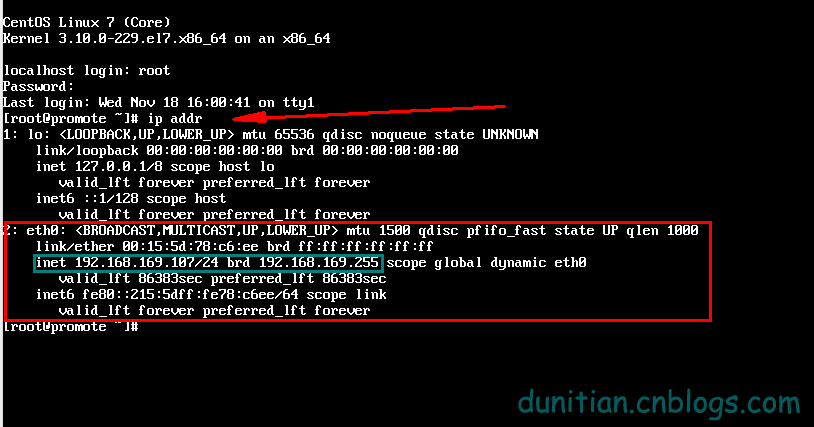
成功!!
解决方案4:(网络)
http://blog.sina.com.cn/s/blog_946cb2b70100wx2j.html
yum install setuptool安装setup,不过安装后使用运行setup只有Authentication configuration可用。
如想配置IP,安装system-config-network-tui即可。
yum install system-config-firewall-tui安装图形化Firewall配置工具。
yum list system-config* 全部安装。
ifconfig: command not found(CentOS 7,其他的可以参考)的更多相关文章
- ifconfig: command not found(CentOS专版,其他的可以参考)
ifconfig: command not found 查看path配置(echo相当于c中的printf,C#中的Console.WriteLine) echo $PATH 解决方案1:先看看是不是 ...
- Linux系统ifconfig命令找不到,centos ifconfig Command not found
centos ifconfig Command not found,Linux系统ifconfig命令找不到 >>>>>>>>>>>& ...
- CentOS 7.0下解决ifconfig: command not found的方法
在CentOS7.0中输入ifconfig命令会遇到-bash: ifconfig: command not found. 在CentOS最小安装时是没有附带ifconfig,我们进入sbin目录下可 ...
- CentOS 7.6 最小安装 ifconfig command not found 及 yum 不可用的解决办法
问题描述 下载的是 CentOS 7.6 Everything 版本,在 VMware 12 上安装时软件选择“最小安装”后,输入 ifconfig 命令提示: bash ifconfig comma ...
- CentOS 7 ifconfig: command not found
# ifcon-bash: ifconfig: command not found谷歌了一下,整理了一下解决思路 查看ifconfig命令是否存在 查看 /sbin/ifconfig是否存在 如果if ...
- ifconfig: command not found 如何解决?
ifconfig: command not found 查看path配置(echo相当于c中的printf,C#中的Console.WriteLine) 1 echo $PATH 解决方案1:先看看是 ...
- ifconfig出现bash: ifconfig:command not found解决办法之解决连环问题
Centos7中没有安装ifconfig命令的解决方法 在这之前,centos7最小化安装默认是不能联网的,首先必须切换到root用户,再解决网络问题 一. 切换到root用户 二. ...
- CentOS7 下ifconfig command not found解决办法
今天尝鲜用VMWare安装了CentOS7,选择了最小安装包模式,安装完毕之后想查看一下本机的ip地址,发现报错 # ifcon -bash: ifconfig: command not found ...
- bash: ifconfig: command not found解决方法
1.问题: #ifconfig bash: ifconfig: command not found 2.原因:非root用户的path中没有/sbin/ifconfig ,其它的命令也可以出现这种情况 ...
随机推荐
- SuperSocket 案例
SuperSocket 是一个轻量级, 跨平台而且可扩展的 .Net/Mono Socket 服务器程序框架.你无须了解如何使用 Socket, 如何维护 Socket 连接和 Socket 如何工作 ...
- Android 播放Gif 动画
在Android 中是不支持直接使用Gif 图片关联播放帧动画,如下动画在Android 中是无法播放的: Android 提供了另外一种解决的办法,就是使用AnimationDrawable 这一函 ...
- 【BZOJ5302】[HAOI2018]奇怪的背包(动态规划,容斥原理)
[BZOJ5302][HAOI2018]奇怪的背包(动态规划,容斥原理) 题面 BZOJ 洛谷 题解 为啥泥萌做法和我都不一样啊 一个重量为\(V_i\)的物品,可以放出所有\(gcd(V_i,P)\ ...
- docker-网络基础
网络 Docker 网络从覆盖范围可分为单个 host 上的容器网络和跨多个 host 的网络 Docker 安装时会自动在 host 上创建三个网络, ⚡ root@bogon /home ...
- Nginx-Cluster 构建
nx-Cluster and ReverseProxyServer-----------ReProxy-------------------------Client-----------192.168 ...
- noiac64 sort (二分答案)
首先如果L=1,那就可以直接用一个优先队列来做 但它并不是1 所以要换个做法 假设我们已经知道第L的数是x,第R的数是y 那其实就只需要找到[x+1,y+1]这一段,然后再加上一定数量的x和y就是答案 ...
- SRM 605 div 2 T3
#include <bits/stdc++.h> #define Mo 1000000007 #define MAXN 50 #define MAXK 10 using namespace ...
- fcntl F_GETFL
F_GETFL 我的理解是file get flag #include <stdio.h>#include <fcntl.h>#include <unistd.h> ...
- bash 6
1)如果在开发过程中,遇到大段的代码需要临时注释起来,过一会儿又取消注释,怎么办呢? 每一行加个#符号太费力了,可以把这一段要注释的代码用一对花括号括起来,定义成一个函数, 没有地方调用这个函数,这块 ...
- Day8--Python--文件操作
对文件内部的内容进行操作1.open('文件路径', mode='模式(默认是读r)', encoding='编码') 读取内容: f = open('d:/练习.txt', mode='r', en ...