
WebApi接口 - 如何在应用中调用webapi接口
很高兴能再次和大家分享webapi接口的相关文章,本篇将要讲解的是如何在应用中调用webapi接口;对于大部分做内部管理系统及类似系统的朋友来说很少会去调用别人的接口,因此可能在这方面存在一些困惑,希望本篇分享文章内容能给您们带来帮助或者学习,希望大家喜欢,也希望各位多多扫码支持和点赞谢谢:
» 简单做个webapi(查询+添加)接口
» MVC代码中如何调用api接口
» ajax如何调api接口
下面一步一个脚印的来分享:
» 简单做个webapi(查询+添加)接口
首先,我们需要有一个webapi接口项目,我这里以前面WebApi接口 - 响应输出xml和json文章的项目来构建本篇文章的测试用例;这里新建一个 DbData 数据源类,主要用来做数据存储和提供查询列表数据及添加数据方法,具体代码如:
 public class DbData

     {

         public static DbData Current

         {

             get

             {

                 var key = "dbKey";

                 var db = CallContext.GetData(key) as DbData;

                 if (db == null)

                 {

                     db = new DbData();

                     CallContext.SetData(key, db);

                 }

                 return db;

             }

         }

         private static List<MoStudent> students = new List<MoStudent>(){

             new MoStudent{ Id = , Name ="小1", Sex = true, Birthday= Convert.ToDateTime("1991-05-31")},

                      new MoStudent{ Id = , Name ="小2", Sex = false, Birthday= Convert.ToDateTime("1991-05-31")},

                      new MoStudent{ Id = , Name ="小3", Sex = false, Birthday= Convert.ToDateTime("1991-05-31")},

                      new MoStudent{ Id = , Name ="小4", Sex = true, Birthday= Convert.ToDateTime("1991-05-31")}

         };

         public List<MoStudent> GetAll()

         {

             return students;

         }

         public bool Save(MoStudent moStudent)

         {

             moStudent.Id = students.Max(b => b.Id) + ;

             students.Add(moStudent);

             return true;

         }

     }
然后,需要在 ValuesController.cs 文件中增加调用数据源类 DbData ,代码: private DbData db = DbData.Current; 这里使用了 DbData 类中的Current属性来获取DbData的实例化对象,这里和大家简单说下这样做的好处在于统一管理调用类的实例,因为我们创建的某个操作类后,可能会在不同的文件或不同业务中调用,如果想调用其内部方法,那么需要用到new一个对象,如此一来多次在使用的地方都new一次感觉很繁琐,而且不容已维护;当然这里的DbData是简单的测试用例,没有用到什么工厂,抽象等设计来处理声明这类的实例(大家可以忽略哦);
好了,我们再 ValuesController 中分别创建个获取学生列表信息的方法 GetAllStudents01_2 和添加学生信息的方法 AddStudent ,然后填写内部代码如:
 private DbData db = DbData.Current;

         [Route("all01_2")]

         [AcceptVerbs("POST","GET")]

         public HttpResponseMessage GetAllStudents01_2()

         {

             var students = db.GetAll();

             return Request.CreateResponse(HttpStatusCode.OK, students);

         }

         [Route("add")]

         [HttpPost]

         public HttpResponseMessage AddStudent(MoStudent moStudent)

         {

             var httpStatus = HttpStatusCode.OK;

             if (ModelState.IsValid)

             {

                 var isfalse = db.Save(moStudent);

             }

             return Request.CreateResponse(httpStatus, moStudent);

         }
两个方法的参数或者返回信息没有做更多的处理,能够大家看就行,好了创建完api接口代码后,我们来测试访问下学生列表接口,地址如: http://localhost:1001/s/all01_2 ,得到的结果图:
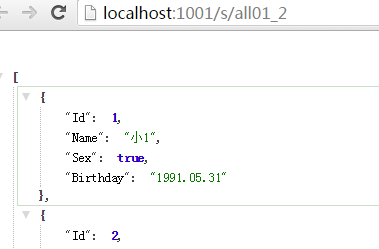
返回的是json格式数据,本篇围绕的数据格式都是json,这也是很常用的返回数据格式之一;
» MVC代码中如何调用api接口
首先,创建一个mvc项目,创建方式可以看这篇文章WebApi - 路由,然后再 HomeController.cs 文件中增加Index(学生列表)和Add(添加学生信息)两个Action方法,并且填写代码如:
 public class HomeController : Controller

     {

         public async Task<ActionResult> Index()

         {

             var searchData = new MoStudent();

             //查询条件

             var webapiUrl = "http://localhost:1001/s/all01_2";

             var httpResponseMsg = new HttpResponseMessage();

             using (var httpClient = new HttpClient())

             {

                 httpResponseMsg = await httpClient.PostAsync(webapiUrl, searchData, new System.Net.Http.Formatting.JsonMediaTypeFormatter());

             }

             var students = httpResponseMsg.Content.ReadAsAsync<List<MoStudent>>().Result;

             return View(students);

         }

         [HttpGet]

         public ActionResult Add()

         {

             return View();

         }

         [HttpPost]

         public async Task<ActionResult> Add(MoStudent model)

         {

             if (ModelState.IsValid)

             {

                 var webapiUrl = "http://localhost:1001/s/add";

                 var httpResponseMsg = new HttpResponseMessage();

                 using (var httpClient = new HttpClient())

                 {

                     httpResponseMsg = await httpClient.PostAsync<MoStudent>(webapiUrl, model, new System.Net.Http.Formatting.JsonMediaTypeFormatter());

                 }

                 model = httpResponseMsg.Content.ReadAsAsync<MoStudent>().Result;

             }

             ModelState.AddModelError("", model.Id >  ? "添加成功" : "添加失败");

             return View(model);

         }

     }
这里需要讲解几个注意的地方, HttpClient 类主要用来做接口请求的,这里我通过传递参数给她的扩展 PostAsync 方法来请求我们刚才创建的webapi地址 http://localhost:1001/s/all01_2 ,这里先来简单看下这个方法使用到的参数说明:
 //

         // 摘要:

         //     使用通过给定格式化程序序列化的指定值,以异步操作方式发送 POST 请求。

         //

         // 参数:

         //   client:

         //     用于发出请求的客户端。

         //

         //   requestUri:

         //     请求将发送到的 URI。

         //

         //   value:

         //     要写入到请求的实体正文的值。

         //

         //   formatter:

         //     用于序列化值的格式化程序。

         //

         // 类型参数:

         //   T:

         //     要序列化的对象的类型。

         //

         // 返回结果:

         //     一个表示异步操作的任务对象。

         public static Task<HttpResponseMessage> PostAsync<T>(this HttpClient client, string requestUri, T value, MediaTypeFormatter formatter);
值得注意的是最后一个参数 new System.Net.Http.Formatting.JsonMediaTypeFormatter() , JsonMediaTypeFormatter 类是继承了 MediaTypeFormatter 类并重写了格式化的一些方法,因为我们创建的api项目要求的是json格式的参数和返回,所以这里用的是 JsonMediaTypeFormatter 类,还有其他的格式如: XmlMediaTypeFormatter 等这个也在上一篇分享文章中使用到了,各位可以看下做下了解;PostAsync方法是异步的方法,所以咋们需要在调用的时候使用 await 修饰,有了await自然要有她的配套组合 async 和 Task 因此就有了咋们的 public async Task<ActionResult> Index() 这样的代码;好了废话太多了,咋们一起来看下试图view中绑定代码和绑定学生列表后的查询结果:
 @model List<Stage.Api.Extend.MoStudent>

 <div class="row">

     <h3>学生信息列表</h3>

     <hr />

     <h4>后台请求接口</h4>

     @using (Html.BeginForm())

     {

         <button class="btn btn-default" type="submit">查 询</button>

         <a class="btn btn-default" href="/home/add">添 加</a>

         <hr />

         <table id="tab01" class="table table-hover table-bordered text-center">

             <thead>

                 <tr>

                     <td>学生编号</td>

                     <td>姓名</td>

                     <td>性别</td>

                     <td>出生日期</td>

                 </tr>

             </thead>

             <tbody>

                 @foreach (var item in Model)

                 {

                     <tr>

                         <td>@item.Id</td>

                         <td>@item.Name</td>

                         <td>@(item.Sex ? "男" : "女")</td>

                         <td>@item.Birthday.ToString("yyyy.MM.dd")</td>

                     </tr>

                 }

             </tbody>

         </table>

     }
执行方法这个学生列表Action的Index方法后,在浏览器的效果如:
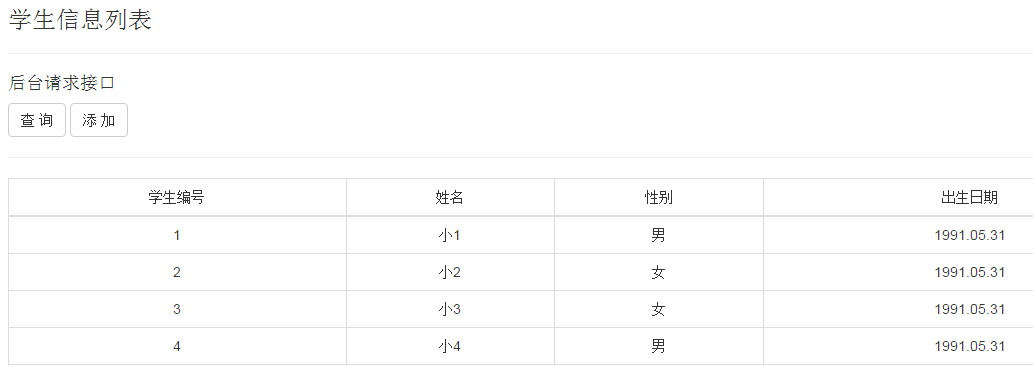
看到结果后,咋们的mvc调用webapi的例子就成功了,下面来看下添加功能,添加方法里面的主要调用webapi代码和查询学生列表方法的代码几乎一样,只是这里调用api方法后返回的结果是单个学生对象信息不是集合了,这里只贴一下Add视图代码供大家参考:
 @model Stage.Api.Extend.MoStudent

 @{

     ViewBag.Title = "添加 - 学生";

 }

 <h3>添加 - 学生</h3>

 @using (Html.BeginForm())

 {

     @Html.AntiForgeryToken()

     <div class="form-horizontal">

         <hr />

         @Html.ValidationSummary(true)

         <div class="form-group">

             @Html.LabelFor(model => model.Name, "姓名", new { @class = "control-label col-md-2" })

             <div class="col-md-10">

                 @Html.EditorFor(model => model.Name)

                 @Html.ValidationMessageFor(model => model.Name)

             </div>

         </div>

         <div class="form-group">

             @Html.LabelFor(model => model.Sex, "性别", new { @class = "control-label col-md-2" })

             <div class="col-md-10">

                 @Html.EditorFor(model => model.Sex)

                 @Html.ValidationMessageFor(model => model.Sex)

             </div>

         </div>

         <div class="form-group">

             @Html.LabelFor(model => model.Birthday, "出生日期", new { @class = "control-label col-md-2" })

             <div class="col-md-10">

                 @Html.EditorFor(model => model.Birthday)

                 @Html.ValidationMessageFor(model => model.Birthday)

             </div>

         </div>

         <div class="form-group">

             <div class="col-md-offset-2 col-md-10">

                 <input type="submit" value="服务端保存" class="btn btn-default" />

                 <input type="button" id="btnAjaxSave" value="ajax保存" class="btn btn-default" />

             </div>

         </div>

         <div class="form-group">

             <div id="divResult" class="col-md-offset-2 col-md-10" style="color:red">

             </div>

         </div>

     </div>

 }

 <div>

     @Html.ActionLink("返回列表", "Index")

 </div>
值得注意的是这种后台请求不同域之间的api接口,不会有跨域的限制,除非接口本身有限制外,下面要讲解的ajax方式就不相同了;
» ajax如何调api接口
首先,咋们需要明确一个东西,ajax调用接口不能跨域,这个是必须了解的,比如手机h5的webapp通常都是使用ajax来调用接口获取数据的,而且大部分需求都是跨域来请求的,因此本示例会在下面讲解的时候简单提及到常用的几种处理方式,并且使用其中一种来讲解,希望能给大家带来帮助;为了测试跨域访问情况,我们在上一节点的试图中增加如下布局代码:
     <h4>ajax请求接口</h4>

     <button class="btn btn-default" id="btnSearch">查 询</button>

     <a class="btn btn-default" href="/home/add">添 加</a>

     <hr />

     <table id="tab" class="table table-hover table-bordered text-center">

         <thead>

             <tr>

                 <td>学生编号</td>

                 <td>姓名</td>

                 <td>性别</td>

                 <td>出生日期</td>

             </tr>

         </thead>

         <tbody>

             <tr>

                 <td colspan=""></td>

             </tr>

         </tbody>

     </table>
然后,jquery绑定查询按钮事件代码如:
 <script type="text/javascript">

     $(function () {

         $("#btnSearch").on("click", function () {

             var tabObj = $("#tab tbody");

             tabObj.html('tr><td colspan="4">加载中...</td></tr>');

             $.post("http://localhost:1001/s/all01_2", {}, function (data) {

                 var tabHtml = [];

                 $.each(data, function (i, item) {

                     tabHtml.push('<tr>');

                     tabHtml.push("<td>" + item.Id + "</td>");

                     tabHtml.push("<td>" + item.Name + "</td>");

                     tabHtml.push("<td>" + (item.Sex ? "男" : "女") + "</td>");

                     tabHtml.push("<td>" + item.Birthday + "</td>");

                     tabHtml.push('</tr>');

                 });

                 if (tabHtml.length <= ) { return false; }

                 tabObj.html(tabHtml.join(''));

             });

         });

     })

 </script>
然后,用iis新发布一个站点指向和上面mvc项目例子一样的磁盘目录,然后iis路由地址为: http://localhost:1002/home ,注意那我们刚才的webapi地址为 http://localhost:1001/s/all01_2 ,这两个地址区别在于,一个是1002端口一个是1001端口,这样就构建好了咋们跨域的要求了(当然有些朋友会在意在说为什么不配置个host本地域名来测试呢 ,我只能说这是一样的效果),然后我们访问 http://localhost:1002/home 路由,并且点击我们绑定好的查询事件按钮,会有这样一个ajax请求输出来的错误:

很显然这是跨域提示的错误,我们要怎么避免他呢,市面上通常的方式
1. 使用jsonp格式来处理
2. 在接口端写入接受跨域请求的设置
很显然咋们本次测试用的是第二种,方便,快速就能完成,不过这里因为是webapi,所以这里直接使用微软提供的Cors的服务,我们需要使用nuget控制台录入如下指定: Install-Package Microsoft.AspNet.WebApi.Cors -Version 5.0. ,目前最后更新的版本是:
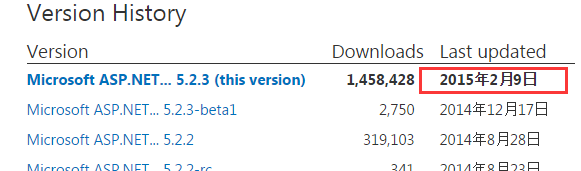
能看出来,这个包现在已经停止了更新了,这里我为什么用5.0.0版本呢,因为我项目的其他包最新是5.0.0,而安装了5.2.3版本的话项目中的很多包都会升级并且有些包自动安装不上,会导致项目出问题变动很大,多方尝试后还是这个5.0.0版本的稳定(这个情况需要朋友注意下);怎么用呢,这里只需要在咋们webapi项目中的 App_Start/WebApiConfig.cs 文件中注册一下就行了,代码如: config.EnableCors(); 意思是启动Cors跨域;然后咋们在自定义 ValuesController class上方增加如下标记: [EnableCors("http://localhost:1002", "*", "*")] ,这个EnableCors第一个参数是允许跨域访问的域地址,好了咋们还是点击ajax请求接口中的查询按钮,得到效果:
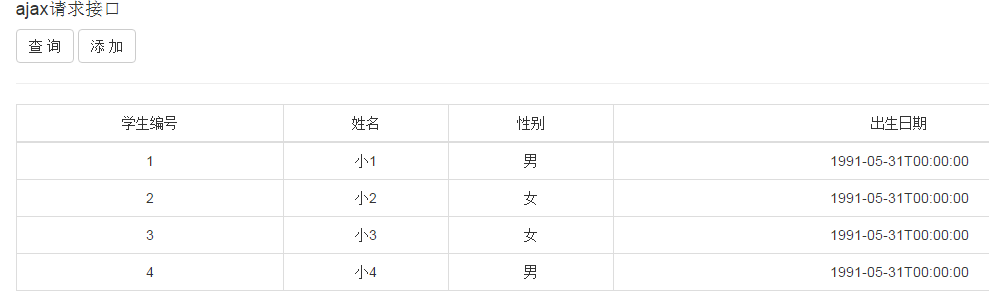
能正常获取出来webapi接口数据了,好了咋们再来简单看下在Controller中 EnableCors 允许传递的参数说明:
 // 摘要:

         //     Initializes a new instance of the System.Web.Http.Cors.EnableCorsAttribute

         //     class.

         //

         // 参数:

         //   origins:

         //     Comma-separated list of origins that are allowed to access the resource.

         //     Use "*" to allow all.

         //

         //   headers:

         //     Comma-separated list of headers that are supported by the resource. Use "*"

         //     to allow all. Use null or empty string to allow none.

         //

         //   methods:

         //     Comma-separated list of methods that are supported by the resource. Use "*"

         //     to allow all. Use null or empty string to allow none.

         public EnableCorsAttribute(string origins, string headers, string methods);

         //

         // 摘要:

         //     Initializes a new instance of the System.Web.Http.Cors.EnableCorsAttribute

         //     class.

         //

         // 参数:

         //   origins:

         //     Comma-separated list of origins that are allowed to access the resource.

         //     Use "*" to allow all.

         //

         //   headers:

         //     Comma-separated list of headers that are supported by the resource. Use "*"

         //     to allow all. Use null or empty string to allow none.

         //

         //   methods:

         //     Comma-separated list of methods that are supported by the resource. Use "*"

         //     to allow all. Use null or empty string to allow none.

         //

         //   exposedHeaders:

         //     Comma-separated list of headers that the resource might use and can be exposed.

         //     Use null or empty string to expose none.

         public EnableCorsAttribute(string origins, string headers, string methods, string exposedHeaders);
由上的参数说明我们可以这样设置,来确保任何请求地址都能访问到我们webapi接口:
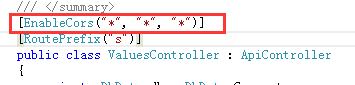
EnableCors的第一个参数如果是*,表示任何请求地址来源都运行访问该webapi;第二个参数如果是*,表示任意头部head信息都可以;第三参数为*,表示任意请求方式(如:Post,put,delete等);总结下ajax方式请求不同域名接口,需要跨域运行设置,这个也是很多互联网公司webapp应用很常见的一种方式;
只要跨域请求成功后,添加学生信息就好做了,下面直接贴出通过ajax调用添加学生信息接口代码:
 <script type="text/javascript">

     $(function () {

         $("#btnAjaxSave").on("click", function () {

             var divResult = $("#divResult");

             divResult.html("保存中,请稍后...");

             var param = {

                 Name: $("input[name='Name']").val(),

                 Sex: $("input[name='Sex']").is(":checked"),

                 Birthday: $("input[name='Birthday']").val()

             };

             $.post("http://localhost:1001/s/add", param, function (data) {

                 console.log(data);

                 if (data) {

                     divResult.html(data.Id >  ? "添加成功" : "添加失败");

                 } else {

                     divResult.html("");

                 }

             });

         });

     })

 </script>
对应的学生信息添加接口:
 [Route("add")]

         [HttpPost]

         public HttpResponseMessage AddStudent(MoStudent moStudent)

         {

             var httpStatus = HttpStatusCode.OK;

             if (ModelState.IsValid)

             {

                 var isfalse = db.Save(moStudent);

             }

             return Request.CreateResponse(httpStatus, moStudent);

         }
好了咋们本次分享的内容就到这里吧,主要讲解了怎么再后台和用ajax调用webapi接口,希望各位喜欢,多多点赞。
WebApi接口 - 如何在应用中调用webapi接口的更多相关文章
- Ninject中调用webapi卡住的情况解决
过年这两天在家做项目,把mvc升级到了5.1,webapi升级到了2.1,忽然发现一个问题,在某些页面上ajax调用webapi时会发现卡死现象,CPU也没有被占用,就是网页一些在加载也不报错,经过2 ...
- 在C代码中调用C++接口
一 在C源文件中调用C++封装的接口 例如: 要想在A.c文件中,调用生命在B.h,实现在B.cpp中的接口bool getMAC(char *mac_addr); 其实现方法 B.cpp 如下: / ...
- MOOC(7)- case依赖、读取json配置文件进行多个接口请求-测试类中调用封装的mock(10)
封装mock后,在单元测试中调用 # -*- coding: utf-8 -*- # @Time : 2020/2/11 8:35 # @File : test_class_10.py.py # @A ...
- php中调用WebService接口
一.背景 调用第三方短信提供商的WebService接口. 二.介绍 1.WebService三要素: SOAP(Simple Object Access Protocol) 用来描述传递信息的格式 ...
- PyQt5 中调用MySql接口失败 ( QSqlDatabase 组件) 在Linux环境下如何修改
最近在跑下面这么一个代码,怎么跑都无法连通服务器,如下: # -*- coding: utf-8 -*- ''' [简介] PyQt5中 处理database 例子 ''' import sys fr ...
- python中调用httpclient接口的实例代码
#coding=utf-8 import httplib,urllib #get调用 httpClient=None try: params=urllib.urlencode({'account':' ...
- java中调用三方接口post传参时map和jsonobject的区别转换
post方法名及参数为:(具体方法可参考https://www.cnblogs.com/mufengforward/p/10510337.html) public static String doPo ...
- 【Loadrunner_WebService接口】对项目中的GetProduct接口生成性能脚本
一.环境 https://xxx.xxx.svc?wsdl 用户名:username 密码:password 对其中的GetProduct接口进行测试 备注:GetProducts.xml文件内容和S ...
- 【Jmeter_WebService接口】对项目中的GetProduct接口生成性能脚本
一.环境信息 https://xxx.xxx.svc?wsdl 用户名:username 密码:password 对其中的GetProduct接口进行测试 二.通过soapui获取soup请求信息 1 ...
随机推荐
- 【原】谈谈对Objective-C中代理模式的误解
[原]谈谈对Objective-C中代理模式的误解 本文转载请注明出处 —— polobymulberry-博客园 1. 前言 这篇文章主要是对代理模式和委托模式进行了对比,个人认为Objective ...
- “.Net 社区虚拟大会”(dotnetConf) 2016 Day 2 Keynote: Miguel de Icaza
美国时间 6月7日--9日,为期三天的微软.NET社区虚拟大会正式在 Channel9 上召开,美国时间6.8 是第二天, Miguel de Icaza 做Keynote,Miguel 在波士顿Xa ...
- Modify Branding of FreeCAD
Modify Branding of FreeCAD eryar@163.com This article describes the Branding of FreeCAD. Branding me ...
- 23种设计模式--单例模式-Singleton
一.单例模式的介绍 单例模式简单说就是掌握系统的至高点,在程序中只实例化一次,这样就是单例模式,在系统比如说你是该系统的登录的第多少人,还有数据库的连接池等地方会使用,单例模式是最简单,最常用的模式之 ...
- spring源码分析之freemarker整合
FreeMarker是一款模板引擎: 即一种基于模板和要改变的数据, 并用来生成输出文本(HTML网页.电子邮件.配置文件.源代码等)的通用工具. 它不是面向最终用户的,而是一个Java类库,是一款程 ...
- JAVA构造时成员初始化的陷阱
让我们先来看两个类:Base和Derived类.注意其中的whenAmISet成员变量,和方法preProcess(). 情景1:(子类无构造方法) class Base { Base() { pre ...
- JDBC MySQL 多表关联查询查询
public static void main(String[] args) throws Exception{ Class.forName("com.mysql.jdbc.Driver&q ...
- 分享两个BPM配置小技巧
1.小技巧 流程图修改后发布的话版本号会+1,修改次数多了之后可能会导致版本号很高,这个时候可以将流程导出,然后删除对应的流程包再导入,发布数据模型和流程图之后,版本清零 2.小技巧 有的同事入职后使 ...
- 如何使用dos命令查看MySQL当前使用的数据库?
1.dos命令安装mysqld --stall.启动net start mysql.进入MySQL数据库mysql -uroot -p后,输入select database(); 如图:
- MySQL数据库罕见的BUG——Can't get hostname for your address
在连接mysql jdbc时候,抛出了 com.mysql.jdbc.exceptions.jdbc4.MySQLNonTransientConnectionException: Communicat ...