
ibatis源码分析
背景:调试模式下,单步运行一个查询订单协议操作,记录了ibatis框架的执行动作,侧面剖析其原理。
一、简介:
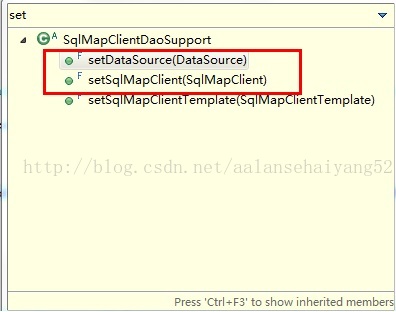
1. dal 层的dao接口实现类通常会继承SqlMapClientDaoSupport。spring容器在初始化一个dao bean实例时,通常会注入两块信息DataSource(数据源)和sqlMapClient(主要是sql语句),这两块信息会封装到SqlMapClientTemplate
2. 其中数据源的实例通常采用apache的开源项目dbcp
代码配置如下:
- <bean id="dataSource" class="org.apache.commons.dbcp.BasicDataSource" destroy-method="close">
- <property name="driverClassName" value="com.mysql.jdbc.Driver" />
- <property name="url" value="xxxx" />
- <property name="username"><value>xxxx</value></property>
- <property name="password"><value>xxxxx</value></property>
- <property name="maxActive"><value>20</value></property>
- <property name="initialSize"><value>1</value></property>
- <property name="maxWait"><value>60000</value></property>
- <property name="maxIdle"><value>20</value></property>
- <property name="minIdle"><value>3</value></property>
- <property name="removeAbandoned"><value>true</value></property>
- <property name="removeAbandonedTimeout"><value>180</value></property>
- <property name="connectionProperties"><value>clientEncoding=GBK</value></property>
- </bean>
各配置参数的具体含义可参照:dbcp基本配置和重连配置
3. sqlMapClient
- <bean id="sqlMapClient" class="org.springframework.orm.ibatis.SqlMapClientFactoryBean">
- <property name="configLocation">
- <value>classpath:sqlmap.xml</value>
- </property>
- </bean>
- <bean id="sqlMapClientTddl" class="org.springframework.orm.ibatis.SqlMapClientFactoryBean">
- <property name="dataSource" ref="tGroupDataSource" />
- <property name="configLocation" value="classpath:sqlmap.xml"/>
- </bean>
sqlMapClient,主要是借助于实现FactoryBean和InitializingBean两个接口,加载sql.xml文件资源信息,得到sqlMapClient组件
注:上面的sqlMapClient默认不配置数据源,后面的SqlMapClientTemplate优先从全局变量中取,如果没有再从sqlMapClient中查找。
- public DataSource getDataSource() {
- DataSource ds = super.getDataSource();
- return (ds != null ? ds : this.sqlMapClient.getDataSource());
- }
构造sqlMapClient组件的代码块。
- public void afterPropertiesSet() throws Exception {
- if (this.lobHandler != null) {
- // Make given LobHandler available for SqlMapClient configuration.
- // Do early because because mapping resource might refer to custom types.
- configTimeLobHandlerHolder.set(this.lobHandler);
- }
- try {
- this.sqlMapClient = buildSqlMapClient(this.configLocations, this.mappingLocations, this.sqlMapClientProperties);
- // Tell the SqlMapClient to use the given DataSource, if any.
- if (this.dataSource != null) {
- TransactionConfig transactionConfig = (TransactionConfig) this.transactionConfigClass.newInstance();
- DataSource dataSourceToUse = this.dataSource;
- if (this.useTransactionAwareDataSource && !(this.dataSource instanceof TransactionAwareDataSourceProxy)) {
- dataSourceToUse = new TransactionAwareDataSourceProxy(this.dataSource);
- }
- transactionConfig.setDataSource(dataSourceToUse);
- transactionConfig.initialize(this.transactionConfigProperties);
- applyTransactionConfig(this.sqlMapClient, transactionConfig);
- }
- }
- finally {
- if (this.lobHandler != null) {
- // Reset LobHandler holder.
- configTimeLobHandlerHolder.set(null);
- }
- }
- }
4. SqlMapExecutor
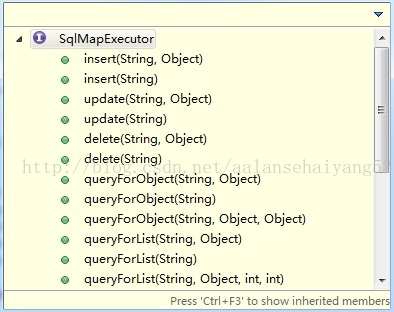
该接口是对SQL操作行为的抽象,提供了SQL单条执行和批处理涉及的所有操作方法
5. SqlMapTransactionManager
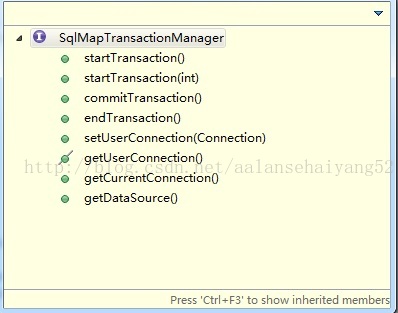
该接口是对事务行为的抽象,提供了事务执行过程中涉及的所有方法。
6. SqlMapClient
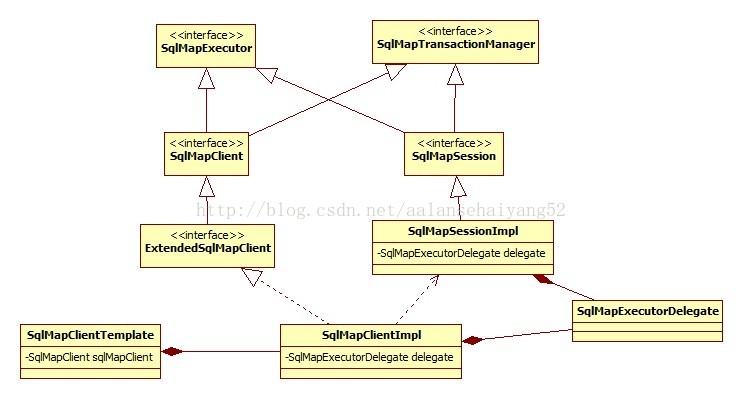
该接口定位是SQL执行客户端,是线程安全的,用于处理多个线程的sql执行。它继承了上面两个接口,这意味着该接口具有SQL执行和事务处理的能力,该接口的核心实现类是SqlMapClientImpl。
7. SqlMapSession
该接口在继承关系上和SqlMapClient一致,但它的定位是保存单线程sql执行过程的session信息。该接口的核心实现类是SqlMapSessionImpl
8. MappedStatement
该接口定位是单条SQL执行时的上下文环境信息,如SQL标识、SQL、参数信息、返回结果、操作行为等。
9. ParameterMap/ResultMap
该接口用于在SQL执行的前后提供参数准备和执行结果集的处理。
整体类图:
二、具体调用
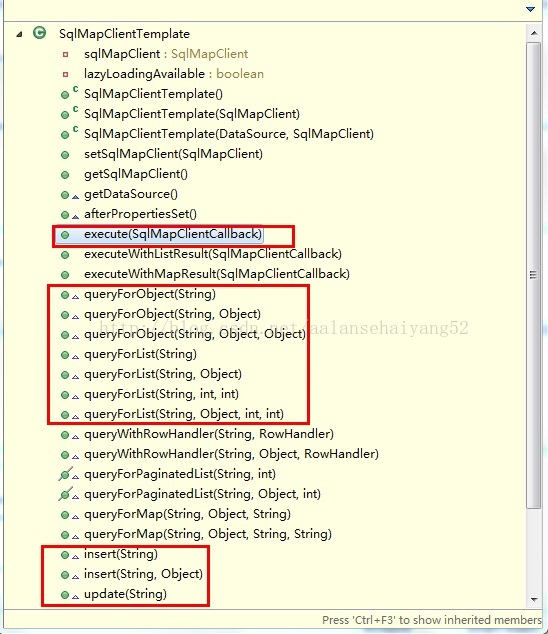
接下来就到了数据持久层的代码调用,所有的数据库DML操作(增、删、改、查)都是借助于SqlMapClientTemplate来实现的。
- public OrderEnsureProtocolDO getOrderEnsureProtocolByOrderId(Long orderId) {
- if (orderId == null) {
- return null;
- }
- return (OrderEnsureProtocolDO) this.getSqlMapClientTemplate().queryForObject("MS-FIND-ORDERENSUREPROTOCOL-BY-ORDERID",
- orderId);
- }
如果一次执行的sql较多,我们会采用批处理的形式
- public void batchDeleteOfferSaleRecord(final List<Long> orderEntryIds) throws Exception {
- if (orderEntryIds == null || orderEntryIds.size() < 1 || orderEntryIds.size() > 50) {
- return;
- }
- this.getSqlMapClientTemplate().execute(new SqlMapClientCallback() {
- @Override
- public Object doInSqlMapClient(SqlMapExecutor executor) throws SQLException {
- executor.startBatch();
- for (Long entryId : orderEntryIds) {
- executor.insert(MS_DELETE_SALE_RECORD, entryId);
- }
- return executor.executeBatch();
- }
- });
- }
不管采用上面哪种方式,查看源代码会发现,最后都是在调用execute(SqlMapClientCallback action)方法
- public Object queryForObject(final String statementName, final Object parameterObject)
- throws DataAccessException {
- return execute(new SqlMapClientCallback() {
- public Object doInSqlMapClient(SqlMapExecutor executor) throws SQLException {
- return executor.queryForObject(statementName, parameterObject);
- }
- });
- }
- public Object execute(SqlMapClientCallback action) throws DataAccessException {
- Assert.notNull(action, "Callback object must not be null");
- Assert.notNull(this.sqlMapClient, "No SqlMapClient specified");
- //获取session信息(SqlMapSessionImpl实例)
- SqlMapSession session = this.sqlMapClient.openSession();
- if (logger.isDebugEnabled()) {
- logger.debug("Opened SqlMapSession [" + session + "] for iBATIS operation");
- }
- Connection ibatisCon = null;
- try {
- Connection springCon = null;//数据库连接
- DataSource dataSource = getDataSource();
- boolean transactionAware = (dataSource instanceof TransactionAwareDataSourceProxy);
- try {
- //获取数据获连接
- ibatisCon = session.getCurrentConnection();
- if (ibatisCon == null) {
- springCon = (transactionAware ?
- dataSource.getConnection() : DataSourceUtils.doGetConnection(dataSource));
- //将数据源set到session会话中
- session.setUserConnection(springCon);
- if (logger.isDebugEnabled()) {
- logger.debug("Obtained JDBC Connection [" + springCon + "] for iBATIS operation");
- }
- }
- else {
- if (logger.isDebugEnabled()) {
- logger.debug("Reusing JDBC Connection [" + ibatisCon + "] for iBATIS operation");
- }
- }
- }
- catch (SQLException ex) {
- throw new CannotGetJdbcConnectionException("Could not get JDBC Connection", ex);
- }
- try {
- //执行SQL
- return action.doInSqlMapClient(session);
- }
- catch (SQLException ex) {
- throw getExceptionTranslator().translate("SqlMapClient operation", null, ex);
- }
- finally {
- 省略。。。一系列的关闭工作
- }
- }
SqlMapSessionImpl().queryForObject()的方法很简单,直接交给代理对象SqlMapExecutorDelegate处理(里面注入了很多功能对象,负责具体的sql执行)
- public Object queryForObject(String id, Object paramObject) throws SQLException {
- return delegate.queryForObject(session, id, paramObject);
- }
经过N层重载,最后调用内部的通用方法
- 入参:
- id=MS-FIND-ORDERENSUREPROTOCOL-BY-ORDERID
- paramObject=26749329
- public Object queryForObject(SessionScope session, String id, Object paramObject, Object resultObject) throws SQLException {
- Object object = null;
- //MappedStatement对象集是上文中提及的初始化方法SqlMapClientFactoryBean.afterPropertiesSet()中,由配置文件构建而成
- //调试中的ms为SelectStatement,具体的执行器
- MappedStatement ms = getMappedStatement(id);
- // 用于事务执行
- Transaction trans = getTransaction(session);
- boolean autoStart = trans == null;
- try {
- trans = autoStartTransaction(session, autoStart, trans);
- // 从RequestScope池中获取该次sql执行中的上下文环境RequestScope
- RequestScope request = popRequest(session, ms);
- try {
- // 执行sql
- object = ms.executeQueryForObject(request, trans, paramObject, resultObject);
- } finally {
- pushRequest(request); //归还RequestScope
- }
- autoCommitTransaction(session, autoStart);
- } finally {
- autoEndTransaction(session, autoStart);
- }
- return object;
- }
接下来由MappedStatement.executeQueryForObject()来执行
- public Object executeQueryForObject(RequestScope request, Transaction trans, Object parameterObject, Object resultObject)
- throws SQLException {
- try {
- Object object = null;
- DefaultRowHandler rowHandler = new DefaultRowHandler();
- //执行sql语句
- executeQueryWithCallback(request, trans.getConnection(), parameterObject, resultObject, rowHandler, SqlExecutor.NO_SKIPPED_RESULTS, SqlExecutor.NO_MAXIMUM_RESULTS);
- //结果处理,返回结果
- List list = rowHandler.getList();
- if (list.size() > 1) {
- throw new SQLException("Error: executeQueryForObject returned too many results.");
- } else if (list.size() > 0) {
- object = list.get(0);
- }
- 。。。。。。。。。
- }
MappedStatement.executeQueryWithCallback()方法包含了参数值映射、sql准备和sql执行等关键过程
- protected void executeQueryWithCallback(RequestScope request, Connection conn, Object parameterObject, Object resultObject, RowHandler rowHandler, int skipResults, int maxResults)
- throws SQLException {
- //预先封装错误信息,如果报错时便于排查问题
- ErrorContext errorContext = request.getErrorContext();
- errorContext.setActivity("preparing the mapped statement for execution");
- errorContext.setObjectId(this.getId());
- errorContext.setResource(this.getResource());
- try {
- //验证入参
- parameterObject = validateParameter(parameterObject);
- //获取SQL对象
- Sql sql = getSql();
- errorContext.setMoreInfo("Check the parameter map.");
- // 入参映射
- ParameterMap parameterMap = sql.getParameterMap(request, parameterObject);
- errorContext.setMoreInfo("Check the result map.");
- //获取结果
- ResultMap resultMap = sql.getResultMap(request, parameterObject);
- request.setResultMap(resultMap);
- request.setParameterMap(parameterMap);
- errorContext.setMoreInfo("Check the parameter map.");
- //获取参数值
- Object[] parameters = parameterMap.getParameterObjectValues(request, parameterObject);
- errorContext.setMoreInfo("Check the SQL statement.");
- //获取拼装后的sql语句
- String sqlString = sql.getSql(request, parameterObject);
- errorContext.setActivity("executing mapped statement");
- errorContext.setMoreInfo("Check the SQL statement or the result map.");
- RowHandlerCallback callback = new RowHandlerCallback(resultMap, resultObject, rowHandler);
- //sql执行
- sqlExecuteQuery(request, conn, sqlString, parameters, skipResults, maxResults, callback);
- ....省略
- }
最后调用com.ibatis.sqlmap.engine.execution.SqlExecutor.executeQuery(RequestScope, Connection, String, Object[], int, int, RowHandlerCallback)
- public void executeQuery(RequestScope request, Connection conn, String sql, Object[] parameters, int skipResults, int maxResults, RowHandlerCallback callback) throws SQLException {
- ...省略
- PreparedStatement ps = null;
- ResultSet rs = null;
- setupResultObjectFactory(request);
- try {
- errorContext.setMoreInfo("Check the SQL Statement (preparation failed).");
- Integer rsType = request.getStatement().getResultSetType();
- //初始化PreparedStatement,设置sql、参数值等
- if (rsType != null) {
- ps = prepareStatement(request.getSession(), conn, sql, rsType);
- } else {
- ps = prepareStatement(request.getSession(), conn, sql);
- }
- setStatementTimeout(request.getStatement(), ps);
- Integer fetchSize = request.getStatement().getFetchSize();
- if (fetchSize != null) {
- ps.setFetchSize(fetchSize.intValue());
- }
- errorContext.setMoreInfo("Check the parameters (set parameters failed).");
- request.getParameterMap().setParameters(request, ps, parameters);
- errorContext.setMoreInfo("Check the statement (query failed).");
- //执行
- ps.execute();
- errorContext.setMoreInfo("Check the results (failed to retrieve results).");
- //结果集处理
- rs = handleMultipleResults(ps, request, skipResults, maxResults, callback);
- 。。。省略
- }
ibatis源码分析的更多相关文章
- 【异常及源码分析】org.mybatis.spring.MyBatisSystemException: nested exception is org.apache.ibatis.type.TypeException: Could not set parameters for mapping: ParameterMapping
一.异常出现的场景 1)异常出现的SQL @Select("SELECT\n" + " id,discount_type ,min_charge, ${cardFee} ...
- MyBatis源码分析-SQL语句执行的完整流程
MyBatis 是支持定制化 SQL.存储过程以及高级映射的优秀的持久层框架.MyBatis 避免了几乎所有的 JDBC 代码和手动设置参数以及获取结果集.MyBatis 可以对配置和原生Map使用简 ...
- MyBatis源码分析(5)——内置DataSource实现
@(MyBatis)[DataSource] MyBatis源码分析(5)--内置DataSource实现 MyBatis内置了两个DataSource的实现:UnpooledDataSource,该 ...
- MyBatis源码分析(4)—— Cache构建以及应用
@(MyBatis)[Cache] MyBatis源码分析--Cache构建以及应用 SqlSession使用缓存流程 如果开启了二级缓存,而Executor会使用CachingExecutor来装饰 ...
- 《深入理解Spark:核心思想与源码分析》(前言及第1章)
自己牺牲了7个月的周末和下班空闲时间,通过研究Spark源码和原理,总结整理的<深入理解Spark:核心思想与源码分析>一书现在已经正式出版上市,目前亚马逊.京东.当当.天猫等网站均有销售 ...
- 《深入理解Spark:核心思想与源码分析》一书正式出版上市
自己牺牲了7个月的周末和下班空闲时间,通过研究Spark源码和原理,总结整理的<深入理解Spark:核心思想与源码分析>一书现在已经正式出版上市,目前亚马逊.京东.当当.天猫等网站均有销售 ...
- 《深入理解Spark:核心思想与源码分析》正式出版上市
自己牺牲了7个月的周末和下班空闲时间,通过研究Spark源码和原理,总结整理的<深入理解Spark:核心思想与源码分析>一书现在已经正式出版上市,目前亚马逊.京东.当当.天猫等网站均有销售 ...
- MyBatis源码分析(1)-MapConfig文件的解析
1.简述 MyBatis是一个优秀的轻ORM框架,由最初的iBatis演化而来,可以方便的完成sql语句的输入输出到java对象之间的相互映射,典型的MyBatis使用的方式如下: String re ...
- Mybatis源码分析-BaseExecutor
根据前文Mybatis源码分析-SqlSessionTemplate的简单分析,对于SqlSession的CURD操作都需要经过Executor接口的update/query方法,本文将分析下Base ...
- 【MyBatis源码分析】Configuration加载(下篇)
元素设置 继续MyBatis的Configuration加载源码分析: private void parseConfiguration(XNode root) { try { Properties s ...
随机推荐
- [postgres]使用pgbench进行基准测试
前言 pgbench是一种在postgres上进行基准测试的简单程序,一般安装后就会自带.pgbench可以再并发的数据库绘画中一遍遍地进行相同序列的SQL语句,并且计算平均事务率. 测试准备 既然要 ...
- Figma 学习笔记 – Keyboard Shortcut and Tips 小技巧
参考: 10 tips to work 10x faster in Figma 15 tips to design 15X faster in Figma | Figma Tutorial 2021 ...
- CMake构建学习笔记16-使用VS进行CMake项目的开发
目录 1. 概论 2. 详论 2.1 创建工程 2.2 加载工程 2.3 配置文件 2.4 工程配置 2.5 调试执行 3. 项目案例 4. 总结 1. 概论 在之前的系列博文中,我们学习了如何构建第 ...
- SpringMVC —— 请求参数(传递json数据)
接收请求中的json数据 注解 json格式(POJO) json数组(POJO) @RequestBody与@RequestParam区别
- Flutter Web 近期的重要更新
我们的发布重点优先关注在性能.开发者体验以及 Web 集成上 2021 年 3 月 Flutter Web 支持已进入稳定版,那么,下一步是什么? 我们对用户研究发现,有超过 10% 的 Flutte ...
- Nuxt Kit 实用工具的使用示例
title: Nuxt Kit 实用工具的使用示例 date: 2024/9/25 updated: 2024/9/25 author: cmdragon excerpt: 摘要:本文介绍了Nuxt ...
- threejs渲染基础的3D场景
// 创建一个场景对象 let scene = new THREE.Scene(); // 创建一个相机对象 let camera = new THREE.PerspectiveCamera(75, ...
- 16. VUE怎么阻止冒泡
给事件添加 stop 修饰符 ,比如 click.stop ; 补充: 阻止默认行为 prevent 修饰符 ,超链接的跳转,表单的默认提交 : once 修饰符 事件只触发一次 ps:事件修饰符可 ...
- 云原生周刊:Microcks 成为 CNCF 沙箱项目
开源项目推荐 Kubent Kube No Trouble (kubent) 是一个简单的工具,该工具将能够根据您部署资源的方式检测已弃用的 API. kdoctor kdoctor 是一个数据面测试 ...
- 小A的组合数
小A的组合数 题目描述 \(C_n^m\)表示组合,组合公式为:\(C_n^m=\frac{n!}{m!\times (n-m)!}\),请你求出\(C_n^m\)的因子个数\(tot\),由于大难会 ...