
【前端】【探究】HTML - input类型为file时如何实现自定义文本以更好的美化
想到英语四级考了两次都没过,我觉得要多使用英文,所以本文使用英文书写。
本文讲述了遇到的问题,解决的思路,并讲述了解决方案,也许对你会有帮助。
2022年9月25日凌晨3点20分@萌狼蓝天
Problem description
when we want to use input of file type, it has a very serious problem : the text content(文本内容) displayed (显示)cannot be set by us , And the default text display varies(不同) from browser to browser!
- It displays on Edge as shown below
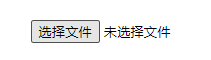
- It displays on Webstorm default preview browser(Webstorm默认预览浏览器) as shown below

Solution
We can use a button to select file and use a text box to show selected file's name , instead of file type input.
This does not mean that we discard input of file type , just hide it and use other elements to control it , it's still the one that actually works.(这并不意味着我们抛弃了文件类型的 "input",只是隐藏了它并使用其他元素来控制它,它仍然是真正起作用的)
Example
1.Use Button to select file
Use
display:noneto hiden file typeinput
 <input id="selectFile" type="button" value="选择文件" onclick="document.getElementById('fileUp').click()">

 <input type="file" style="display: none" name="fileUp" id="fileUp">
When we click on the button with the id selectFile, Javascript will get the element of file type input, and then execute its click event(点击事件).
2.Use a box to show selected file‘s name
You can use a text type input、p tags、 div tags and so on.
Now,I'll use a text type input as case to write a demo
Prefor a text type input and set it read only, the code is as follows:
<input type="text" readonly id="fileSelected" value="未选择任何文件" >
Now, we have to thinking about how to get the selected file'name.
Obviously, we need to read the name of the uploaded file from the input of the file type, the code is as follows:
<input type="text" readonly id="fileSelected" value="未选择任何文件" onclick="document.getElementById('fileUp').click()" style="border: none;">
tips : you can use
outline:noneto make the element outline hiden.
The complete code
<input id="selectFile" type="button" value="选择文件" onclick="document.getElementById('fileUp').click()">

                    <label for="selectFile">

                        <input type="text" readonly id="fileSelected" value="未选择任何文件" onclick="document.getElementById('fileUp').click()" style="border: none;">

                    </label>

                    <input type="file" style="display: none" name="fileUp" id="fileUp"

                           onchange="document.getElementById('fileSelected').value=this.value">

【前端】【探究】HTML - input类型为file时如何实现自定义文本以更好的美化的更多相关文章
- 怎么去掉select的下拉箭头和输入框input类型为number时的上下箭头
一.去掉select的下拉箭头 方法一:在select外面加一个div,设置select宽度大于div的宽度,并加一个超出隐藏属性overflow:hidden,小三角会隐藏掉: 方法二:给selec ...
- input输入框type=file时accept中可以限制的文件类型(转载)
转载自: input type=file accept中可以限制的文件类型 在上传文件的时候,需要限制指定的文件类型. <input type="file" accept=& ...
- input类型为file改变默认按钮样式
改变 input file 样式(input 文件域)是很多前端朋友经常遇到的头疼问题,今天推荐两种改变 input file 样式的两种常用方法: 方法一: <input type=&quo ...
- 在Chrome与火狐中,输入框input类型为number时,如何去除掉的自带的上下默认箭头
如何移除input='number'时浏览器自带的上下箭头: CSS样式: /* 去除input[type=number]浏览器默认的icon显示 */ input::-webkit-outer-sp ...
- Input类型是checkbox时checked属性获取
记录一下checkbox 的 checked 属性的获取办法,以备忘记: 假如你的一个HTML页中有这么一段代码: <input name="chbRem" id=" ...
- [HTML] css3 输入框input类型为number时,去掉上下箭头方式
<input type="number" ...> <style> input::-webkit-outer-spin-button, input::-we ...
- 使用 HTML5 input 类型提升移动端输入体验
在过去的几年里,在移动设备上浏览网页已变得难以置信的受欢迎. 但是这些设备上的浏览体验,有时遗留很多的有待改进.当涉及到填写表单时,这一点尤为明显.幸运的是,HTML5规范引入了许多新input类型, ...
- 使用 HTML5 input 类型提升移动端输入体验(键盘)
在最近的项目中,策划老是要求我们弹出各种类型的键盘,特别是在iOS下,例如输入帐号的时候,不应该支持输入中文,该输入纯数字的时候就应该谈数字键盘等.个人觉得这些都是我们平时开发很少意识到的,虽然有些刁 ...
- 使用 HTML5 input 类型提升移动端输入体验(转翻译)
在过去的几年里,在移动设备上浏览网页已变得难以置信的受欢迎. 但是这些设备上的浏览体验,有时遗留很多的有待改进.当涉及到填写表单时,这一点尤为明显.幸运的是,HTML5规范引入了许多新input类型, ...
- input 类型为number型时,maxlength不生效?
input 类型为number型时,maxlength不生效? 可以加oninput属性来控制最大长度:<input id="numInput" type="num ...
随机推荐
- `std::packaged_task`、`std::thread` 和 `std::async` 的区别与联系
std::packaged_task.std::thread 和 std::async 的区别与联系 std::packaged_task.std::thread 和 std::async 都是 C+ ...
- 深度学习 - Torch-TensorRT 推理加速
深度学习 - Torch-TensorRT 推理加速 Torch-TensorRT 作为 TorchScript 的扩展. 它优化并执行兼容的子图,让 PyTorch 执行剩余的图. PyTorch ...
- VM Ware 安装mac OS xxx 系统
1. unlock 文件破解Vm Ware 默认不能安装苹果系统 :https://drive.google.com/file/d/1_AUeYh5JYltqjnuztQh-5UTomAIVBcLZ/ ...
- 基于 KubeSphere 的开源微服务开发平台 Pig 最佳实践
作者:何昌涛,北京北大英华科技有限公司高级 Java 工程师,云原生爱好者. 前言 近年来,为了满足越来越复杂的业务需求,我们从传统单体架构系统升级为微服务架构,就是把一个大型应用程序分割成可以独立部 ...
- count(*)、count(1)哪个更快?面试必问:通宵整理的十道经典MySQL必问面试题
一.你是如何理解Count(*)和Count(1)的? 这两个并没有区别,不要觉得 count() 会查出全部字段,而 count(1) 不会.所以 count() 会更慢,你觉得 MySQL 作者会 ...
- SpringBoot读取properties文件配置项
使用SpringBoot开发过程中,难免需要配置相关数据项,然后在Java代码中@Autowired注入并使用. 我们应该如何读取properties文件中的配置项呢? 基于SpringBoot项目, ...
- MySql5.7及以上 ORDER BY 报错问题
一.问题 本人使用的MySql版本是8.0的 当MySql5.7及以上的版本执行带有 ORDER BY 的SQL语句时可能会报错. 例如,执行以下mysql语句: SELECT id, user_id ...
- C语言(从入门到入土)
1.C语言整体上需要记住的 总体上必须清楚的: 1)程序结构是三种: 顺序结构 , 循环结构 (三个循环结构), 选择结构 (if 和 switch) 2)读程序都要从main()入口, 然后从最上面 ...
- 计算机网络常见面试题(一):TCP/IP五层模型、TCP三次握手、四次挥手,TCP传输可靠性保障、ARQ协议
文章目录 一.TCP/IP五层模型(重要) 二.应用层常见的协议 三.TCP与UDP 3.1 TCP.UDP的区别(重要) 3.2 运行于TCP.UDP上的协议 3.3 TCP的三次握手.四次挥手 3 ...
- P4690 Ynoi2016 镜中的昆虫
P4690 Ynoi2016 镜中的昆虫 原题不会见祖宗. 前置 珂朵莉树.cdq 分治.树状数组 思路 单点修改区间查询 定义 \(pre_i\) 表示 \(col_i\) 的前一个一样颜色的位置, ...