
CAShapeLayer的path动画
CAShapeLayer的path动画
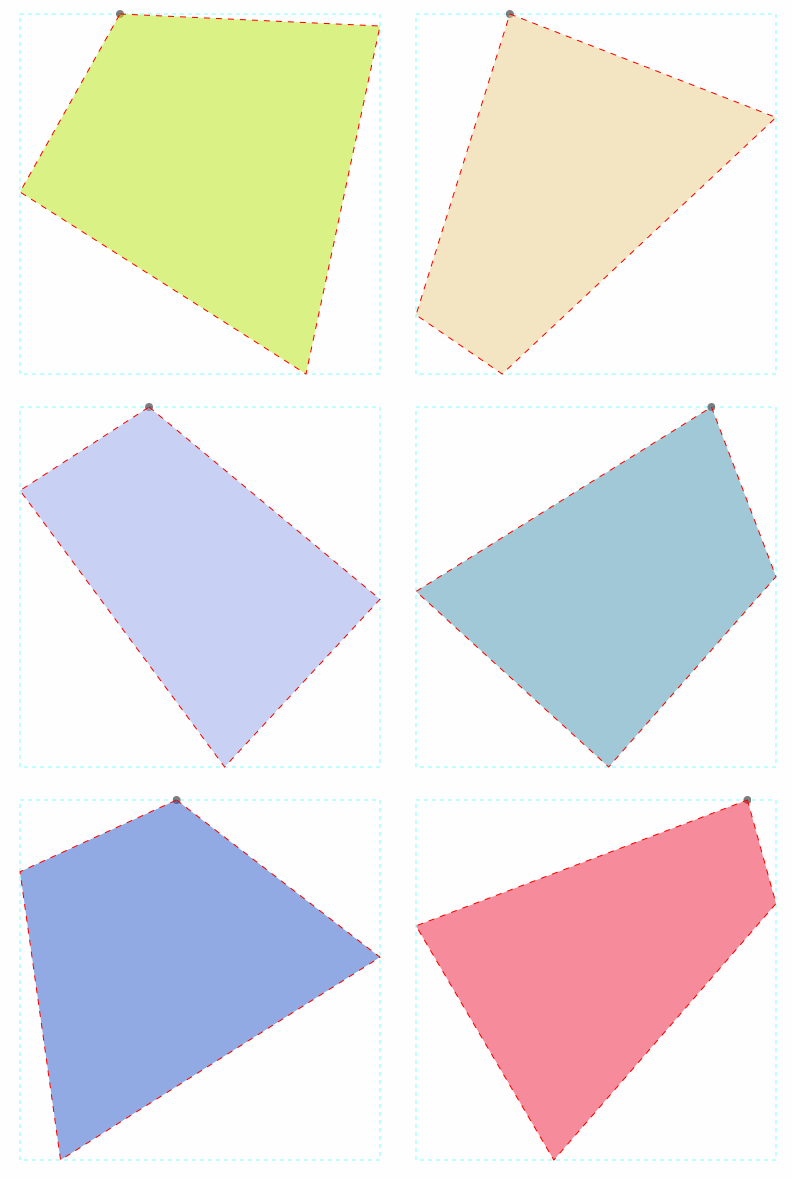
效果
源码
https://github.com/YouXianMing/Animations
//

//  CAShapeLayerPathController.m

//  Animations

//

//  Created by YouXianMing on 15/11/17.

//  Copyright © 2015年 YouXianMing. All rights reserved.

//

#import "CAShapeLayerPathController.h"

#import "PathView.h"

#import "UIView+SetRect.h"

#import "GCD.h"

@interface CAShapeLayerPathController ()

@property (nonatomic, strong) PathView *pathView;

@property (nonatomic, strong) GCDTimer *timer;

@property (nonatomic, strong) CAShapeLayer *lineShapeLayer;

@property (nonatomic, strong) CAShapeLayer *fillShapeLayer;

@property (nonatomic) CGPoint A;

@property (nonatomic, strong) CALayer *pointA;

@end

@implementation CAShapeLayerPathController

- (void)viewDidLoad {

    [super viewDidLoad];

}

- (void)setup {

    [super setup];

    // background view

    self.pathView        = [[PathView alloc] initWithFrame:CGRectMake(, , , )];

    self.pathView.center = self.view.center;

    self.pathView.gap    = .f;

    [self.pathView setNeedsDisplay];

    [self.view addSubview:self.pathView];

    UIBezierPath *path = [self randomPath];

    // point A

    self.pointA                 = [CALayer layer];

    self.pointA.frame           = CGRectMake(, , , );

    self.pointA.cornerRadius    = .f;

    self.pointA.backgroundColor = [[UIColor blackColor] colorWithAlphaComponent:0.5f].CGColor;

    self.pointA.position        = CGPointMake(self.A.x + , self.A.y + );

    [self.pathView.layer addSublayer:self.pointA];

    // shape

    self.fillShapeLayer             = [CAShapeLayer layer];

    self.fillShapeLayer.path        = path.CGPath;

    self.fillShapeLayer.strokeColor = [UIColor clearColor].CGColor;

    self.fillShapeLayer.fillColor   = [UIColor cyanColor].CGColor;

    self.fillShapeLayer.lineWidth   = .f;

    self.fillShapeLayer.frame       = CGRectMake(self.pathView.gap,

                                                 self.pathView.gap,

                                                 self.pathView.width -  * self.pathView.gap,

                                                 self.pathView.width -  * self.pathView.gap);

    [self.pathView.layer addSublayer:self.fillShapeLayer];

    // line

    self.lineShapeLayer             = [CAShapeLayer layer];

    self.lineShapeLayer.path        = path.CGPath;

    self.lineShapeLayer.strokeColor = [UIColor redColor].CGColor;

    self.lineShapeLayer.fillColor   = [UIColor clearColor].CGColor;

    self.lineShapeLayer.lineWidth   = 0.5f;

    self.lineShapeLayer.lineDashPattern = @[@(), @()];

    self.lineShapeLayer.frame       = CGRectMake(self.pathView.gap,

                                                 self.pathView.gap,

                                                 self.pathView.width -  * self.pathView.gap,

                                                 self.pathView.width -  * self.pathView.gap);

    [self.pathView.layer addSublayer:self.lineShapeLayer];

    // timer

    self.timer = [[GCDTimer alloc] initInQueue:[GCDQueue mainQueue]];

    [self.timer event:^{

        // path animation.

        UIBezierPath *newPath            = [self randomPath];

        CABasicAnimation *basicAnimation = [CABasicAnimation animationWithKeyPath:@"path"];

        basicAnimation.duration          = 0.5;

        basicAnimation.fromValue         = (__bridge id)(self.lineShapeLayer.path);

        basicAnimation.toValue           = (__bridge id)newPath.CGPath;

        self.lineShapeLayer.path         = newPath.CGPath;

        self.fillShapeLayer.path         = newPath.CGPath;

        [self.lineShapeLayer addAnimation:basicAnimation forKey:@"lineShapeLayerPath"];

        [self.fillShapeLayer addAnimation:basicAnimation forKey:@"fillShapeLayerPath"];

        // fillColor animation.

        UIColor *newColor = [self randomColor];

        CABasicAnimation *colorAnimation = [CABasicAnimation animationWithKeyPath:@"fillColor"];

        colorAnimation.duration          = 0.5;

        colorAnimation.fromValue         = (__bridge id _Nullable)(self.fillShapeLayer.fillColor);

        colorAnimation.toValue           = (__bridge id)newColor.CGColor;

        self.fillShapeLayer.fillColor    = newColor.CGColor;

        [self.fillShapeLayer addAnimation:colorAnimation forKey:@"fillShapeLayerColor"];

        // path animation.

        CGPoint newPoint = CGPointMake(self.A.x + , self.A.y + );

        CABasicAnimation *positionAnimation = [CABasicAnimation animationWithKeyPath:@"position"];

        positionAnimation.duration          = 0.5f;

        positionAnimation.fromValue         = [NSValue valueWithCGPoint:self.pointA.position];

        positionAnimation.toValue           = [NSValue valueWithCGPoint:newPoint];

        self.pointA.position                = newPoint;

        [self.pointA addAnimation:positionAnimation forKey:@"positionAnimation"];

    } timeIntervalWithSecs:.f];

    [self.timer start];

}

- (UIBezierPath *)randomPath {

    CGPoint pointA = [self randomPointA];

    CGPoint pointB = [self randomPointB];

    CGPoint pointC = [self randomPointC];

    CGPoint pointD = [self randomPointD];

    self.A = pointA;

    UIBezierPath* bezierPath = [UIBezierPath bezierPath];

    [bezierPath moveToPoint:pointA];

    [bezierPath addLineToPoint:pointB];

    [bezierPath addLineToPoint:pointC];

    [bezierPath addLineToPoint:pointD];

    [bezierPath closePath];

    return bezierPath;

}

- (CGPoint)randomPointA {

    return CGPointMake(arc4random() % (int)(self.pathView.width -  * self.pathView.gap), );

}

- (CGPoint)randomPointB {

    return CGPointMake(self.pathView.width -  * self.pathView.gap, arc4random() % (int)(self.pathView.width -  * self.pathView.gap));

}

- (CGPoint)randomPointC {

    return CGPointMake(arc4random() % (int)(self.pathView.width -  * self.pathView.gap), self.pathView.width -  * self.pathView.gap);

}

- (CGPoint)randomPointD {

    return CGPointMake(, arc4random() % (int)(self.pathView.width -  * self.pathView.gap));

}

- (UIColor *)randomColor {

    return [UIColor colorWithRed:arc4random() %  / .f

                           green:arc4random() %  / .f

                            blue:arc4random() %  / .f

                           alpha:0.5f];

}

@end
细节
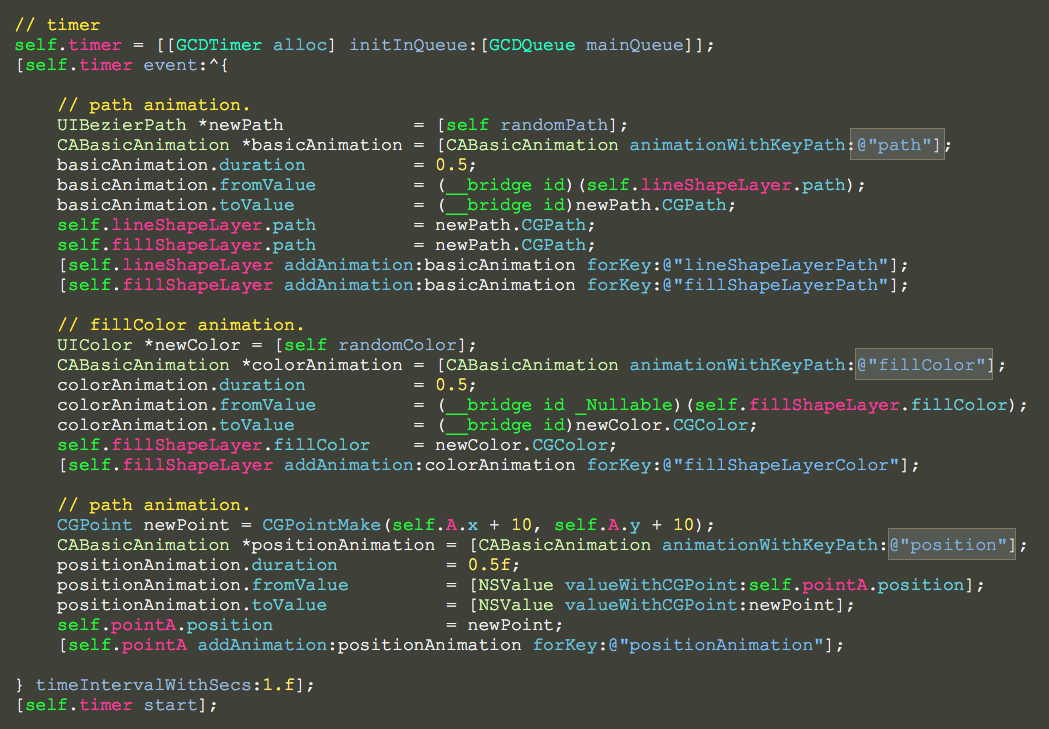
注意keyPath参数。
CAShapeLayer的path动画的更多相关文章
- 用path动画绘制水波纹
用path动画绘制水波纹 效果 源码 // // ViewController.m // PathAnimation // // Created by YouXianMing on 15/7/3. / ...
- 使用CAShapeLayer的path属性与UIBezierPath画出扫描框
1.CAShapeLayer CAShapeLayer具有path属性,(是CGPath对象),可以使用这个属性与UIBezierPath画出想要的图形.该子类根据其fill color和stroke ...
- iOS | CAShapeLayer转场动画
什么也不说了,作为一名乐于分享技术的小开发,直接先上个样式最为直观贴切,有需要的朋友可以直接拿过去用. 需要demo请点击这里 :github 在这个demo中,核心为选用画布CAShapeLayer ...
- CAShapeLayer+CADisplayLink 波浪动画
p.p1 { margin: 0.0px 0.0px 0.0px 0.0px; font: 14.0px Menlo; color: #1e9421 } p.p2 { margin: 0.0px 0. ...
- svg path 动画效果
http://www.zhangxinxu.com/wordpress/2014/04/animateion-line-drawing-svg-path-%E5%8A%A8%E7%94%BB-%E8% ...
- iOS酷炫动画效果合集
iOS酷炫动画效果合集 源码地址 https://github.com/YouXianMing/Animations 效果绝对酷炫,包含了多种多样的动画类型,如POP.Easing.粒子效果等等,虽然 ...
- 动画黄金搭档:CADisplayLink&CAShapeLayer
我们在开发中有时会遇到一些看似非常复杂的动画,不知该如何下手,今天的这篇文章中我会讲到如何利用CADisplayLink和CAShapeLayer来构建一些复杂的动画,希望能在你下次构建动画中,给你一 ...
- 动画黄金搭档:CADisplayLink & CAShapeLayer
我们在开发中有时会遇到一些看似非常复杂的动画,不知该如何下手,今天的这篇文章中我会讲到如何利用CADisplayLink和CAShapeLayer来构建一些复杂的动画,希望能在你下次构建动画中,给你一 ...
- iOS开发——图形编程Swift篇&CAShapeLayer实现圆形图片加载动画
CAShapeLayer实现圆形图片加载动画 几个星期之前,Michael Villar在Motion试验中创建一个非常有趣的加载动画. 下面的GIF图片展示这个加载动画,它将一个圆形进度指示器和圆形 ...
随机推荐
- hdu 4006 第K大的数(优先队列)
N次操作 I是插入一个数 Q是输出第K大的数 Sample Input8 3 //n kI 1I 2I 3QI 5QI 4Q Sample Output123 # include <iostre ...
- pymongo处理正则表达式的情况
在python里使用pymongo处理mongodb数据库,在插入或者查询的时候,我们有时需要使用操作符号,如set,in, 具体操作符的可以参考 https://docs.mongodb.com/ ...
- 安装 Git
是时候动手尝试下 Git 了,不过得先安装好它.有许多种安装方式,主要分为两种,一种是通过编译源代码来安装:另一种是使用为特定平台预编译好的安装包. 从源代码安装 若是条件允许,从源代码安装有很多好处 ...
- ubuntu 安装 Sqlite 和 可视化工具 SqliteBroswer
ubuntu 安装 Sqlite 和 可视化工具 SqliteBroswer 下载sqlite www.sqlite.org/download.html 安装Sqlite 创建一个目录: ...
- python爬虫+词云图,爬取网易云音乐评论
又到了清明时节,用python爬取了网易云音乐<清明雨上>的评论,统计词频和绘制词云图,记录过程中遇到一些问题 爬取网易云音乐的评论 一开始是按照常规思路,分析网页ajax的传参情况.看到 ...
- Bomb HDU 3555 dp状态转移
题目:http://acm.hdu.edu.cn/showproblem.php?pid=3555 题意: 给出一个正整数N,求出1~N中含有数字“49”的数的个数 思路: 采用数位dp的状态转移方程 ...
- C++运算符重载 模板友元 new delete ++ = +=
今天的重载是基于C++ 类模板的,如果需要非类模板的重载的朋友可以把类模板拿掉,同样可以参考,谢谢. 一.类模板中的友元重载 本人喜好类声明与类成员实现分开写的代码风格,如若您喜欢将类成员函数的实现写 ...
- pycharm安装使用,python运算规则
首先讲了pycharm的安装和使用,基本上算是个脚本编辑器.另外pycharm的一些操作方法:http://edu.51cto.com/course/9043.html 葫芦老师录的pycharm视频 ...
- PHP大型电商网站秒杀思路
秒杀/抢购 技术:高可用,高并发 市场:用户体验,曝光度,促销 秒杀放单独服务器,这样即使崩溃不影响网站其他功能. 高可用:双活. 高并发:负载均衡,安全过滤. 阿里云:云监控 分流,CDN加速 业务 ...
- ZOJ2112 BZOJ1901 Dynamic Rankings 树套树 带修改的区间第k小
http://acm.zju.edu.cn/onlinejudge/showProblem.do?problemCode=2112 树套树,线段树套splay或者主席树套树状数组,我抄了一下hzwer ...