
Aspose.cells常用用法1
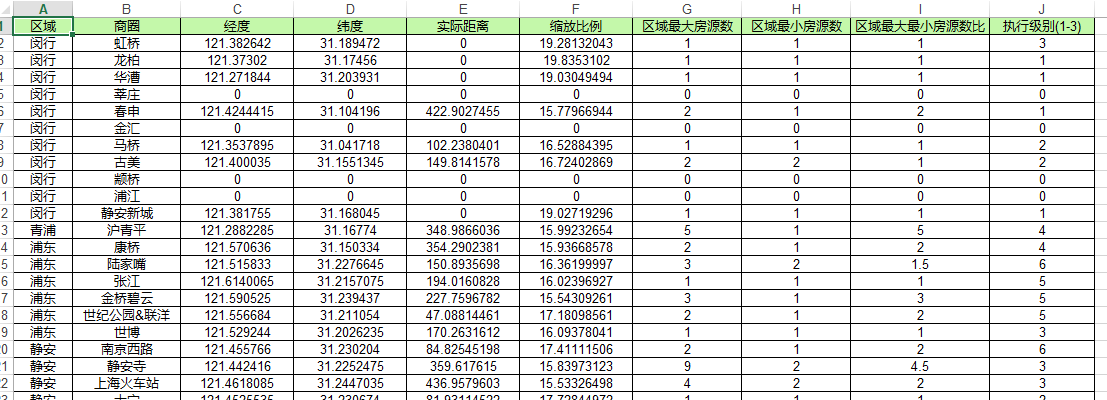
代码:
var execl_path = @"G:\zhyue\backup\项目修改-工作日常\2018-11-12 区域楼盘中心点和放大比例计算\a.xlsx";

Workbook wb = new Workbook();

Worksheet sheet = wb.Worksheets[];

//添加表头

sheet.Cells[, ].SetCell("区域", Color.FromArgb(, , ));

sheet.Cells[, ].SetCell("商圈", Color.FromArgb(, , ));

sheet.Cells[, ].SetCell("经度", Color.FromArgb(, , ));

sheet.Cells[, ].SetCell("纬度", Color.FromArgb(, , ));

sheet.Cells[, ].SetCell("实际距离", Color.FromArgb(, , ));

sheet.Cells[, ].SetCell("缩放比例", Color.FromArgb(, , ));

sheet.Cells[, ].SetCell("区域最大房源数", Color.FromArgb(, , ));

sheet.Cells[, ].SetCell("区域最小房源数", Color.FromArgb(, , ));

sheet.Cells[, ].SetCell("区域最大最小房源数比", Color.FromArgb(, , ));

sheet.Cells[, ].SetCell("执行级别(1-3)", Color.FromArgb(, , ));

int row = ;//第几行

list_reach.ForEach(s =>

{

    int i = ;

    GetResult(s.SQID, out longitude, out latitude, out distance, out scale, out max_com_num, out min_com_num, out max_min_scale, ref i);

    sheet.Cells[row, ].SetCell(s.C_ReachName, Color.White);

    sheet.Cells[row, ].SetCell(s.SQName, Color.White);

    sheet.Cells[row, ].SetCell(longitude, Color.White);

    sheet.Cells[row, ].SetCell(latitude, Color.White);

    sheet.Cells[row, ].SetCell(distance, Color.White);

    sheet.Cells[row, ].SetCell(scale, Color.White);

    sheet.Cells[row, ].SetCell(max_com_num, Color.White);

    sheet.Cells[row, ].SetCell(min_com_num, Color.White);

    sheet.Cells[row, ].SetCell(max_min_scale, Color.White);

    sheet.Cells[row, ].SetCell(i - , Color.White);

    row++;

});

sheet.setColumnWithAuto();

wb.Save(execl_path);
引用扩展类
static class Cells1

{

    /// <summary>

    /// 设置cell的Value和Style

    /// </summary>

    /// <param name="cell"></param>

    /// <param name="name"></param>

    /// <param name="bgColor"></param>

    public static void SetCell(this Cell cell, object name, Color bgColor)

    {

        cell.PutValue(name);//单元格值

        Style style = new CellsFactory().CreateStyle();

        style.ForegroundColor = bgColor;

        style.Pattern = BackgroundType.Solid;//背景颜色不起作用,加入该行代码

        style.Borders[BorderType.LeftBorder].LineStyle = CellBorderType.Thin; //应用边界线 左边界线

        style.Borders[BorderType.RightBorder].LineStyle = CellBorderType.Thin; //应用边界线 右边界线

        style.Borders[BorderType.TopBorder].LineStyle = CellBorderType.Thin; //应用边界线 上边界线

        style.Borders[BorderType.BottomBorder].LineStyle = CellBorderType.Thin; //应用边界线 下边界线

        style.HorizontalAlignment = TextAlignmentType.Center;

        style.VerticalAlignment = TextAlignmentType.Center;

        cell.SetStyle(style);

    }

    /// <summary>

    /// 设置表页的列宽度自适应

    /// </summary>

    /// <param name="sheet">worksheet对象</param>

    public static void setColumnWithAuto(this Worksheet sheet)

    {

        Cells cells = sheet.Cells;

        int columnCount = cells.MaxColumn;  //获取表页的最大列数

        int rowCount = cells.MaxRow;        //获取表页的最大行数

        for (int col = ; col <= columnCount; col++)

        {

            sheet.AutoFitColumn(col, , rowCount);

        }

        for (int col = ; col <= columnCount; col++)

        {

            cells.SetColumnWidthPixel(col, cells.GetColumnWidthPixel(col) + );

        }

    }

}
Aspose.cells常用用法1的更多相关文章
- Aspose.Cells 基础用法
最近使用Aspose.Cells做Excel,在怎么添加批注和添加内部导航链接上耗费了一些时间,最后在官网上找到相关用法,记录一下. 代码不用过多介绍,看看即可明白. 测试代码下载 Workbook ...
- Aspose.Cells.dll的用法
public void OutExcel() { #region WorkbookDesigner designer = new WorkbookDesigner(); Worksheet sheet ...
- 常用类-Excel-使用Aspose.Cells插件
using System; using System.Collections.Generic; using System.Linq; using System.Web; using System.Xm ...
- NPOI、MyXls、Aspose.Cells 导入导出Excel(转)
Excel导入及导出问题产生: 从接触.net到现在一直在维护一个DataTable导s出到Excel的类,时不时还会维护一个导入类.以下是时不时就会出现的问题: 导出问题: 如果是asp.net,你 ...
- 对Aspose.Cells Excel文件操作的扩展
工作中对Excel操作的需求很是常见,今天其他项目组的同事在进行Excel数据导入时,使用Aspose.Cells Excel 遇到了些问题. 刚好闲来不忙,回想自己用过的Excel文件操作,有NPO ...
- C#使用Aspose.Cells导出Excel简单实现
首先,需要添加引用Aspose.Cells.dll,官网下载地址:http://downloads.aspose.com/cells/net 将DataTable导出Xlsx格式的文件下载(网页输出) ...
- Aspose.Cells导出Excel(2)
DataTable dtTitle = ds.Tables[]; DataTable dtDetail = ds.Tables[]; int columns = dtTitle.Columns.Cou ...
- Aspose.Cells导出Excel(1)
利用Aspose.Cells导出excel 注意的问题 1.DataTable的处理 2.进行编码,便于中文名文件下载 3.别忘了Aspose.Cells.dll(可以自己在网上搜索) public ...
- 使用Aspose.Cells读取Excel
最新更新请访问: http://denghejun.github.io Aspose.Cells读取Excel非常方便,以下是一个简单的实现读取和导出Excel的操作类: 以下是Aspose.Ce ...
随机推荐
- Java MVC和三层架构
一.设计模式 Model 1 和Model 2 Model 1 前面学习了Servlet和Jsp,对这两个有个大概的认识,Servlet就是为了解决静态页面的问题,能够实现动态的页面,使维护,开发更加 ...
- error: failed to push some refs to 'https://github.com/username/python.git'
解决error: failed to push some refs to 'https://github.com/bluepen/python.git' 当我们在使用git工具上传我们自己的代码时,可 ...
- css之IE hack 方法[ IE6 - IE9]
ps: 由于近来需要研究IE下兼容问题,今天又再次翻起起这些针对IE的hack,于是决定写下这篇笔记,记录下这些本该献祭级浏览器下的处理方法,用于备忘 一.IE10以及以下版本均会生效(ie edge ...
- linux安装应用程序
实验:为 Linux 主机安装应用程序 环境:vmware workstation 14 . redhad-server-6.4 需求:1.使用 RPM 包的方式安装 Mozilla Firef ...
- 数据库MySQL(课下作业,必做)
数据库MySQL(课下作业,必做) 题目要求: 下载附件中的world.sql.zip, 参考http://www.cnblogs.com/rocedu/p/6371315.html#SECDB,导入 ...
- 剑指offer四十一之和为S的连续正数序列
一.题目 题目描述:小明很喜欢数学,有一天他在做数学作业时,要求计算出9~16的和,他马上就写出了正确答案是100.但是他并不满足于此,他在想究竟有多少种连续的正数序列的和为100(至少包括两个数 ...
- apache URL重写 标志表 以及 错误解决方法
Apache mod_rewrite规则重写的标志一览 1) R[=code](force redirect) 强制外部重定向 强制在替代字符串加上http://thishost[:thisport] ...
- Android Studio修改字体大小
android studio提供的主题是不能修改字体和字体大小的,如果要修改大小就的另存一份自定义的主题了. 1.启动Android Studio,菜单"File"-"S ...
- 使用Mac命令别名,提升工作效率
为系统添加命令别名可以提高我们的工作效率,告别命令繁琐,庸长的的烦恼. Mac的~/.bash_profile文件提供了为系统添加命令别名的地方.所以我们要操作的也是这个文件. 下面是修改~/.bas ...
- ES6那些事半功倍的新特性(一)
数组方面 Array.from(xxx):把json格式字符串转换成数组: Array.of(x,x,x):负责把一堆文本或者变量转换成数组 find( ):该方法为实例方法,就是以Array对象开头 ...