
Aspose.cells常用用法1
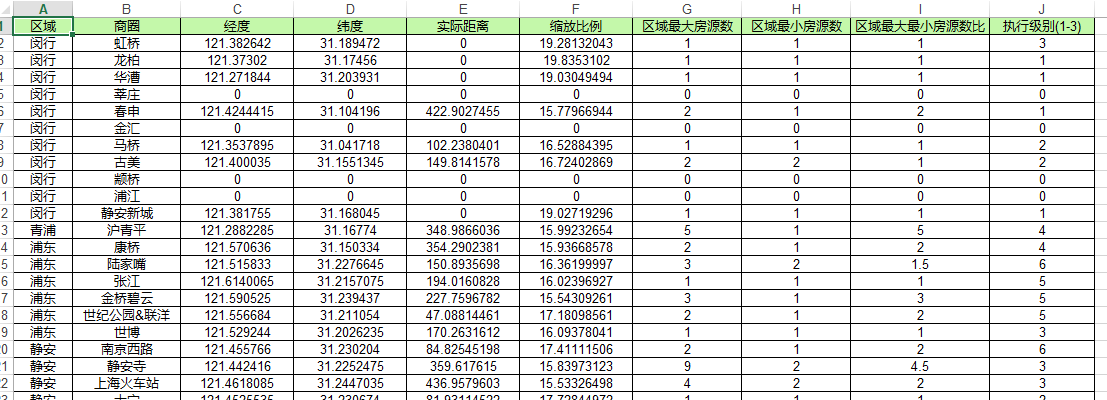
代码:
var execl_path = @"G:\zhyue\backup\项目修改-工作日常\2018-11-12 区域楼盘中心点和放大比例计算\a.xlsx";

Workbook wb = new Workbook();

Worksheet sheet = wb.Worksheets[];

//添加表头

sheet.Cells[, ].SetCell("区域", Color.FromArgb(, , ));

sheet.Cells[, ].SetCell("商圈", Color.FromArgb(, , ));

sheet.Cells[, ].SetCell("经度", Color.FromArgb(, , ));

sheet.Cells[, ].SetCell("纬度", Color.FromArgb(, , ));

sheet.Cells[, ].SetCell("实际距离", Color.FromArgb(, , ));

sheet.Cells[, ].SetCell("缩放比例", Color.FromArgb(, , ));

sheet.Cells[, ].SetCell("区域最大房源数", Color.FromArgb(, , ));

sheet.Cells[, ].SetCell("区域最小房源数", Color.FromArgb(, , ));

sheet.Cells[, ].SetCell("区域最大最小房源数比", Color.FromArgb(, , ));

sheet.Cells[, ].SetCell("执行级别(1-3)", Color.FromArgb(, , ));

int row = ;//第几行

list_reach.ForEach(s =>

{

    int i = ;

    GetResult(s.SQID, out longitude, out latitude, out distance, out scale, out max_com_num, out min_com_num, out max_min_scale, ref i);

    sheet.Cells[row, ].SetCell(s.C_ReachName, Color.White);

    sheet.Cells[row, ].SetCell(s.SQName, Color.White);

    sheet.Cells[row, ].SetCell(longitude, Color.White);

    sheet.Cells[row, ].SetCell(latitude, Color.White);

    sheet.Cells[row, ].SetCell(distance, Color.White);

    sheet.Cells[row, ].SetCell(scale, Color.White);

    sheet.Cells[row, ].SetCell(max_com_num, Color.White);

    sheet.Cells[row, ].SetCell(min_com_num, Color.White);

    sheet.Cells[row, ].SetCell(max_min_scale, Color.White);

    sheet.Cells[row, ].SetCell(i - , Color.White);

    row++;

});

sheet.setColumnWithAuto();

wb.Save(execl_path);
引用扩展类
static class Cells1

{

    /// <summary>

    /// 设置cell的Value和Style

    /// </summary>

    /// <param name="cell"></param>

    /// <param name="name"></param>

    /// <param name="bgColor"></param>

    public static void SetCell(this Cell cell, object name, Color bgColor)

    {

        cell.PutValue(name);//单元格值

        Style style = new CellsFactory().CreateStyle();

        style.ForegroundColor = bgColor;

        style.Pattern = BackgroundType.Solid;//背景颜色不起作用,加入该行代码

        style.Borders[BorderType.LeftBorder].LineStyle = CellBorderType.Thin; //应用边界线 左边界线

        style.Borders[BorderType.RightBorder].LineStyle = CellBorderType.Thin; //应用边界线 右边界线

        style.Borders[BorderType.TopBorder].LineStyle = CellBorderType.Thin; //应用边界线 上边界线

        style.Borders[BorderType.BottomBorder].LineStyle = CellBorderType.Thin; //应用边界线 下边界线

        style.HorizontalAlignment = TextAlignmentType.Center;

        style.VerticalAlignment = TextAlignmentType.Center;

        cell.SetStyle(style);

    }

    /// <summary>

    /// 设置表页的列宽度自适应

    /// </summary>

    /// <param name="sheet">worksheet对象</param>

    public static void setColumnWithAuto(this Worksheet sheet)

    {

        Cells cells = sheet.Cells;

        int columnCount = cells.MaxColumn;  //获取表页的最大列数

        int rowCount = cells.MaxRow;        //获取表页的最大行数

        for (int col = ; col <= columnCount; col++)

        {

            sheet.AutoFitColumn(col, , rowCount);

        }

        for (int col = ; col <= columnCount; col++)

        {

            cells.SetColumnWidthPixel(col, cells.GetColumnWidthPixel(col) + );

        }

    }

}
Aspose.cells常用用法1的更多相关文章
- Aspose.Cells 基础用法
最近使用Aspose.Cells做Excel,在怎么添加批注和添加内部导航链接上耗费了一些时间,最后在官网上找到相关用法,记录一下. 代码不用过多介绍,看看即可明白. 测试代码下载 Workbook ...
- Aspose.Cells.dll的用法
public void OutExcel() { #region WorkbookDesigner designer = new WorkbookDesigner(); Worksheet sheet ...
- 常用类-Excel-使用Aspose.Cells插件
using System; using System.Collections.Generic; using System.Linq; using System.Web; using System.Xm ...
- NPOI、MyXls、Aspose.Cells 导入导出Excel(转)
Excel导入及导出问题产生: 从接触.net到现在一直在维护一个DataTable导s出到Excel的类,时不时还会维护一个导入类.以下是时不时就会出现的问题: 导出问题: 如果是asp.net,你 ...
- 对Aspose.Cells Excel文件操作的扩展
工作中对Excel操作的需求很是常见,今天其他项目组的同事在进行Excel数据导入时,使用Aspose.Cells Excel 遇到了些问题. 刚好闲来不忙,回想自己用过的Excel文件操作,有NPO ...
- C#使用Aspose.Cells导出Excel简单实现
首先,需要添加引用Aspose.Cells.dll,官网下载地址:http://downloads.aspose.com/cells/net 将DataTable导出Xlsx格式的文件下载(网页输出) ...
- Aspose.Cells导出Excel(2)
DataTable dtTitle = ds.Tables[]; DataTable dtDetail = ds.Tables[]; int columns = dtTitle.Columns.Cou ...
- Aspose.Cells导出Excel(1)
利用Aspose.Cells导出excel 注意的问题 1.DataTable的处理 2.进行编码,便于中文名文件下载 3.别忘了Aspose.Cells.dll(可以自己在网上搜索) public ...
- 使用Aspose.Cells读取Excel
最新更新请访问: http://denghejun.github.io Aspose.Cells读取Excel非常方便,以下是一个简单的实现读取和导出Excel的操作类: 以下是Aspose.Ce ...
随机推荐
- 《JAVA与模式》之模板方法模式
在阎宏博士的<JAVA与模式>一书中开头是这样描述模板方法(Template Method)模式的: 模板方法模式是类的行为模式.准备一个抽象类,将部分逻辑以具体方法以及具体构造函数的形式 ...
- 【PaddlePaddle系列】CIFAR-10图像分类
前言 本文与前文对手写数字识别分类基本类似的,同样图像作为输入,类别作为输出.这里不同的是,不仅仅是使用简单的卷积神经网络加上全连接层的模型.卷积神经网络大火以来,发展出来许多经典的卷积神经网络模型, ...
- POJ1038 Bugs Integrated, Inc.
题目来源:http://poj.org/problem?id=1038 题目大意: 有一家芯片公司要在一块N*M的板子上嵌入芯片,其中1<=N<=150, 1<=M<=10,但 ...
- 剑指offer四十八之不用加减乘除做加法
一.题目 写一个函数,求两个整数之和,要求在函数体内不得使用+.-.*./四则运算符号. 二.思路 1. 采用位运算的方法,分三步: (1).两个数异或:相当于每一位相加,而不考虑进位 (2).两个数 ...
- 剑指offer二十八之数组中出现次数超过一半的数字
一.题目 数组中有一个数字出现的次数超过数组长度的一半,请找出这个数字.例如输入一个长度为9的数组{1,2,3,2,2,2,5,4,2}.由于数字2在数组中出现了5次,超过数组长度的一半,因此输出2. ...
- Linux awk命令详解[备份]
简介 awk是一个强大的文本分析工具,相对于grep的查找,sed的编辑,awk在其对数据分析并生成报告时,显得尤为强大.简单来说awk就是把文件逐行的读入,以空格为默认分隔符将每行切片,切开的部分再 ...
- Java后台 解析JSON的几个方法
1.对象转JSON对象. public static void main(String[] args) { Domain demo = new Domain( "在线JSON校验格式化工具 ...
- 删除Open with Atom右键菜单
特别特别讨厌Atom的右键菜单,叕没有设置项可以去掉,烦!安装完RegScanner v2.15汉化版之后,开始搜索删除Atom的右键菜单 1.打开E:\RegScanner2.加载配置文件 E:\R ...
- invalid request block size: 4542 (max 4096)...skip引起的Nginx 502 Bad Geteway
今天有用户报告了一个issue: 当他访问我们的网站时出现了以下错误: 但是我访问同样的地址却没有这个问题,连续访问多次,查看uWSGI日志发现出现以下ERROR: 原来是请求头的大小超出了uWSGI ...
- jieba分词过程
jieba分词最重要的就是字典,我们一般用jieba的话是用的它通用的字典,这样在特定的环境中无法分成我们想要的效果,我们需要根据我们自己的生产环境自己添加我们的字典,然后下载jieba源码进行更改, ...