
@JsonView注解的使用
看到一个新的注解以前没有用过,记录一下使用方法。
注意是:com.fasterxml.jackson.annotation.JsonView
@JsonView可以过滤pojo的属性,使Controller在返回json时候,pojo某些属性不返回,比如User的密码,一般是不返回的,就可以使用这个注解。
@JsonView使用方法:
1,使用接口来声明多个视图
2,在pojo的get方法上指定视图
3,在Controller方法上指定视图
例子:条件查询时候不返回用户的密码,查看详情时候返回用户的密码
User:
package com.imooc.dto;

import com.fasterxml.jackson.annotation.JsonView;

public class User {

    public interface UserSimpleView {};

    public interface UserDetailView extends UserSimpleView{}; //继承

    private String username;

    private String password;

    //UserSimpleView视图有

    @JsonView(UserSimpleView.class)

    public String getUsername() {

        return username;

    }

    public void setUsername(String username) {

        this.username = username;

    }

    @JsonView(UserDetailView.class)

    public String getPassword() {

        return password;

    }

    public void setPassword(String password) {

        this.password = password;

    }

    @Override

    public String toString() {

        return "User [username=" + username + ", password=" + password + "]";

    }

}
Controller:
package com.imooc.web.controller;

import java.util.ArrayList;

import java.util.List;

import org.springframework.data.domain.Pageable;

import org.springframework.web.bind.annotation.GetMapping;

import org.springframework.web.bind.annotation.PathVariable;

import org.springframework.web.bind.annotation.RequestMapping;

import org.springframework.web.bind.annotation.RestController;

import com.fasterxml.jackson.annotation.JsonView;

import com.imooc.dto.User;

import com.imooc.dto.UserQueryCondition;

@RestController

@RequestMapping("/user")

public class UserController {

    /**

     * @Description: 条件查询

     * @param @param condition

     * @param @param pageable

     * @param @return

     * @return List<User>

     * @throws

     * @author lihaoyang

     * @date 2018年2月24日

     */

    @GetMapping("query")

    @JsonView(User.UserSimpleView.class)

    public List<User> query(

            //@RequestParam(value="username",required=false,defaultValue="lhy") String username

            UserQueryCondition condition , Pageable pageable){

//        System.err.println(username);

        System.err.println(condition.toString());

        System.err.println(pageable.toString());

        List<User> users = new ArrayList<User>();

        users.add(new User());

        users.add(new User());

        users.add(new User());

        return users;

    }

    /**

     * 详情

     * @Description: TODO

     * @param @param id

     * @param @return

     * @return User

     * @throws

     * @author lihaoyang

     * @date 2018年2月24日

     */

    @GetMapping("detail/{id:\\d+}") //{}里可以是正则,匹配数字

//    @GetMapping("detail/{id}")

    @JsonView(User.UserDetailView.class)

    public User getInfo(@PathVariable(value="id",required=true) String id){

        System.err.println(id);

        User user = new User();

        user.setUsername("tom");

        return user;

    }

}
测试用例:
package com.imooc.web.controller;

import org.junit.Before;

import org.junit.Test;

import org.junit.runner.RunWith;

import org.springframework.beans.factory.annotation.Autowired;

import org.springframework.boot.test.context.SpringBootTest;

import org.springframework.http.MediaType;

import org.springframework.test.context.junit4.SpringRunner;

import org.springframework.test.web.servlet.MockMvc;

import org.springframework.test.web.servlet.request.MockMvcRequestBuilders;

import org.springframework.test.web.servlet.result.MockMvcResultMatchers;

import org.springframework.test.web.servlet.setup.MockMvcBuilders;

import org.springframework.web.context.WebApplicationContext;

@RunWith(SpringRunner.class)

@SpringBootTest

public class UserControllerTest {

    @Autowired

    private WebApplicationContext webCtx;

    //伪造mvc

    private MockMvc mockMvc;

    @Before

    public void setup(){

        mockMvc = MockMvcBuilders.webAppContextSetup(webCtx).build();

    }

    /**

     * 查询

     */

    @Test

    public void whenQuerySuccess() throws Exception{

        String result = mockMvc.perform(MockMvcRequestBuilders.get("/user/query") //路径

                .param("page", "10")   //参数

                .param("size", "12")

                .param("sort", "age,desc")

                .param("username", "xiaoming")

                .param("age", "18")

                .param("ageTo", "40")

                .param("other", "otherProperty")

                .contentType(MediaType.APPLICATION_JSON_UTF8))

                .andExpect(MockMvcResultMatchers.status().isOk()) //状态码200

                .andExpect(MockMvcResultMatchers.jsonPath("$.length()").value(3))//长度为3,具体查看github的jsonPath项目

                .andReturn().getResponse().getContentAsString();

        System.err.println(result);

    }

    /**

     * 详情

     */

    @Test

    public void whenGetInfoSuccess() throws Exception{

        String result = mockMvc.perform(MockMvcRequestBuilders.get("/user/detail/1")

                .contentType(MediaType.APPLICATION_JSON_UTF8))

                .andExpect(MockMvcResultMatchers.status().isOk())

                .andExpect(MockMvcResultMatchers.jsonPath("$.username").value("tom"))

                .andReturn().getResponse().getContentAsString();

        System.err.println(result);

    }

    /**

     * 详情失败

     */

    @Test

    public void whenGetInfoFail() throws Exception{

        mockMvc.perform(MockMvcRequestBuilders.get("/user/detail/a") //匹配正则

                .contentType(MediaType.APPLICATION_JSON_UTF8))

                .andExpect(MockMvcResultMatchers.status().is4xxClientError());

    }

}
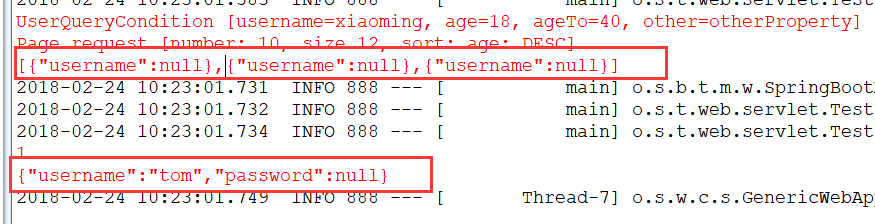
打印结果:使用UserDetailView视图的会把密码给打印出来
@JsonView注解的使用的更多相关文章
- 使用@JsonView注解控制返回的Json属性
我也是刚看到原来还可以这么玩,但是我还是习惯使用Dto,我总感觉这样做的话实体类耦合程度有点高.还是记录以下,万一今后用到了呢 ⒈在实体类中使用接口来声明该实体类的多个视图. ⒉在实体类的属性get方 ...
- 利用@jsonView注解来实现自定义返回字段
业务场景:比如说一个User对象,有两个字段,一个username,一个password,有一个获取用户信息的接口要返回这个User列表,但是不想要这个User列表的password字段. 还有一个接 ...
- @JsonView注解指定返回的model类中显示的字段
1.User类 package com.imooc.model; import com.fasterxml.jackson.annotation.JsonView; /** * @author oy ...
- jackson annotations注解详解 (zhuan)
http://blog.csdn.net/sdyy321/article/details/40298081 ************************************** 官方WIKI: ...
- Spring MVC中@JsonView的使用
一.@JsonView注解的简介 @JsonView是jackson json中的一个注解,Spring webmvc也支持这个注解,它的作用就是控制输入输出后的json 二.@JsonView注解的 ...
- SpringMvc @JsonView 使用方式
准确来说,@JsonView注解不是Spring的,它位于jackson-annotation包中: 作用:SpringMvc使用@ResponseBody将结果以json返回客户端, 有些实体类的 ...
- Spring 4 官方文档学习 Web MVC 框架
1.介绍Spring Web MVC 框架 Spring Web MVC 框架是围绕DispatcherServlet设计的,所谓DispatcherServlet就是将请求分发到handler,需要 ...
- SpringMvc @ResponseBody
一.@Response使用条件 二. @Response在最小配置.jackson的jar包情况下,json中包含的日期类型字段都是以时间戳long类型返回 三. Jack序列化对象转为JSON的限制 ...
- Spring 4 官方文档学习(十一)Web MVC 框架
介绍Spring Web MVC 框架 Spring Web MVC的特性 其他MVC实现的可插拔性 DispatcherServlet 在WebApplicationContext中的特殊的bean ...
随机推荐
- stark 增删改
优雅装饰器 import functools def wrapper(func): @functools.wraps(func) # 保留原函数的信息 def inner(*args, **kwarg ...
- HDU 2136 Largest prime factor (素数打表。。。)
题意:给你一个数,让你求它的最大因子在素数表的位置. 析:看起来挺简单的题,可是我却WA了一晚上,后来终于明白了,这个第一层循环不是到平方根, 这个题和判断素数不一样,只要明白了这一点,就很简单了. ...
- MySQL性能调优与架构设计——第13章 可扩展性设计之 MySQL Replication
第13章 可扩展性设计之 MySQL Replication 前言: MySQL Replication 是 MySQL 非常有特色的一个功能,他能够将一个 MySQL Server 的 Instan ...
- (最小生成树) Borg Maze -- POJ -- 3026
链接: http://poj.org/problem?id=3026 http://acm.hust.edu.cn/vjudge/contest/view.action?cid=82831#probl ...
- noip第9课作业
1. 打印乘法表 [问题描述] 用for循环实现输出1至9的乘法表 [样例输出] 1*1=1 1*2=2 2*2=4 1*3=3 2*3=6 3*3=9 1*4=4 2*4=8 3*4=12 4 ...
- MFC自动生成代码详解(一)
首先声明这篇博客是给MFC刚刚上路的coder准备的,老鸟们就自觉无视我吧! 大家有没有感觉,创建MFC工程时他总会生成一大堆文件一大堆代码.虽然给我们带来了便利,但是调试的时候碰到这些代码总是畏首畏 ...
- Delphi for iOS开发指南(7):在iOS应用程序中使用WebBrowser组件
Delphi for iOS开发指南(7):在iOS应用程序中使用WebBrowser组件 在FireMonkey iOS应用程序中使用WebBrowser 在iOS平台上,FireMonkey使用T ...
- 自适应XAML布局经验总结 (三) 局部布局设计模式2
本系列对实际项目中的XAML布局场景进行总结,给出了较优化的自适应布局解决方案,希望对大家有所帮助. 下面继续介绍局部布局设计模式. 5. 工具箱模式 绘图,三维模型操作等需要工具的情况,可以使用带分 ...
- c# 合并重叠时间段的算法
c# 合并重叠时间段的算法 一.采用非排序: 方案一: 使用递归算法,如不喜欢递归的伙伴们,可以使用whie代替. 1.文件:Extract_Chao.cs(核心) using System; usi ...
- shiro之深度解析FormAuthenticationFilter
shiro是我们在项目经常使用到的权限管理框架,本文我们就重点来分析FormAuthenticationFilter的验证过程. FormAuthenticationFilter 1.继承结构 ...