
GONMarkupParser的使用
GONMarkupParser的使用

说明
这是一个写得非常好的富文本工具类,便于你进行简易的封装。本人抛砖引玉,只进行了少量的简化使用封装。
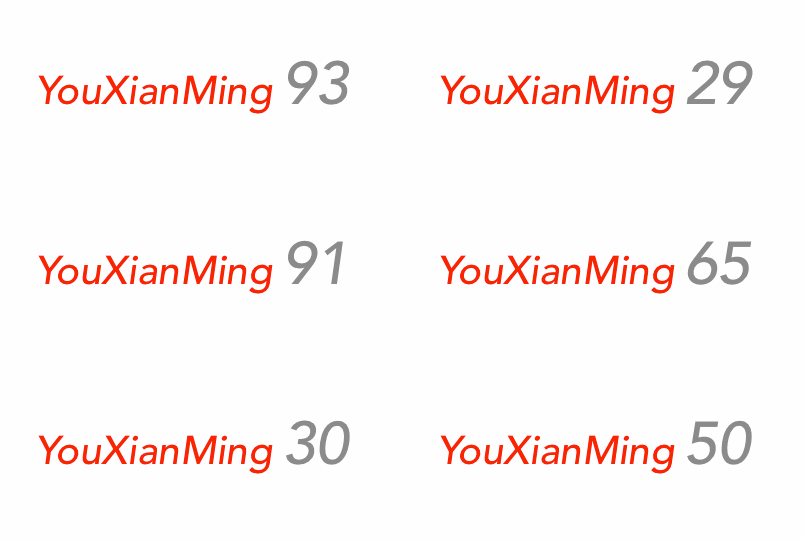
效果
源码
https://github.com/nicolasgoutaland/GONMarkupParser
//

//  NSString+MarkupParserString.h

//  RichText

//

//  Created by YouXianMing on 15/5/14.

//  Copyright (c) 2015年 YouXianMing. All rights reserved.

//

#import <Foundation/Foundation.h>

#import <UIKit/UIKit.h>

@interface NSString (MarkupParserString)

/**

 *  添加颜色标识

 *

 *  @param mark 颜色标识

 *

 *  @return 添加好的文本

 */

- (NSString *)addColorMark:(NSString *)mark;

/**

 *  添加字体标识

 *

 *  @param name 字体名字(如果为空则为系统字体)

 *  @param size 字体大小

 *

 *  @return 添加好的文本

 */

- (NSString *)addFontMarkWithFontName:(NSString *)name

                                 size:(CGFloat)size;

/**

 *  添加链接标识

 *

 *  @param mark 链接标识

 *

 *  @return 添加好的文本

 */

- (NSString *)addLinkMark:(NSString *)mark;

/**

 *  创建富文本

 *

 *  @return 创建好的富文本

 */

- (NSAttributedString *)createAttributedString;

@end
//

//  NSString+MarkupParserString.m

//  RichText

//

//  Created by YouXianMing on 15/5/14.

//  Copyright (c) 2015年 YouXianMing. All rights reserved.

//

#import "NSString+MarkupParserString.h"

#import "GONMarkupParser_All.h"

@implementation NSString (MarkupParserString)

- (NSString *)addColorMark:(NSString *)mark {

    //  <color value="red">text</>

    //  <color value="#FFEEAA">text</>

    //  <color value="myCustomRegisteredColor">text</>

    return [NSString stringWithFormat:@"<color value=\"%@\">%@</>", mark, self];

}

- (NSString *)addFontMarkWithFontName:(NSString *)name

                                 size:(CGFloat)size {

    //  Define a generic markup to configure font

    //  "size" is used to define font size

    //      If missing, current font size will be used. If not found is set, default system font size will be used

    //  "name" define a registered font name or full font name

    //      - Markup will first try to find a registeredFont with given name.

    //      - If no font found, markup will try to load a font using given name

    //  If "name" isn't set, current defined font will be used with new defined size. If no font is currently used, default system one will be used

    //

    //  If no attribute is set, current defined font will be removed (NSFontAttributeName), and default system one will be used instead

    //

    //  Examples

    //

    //  <font size="18">This text will use current font, set to 18</>

    //  <font name="Helvetica">This text will use Helvetica as font, using current font size</>

    //  <font name="Helvetica" size="18">This text will use Helvetica, set to 18</>

    if (name == nil) {

        return [NSString stringWithFormat:@"<font size=\"%f\">%@</>", size, self];

    } else {

        return [NSString stringWithFormat:@"<font name=\"%@\" size=\"%f\">%@</>", name, size, self];

    }

}

- (NSString *)addLinkMark:(NSString *)mark {

    //  To detect user touch on link :

    //  - display attributed string in a UITextView

    //  - configure UITextView selectable property to YES and isEditable to NO

    //  - set delegate

    //  - implement "textView:shouldInteractWithURL:inRange:" method

    //

    //  Examples

    //

    //  <a href="#1">Link 1</>

    //  <a href="http://www.apple.com">Link to apple.com</>

    //  <a href="myscheme://myapp">Custom link</>

    return [NSString stringWithFormat:@"<a href=\"%@\">%@</>", mark, self];

}

- (NSAttributedString *)createAttributedString {

    return [[GONMarkupParserManager sharedParser] attributedStringFromString:self

                                                                       error:nil];

}

@end
//

//  ViewController.m

//  RichText

//

//  Created by YouXianMing on 15/5/14.

//  Copyright (c) 2015年 YouXianMing. All rights reserved.

//

#import "ViewController.h"

#import "NSString+MarkupParserString.h"

@interface ViewController ()

@property (nonatomic, strong) UILabel  *label;

@property (nonatomic, strong) NSTimer  *timer;

@end

@implementation ViewController

- (void)viewDidLoad {

    [super viewDidLoad];

    // 创建label

    self.label        = [[UILabel alloc] initWithFrame:CGRectMake(, , , )];

    self.label.center = self.view.center;

    [self.view addSubview:self.label];

    // 定时器

    self.timer = [NSTimer scheduledTimerWithTimeInterval:0.1f

                                                  target:self

                                                selector:@selector(timerEvent)

                                                userInfo:nil

                                                 repeats:YES];

}

- (void)timerEvent {

    NSString *num  = [NSString stringWithFormat:@"%d", (arc4random() % )];

    NSString *name = [[@"YouXianMing" addFontMarkWithFontName:@"Avenir-MediumOblique" size:] addColorMark:@"red"];

    NSString *age  = [[num addFontMarkWithFontName:@"Avenir-MediumOblique" size:.f] addColorMark:@"gray"];

    // 加载富文本

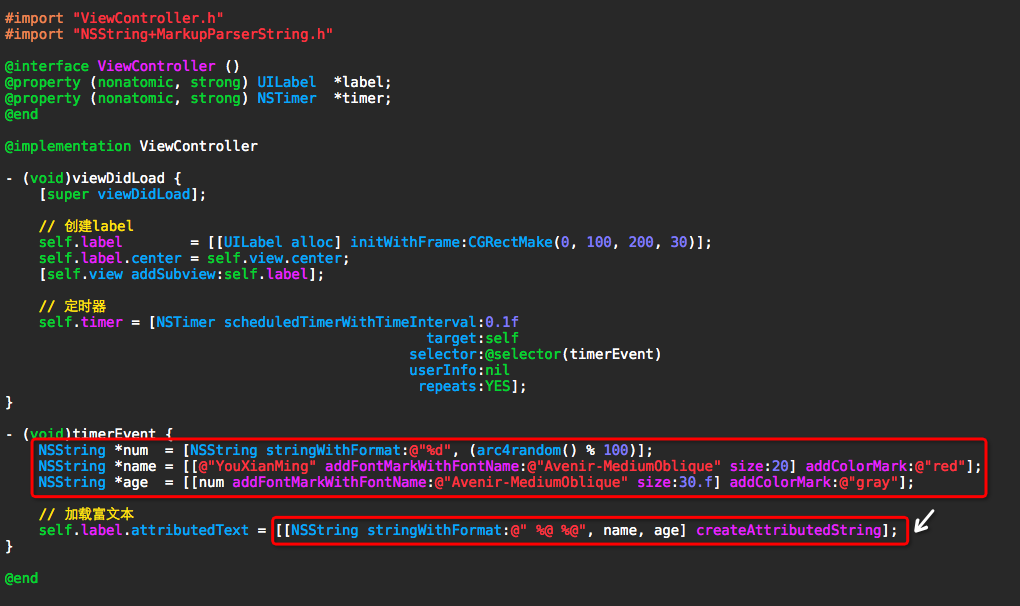
    self.label.attributedText = [[NSString stringWithFormat:@" %@ %@", name, age] createAttributedString];

}

@end
细节
GONMarkupParser的使用的更多相关文章
- [翻译] GONMarkupParser
GONMarkupParser https://github.com/nicolasgoutaland/GONMarkupParser NSString *inputText = @"Sim ...
- iOS之UI--富文本总结
文章内容大纲 1.NSMutableAttributedString的基本使用 2.NSMutableAttributedString的简易封装 3.使用开源代码GOBMarkupPaser处理富文本 ...
- iOS富文本-NSAttributedString简单封装
直接调用系统的写起来比较麻烦,封装一下 因为要简单所以就写类方法 WJAttributeStyle 基类 ) { ; i < styles.count; i ++) { ...
随机推荐
- 使用epublib解析epub文件(章节内容、书籍菜单)
链接地址https://blog.csdn.net/sonnyching/article/details/47407549
- Cloudera Impala源码分析: SimpleScheduler调度策略详解包括作用、接口及实现等
问题导读:1.Scheduler任务中Distributed Plan.Scan Range是什么?2.Scheduler基本接口有哪些?3.QuerySchedule这个类如何理解?4.Simple ...
- Kafka消息重新发送
Kafka消息重新发送 1. 使用kafka消息队列做消息的发布.订阅,如果consumer端消费出问题,导致数据并没有消费,此时不需要担心,数据并不会立刻丢失,kafka会把数据在服务器的磁盘 ...
- SpringBoot(一)初遇
环境: IDEA 2018.1.3 , jdk 1.8 , maven 3.3.9 零 第一次接触springboot, 如何学习比较困惑, 思前想后最后决定从文档来学习, 以下为学习中的参考资料: ...
- 前端(十):使用redux管理数据
react本身能够完成动态数据的监听和更新,如果不是必要可以不适用redux. 安装redux: cnpm install redux --save,或者yarn add redux. 一.react ...
- iReport(模版) 与Jasper(数据填充)生成pdf文档
报表模板生成软件:iReport . 润乾.水晶. 一.Jaspersoft iReport Desiginer 5.60 的使用 1.软件jar包的下载地址与配置 百度云盘下载链接:https:// ...
- .NET中的异步编程
开篇 异步编程是程序设计的重点也是难点,还记得在刚开始接触.net的时候,看的是一本c#的Winform实例教程,上面大部分都是教我们如何使用Winform的控件以及操作数据库的实例,那时候做的基本都 ...
- elastic job will never fire
1. 描述 2018-08-20 18:11:01.912 [Thread-8] INFO org.quartz.impl.StdSchedulerFactory - Using default i ...
- [清华集训]Rmq Problem / mex
题目链接 我们离线处理这些询问 在右端点所在的位置用vector来push_back询问 维护每个数值最后出现的位置p[x] 从左往右扫,边走边回答询问 对于每个询问我们回答第一个p[x]<l的 ...
- THUSC2017 游记
你若安好,便是晴天. Day 0 中午就要出发了,上午浮躁的不行,根本写不下题去. 到了火车站之后发现教练和lyc和ztc在4车靠近5车的那一边,然而我在5车靠近4车的那边,尴尬…… 本来是想着上了火 ...