
Android Studio 升级为3.1 踩到的坑
原文:https://blog.csdn.net/xiariluoxue/article/details/80050700
- AndroidStudio、gradle、buildToolsVersion的关系
- Android Studio gradle插件版本和gradle版本对应关系
- Android Studio 升级为3.1遇到的问题
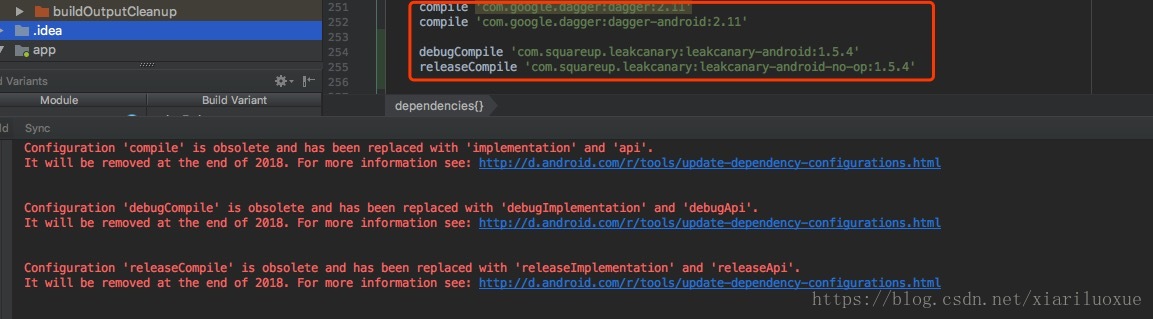
- 问题一:Configuration ‘compile’ is obsolete and has been replaced with ‘implementation’ and ‘api’.`
- 问题二:The SourceSet ‘instrumentTest’ is not recognized by the Android Gradle Plugin. Perhaps you misspelled something?
- 问题三:extractDebugAnnotations is incompatible with java 8 sources and has been disabled.extractReleaseAnnotations is incompatible with java 8 sources and has been disabled
- 问题四:解决No such property: FOR_RUNTIME for class: org.gradle.api.attributes.Usage的问题
AndroidStudio、gradle、buildToolsVersion的关系
The Android Studio build system is based on Gradle, and the Android plugin for Gradle adds several features that are specific to building Android apps.
Android Studio基于Gradle构建系统,为了构建Android应用,Android gradle 插件添加了构建Android应用程序特有的几项功能。
- AndroidStudio:是Google官方基于IntelliJ IDEA开发的一款Android应用开发工具
- Gradle:是一个工具,也是一个编程框架。使用Gradle可完成app的编译打包等工作。
- buildToolsVersion: android构建工具的版本,其中包含打包工具aapt、dx等。buildToolsVersion在安装的android sdk路径下的/build-tools/
Android Studio gradle插件版本和gradle版本对应关系
- gradle插件版本配置:project对应的
build.gradle文件中
buildscript {

    repositories {

         /**Gradle 4.1 and higher include support for Google's Maven repo using

         the google() method. And you need to include this repo to download

        Android plugin 3.0.0 or higher.*/

        jcenter()

        google()

        ...

    }

    dependencies {

        classpath 'com.android.tools.build:gradle:3.1.1'

    }

}

allprojects {

     repositories {

          jcenter()

          google()

     }

}- 1
- 2
- 3
- 4
- 5
- 6
- 7
- 8
- 9
- 10
- 11
- 12
- 13
- 14
- 15
- 16
- 17
- 18
- 19
- 20
buildscript定义了全局的相关属性repositories定义仓库:一个仓库代表着依赖包的来源,例如jcenter仓库dependencies用来定义构建过程:仅仅需要定义默认的Android插件,该插件可以让你执行相关Android的tasks,注意:不应该在该方法体内定义子模块的依赖包。allprojects用来定义各个模块的默认属性:不仅仅局限于默认的配置,也可以自己创造tasks在allprojects方法体内,这些tasks将会在所有模块中可见。
- gradle版本配置
在gradle/wrapper/gradle-wrapper.properties文件中
distributionUrl=https\://services.gradle.org/distributions/gradle-4.4-all.zip- 1
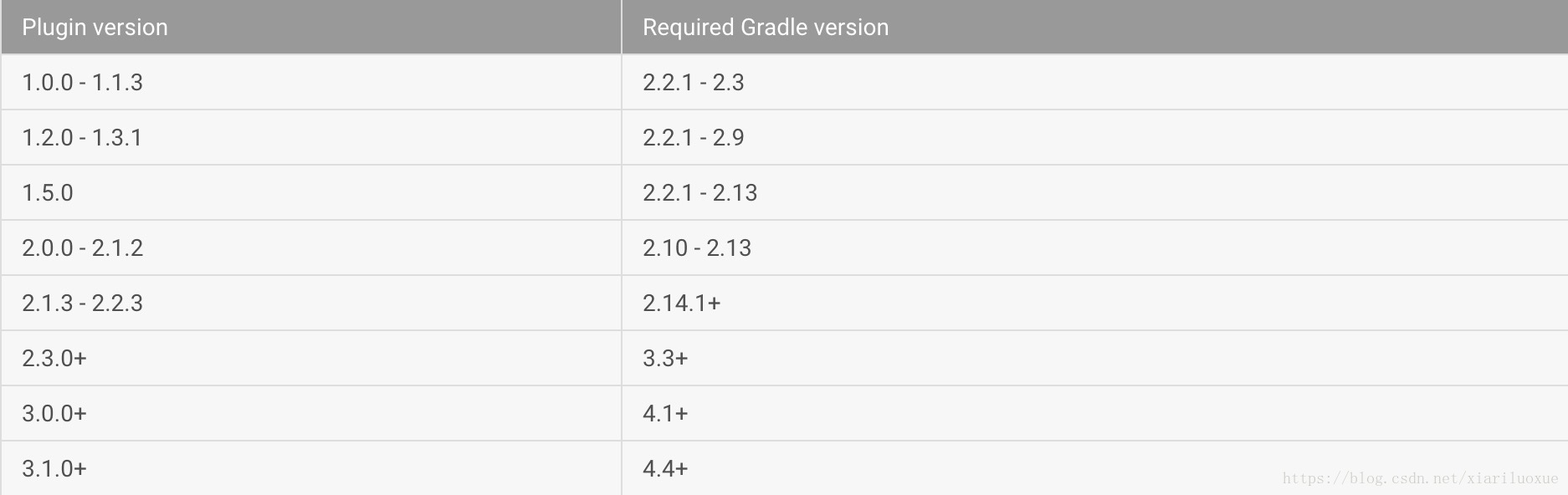
- gradle插件版本和gradle版本对应如下:
官网链接:https://developer.android.google.cn/studio/releases/gradle-plugin.html#updating-plugin
Android Studio 升级为3.1遇到的问题
Android Studio升级为3.1,Gradle 4.4,buildToolsVersion 27.0.3所带来的问题
- 1
- 2
问题一:Configuration ‘compile’ is obsolete and has been replaced with ‘implementation’ and ‘api’.`
使用implementation或者api代替compile
dependencies {

 compile 'com.google.dagger:dagger:2.11'

 compile 'com.google.dagger:dagger-android:2.11'

 debugCompile 'com.squareup.leakcanary:leakcanary-android:1.5.4'

 releaseCompile 'com.squareup.leakcanary:leakcanary-android-no-op:1.5.4'

} - 1
- 2
- 3
- 4
- 5
- 6
- 7
dependencies {

    implementation 'com.google.dagger:dagger:2.11'

    implementation 'com.google.dagger:dagger-android:2.11'

    debugImplementation 'com.squareup.leakcanary:leakcanary-android:1.5.4'

    debugImplementation 'com.squareup.leakcanary:leakcanary-android-no-op:1.5.4'

} - 1
- 2
- 3
- 4
- 5
- 6
api和implementation的区别:
api:模块的依赖对外公开,可被依赖包所引用(完全等同于compile指令)
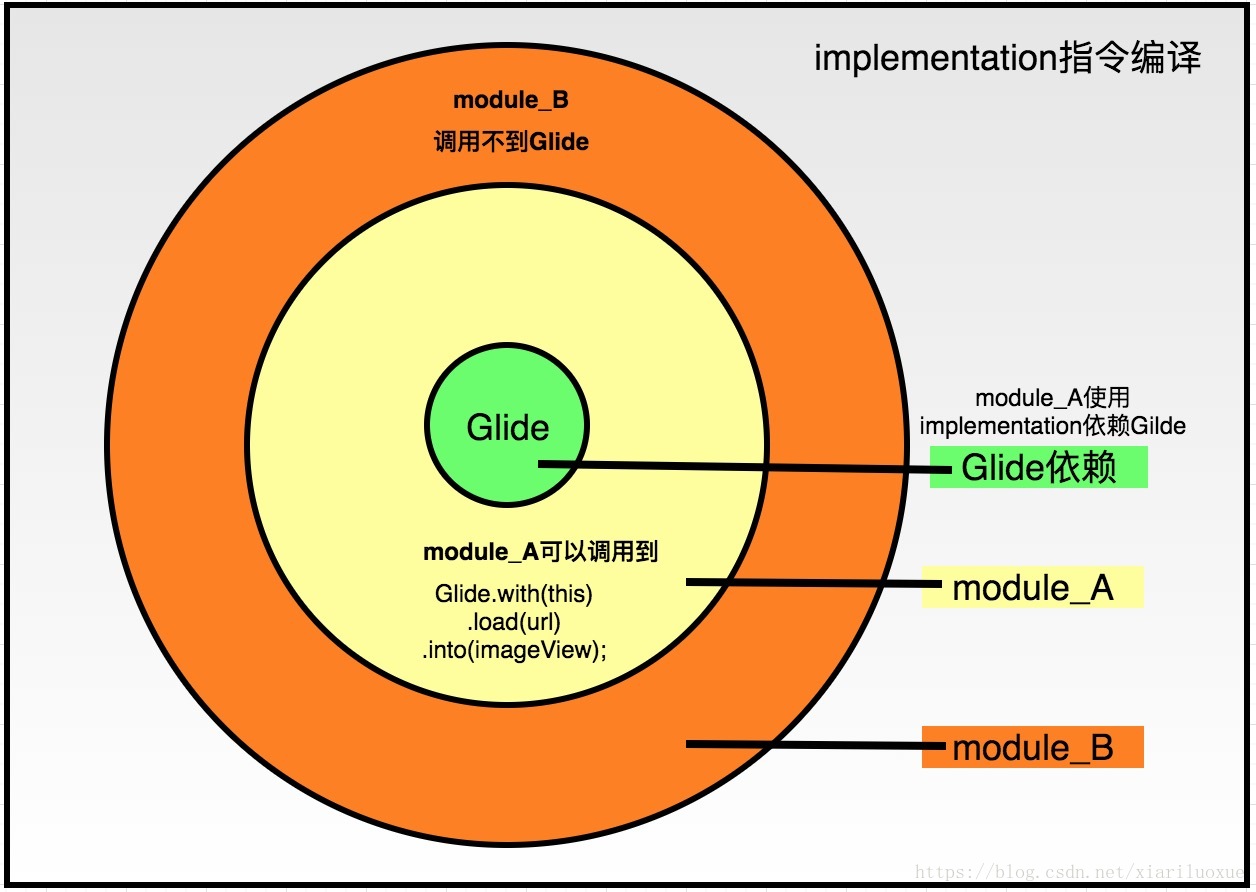
implementation:依赖只作用于当前的module,将该模块的依赖隐藏在内部,而不对外部公开(使用implementation指令的依赖不会传递)
有一个module_A依赖于glide(module_A使用的是implementation 指令来依赖glide)
implementation 'com.github.bumptech.glide:glide:3.7.0' - 1
另一个module_B,依赖于module_A:
implementation project(':module_A')- 1
此时module_B里边不能引用glide,module_B要想引用glide,就在module_A使用的是api来引用glide
api 'com.github.bumptech.glide:glide:3.7.0' - 1
用implementation指令编译,Glide依赖对Module是module_B是不可见的
用api指令编译,Glide依赖对Module是module_B是可见的
建议:在Google IO 中提到了一个建议,依赖首先应该设置为implementation的,如果没有错,那就用implementation,如果有错,那么使用api指令。`使用implementation会使编译速度有所增快。`
- 1
- 2
问题二:The SourceSet ‘instrumentTest’ is not recognized by the Android Gradle Plugin. Perhaps you misspelled something?
将instrumentTest改为 androidTest
新版本Gradle对instrumentTest做了重命名
| 旧版本 | 新版本 |
|---|---|
| instrumentTestCompile | androidTestCompile |
| instrumentTest | androidTest |
问题三:extractDebugAnnotations is incompatible with java 8 sources and has been disabled.extractReleaseAnnotations is incompatible with java 8 sources and has been disabled
项目里使用了me.tatarka:gradle-retrolambda,

dependencies {

      classpath 'me.tatarka:gradle-retrolambda:3.2.5'

}- 1
- 2
- 3
对retrolambda进行了升级,解决了问题
dependencies {

       classpath 'me.tatarka:gradle-retrolambda:3.7.0'

}
- 1
- 2
- 3
- 4
问题四:解决No such property: FOR_RUNTIME for class: org.gradle.api.attributes.Usage的问题
dependencies {

    //classpath 'com.novoda:bintray-release:0.5.0'

    classpath 'com.novoda:bintray-release:0.8.0'

}- 1
- 2
- 3
- 4
升级com.novoda.bintray-release版本
Android Studio 升级为3.1 踩到的坑的更多相关文章
- Android Studio 升级到3.0 提示 java.lang.NoClassDefFoundError
Android Studio 升级到3.0 提示 java.lang.NoClassDefFoundError 这个问题折腾了2个小时,最后解决了,Stack Overflow 上也有一次类似的问题, ...
- android studio 升级到3.3.1后,提示程序包不存在
android studio 升级到3.3.1后,提示程序包不存在 原因 主Module--A 引用了其他Moduel--B里的jar库, 只需要把B的dependencies改成如下(implent ...
- Android Studio 升级到3.0后出现编译错误\.gradle\caches\transforms-1\files-1.1\*****-release.aar
Android Studio 升级到3.0后出现各种编译问题,其中有一个问题是关于资源找不到的问题,百度了半天,也没有相关的文章 C:\Users.gradle\caches\transforms-1 ...
- 关于Android Studio升级到2.0后和Gradle插件不兼容的问题
今天升级AS到2.0后,用AS在真机上调试,发现报了如下错误: This version of Android Studio is incompatible with the Gradle Plugi ...
- Android Studio升级后projectBuild failed.
近期在升级Android Studio后,发现原先能编译通过的project,突然就编译只是了,原因是生成的AndroidManifest.xml文件里有乱码. 升级后: android studio ...
- 记一次Android studio升级之后的坑
像往常一样打开Android studio,但这次它提示我升级!说是什么为了更好的体验,在好奇心的驱使下,我毅然地点击了“update”按钮.升级之后,编译项目,报出了N多个error,我的心都慌完! ...
- Android Studio升级后报 method not found: 'runProguard'的错误
今天升级了下Android Studio,然后发现更新gradle,然后在sync项目的时候总是报 method not found: 'runProguard'的错误 找了很多发现不对. 最后解决 ...
- Android studio 升级,不用下载完整版,完美更新到2.0
Android studio 2.0 公布已有一旦时间,据说,速度大大提高了.但是一直没有尝试更新,看到大家相继更新,所以迫不及待就准备更新,但是.更新之路确实异常坎坷.询问度娘,千奇百怪的问题接憧而 ...
- android开发里跳过的坑——android studio升级完成后eclipse adt无法正常使用
最近有时间,把android studio做了一次升级,升级完成后,悲催的发现eclipse不能正常运行了,网上查了好多资料,试了很多方法都不行,最后把eclipse使用的sdk与AS使用的SDK区分 ...
随机推荐
- DNS系统的解析原理
根据网络通讯原理,对于Router设备是通过IP地址进行路径的Forward:当通过域名(主机名)访问远程主机时,必须将相应的主机名解析为IP地址,DNS服务器就充当了这个角色. DNS的工作原理: ...
- GO_03:GO语言基础语法
1. Go项目的目录结构 一般的,一个Go项目在GOPATH下,会有如下三个目录: project --- bin --- pkg --- src 其中,bin 存放编译后的可执行文件:p ...
- P3014 [USACO11FEB]牛线Cow Line && 康托展开
康托展开 康托展开为全排列到一个自然数的映射, 空间压缩效率很高. 简单来说, 康托展开就是一个全排列在所有此序列全排列字典序中的第 \(k\) 大, 这个 \(k\) 即是次全排列的康托展开. 康托 ...
- Linux之find查找命令
Linux中find常见用法示例 [root@localhost ~]# find [PATH] [option] [action] 参数: 1. 与时间有关的参数:共有-atime.-ctim ...
- bzoj千题计划155:bzoj3543: [ONTAK2010]Garden
http://www.lydsy.com/JudgeOnline/problem.php?id=3543 枚举每一个点,作为左下角 然后枚举 相同的x坐标,y坐标 少的那个 作为另一个角 二分判断另外 ...
- Spring MVC处理响应的 header
我们经常需要在HttpResponse中设置一些headers,我们使用Spring MVC框架的时候我们如何给Response设置Header呢? So easy, 看下面的代码: @Request ...
- Cloudera Manager Admin控制台启动不起来
这几天都在搞大数据这一块,由于以前自己在弄hadoop等安装的时候特别的费劲,于是乎找到了广大程序员的福音——cloudera manager,但是第一步安装好了以后无法启动,再三思考+百度发现: 通 ...
- js操作控制iframe页面的dom元素
1.代码1 index.html <!DOCTYPE html> <html> <head> <meta charset="UTF-8" ...
- 利用Object.defineProperty 简化 Chrome插件本地存储操作
通常谷歌插件本地存储写法很别扭☹,如 chrome.storage.sync.get(null,function(data){ //todo console.log(data); }); 如果get ...
- POI读取Excel数据保存到数据库,并反馈给用户处理信息(导入带模板的数据)
今天遇到这么一个需求,将课程信息以Excel的形式导入数据库,并且课程编号再数据库中不能重复,也就是我们需要先读取Excel提取信息之后保存到数据库,并将处理的信息反馈给用户.于是想到了POI读取文件 ...