
Centos6.6下安装nginx1.6.3
安装环境:
[root@nginx ~]# cat /etc/redhat-release

CentOS release 6.6 (Final)

[root@nginx ~]# uname -r

2.6.32-504.el6.x86_64
Nginx安装
1:安装必须的包
[root@nginx ~]# yum install -y pcre pcre-devel openssl-devel
pcre全称(Perl Compatible Regular Expressions),中文perl兼容正则表达式!(nginx的rewite模块需要它)
2:添加虚拟用户
[root@nginx tools]# useradd -s /sbin/nologin -M nginx

[root@nginx tools]# id nginx

uid=501(nginx) gid=501(nginx) groups=501(nginx)
3:新建一目录,用于安装nginx
[root@nginx nginx-1.6.3]# mkdir /application
4:下载nginx
wget -q http://nginx.org/download/nginx-1.6.3.tar.gz
百度下载:http://pan.baidu.com/s/1jIE37Oa
微云下载:https://share.weiyun.com/8b3117629c6381199df93809ce26d81e
5:编译安装nginx
wget -q http://nginx.org/download/nginx-1.6.3.tar.gz

tar zxf nginx-1.6.3.tar.gz

./configure --prefix=/application/nginx-1.6.3 --user=nginx --group=nginx --with-http_ssl_module --with-http_stub_status_module

make        #只要结尾没有报错就OK

make install
6:创建软链接
[root@nginx application]# ln -s nginx-1.6.3 nginx

[root@nginx application]# ll

total 4

lrwxrwxrwx 1 root root   11 Feb 14 21:31 nginx -> nginx-1.6.3

drwxr-xr-x 6 root root 4096 Feb 14 21:30 nginx-1.6.3
7:启动nginx
[root@nginx application]# /application/nginx/sbin/nginx
查看是否启动成功:
[root@nginx application]# ps -ef|grep nginx

root      5205     1  0 21:32 ?        00:00:00 nginx: master process /application/nginx/sbin/nginx

nginx     5206  5205  0 21:32 ?        00:00:00 nginx: worker process

root      5208   967  0 21:32 pts/0    00:00:00 grep nginx
查看nginx端口号:
[root@nginx application]# ss -lnput|grep nginx

tcp    LISTEN     0      511                    *:80                    *:*      users:(("nginx",5205,6),("nginx",5206,6))
停掉nginx:
[root@nginx application]# /application/nginx/sbin/nginx -s stop
重启nginx:
[root@nginx application]# /application/nginx/sbin/nginx -s reload
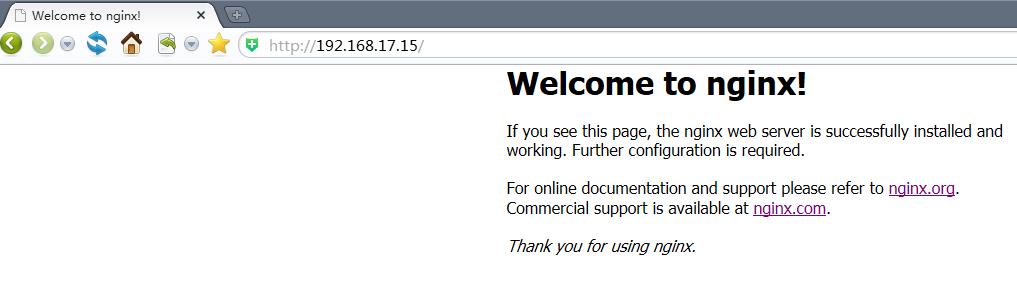
以上就是nginx1.6.3的安装!此时在windonws浏览器下输入IP地址,即可看到如下页面:
Linux本机测试:
[root@nginx application]# curl 192.168.17.15

<!DOCTYPE html>

<html>

<head>

<title>Welcome to nginx!</title>

<style>

    body {

        width: 35em;

        margin: 0 auto;

        font-family: Tahoma, Verdana, Arial, sans-serif;

    }

</style>

</head>

<body>

<h1>Welcome to nginx!</h1>

<p>If you see this page, the nginx web server is successfully installed and

working. Further configuration is required.</p>

<p>For online documentation and support please refer to

<a href="http://nginx.org/">nginx.org</a>.<br/>

Commercial support is available at

<a href="http://nginx.com/">nginx.com</a>.</p>

<p><em>Thank you for using nginx.</em></p>

</body>

</html>
nginx常用模块介绍
nginx技术内幕课程视频:http://edu.51cto.com/lesson/id-56899.html
nginx核心模块:http://nginx.org/en/docs
Nginx配置文件(nginx.conf)配置详解
[root@ClientA nginx]# cat conf/nginx.conf

#user  nobody;								#Nginx用户及组:用户 组。window下不指定

worker_processes  1;							#工作进程:数目。根据硬件调整,通常等于CPU数量或者2倍于CPU。

#error_log  logs/error.log;

#error_log  logs/error.log  notice;

#error_log  logs/error.log  info;

#pid        logs/nginx.pid;					#pid(进程标识符):存放路径。

events {

    worker_connections  1024;

}

#每个工作进程的最大连接数量。根据硬件调整,和前面工作进程配合起来用,尽量大,但是别把cpu跑到100%就行。每个进程允许的最多连接数,理论上每台nginx服务器的最大连接数为:worker_processes*worker_connections

http {

    include       mime.types;			#设定mime类型,类型由mime.type文件定义

    default_type  application/octet-stream;

    #log_format  main  '$remote_addr - $remote_user [$time_local] "$request" '

    #                  '$status $body_bytes_sent "$http_referer" '

    #                  '"$http_user_agent" "$http_x_forwarded_for"';

    #access_log  logs/access.log  main;

    sendfile        on;			#开启高效传输模式

    #tcp_nopush     on;

    #keepalive_timeout  0;

    keepalive_timeout  65;

    #gzip  on;

    server {

        listen       80;

        server_name  localhost;

        #charset koi8-r;

        #access_log  logs/host.access.log  main;

        location / {

            root   html;

            index  index.html index.htm;

        }

        #error_page  404              /404.html;

        # redirect server error pages to the static page /50x.html

        #

        error_page   500 502 503 504  /50x.html;

        location = /50x.html {

            root   html;

        }

        # proxy the PHP scripts to Apache listening on 127.0.0.1:80

        #

        #location ~ \.php$ {

        #    proxy_pass   http://127.0.0.1;

        #}

        # pass the PHP scripts to FastCGI server listening on 127.0.0.1:9000

        #

        #location ~ \.php$ {

        #    root           html;

        #    fastcgi_pass   127.0.0.1:9000;

        #    fastcgi_index  index.php;

        #    fastcgi_param  SCRIPT_FILENAME  /scripts$fastcgi_script_name;

        #    include        fastcgi_params;

        #}

        # deny access to .htaccess files, if Apache's document root

        # concurs with nginx's one

        #

        #location ~ /\.ht {

        #    deny  all;

        #}

    }

    # another virtual host using mix of IP-, name-, and port-based configuration

    #

    #server {

    #    listen       8000;

    #    listen       somename:8080;

    #    server_name  somename  alias  another.alias;

    #    location / {

    #        root   html;

    #        index  index.html index.htm;

    #    }

    #}

    # HTTPS server

    #

    #server {

    #    listen       443 ssl;

    #    server_name  localhost;

    #    ssl_certificate      cert.pem;

    #    ssl_certificate_key  cert.key;

    #    ssl_session_cache    shared:SSL:1m;

    #    ssl_session_timeout  5m;

    #    ssl_ciphers  HIGH:!aNULL:!MD5;

    #    ssl_prefer_server_ciphers  on;

    #    location / {

    #        root   html;

    #        index  index.html index.htm;

    #    }

    #}

}
基于域名的虚拟主机配置步骤
为了让配置文件规范化,我们使用一个网站一个配置文件,操作步骤如下:
1:编辑nginx.conf配置文件
[root@nginx application]# vim /application/nginx/conf/nginx.conf

worker_processes  1;

events {

    worker_connections  1024;

}

http {

    include       mime.types;

    default_type  application/octet-stream;

    sendfile        on;

    keepalive_timeout  65;

    # nginx vhosts config

    include extra/www.conf;

    #include extra/bbs.conf;

    #include extra/blog.conf;      ##如果有多个网站在这里添加配置文件路径

}

##编辑后的文件,删除了注释,添加include几行
2:在/application/nginx/conf/extra目录下创建对应的网站配置文件
[root@nginx conf]# mkdir extra

[root@nginx conf]# cd extra

[root@nginx extra]# cat www.conf

server {

    listen  80;

    server_name www.ginvip.com alias ginvip.com;

    location / {

        root    html/ginvip;

        index   index.html index.htm;

    }

}
上面的alias ginvip.com就是别名配置!类似于IIS里的301重定向
3:创建对应的网站目录(路径就是上面的配置文件中:html/ginvip)
[root@nginx nginx]# mkdir html/ginvip
4:创建测试文件
[root@nginx nginx]# cd html/ginvip

[root@nginx ginvip]# ll

total 0

[root@nginx ginvip]# echo "this is a test nginx website" >index.html

[root@nginx ginvip]# ll

total 4

-rw-r--r-- 1 root root 29 Feb 14 22:07 index.html
5:检查语法,重启nginx
[root@nginx ginvip]# /application/nginx/sbin/nginx -t

nginx: the configuration file /application/nginx-1.6.3/conf/nginx.conf syntax is ok

nginx: configuration file /application/nginx-1.6.3/conf/nginx.conf test is successful

[root@nginx ginvip]# /application/nginx/sbin/nginx -s reload
6:添加IP,域名到本地的hosts文件
Linux平台添加:
[root@nginx ginvip]# vim /etc/hosts

192.168.17.15   www.ginvip.com ginvip.com
windows平台添加:(路径:C:\Windows\System32\drivers\etc\hosts)
7:测试
Linux平台测试:
[root@nginx ginvip]# curl www.ginvip.com

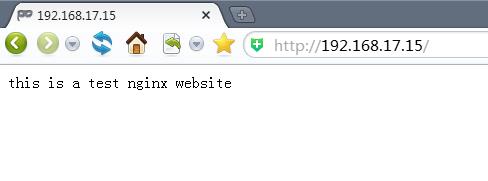
this is a test nginx website
测试别名:
[root@nginx ginvip]# curl ginvip.com

this is a test nginx website
windows平台测试:
基于端口的虚拟主机配置
基于端口的虚拟主机在生产环境中不多见,仅偶尔会用到,一般是为公司内部人员提供访问的,如OA系统,网站程序的后台,CMS发布后台,Mysql的web客户端phpmyadmin等。
配置文件中的配置与基于域名的配置大致一样,只是修改上面配置文件中的80端口为你想要访问的端口!测试访问的时候,域名后面加上 :端口号
基于IP的虚拟主机实战
只需要在配置文件中的80端口前加上IP地址即可!
Nginx状态信息功能实战
1:在extra目录增加一个status.conf配置文件,内容如下:
[root@nginx nginx]# vim conf/extra/status.conf

## website status

server {

    listen  80;

    server_name status.ginvip.com;

    location / {

        stub_status on;  #开启http_stub_status_module模块

        access_log  off;

    }

}
2:在主配置文件包含status.conf配置文件
[root@nginx nginx]# cat conf/nginx.conf

worker_processes  1;

events {

    worker_connections  1024;

}

http {

    include       mime.types;

    default_type  application/octet-stream;

    sendfile        on;

    keepalive_timeout  65;

    # nginx vhosts config

    include extra/www.conf;

    include extra/status.conf;

}
3:检查语法,重启nginx
[root@nginx nginx]# sbin/nginx -t

nginx: the configuration file /application/nginx-1.6.3/conf/nginx.conf syntax is ok

nginx: configuration file /application/nginx-1.6.3/conf/nginx.conf test is successful

[root@nginx nginx]# sbin/nginx -s reload
4:添加域名到/etc/hosts文件
5:测试status.ginvip.com
[root@nginx nginx]# curl status.ginvip.com

Active connections: 1      #活跃的连接数量

server accepts handled requests

 4      4        4       4

Reading: 0 Writing: 1 Waiting: 0
第一个server表示Nginx启动到现在共处理了4个连接
第三个accepts表示Nginx启动到现在共成功创建了4次握手:请求丢失数=(握手数-连接数),可以看出,本次状态显示没有丢失请求
第三个handled requests,表示总共处理了4次请求
Reading: 0 Writing: 1 Waiting: 0
Reading:Nginx读取到客户端的header信息数
Writing:Nginx返回给客户端的header信息数
Waiting:Nginx已经处理完正在等候下一次请求指令的驻留连接。开启keep-alive的情况下,这个值等于active-(reading+writing)
为Nginx增加错误日志(error_log)配置
error_log的语法格式及参数语法说明如下:
error_log		file				level;

#关键字		    日志文件	            错误日志级别
生产场景一般是warn|error|crit这三个级别之一,注意不要配置info等较低级别,会带来更多的磁盘I/O消耗
error_log的默认值为:
#default: error_log logs/error.log error;
可以放置的标签段为:
#context: main, http, server, location
官方参考资料:http://nginx.org/docs/ngx_core_module.html#error_log
在主配置文件nginx.conf中添加日志项:
[root@nginx nginx]# cat conf/nginx.conf

worker_processes  1;

error_log   logs/error.log  error;

events {

    worker_connections  1024;

}

http {

    include       mime.types;

    default_type  application/octet-stream;

    sendfile        on;

    keepalive_timeout  65;

    # nginx vhosts config

    include extra/www.conf;

    include extra/status.conf;

}
Nginx访问日志介绍
Nginx软件会把每个用户访问网站的日志信息记录到指定的日志文件里,供网站提供都分析用户浏览器行为等,此功能由ngx_http_log_module模块负责。
对应官方地址:http://nginx.org/en/docs/http/ngx_http_log_module.html
Nginx的访问日志主要由下面的两个参数控制:
|
参数 |
说明 |
|
log_format |
用来定义记录日志的格式(可以定义多种日志格式,取不同名字即可) |
|
access_log |
用来指定日志文件的路径及使用的何种日志格式记录日志 |
Nginx日志格式中默认的参数配置格如下:
[root@ClientA nginx]# cat conf/nginx.conf.default

    #log_format  main  '$remote_addr - $remote_user [$time_local] "$request" '

    #                  '$status $body_bytes_sent "$http_referer" '

    #                  '"$http_user_agent" "$http_x_forwarded_for"';
将上面三行代码去掉#号,复制到主配置文件nginx.conf
[root@nginx nginx]# cat conf/nginx.conf

worker_processes  1;

error_log   logs/error.log  error;

events {

    worker_connections  1024;

}

http {

    include       mime.types;

    default_type  application/octet-stream;

    sendfile        on;

    keepalive_timeout  65;

    log_format  main  '$remote_addr - $remote_user [$time_local] "$request" '

                      '$status $body_bytes_sent "$http_referer" '

                      '"$http_user_agent" "$http_x_forwarded_for"';

    # nginx vhosts config

    include extra/www.conf;

    include extra/status.conf;

}
Nginx日志变量说明如下:
|
Nginx日志变量 |
说明 |
|
$remote_addr |
记录访问网站的客户端地址 |
|
$http_x_forwarded_for |
当前端有代理服务器时,设置WEB节点记录客户端地址的配置,此参数生效的前提是代理服务器上也要进行相关的x_forwarded_for设置 |
|
$remote_user |
远程客户端用户名称 |
|
$time_local |
记录访问时间与时区 |
|
$request |
用户的http请求起始行信息 |
|
$status |
http状态码,记录请求返回的状态,如:200 , 404 , 301等 |
|
$body_bytes_sents |
服务器发送给客户端的响应body字节数 |
|
$http_referer |
记录此次请求是从哪个链接访问过来的,可以根据referer进行防盗链设置 |
|
$http_user_agent |
记录客户端访问信息,如:浏览器,手机客户端 |
没有特殊要求,默认的配置即可,更多可以设置的记录日志信息变量见:http://nginx.org/en/docs/http/ngx_http_log_module.html
记录日志的access_log参数说明
access_log off; #这里的off,表示不记录访问日志
默认配置:access_log logs/access.log combined;
放置位置:http , server , location , if in location , limit_except
访问日志最好在单独的配置文件中配置:
[root@nginx nginx]# cat conf/extra/www.conf

server {

    listen  80;

    server_name www.ginvip.com alias ginvip.com;

    location / {

        root    html/ginvip;

        index   index.html index.htm;

    }

    access_log  logs/access_www.log main;

}
如果不指定日志格式就会用默认的combined格式记录日志
也可以对日志进行压缩,可以在记录日志参数中加上buffer和flush选项,这样做会在高并发场景下提升网站访问....:
access_log logs/access_www.log main gzip buffer=32k flush=5s;
更多内容参考:http://nginx.org/en/docs/http/ngx_http_log_module.html
Nginx访问日志轮询切割
默认情况nginx会把所有的访问日志生成到一个指定的访问日志文件access.log里,如果自己配置了日志,如上面我就对网站做了配置,写到了logs/access_www.conf文件里,时间长了会导致日志容量过大,不利于分析日志和处理,因此,有必要对Nginx按天或按指定时间进行切割成不同的文件保留,这里使用按天切割的方法:
[root@nginx scripts]# cat cut_nginx_log.sh

#!/bin/sh

Dateformat=`date +%Y%m%d -d -1day`

Basedir='/application/nginx'

Nginxlogdir="$Basedir/logs"

Logname="access_www"

[ -d $Nginxlogdir ] && cd $Nginxlogdir || exit 1

[ -f ${Logname}.log ] || exit 1

/bin/mv ${Logname}.log ${Dateformat}_${Logname}.log

$Basedir/sbin/nginx -s reload
将此脚本加入到定时任务中即可!
Nginx常用日志收集及分析工具
见:http://oldboy.blog.51cto.com/2561410/775056
Centos6.6下安装nginx1.6.3的更多相关文章
- CentOS6.8下安装Nginx-1.9.15
1. 简介 Nginx是一个高性能的HTTP和反向代理服务器,也是一个IMAP/POP3/SMTP代理服务器. Nginx是一款轻量级的Web服务器/反向代理服务器以及电子邮件代理服务器,并在一个BS ...
- CentOS6.4下安装Nginx1.12.2
1.安装GCC安装 nginx 需要先将官网下载的源码进行编译,编译依赖 gcc 环境,如果没有 gcc 环境,则需要安装 yum install gcc-c++ 2.安装PCRE-devel PCR ...
- CentOS6.5下安装JDK1.7+MYSQL5.5+TOMCAT7+nginx1.7.5环境安装文档
----------------CentOS6.5下安装JDK1.7+MYSQL5.5+TOMCAT7+nginx1.7.5环境安装文档----------------------- [JDK1.7安 ...
- 【转载】CentOS6.5_X64下安装配置MongoDB数据库
[转载]CentOS6.5_X64下安装配置MongoDB数据库 2014-05-16 10:07:09| 分类: 默认分类|举报|字号 订阅 下载LOFTER客户端 本文转载自zhm&l ...
- CentOS6.5下安装apache2.2和PHP 5.5.28
CentOS6.5下安装apache2.2 1. 准备程序 :httpd-2.2.27.tar.gz 下载地址:http://httpd.apache.org/download.cgi#apache2 ...
- CentOS6.5下安装配置MySQL
CentOS6.5下安装配置MySQL,配置方法如下: 安装mysql数据库:# yum install -y mysql-server mysql mysql-deve 查看mysql-server ...
- Linux下安装Nginx1.9.3-0303(本人亲手实践)
Linux下安装Nginx1.9.3 Linux操作系统 Oel 5.8 64bit 最新版Nginx: 1.9.3 最近同事让我帮忙搞 ngix,两天时间 安装.配置搞定了.继续 Nginx 1.9 ...
- CentOS6.5下安装Apache2.4+PHP7
CentOS6.5下安装Apache2.4+PHP7 http://blog.csdn.net/along602/article/details/42695779 http://www.th7.cn/ ...
- 在CentOS6.8下安装Docker
在CentOS6.8下安装Docker 一.查看系统版本 [root@localhost opt]# uname -a Linux localhost.localdomain -.el6.x86_64 ...
随机推荐
- 通过NPM快速发布你的NodeJS模块(组件包)
1.更新 NPM - [ npm install -g npm | 该步骤可选:最好使用新版本] 楼主当前版本号 2.6.1 ,如果更新报错,可以尝试 国内淘宝镜像 $ npm -v 2.6.1 // ...
- LIFI热火下的VLC基本链路、标准及发展问题
和白炽及荧光灯相比,白光发光二极管(LED)具有寿命长.光效高.功耗低.无辐射.安全性好.可靠性高等特点,被称为"绿色照明"并得到迅猛发展.白光LED在未来市场极具竞争力.世界范围 ...
- Notes of Scrum Meeting(2014/11/2)
Notes of Scrum Meeting (2014/11/2) 软件工程项目组Sevens开始项目之后的第一次Scrum Meeting报告 会议时间:2014年11月2日 20:00—20: ...
- YQCB冲刺周第四天
上图站立会议 任务看板: 今天的任务:做登录身份的验证,区别普通用户和超级管理员 遇到的困难:中文乱码问题
- PAT 1001 A+B Fotmat
源码 1001. A+B Format (20) 时间限制 400 ms 内存限制 65536 kB 代码长度限制 16000 B 判题程序 Standard 作者 CHEN, Yue Calcula ...
- 【贪心算法】POJ-1862 简单哈夫曼
一.题目 Description Our chemical biologists have invented a new very useful form of life called stripie ...
- 团队作业2 <嗨,你的快递!>需求分析与原型设计
哦,不,是你的快速(*_*) 第一部分 需求分析 1.1 用户调研 1.1.1调研对象:由于我们的系统是校园快递代取业务,面向的是大学生活,所以本次调研范围都是在校大学生(除了师大学生,也包括了外校的 ...
- 饭来了小组Alpha冲刺阶段记录
一.第一天 日期:2018/6/13 1.1今日完成任务情况以及遇到的问题 侯晓东: 1.完成任务项:具体了解了微信小程序的开发流程,然后大致规划了我们项目的进度和完成节点:汇总组员的进度,写博客:画 ...
- 深入理解JAVA I/O系列三:字符流详解
字符流为何存在 既然字节流提供了能够处理任何类型的输入/输出操作的功能,那为什么还要存在字符流呢?容我慢慢道来,字节流不能直接操作Unicode字符,因为一个字符有两个字节,字节流一次只能操作一个字节 ...
- AG-Admin微服务框架入门
AG-Admin微服务框架入门 @qq群:一群: 837736451 二群 169824183 一 概要介绍 AG-Admin后台地址:https://gitee.com/minull/ace-s ...