
android 地址控件概述
最近,公司做项目,需要一个地址控件,本来是想androidcopy开源的android的地址控件,但是了,找来找去。都没有找到一个真正满足我的需求的,普通的地址控件只是精确到市县区三级,但是我们的需求是精确到乡镇四级。于是,做了一个。
我设计思路就是模仿jquery的并列的地址的选择控件,当选择上一级着,直接来跳转到下一级进行选择。设计的原型图为这样:
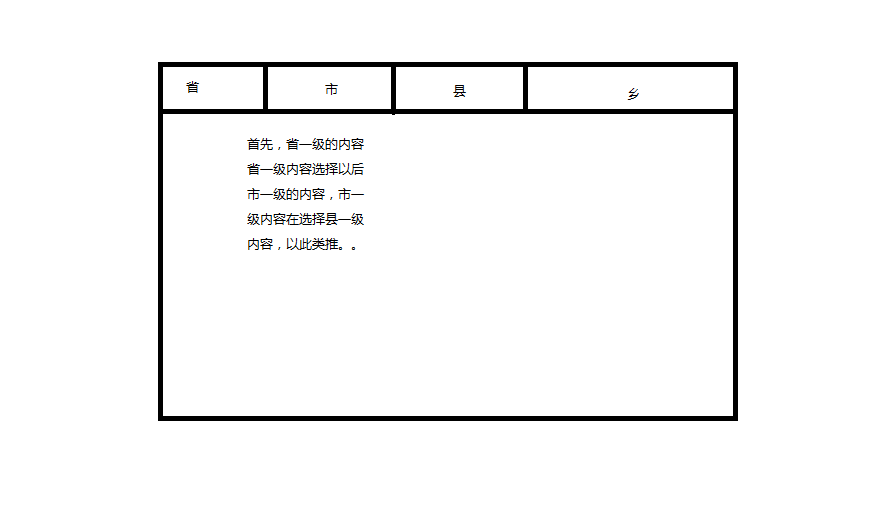
看到这样布局的方式很显然用gridview数据表格的方式来显示省市县的数据。而每个的数据网格的布局的方式只需要一个textview来显示相应的数据的方式就可以了。这两个的布局文件的样子如下所示:
gridview的布局文件的代码:
<LinearLayout xmlns:android="http://schemas.android.com/apk/res/android"

    android:layout_width="match_parent"

    android:layout_height="match_parent"

    android:orientation="vertical" >

    <GridView

                android:id="@+id/gridview_county"

                android:layout_width="fill_parent"

                android:layout_height="0dp"

                android:layout_weight="1"

                android:background="@color/back_color"

                android:gravity="center"

                android:horizontalSpacing="1dp"

                android:numColumns="5"

                android:columnWidth="80dp"

                android:stretchMode="columnWidth"

                android:verticalSpacing="1dp" />

</LinearLayout>
每项item的布局文件:
<LinearLayout xmlns:android="http://schemas.android.com/apk/res/android"

    android:layout_width="match_parent"

    android:layout_height="match_parent"

    android:orientation="vertical" >

    <GridView

                android:id="@+id/gridview_county"

                android:layout_width="fill_parent"

                android:layout_height="0dp"

                android:layout_weight="1"

                android:background="@color/back_color"

                android:gravity="center"

                android:horizontalSpacing="1dp"

                android:numColumns="5"

                android:columnWidth="80dp"

                android:stretchMode="columnWidth"

                android:verticalSpacing="1dp" />

</LinearLayout>
这两个文件都十分的简洁,真是有了这个布局文件作为基础,才能实现这个控件的真正的布局来实现了,那么他的真正的组装的布局的文件又是那个样子了。这就用了一个slideview来把这四个布局文件来包裹起来了。同时来实现相应的动画效果。他的布局文件如下:
<?xml version="1.0" encoding="utf-8"?>

<LinearLayout xmlns:android="http://schemas.android.com/apk/res/android"

    xmlns:tools="http://schemas.android.com/tools"

    android:id="@+id/ll_main"

    android:layout_width="match_parent"

    android:layout_height="match_parent"

    android:focusable="true"

    android:focusableInTouchMode="true"

    android:orientation="vertical" >

    <LinearLayout

        android:id="@+id/table"

        android:layout_width="match_parent"

        android:layout_height="wrap_content"

        android:layout_marginTop="40dp"

        android:background="#FFFFFFFF"

        android:orientation="horizontal" >

        <FrameLayout

            android:layout_width="0dp"

            android:layout_height="fill_parent"

            android:layout_gravity="center"

            android:layout_weight="1"

            android:background="@drawable/a"

            android:clickable="true" >

            <TextView

                android:id="@+id/table_text"

                android:layout_width="wrap_content"

                android:layout_height="wrap_content"

                android:layout_gravity="center_horizontal"

                android:layout_marginTop="8dp"

                android:tag="0"

                android:text="省份"

                android:textColor="@color/text_down"

                android:textSize="16dp" />

        </FrameLayout>

        <FrameLayout

            android:id="@+id/frame_route_baseinfo"

            android:layout_width="0dp"

            android:layout_height="fill_parent"

            android:layout_weight="1"

            android:background="@drawable/b"

            android:clickable="false"

            android:focusable="false" >

            <TextView

                android:id="@+id/table_text"

                android:layout_width="wrap_content"

                android:layout_height="wrap_content"

                android:layout_gravity="center_horizontal"

                android:layout_marginTop="8dp"

                android:tag="1"

                android:text="地市"

                android:textColor="@color/text_normal"

                android:textSize="16dp" />

        </FrameLayout>

        <FrameLayout

            android:id="@+id/frame_countyinfo"

            android:layout_width="0dp"

            android:layout_height="fill_parent"

            android:layout_weight="1"

            android:background="@drawable/b"

            android:clickable="false"

            android:focusable="false"

            android:textColor="@color/text_normal" >

            <TextView

                android:id="@+id/table_text"

                android:layout_width="wrap_content"

                android:layout_height="wrap_content"

                android:layout_gravity="center_horizontal"

                android:layout_marginTop="8dp"

                android:tag="2"

                android:text="区县"

                android:textColor="@color/text_normal"

                android:textSize="16dp" />

        </FrameLayout>

        <FrameLayout

            android:id="@+id/frame_countryinfo"

            android:layout_width="0dp"

            android:layout_height="fill_parent"

            android:layout_weight="1"

            android:background="@drawable/b"

            android:clickable="true" >

            <TextView

                android:id="@+id/table_text"

                android:layout_width="wrap_content"

                android:layout_height="wrap_content"

                android:layout_gravity="center_horizontal"

                android:layout_marginTop="8dp"

                android:tag="3"

                android:text="乡镇/街道"

                android:textColor="@color/text_normal"

                android:textSize="16dp" />

        </FrameLayout>

    </LinearLayout>

    <LinearLayout

        android:layout_width="match_parent"

        android:layout_height="wrap_content"

        android:background="@drawable/c"

        android:orientation="vertical" >

    </LinearLayout>

    <LinearLayout

        android:layout_width="match_parent"

        android:layout_height="0dp"

        android:layout_weight="1"

        android:orientation="vertical" >

        <LinearLayout

            android:layout_width="match_parent"

            android:layout_height="wrap_content" >

            <com.example.address_ctrl.element.SlideChangeView

                android:id="@+id/slide_change_page"

                android:layout_width="fill_parent"

                android:layout_height="fill_parent" >

                <LinearLayout

                    android:id="@+id/provinceview_layout"

                    android:layout_width="match_parent"

                    android:layout_height="match_parent" >

                    <include

                        android:layout_width="match_parent"

                        android:layout_height="match_parent"

                        layout="@layout/provinceview" />

                </LinearLayout>

                <LinearLayout

                    android:id="@+id/cityview_layout"

                    android:layout_width="fill_parent"

                    android:layout_height="fill_parent" >

                    <include

                        android:layout_width="match_parent"

                        android:layout_height="fill_parent"

                        layout="@layout/cityview" />

                </LinearLayout>

                <LinearLayout

                    android:id="@+id/countyview_layout"

                    android:layout_width="fill_parent"

                    android:layout_height="fill_parent" >

                    <include

                        android:layout_width="match_parent"

                        android:layout_height="fill_parent"

                        layout="@layout/countyview" />

                </LinearLayout>

                <LinearLayout

                    android:id="@+id/countryview_layout"

                    android:layout_width="fill_parent"

                    android:layout_height="fill_parent" >

                    <include

                        android:layout_width="match_parent"

                        android:layout_height="fill_parent"

                        layout="@layout/countryview" />

                </LinearLayout>

            </com.example.address_ctrl.element.SlideChangeView>

        </LinearLayout>

    </LinearLayout>

    <LinearLayout

        android:layout_width="fill_parent"

        android:layout_height="wrap_content"

        android:layout_alignParentBottom="true"

        android:gravity="center"

        android:orientation="vertical"

        android:padding="5dp"

        android:paddingBottom="20dp" >

        <LinearLayout

            android:layout_width="fill_parent"

            android:layout_height="wrap_content"

            android:gravity="center"

            android:orientation="horizontal" >

            <TextView

                android:layout_width="0dp"

                android:layout_height="wrap_content"

                android:layout_weight="0.2"

                android:text="选择地址"

                android:textColor="@color/normal_color" />

            <EditText

                android:id="@+id/address_edit"

                android:layout_width="0dp"

                android:layout_height="wrap_content"

                android:layout_weight="0.6"

                android:background="@color/text_normal"

                android:editable="false"

                android:textColor="@color/black_color" />

            <Button

                android:id="@+id/car_no_btn"

                android:layout_width="0dp"

                android:layout_height="wrap_content"

                android:layout_weight="0.2"

                android:text="确定" />

        </LinearLayout>

    </LinearLayout>

</LinearLayout>
通过上面的源代码,我们可以明确的看到,有个editext来接受你选择的相应的结果,有个button来确定你选择的结果,这样子的话,就构成 一个完整的地址的空间的布局了。
值得一提的,这里有一个所谓的SlideChangeView自定义的控件,这实现的功能本身和viewflipper差不多了,这不过这里能够继承了自定义的动画,似的翻页的时候来更生动形象。至于这里的控制文件无非是加载数据在进行了相应的逻辑判断,我就不再这里进行太多赘述。
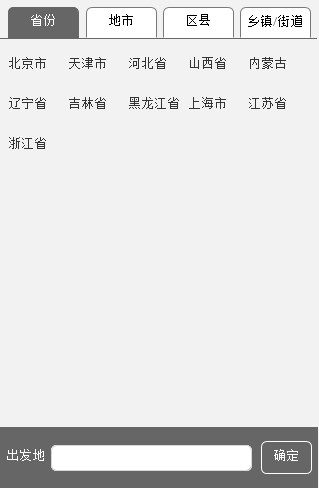
最终控件的效果如下:
android 地址控件概述的更多相关文章
- android 时间控件概述
android的自带时间选择控件,是一个让用户既能输入的又能选择的样子.这本来没有太大的问题了. 但是,坑爹的android是开源的.自带的时间控件在某些机型上,早已经是面目全非了,在用以一个普通用户 ...
- Android圆环控件
Android圆环控件 近期在做一个功能.界面效果要求例如以下: 看到这个界面,我首先想到了曾经在做phone模块的时候,我们定制的来电界面InCallTouchUi,界面效果是相似的. 来电控件使用 ...
- Android 开源控件与常用开发框架开发工具类
Android的加载动画AVLoadingIndicatorView 项目地址: https://github.com/81813780/AVLoadingIndicatorView 首先,在 bui ...
- 与众不同 windows phone (49) - 8.1 新增控件: 概述, ContentDialog, MapControl
[源码下载] 与众不同 windows phone (49) - 8.1 新增控件: 概述, ContentDialog, MapControl 作者:webabcd 介绍与众不同 windows p ...
- android 基础控件(EditView、SeekBar等)的属性及使用方法
android提供了大量的UI控件,本文将介绍TextView.ImageView.Button.EditView.ProgressBar.SeekBar.ScrollView.WebView ...
- Android基本控件之Menus
在我们的手机中有很多样式的菜单,比如:我们的短信界面,每条短信,我们长按都会出现一个菜单,还有很多的种类.那么现在,我们就来详细的讨论一下安卓中的菜单 Android的控件中就有这么一个,叫做Menu ...
- Android:控件布局(相对布局)RelativeLayout
RelativeLayout是相对布局控件:以控件之间相对位置或相对父容器位置进行排列. 相对布局常用属性: 子类控件相对子类控件:值是另外一个控件的id android:layout_above-- ...
- Android:控件布局(线性布局)LinearLayout
LinearLayout是线性布局控件:要么横向排布,要么竖向排布 决定性属性:必须有的! android:orientation:vertical (垂直方向) .horizontal(水平方向) ...
- 矩阵, 矩阵 , Android基础控件之ImageView
天下文章大家抄,以下所有内容,有来自copy,有来自查询,亦有自己的总结(目的是总结出自己的东西),所以说原创,不合适,说是转载也不恰当,所以我称之为笔记,可惜没有此分类选项,姑且不要脸一点,选择为原 ...
随机推荐
- 【线段树】【扫描线】Petrozavodsk Winter Training Camp 2018 Day 5: Grand Prix of Korea, Sunday, February 4, 2018 Problem A. Donut
题意:平面上n个点,每个点带有一个或正或负的权值,让你在平面上放一个内边长为2l,外边长为2r的正方形框,问你最大能圈出来的权值和是多少? 容易推出,能框到每个点的 框中心 的范围也是一个以该点为中心 ...
- [USACO11DEC]Grass Planting
题目大意: 有一棵结点个数为n的树,有m个操作,可以将一段路径上每条边的权值+1或询问某一个边的权值. 思路: 树链剖分+线段树. 轻重链划分本身比较简单,主要需要思考如何用线段树维护每条链. 当x, ...
- 2、Redis的基础知识
写在前面的话:读书破万卷,编码如有神 -------------------------------------------------------------------- 主要内容包括: red ...
- ZOJ 3623 Battle Ships DP
B - Battle Ships Time Limit:2000MS Memory Limit:65536KB 64bit IO Format:%lld & %llu Subm ...
- Python学习笔记(七)—字典的学习
总结内容: 1.字典的定义 2.字典的好处 3.字典的增删改查 4.字典常用方法及内置函数 5.字典的多层嵌套 6.字典的循环 7.字典小练习 1.字典的定义 字典是另一种可变容器模型,且可存储任意类 ...
- EJB (Enterprise Java Bean) 理解
做开发有段时间了,一直似懂非懂的. http://blog.csdn.net/jojo52013145/article/details/5783677
- PHPExcel 导出2003和2007的excel文档实例
require_once 'common/excel/PHPExcel.php'; require_once 'common/excel/phpExcel/Writer/Excel2007.php'; ...
- SPOJ 375. Query on a tree (动态树)
375. Query on a tree Problem code: QTREE You are given a tree (an acyclic undirected connected graph ...
- C#多线程编程之:lock使用注意事项
1.避免锁定public类型对象. 如果实例可以被公共访问,将出现lock(this)问题. 如有一个类MyClass,该类有一个Method方法通过lock(this)来实现互斥: 1 public ...
- ASP.NET Web API教程 分页查询
首先增加支持分页的API方法 public IEnumerable<UserInfo> GetUserInfos(int pageindex, int size) { ...