
Windows Phone 8 下载文件进度
后台代码:
public partial class MainPage : PhoneApplicationPage

    {

        private long siz;

        private long speed;

        private Stopwatch sw;

        private Stopwatch sw1;

        public MainPage()

        {

            InitializeComponent();

        }

        private void button1_Click(object sender, RoutedEventArgs e)

        {

            testspeed();

        }

        public void testspeed()

        {

            WebClient client = new WebClient();

            progressBar1.Value = 0.0;

            textBox2.Text = "0 %";

            client.DownloadStringCompleted += new DownloadStringCompletedEventHandler(this.webClient_DownloadStringCompleted);

            client.DownloadProgressChanged += new DownloadProgressChangedEventHandler(this.webClient_DownloadProgressChanged);

            sw = Stopwatch.StartNew();//用来记录总的下载时间

            sw1 = Stopwatch.StartNew();//用来记录下载过程中的时间片,用于计算临时速度

            client.DownloadStringAsync(new Uri("http://dl_dir.qq.com/qqfile/qq/QQ2011/QQ2011.exe"));

        }

        //下载过程事件

        public void webClient_DownloadProgressChanged(object s, DownloadProgressChangedEventArgs e)

        {

            textBox2.Text = e.ProgressPercentage.ToString() + " %";

            sw1.Stop();

            long num = e.BytesReceived / 1024;

            if (sw1.Elapsed.Seconds != 0)

            {

                speed = num / ((long)sw1.Elapsed.Seconds);

            }

            textBlock4.Text = this.speed + " KB/s";

            progressBar1.Value = e.ProgressPercentage;

            siz = e.TotalBytesToReceive;

            textBlock3.Text = siz/1024/1024 + "MB";

            sw1.Start();

        }

        //下载完成事件

        public void webClient_DownloadStringCompleted(object s, DownloadStringCompletedEventArgs e)

        {

            sw.Stop();

            siz = siz / 1024;

            long num = siz / ((long)sw.Elapsed.Seconds);

            sw.Reset();

            textBox1.Text = "下载完成!";

            textBlock1.Text = num + " KB/s";

        }

    }

}
XAML 设计代码:
<phone:PhoneApplicationPage

    x:Class="DownLoad.MainPage"

    xmlns="http://schemas.microsoft.com/winfx/2006/xaml/presentation"

    xmlns:x="http://schemas.microsoft.com/winfx/2006/xaml"

    xmlns:phone="clr-namespace:Microsoft.Phone.Controls;assembly=Microsoft.Phone"

    xmlns:shell="clr-namespace:Microsoft.Phone.Shell;assembly=Microsoft.Phone"

    xmlns:d="http://schemas.microsoft.com/expression/blend/2008"

    xmlns:mc="http://schemas.openxmlformats.org/markup-compatibility/2006"

    mc:Ignorable="d" d:DesignWidth="480" d:DesignHeight="768"

    FontFamily="{StaticResource PhoneFontFamilyNormal}"

    FontSize="{StaticResource PhoneFontSizeNormal}"

    Foreground="{StaticResource PhoneForegroundBrush}"

    SupportedOrientations="Portrait" Orientation="Portrait"

    shell:SystemTray.IsVisible="True">

    <Grid x:Name="LayoutRoot" Background="Transparent">

        <Grid.RowDefinitions>

            <RowDefinition Height="Auto"/>

            <RowDefinition Height="*"/>

        </Grid.RowDefinitions>

        <StackPanel x:Name="TitlePanel" Grid.Row="0" Margin="12,17,0,28">

            <TextBlock x:Name="ApplicationTitle" Text="WP7开发者" Style="{StaticResource PhoneTextNormalStyle}"/>

            <TextBlock x:Name="PageTitle" Text="下载进度" Margin="9,-7,0,0" Style="{StaticResource PhoneTextTitle1Style}"/>

        </StackPanel>

        <Grid x:Name="ContentPanel" Grid.Row="1" Margin="12,0,12,0">

            <Grid.RowDefinitions>

                <RowDefinition Height="114*"/>

                <RowDefinition Height="493*"/>

            </Grid.RowDefinitions>

            <ProgressBar Foreground="Green" Height="30" HorizontalAlignment="Left" Margin="9,79,0,0" Name="progressBar1" VerticalAlignment="Top" Width="377" Value="0" Maximum="100" FontSize="72" BorderThickness="0"/>

            <TextBlock Height="53" Margin="12,20,-16,0" Name="textBox1" Text="正在下载文件 . . ." VerticalAlignment="Top" Width="460"/>

            <TextBlock Margin="6,24,287,427" Name="result" Text="下载的速度" Grid.Row="1"/>

            <TextBlock  Foreground="White" Height="59" HorizontalAlignment="Left" Margin="203,13,0,0" Name="textBox2" Text=""  VerticalAlignment="Top" Width="123"/>

            <Button Content="开始下载" Height="72" HorizontalAlignment="Left" Margin="96,244,0,0" Name="button1" VerticalAlignment="Top" Width="199" Click="button1_Click" Grid.Row="1"/>

            <TextBlock Height="47"  Margin="6,101,254,0" Name="finalresult" Text="平均的速度" VerticalAlignment="Top" Grid.Row="1"/>

            <TextBlock Height="47" HorizontalAlignment="Left" Margin="132,89,0,0" Name="textBlock1" Text="" VerticalAlignment="Top" Width="156" Grid.Row="1"/>

            <TextBlock Height="47" HorizontalAlignment="Left" Margin="6,166,0,0" Name="textBlock2" Text="文件的大小" VerticalAlignment="Top" Width="127" Grid.Row="1"/>

            <TextBlock Height="47" HorizontalAlignment="Right" Margin="0,166,168,0" Name="textBlock3" Text="" VerticalAlignment="Top" Grid.Row="1" Width="156"/>

            <TextBlock Height="47" HorizontalAlignment="Right" Margin="0,19,168,0" Name="textBlock4" Text="" VerticalAlignment="Top" Grid.Row="1" Width="156"/>

        </Grid>

    </Grid>

</phone:PhoneApplicationPage>
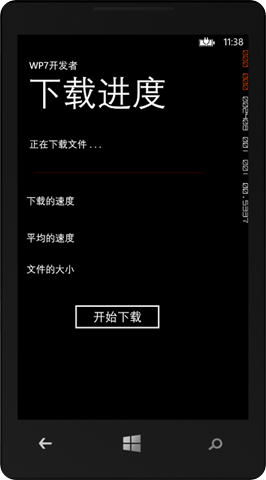
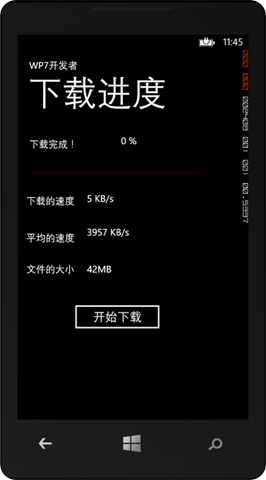
运行结果图:
Windows Phone 8 下载文件进度的更多相关文章
- C#获取windows 10的下载文件夹路径
Windows没有为“下载”文件夹定义CSIDL,并且通过Environment.SpecialFolder枚举无法使用它. 但是,新的Vista 知名文件夹 API确实使用ID定义它FOLDERID ...
- 使用 new XMLHttpRequest() 制作下载文件进度条
mui 进度控件使用方法: 检查当前容器(container控件)自身是否包含.mui-progressbar类: 当前容器包含.mui-progressbar类,则以当前容器为目标控件,直接显示进度 ...
- python实现socket上传下载文件-进度条显示
在python的socket编程中,可以实现上传下载文件,并且在下载的时候,显示进度条,具体的流程如下图所示: 1. 服务器端代码如下: [root@python 519]# cat server.p ...
- 阿里云服务器(Windows)如何下载文件
背景:公司只有我一个技术,在我之前还有一个老技术,属于兼职状态,为了尽快熟悉公司网站及app项目情况,我联系了老技术,请他尽快将代码发给我,他说代码文件过大,问我能不能连上服务器下载.百度了很多,都不 ...
- 使用tqdm实现下载文件进度条
1.获取下载链接 下载链接为:http://fastsoft.onlinedown.net/down/Fcloudmusicsetup2.5.5.197764.exe 2.使用tqdm实现 2.1.从 ...
- linux上很方便的上传下载文件工具rz和sz使用介绍
简单说就是,可以很方便地用这两个sz/rz工具,实现Linux下和Windows之间的文件传输(发送和接收),速度大概为10KB/s,适合中小文件.rz/sz 通过Zmodem协议传输数据 一般来 ...
- 在linux命令行利用SecureCRT上传下载文件
一般来说,linux服务器大多是通过ssh客户端来进行远程的登陆和管理的,使用ssh登陆linux主机以后,如何能够快速的和本地机器进行文件的交互呢,也就是上传和下载文件到服务器和本地?与ssh有关的 ...
- C# Winform下载文件并显示进度条
private void btnDown_Click(object sender, EventArgs e) { DownloadFile("http://localhost:1928/We ...
- WPF多线程下载文件,有进度条
//打开对话框选择文件 private void OpenDialogBox_Click(object sender, RoutedEventArgs e) { ...
随机推荐
- Linux IPC tcp/ip socket 编程
模型 #include <unistd.h> #include <sys/types.h> #include <sys/socket.h> #include < ...
- Sybase PowerDesign 导入数据库结构formSqlserver
采用Sybase PD 创建数据库设计是常见的方法,如果遇到链接数据源时,无法直接链接系统数据源,而且在Sybase PD中无法直接创建odbc数据源时, 可以到控制面板中创建数据源,一步步的网络上有 ...
- Linux下Awk详解(转载)
什么是Awk Awk是一种小巧的编程语言及命令行工具.(其名称得自于它的创始人Alfred Aho.Peter Weinberger 和 Brian Kernighan姓氏的首个字母).它非常适合服务 ...
- Java基础语法总结2
三.运算符 Java基 本 的 运 算 符 按功能分有 下 面 几 类 : 1.算 术 运 算 符 (+,-,*,/,%,++,--) Java对 加 运 算 符 进 行 了 扩 展 ,使 它 能 够 ...
- 退役了退役了-AJAX
hi 昨晚打球悲剧的把脚崴了. 要知道,上一次崴脚是四年前:那一次伤的是左脚,也是我这么多年打篮球的生涯中,这么多次崴脚中,最严重的一次受伤.休息了整整一个月,受寝室兄弟们的无微不至的照顾,最后也买了 ...
- CPU和GPU性能对比
计算20000次10000点的fft,分别使用CPU和GPU,得 the running time of cpu is : 2.3696s the running time of gpu is : 0 ...
- hdu-5492 Find a path(dp)
题目链接: Find a path Time Limit: 2000/1000 MS (Java/Others) Memory Limit: 32768/32768 K (Java/Others ...
- POJ1523 SPF[无向图割点]
SPF Time Limit: 1000MS Memory Limit: 10000K Total Submissions: 8139 Accepted: 3723 Description C ...
- 关于OATUH中的AUTHRAZITON CODE和TOKEN的关系,实际上就是这么回事
关于OATUH中的AUTHRAZITON CODE和TOKEN的关系,实际上就是这么回事 每回要拿AUTHRAZITON CODE换取TOKEN,然后才能正常通信, 为什么要多一步呢?直接给TOKEN ...
- u3d_Shader_effects笔记5 第二章 通过UV,进行纹理移动
1.前面心情 公司最近打包,像我等小弟闲着,看代码容易困,没事偷着学shader,不过还是要多交流才行. 2.本文参考 这次参考比较多:由texture uv延伸问题多,主要是不明白变量定义: htt ...