
[solr] - spell check
solr提供了一个spell check,又叫suggestions,可以用于查询输入的自动完成功能auto-complete。
参考文献:
https://cwiki.apache.org/confluence/display/solr/Spell+Checking
http://www.cnblogs.com/ibook360/archive/2011/11/30/2269077.html
方法:
修改core的solrconfig.xml
加入这段到<config />内
    <searchComponent name="spellcheck" class="solr.SpellCheckComponent">

      <lst name="spellchecker">

        <str name="name">wordbreak</str>

        <str name="classname">org.apache.solr.spelling.suggest.Suggester</str>

        <str name="lookupImpl">org.apache.solr.spelling.suggest.tst.TSTLookup</str>

        <str name="field">content</str>

        <str name="combineWords">true</str>

        <str name="breakWords">true</str>

        <int name="maxChanges">10</int>

      </lst>

    </searchComponent>

    <requestHandler name="/spellcheck" class="org.apache.solr.handler.component.SearchHandler">

      <lst name="defaults">

        <str name="spellcheck">true</str>

        <str name="spellcheck.dictionary">wordbreak</str>

        <str name="spellcheck.count">20</str>

      </lst>

      <arr name="last-components">

        <str>spellcheck</str>

      </arr>

    </requestHandler>
schema.xml配置:
<?xml version="1.0" ?>

<schema name="my core" version="1.1">

    <fieldtype name="string"  class="solr.StrField" sortMissingLast="true" omitNorms="true"/>

    <fieldType name="long" class="solr.TrieLongField" precisionStep="0" positionIncrementGap="0"/>

    <fieldType name="tdate" class="solr.TrieDateField" precisionStep="6" positionIncrementGap="0"/>

    <fieldType name="int" class="solr.TrieIntField" precisionStep="0" positionIncrementGap="0"/>

    <fieldType name="float" class="solr.TrieFloatField" precisionStep="0" positionIncrementGap="0"/>

    <fieldType name="double" class="solr.TrieDoubleField" precisionStep="0" positionIncrementGap="0"/>

    <fieldType name="boolean" class="solr.BoolField" sortMissingLast="true"/>

    <fieldtype name="binary" class="solr.BinaryField"/>

    <fieldType name="text_cn" class="solr.TextField">

        <analyzer type="index" class="org.wltea.analyzer.lucene.IKAnalyzer" />

        <analyzer type="query" class="org.wltea.analyzer.lucene.IKAnalyzer" />

        <analyzer>

            <tokenizer class="solr.KeywordTokenizerFactory"/>

            <filter class="solr.LowerCaseFilterFactory"/>

        </analyzer>

    </fieldType>

    <!-- general -->

    <field name="id" type="long" indexed="true" stored="true" multiValued="false" required="true"/>

    <field name="subject" type="text_cn" indexed="true" stored="true" />

    <field name="content" type="text_cn" indexed="true" stored="true" />

    <field name="category_id" type="long" indexed="true" stored="true" />

    <field name="category_name" type="text_cn" indexed="true" stored="true" />

    <field name="last_update_time" type="tdate" indexed="true" stored="true" />

    <field name="_version_" type="long" indexed="true" stored="true"/>

     <!-- field to use to determine and enforce document uniqueness. -->

     <uniqueKey>id</uniqueKey>

     <!-- field for the QueryParser to use when an explicit fieldname is absent -->

     <defaultSearchField>subject</defaultSearchField>

     <!-- SolrQueryParser configuration: defaultOperator="AND|OR" -->

     <solrQueryParser defaultOperator="OR"/>

</schema>
关键在于这句:
        <analyzer>

            <tokenizer class="solr.KeywordTokenizerFactory"/>

            <filter class="solr.LowerCaseFilterFactory"/>

        </analyzer>
意思是词组搜索
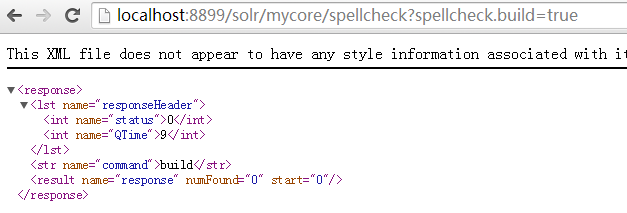
设置完xml,重启tomcat,在浏览器中运行:
http://localhost:8899/solr/mycore/spellcheck?spellcheck.build=true
运行结果:
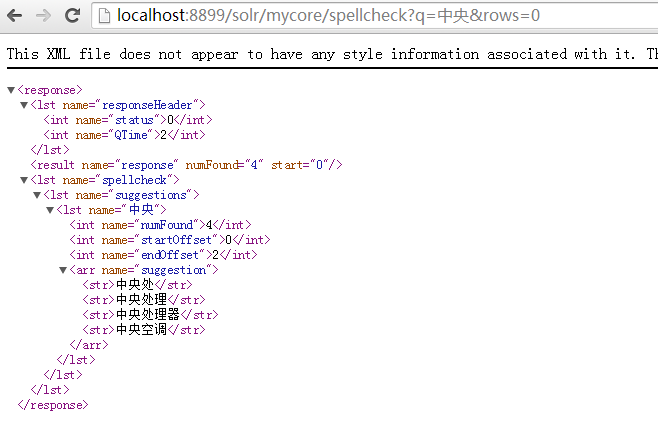
然后在浏览器中运行:
http://localhost:8899/solr/mycore/spellcheck?q=中央&rows=0
运行结果:
Java代码:
Java bean:
package com.my.entity;

import java.util.Date;

import org.apache.solr.client.solrj.beans.Field;

public class Item {

    @Field

    private long id;

    @Field

    private String subject;

    @Field

    private String content;

    @Field("category_id")

    private long categoryId;

    @Field("category_name")

    private String categoryName;

    @Field("last_update_time")

    private Date lastUpdateTime;

    public long getId() {

        return id;

    }

    public void setId(long id) {

        this.id = id;

    }

    public String getSubject() {

        return subject;

    }

    public void setSubject(String subject) {

        this.subject = subject;

    }

    public String getContent() {

        return content;

    }

    public void setContent(String content) {

        this.content = content;

    }

    public long getCategoryId() {

        return categoryId;

    }

    public void setCategoryId(long categoryId) {

        this.categoryId = categoryId;

    }

    public String getCategoryName() {

        return categoryName;

    }

    public void setCategoryName(String categoryName) {

        this.categoryName = categoryName;

    }

    public Date getLastUpdateTime() {

        return lastUpdateTime;

    }

    public void setLastUpdateTime(Date lastUpdateTime) {

        this.lastUpdateTime = lastUpdateTime;

    }

}
测试代码:
package com.my.solr;

import java.io.IOException;

import java.util.ArrayList;

import java.util.Date;

import java.util.List;

import java.util.Map;

import org.apache.solr.client.solrj.SolrQuery;

import org.apache.solr.client.solrj.SolrServerException;

import org.apache.solr.client.solrj.impl.HttpSolrServer;

import org.apache.solr.client.solrj.impl.XMLResponseParser;

import org.apache.solr.client.solrj.response.QueryResponse;

import org.apache.solr.client.solrj.response.SpellCheckResponse;

import org.apache.solr.client.solrj.response.SpellCheckResponse.Collation;

import org.apache.solr.client.solrj.response.SpellCheckResponse.Correction;

import org.apache.solr.client.solrj.response.SpellCheckResponse.Suggestion;

import com.my.entity.Item;

public class TestSolr {

    public static void main(String[] args) throws IOException, SolrServerException {

        String url = "http://localhost:8899/solr/mycore";

        HttpSolrServer core = new HttpSolrServer(url);

        core.setMaxRetries(1);

        core.setConnectionTimeout(5000);

        core.setParser(new XMLResponseParser()); // binary parser is used by default

        core.setSoTimeout(1000); // socket read timeout

        core.setDefaultMaxConnectionsPerHost(100);

        core.setMaxTotalConnections(100);

        core.setFollowRedirects(false); // defaults to false

        core.setAllowCompression(true);

        // ------------------------------------------------------

        // remove all data

        // ------------------------------------------------------

        core.deleteByQuery("*:*");

        List<Item> items = new ArrayList<Item>();

        items.add(makeItem(1, "cpu", "this is intel cpu", 1, "cpu-intel"));

        items.add(makeItem(2, "cpu AMD", "this is AMD cpu", 2, "cpu-AMD"));

        items.add(makeItem(3, "cpu intel", "this is intel-I7 cpu", 1, "cpu-intel"));

        items.add(makeItem(4, "cpu AMD", "this is AMD 5000x cpu", 2, "cpu-AMD"));

        items.add(makeItem(5, "cpu intel I6", "this is intel-I6 cpu", 1, "cpu-intel-I6"));

        items.add(makeItem(6, "处理器", "中央处理器英特儿", 1, "cpu-intel"));

        items.add(makeItem(7, "处理器AMD", "中央处理器AMD", 2, "cpu-AMD"));

        items.add(makeItem(8, "中央处理器", "中央处理器Intel", 1, "cpu-intel"));

        items.add(makeItem(9, "中央空调格力", "格力中央空调", 3, "air"));

        items.add(makeItem(10, "中央空调海尔", "海尔中央空调", 3, "air"));

        items.add(makeItem(11, "中央空调美的", "美的中央空调", 3, "air"));

        core.addBeans(items);

        // commit

        core.commit();

        // ------------------------------------------------------

        // search

        // ------------------------------------------------------

        SolrQuery query = new SolrQuery();

        String token = "中央";

        query.set("qt", "/spellcheck");

        query.set("q", token);

        query.set("spellcheck", "on");

        query.set("spellcheck.build", "true");

        query.set("spellcheck.onlyMorePopular", "true");

        query.set("spellcheck.count", "100");

        query.set("spellcheck.alternativeTermCount", "4");

        query.set("spellcheck.onlyMorePopular", "true");

        query.set("spellcheck.extendedResults", "true");

        query.set("spellcheck.maxResultsForSuggest", "5");

        query.set("spellcheck.collate", "true");

        query.set("spellcheck.collateExtendedResults", "true");

        query.set("spellcheck.maxCollationTries", "5");

        query.set("spellcheck.maxCollations", "3");

        QueryResponse response = null;

        try {

            response = core.query(query);

            System.out.println("查询耗时:" + response.getQTime());

        } catch (SolrServerException e) {

            System.err.println(e.getMessage());

            e.printStackTrace();

        } catch (Exception e) {

            System.err.println(e.getMessage());

            e.printStackTrace();

        } finally {

            core.shutdown();

        }

        SpellCheckResponse spellCheckResponse = response.getSpellCheckResponse();

        if (spellCheckResponse != null) {

            List<Suggestion> suggestionList = spellCheckResponse.getSuggestions();

            for (Suggestion suggestion : suggestionList) {

                System.out.println("Suggestions NumFound: " + suggestion.getNumFound());

                System.out.println("Token: " + suggestion.getToken());

                System.out.print("Suggested: ");

                List<String> suggestedWordList = suggestion.getAlternatives();

                for (String word : suggestedWordList) {

                    System.out.println(word + ", ");

                }

                System.out.println();

            }

            System.out.println();

            Map<String, Suggestion> suggestedMap = spellCheckResponse.getSuggestionMap();

            for (Map.Entry<String, Suggestion> entry : suggestedMap.entrySet()) {

                System.out.println("suggestionName: " + entry.getKey());

                Suggestion suggestion = entry.getValue();

                System.out.println("NumFound: " + suggestion.getNumFound());

                System.out.println("Token: " + suggestion.getToken());

                System.out.print("suggested: ");

                List<String> suggestedList = suggestion.getAlternatives();

                for (String suggestedWord : suggestedList) {

                    System.out.print(suggestedWord + ", ");

                }

                System.out.println("\n\n");

            }

            Suggestion suggestion = spellCheckResponse.getSuggestion(token);

            System.out.println("NumFound: " + suggestion.getNumFound());

            System.out.println("Token: " + suggestion.getToken());

            System.out.print("suggested: ");

            List<String> suggestedList = suggestion.getAlternatives();

            for (String suggestedWord : suggestedList) {

                System.out.print(suggestedWord + ", ");

            }

            System.out.println("\n\n");

            System.out.println("The First suggested word for solr is : " + spellCheckResponse.getFirstSuggestion(token));

            System.out.println("\n\n");

            List<Collation> collatedList = spellCheckResponse.getCollatedResults();

            if (collatedList != null) {

                for (Collation collation : collatedList) {

                    System.out.println("collated query String: " + collation.getCollationQueryString());

                    System.out.println("collation Num: " + collation.getNumberOfHits());

                    List<Correction> correctionList = collation.getMisspellingsAndCorrections();

                    for (Correction correction : correctionList) {

                        System.out.println("original: " + correction.getOriginal());

                        System.out.println("correction: " + correction.getCorrection());

                    }

                    System.out.println();

                }

            }

            System.out.println();

            System.out.println("The Collated word: " + spellCheckResponse.getCollatedResult());

            System.out.println();

        }

        System.out.println("查询耗时:" + response.getQTime());

    }

    private static Item makeItem(long id, String subject, String content, long categoryId, String categoryName) {

        Item item = new Item();

        item.setId(id);

        item.setSubject(subject);

        item.setContent(content);

        item.setLastUpdateTime(new Date());

        item.setCategoryId(categoryId);

        item.setCategoryName(categoryName);

        return item;

    }

}
测试结果:

这种方式可以使用于对现在数据内容的查询拼写检查。
[solr] - spell check的更多相关文章
- VIM 拼写/spell check
VIM 拼写检查/spell check 一.Hunspell科普 Hunspell 作为一个拼写检查的工具,已经用在了许多开源的以及商业软件中.包括Google Chrome, Libreoffic ...
- Solr 6.7学习笔记(06)-- spell check
拼写检查也是搜索引擎必备的功能.Solr中提供了SpellCheckComponent 来实现此功能.我看过<Solr In Action>,是基于Solr4.X版本的,那时Suggest ...
- Word: How to Temporarily Disable Spell Check in Word
link: http://johnlamansky.com/tech/disable-word-spell-check/ 引用: Word 2010 Click the “File” button C ...
- 1.7.7 Spell Checking -拼写检查
1. SpellCheck SpellCheck组件设计的目的是基于其他,相似,terms来提供内联查询建议.这些建议的依据可以是solr字段中的terms,外部可以创建文本文件, 或者其实lucen ...
- solr拼写检查配置
拼写检查功能,能在搜索时,提供一个较好用户体验,所以,主流的搜索引擎都有这个功能. 那么什么是拼写检查,其实很好理解,就是你输入的搜索词,可能是你输错了,也有可能在它的检索库里面根本不存在这个词,但是 ...
- Importing/Indexing database (MySQL or SQL Server) in Solr using Data Import Handler--转载
原文地址:https://gist.github.com/maxivak/3e3ee1fca32f3949f052 Install Solr download and install Solr fro ...
- Solr 6.7学习笔记(03)-- 样例配置文件 solrconfig.xml
位于:${solr.home}\example\techproducts\solr\techproducts\conf\solrconfig.xml <?xml version="1. ...
- Solr基础知识二(导入数据)
上一篇讲述了solr的安装启动过程,这一篇讲述如何导入数据到solr里. 一.准备数据 1.1 学生相关表 创建学生表.学生专业关联表.专业表.学生行业关联表.行业表.基础信息表,并创建一条小白的信息 ...
- 【Nutch2.3基础教程】集成Nutch/Hadoop/Hbase/Solr构建搜索引擎:安装及运行【集群环境】
1.下载相关软件,并解压 版本号如下: (1)apache-nutch-2.3 (2) hadoop-1.2.1 (3)hbase-0.92.1 (4)solr-4.9.0 并解压至/opt/jedi ...
随机推荐
- node.js基础 1之 URL网址解析的好帮手
URL和URI的区别: URL是统一资源定位符 URI是统一资源标识符 URL是URI的子集(URL一定是URI,但URI不一定是URL) node中的URL中的url.parse protocol: ...
- theano + gpu
Teano安装测试 1. Anaconda 安装 Anaconda是一个科学计算环境,自带的包管理器conda很强大.之所以选择它是因为它内置了python,以及numpy.scipy两个必要库和一些 ...
- linux下打包命令的使用
Unix系统业务使用(特别是数据管理与备份)中,经过一番研究.整理后,充分利用Unix系统本身的命令tar.cpio和compress等来做到打包和压缩,使之充当类似DOS下的压缩软件,同时在Unix ...
- C语言输出字符串
在VS2012中,使用gets_s()方法,其中第二个参数可以用sizeof(...)代替.例子代码如下: #include <stdio.h> int main( ) { ]; gets ...
- MYSQL -NOSQL -handlersocket
一个MYSQL的插件,让MYSQL支持NOSQL 好处,跟MYSQL公用数据.比普通CACHE方便.普通CACHE有同步数据问题 坏处,不兼容MEMCAHE,跟MEMCAHE一样没安全控制 编译与安装 ...
- 如何在MapControl界面添加双击事件实现标绘及符号样式更改
private void axMapControl1_OnDoubleClick(object sender, ESRI.ArcGIS.Controls.IMapControlEvents2_OnDo ...
- echsop常用模板方法.
echsop模板遍历文件: {foreach from=$goods_list item=goods} {$goods.name} {/foreach} 不知道为什么ecshop中foreach像个注 ...
- Linux系统真正的优势以及学习方法
作为一名Linux爱好者,在Linux的世界中也算是半个老司机了,从桌面玩到服务器.从ubuntu到centos.从计算机到路由器,各种Linux的花俏玩法都略有体验.作者并非职业Linux选手,我仅 ...
- UITableView编辑
UITableView 编辑步骤如下: 1.让TableView处于编辑状态 2.协议设定 2.1.确定Cell是否处于编辑状态 2.2.设定Cell的编辑样式(删除.添加) 2.3.编辑状 ...
- ConvertFrom-String 命令研究
-------先上个例子------- $aaa = @'0.027 0.034 0.834 0.1050.346 0.558 0.018 0.0780.001 0.997 0.001 0.0010. ...