
UITableView编辑
1.让TableView处于编辑状态
2.协议设定
2.1.确定Cell是否处于编辑状态
2.2.设定Cell的编辑样式(删除、添加)
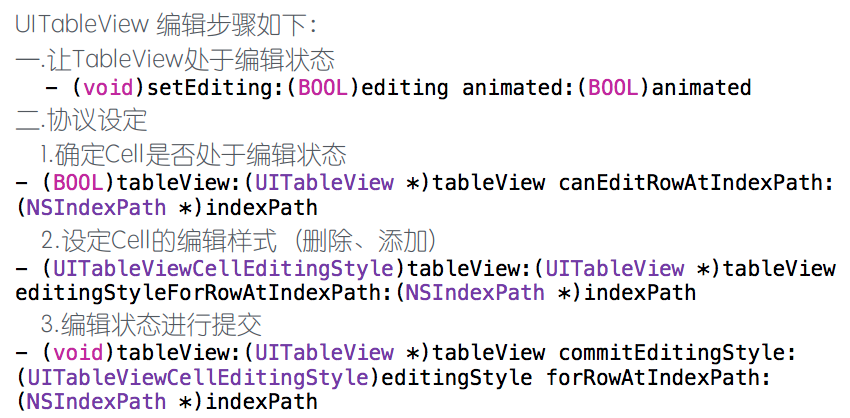
//1、让将要执行删除、添加操作的表视图处于编辑状态
- (void)setEditing:(BOOL)editing animated:(BOOL)animated {
//先执行父类中的这个方法
[super setEditing:editing animated:animated];
//表视图执行此方法
[self.tableView setEditing:editing animated:animated];
}
//2、指定表视图中哪些行可以处于编辑状态
- (BOOL)tableView:(UITableView *)tableView canEditRowAtIndexPath:(NSIndexPath *)indexPath {
// if (indexPath.row % 2 == 0) {
// return YES;
// }
// return NO;
//默认全部都可以进行编辑
return YES;
}
//3、指定编辑样式,到底是删除还是添加
- (UITableViewCellEditingStyle)tableView:(UITableView *)tableView editingStyleForRowAtIndexPath:(NSIndexPath *)indexPath {
//如果此方法不重写,默认是删除样式
return UITableViewCellEditingStyleInsert;
// return UITableViewCellEditingStyleDelete;
// if (indexPath.row > 10) {
// return UITableViewCellEditingStyleInsert;
// } else {
// return UITableViewCellEditingStyleDelete;
// }
}
//4、不管是删除还是添加,这个方法才是操作的核心方法,当点击删除、或者添加按钮时,需要做什么事情,怎样才能完成删除或者添加操作,全部在这个方法内部指定
- (void)tableView:(UITableView *)tableView commitEditingStyle:(UITableViewCellEditingStyle)editingStyle forRowAtIndexPath:(NSIndexPath *)indexPath {
[tableView beginUpdates];//表视图开始更新
if (editingStyle == UITableViewCellEditingStyleDelete) {
//1、将该位置下的单元格删除
[tableView deleteRowsAtIndexPaths:@[indexPath] withRowAnimation:UITableViewRowAnimationFade];
//2、删除数据数组中,与该单元格绑定的数据
[_dataArray removeObjectAtIndex:indexPath.row];
} else if (editingStyle == UITableViewCellEditingStyleInsert) {
Student *student = _dataArray[indexPath.row];
//获取一个位置信息
NSIndexPath *index = [NSIndexPath indexPathForRow:indexPath.row inSection:indexPath.section];
[tableView insertRowsAtIndexPaths:@[index] withRowAnimation:UITableViewRowAnimationTop];
[_dataArray insertObject:student atIndex:index.row];
}
[tableView endUpdates];//表视图结束更新
//1、移动的第一步也是需要将表视图的编辑状态打开(上面已写)
//2、指定哪些行可以进行移动
- (BOOL)tableView:(UITableView *)tableView canMoveRowAtIndexPath:(NSIndexPath *)indexPath{
//默认是都可以移动
return YES;
}
//3、移动完成之后要做什么事情,怎么完成移动
- (void)tableView:(UITableView *)tableView moveRowAtIndexPath:(NSIndexPath *)sourceIndexPath toIndexPath:(NSIndexPath *)destinationIndexPath{
//先记录原有位置下的模型数据
Student *student = _dataArray[sourceIndexPath.row];
[student retain];//防止野指针
//删除原位置下的模型数据
[_dataArray removeObjectAtIndex:sourceIndexPath.row];
//在新位置将记录的模型数据添加到数据组中
[_dataArray insertObject:student atIndex:destinationIndexPath.row];
//点击单元格触发的方法
- (void)tableView:(UITableView *)tableView didSelectRowAtIndexPath:(NSIndexPath *)indexPath {
//push操作、传值
DetailViewController *detailVC = [[DetailViewController alloc] init];
detailVC.student = _dataArray[indexPath.row];
[self.navigationController pushViewController:detailVC animated:YES];
[detailVC release];
1、表视图控制器自带的根视图为UITableView对象
2、self.tableView就代表根视图
3、创建出来的表视图控制器 已经 自动接收了 数据源协议和代理协议
4、不需要通过代码建立协议与代理关系
5、表视图控制器.m文件已经自动帮你添加了数据源协议中必须实现的方法
UITableView编辑的更多相关文章
- iOS学习30之UITableView编辑
1. UITableView编辑 1> UITableView 编辑流程 2> UITableView 编辑步骤(四步) ① 第一步 : 让 TableView 处于编辑状态(在按钮点击事 ...
- IOS第七天(6:UiTableView编辑模式, 拖动位置 ,滑动删除)
**********UiTableView编辑模式, 拖动位置 ,滑动删除 #import "HMViewController.h" @interface HMViewContro ...
- iOS学习之UITableView编辑
一.UITableView编辑 UITableView编辑(删除.添加)步骤: 让TableView处于编辑状态. 协议设定:1)确定Cell是否处于编辑状态:2)设定cell的编辑样式(删除.添加) ...
- ##DAY11 UITableView编辑
##DAY11 UITableView编辑 每一个视图控制器都有一个编辑按钮,因为项目中编辑的应用场景非常多,所以系统预留了一个编辑按钮供我们使用 self.navigationItem.leftBa ...
- UI:UITableView 编辑、cell重用机制
tableView编辑.tableView移动.UITableViewController tableView的编辑:cell的添加.删除. 使⽤场景: 删除⼀个下载好的视频,删除联系⼈: 插⼊⼀条新 ...
- UITableView 编辑模式(增加-删除-移动---自定义左滑 title)
- (void)viewDidLoad { [super viewDidLoad]; // Do any additional setup after loading the view, typica ...
- UITableView编辑模式大全解
1.UITableView 的编辑模式 进入编辑模式 代码体现 // 设置 editing 属性 tableView?.editing = true // 这个设置的时候是有动画效果的 tableVi ...
- iOS - UITableView 编辑(cell的插入, 删除, 移动)
UITableView Cell的插入/删除 核心API Class : UITableView Delegate : UITableViewDataSource, UITableViewDelega ...
- UITableView编辑模式
UITableView有两种模式,普通模式和编辑模式.在编辑模式下可以对cell进行排序.删除.插入等等. 如何进入编辑模式 调用tableView的setEditing(editing: Bool, ...
随机推荐
- 16. 星际争霸之php设计模式--组合模式
题记==============================================================================本php设计模式专辑来源于博客(jymo ...
- java中的乱码问题
1如果使用的tomcat服务器,在server.xml中Connector 标签后加 URIEncoding="UTF-8": 2使用web过滤器: (1).新建一个SetChar ...
- Unity中Collider和刚体Collider性能对比
测试方式: 每个对象做大范围正弦移动,创建1000-5000个对象,保证场景分割树的实时更新,并测试帧率 测试脚本: 移动脚本: using UnityEngine; using System.Col ...
- 【转】【C/C++】实现memcpy函数
本文转自:http://my.oschina.net/renhc/blog/36345 面试中如问到memcpy的实现,那就要小心了,这里有陷阱. 先看下标准memcpy()的解释: ? 1 2 vo ...
- Intellij IDEA debug介绍
先编译好要调试的程序. 1.设置断点 选定要设置断点的代码行,在行号的区域后面单击鼠标左键即可. 2.开启调试会话 点击红色箭头指向的小虫子,开始进入调试. IDE下方出现Debug视图,红色的箭头指 ...
- 【Java】聊聊常用的非对称加密算法之一RSA的使用(Java)
参考的优秀文章 Java加密技术(四)——非对称加密算法RSA RSA算法原理(一).RSA算法原理(二) RSA的公钥和私钥到底哪个才是用来加密和哪个用来解密? 简单的介绍 RSA是有名的非对称加密 ...
- Python数据分析之pandas学习
Python中的pandas模块进行数据分析. 接下来pandas介绍中将学习到如下8块内容:1.数据结构简介:DataFrame和Series2.数据索引index3.利用pandas查询数据4.利 ...
- 3个常用基于Linux系统命令行WEB网站浏览工具(w3m/Links/Lynx)
一般我们常用的浏览器肯定是基于可视化界面的图文结合的浏览界面效果,比如FireFox.Chrome.Opera等等,但是有些时候折腾和项目 的需要,在Linux环境中需要查看某个页面的文字字符,我们需 ...
- SQL&&LINQ:左(外)连接,右(外)连接,内连接,完全连接,交叉连接,多对多连接
SQL: 外连接和内连接: 左连接或左外连接:包含左边的表的所有行,如果右边表中的某行没有匹配,该行内容为空(NULL) --outer jion:left join or left outer jo ...
- 《BI项目笔记》增量ETL数据抽取的策略及方法
增量抽取 增量抽取只抽取自上次抽取以来数据库中要抽取的表中新增或修改的数据.在ETL使用过程中.增量抽取较全量抽取应用更广.如何捕获变化的数据是增量抽取的关键.对捕获方法一般有两点要求:准确性,能够将 ...