
Build an ETL Pipeline With Kafka Connect via JDBC Connectors
This article is an in-depth tutorial for using Kafka to move data from PostgreSQL to Hadoop HDFS via JDBC connections.
Read this eGuide to discover the fundamental differences between iPaaS and dPaaS and how the innovative approach of dPaaS gets to the heart of today’s most pressing integration problems, brought to you in partnership with Liaison.
Tutorial: Discover how to build a pipeline with Kafka leveraging DataDirect PostgreSQL JDBC driver to move the data from PostgreSQL to HDFS. Let’s go streaming!
Apache Kafka is an open source distributed streaming platform which enables you to build streaming data pipelines between different applications. You can also build real-time streaming applications that interact with streams of data, focusing on providing a scalable, high throughput and low latency platform to interact with data streams.
Earlier this year, Apache Kafka announced a new tool called Kafka Connect which can helps users to easily move datasets in and out of Kafka using connectors, and it has support for JDBC connectors out of the box! One of the major benefits for DataDirect customers is that you can now easily build an ETL pipeline using Kafka leveraging your DataDirect JDBC drivers. Now you can easily connect and get the data from your data sources into Kafka and export the data from there to another data source.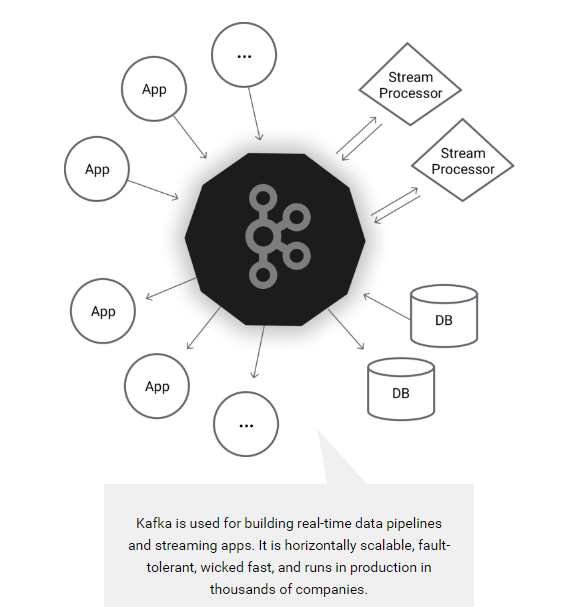
Image From https://kafka.apache.org/
Environment Setup
Before proceeding any further with this tutorial, make sure that you have installed the following and are configured properly. This tutorial is written assuming you are also working on Ubuntu 16.04 LTS, you have PostgreSQL, Apache Hadoop, and Hive installed.
- Installing Apache Kafka and required toolsTo make the installation process easier for people trying this out for the first time, we will be installing Confluent Platform. This takes care of installing Apache Kafka, Schema Registry and Kafka Connect which includes connectors for moving files, JDBC connectors and HDFS connector for Hadoop.
- To begin with, install Confluent’s public key by running the command:
wget -qO -http://packages.confluent.io/deb/2.0/archive.key | sudo apt-key add - - Now add the repository to your sources.list by running the following command:
sudo add-apt-repository "deb http://packages.confluent.io/deb/2.0 stable main" - Update your package lists and then install the Confluent platform by running the following commands:
sudo apt-get updatesudo apt-get install confluent-platform-2.11.7
- To begin with, install Confluent’s public key by running the command:
- Install DataDirect PostgreSQL JDBC driver
- Download DataDirect PostgreSQL JDBC driver by visiting here.
- Install the PostgreSQL JDBC driver by running the following command:
java -jar PROGRESS_DATADIRECT_JDBC_POSTGRESQL_ALL.jar - Follow the instructions on the screen to install the driver successfully (you can install the driver in evaluation mode where you can try it for 15 days, or in license mode, if you have bought the driver)
- Configuring data sources for Kafka Connect
- Create a new file called postgres.properties, paste the following configuration and save the file. To learn more about the modes that are being used in the below configuration file, visit this page.
name=test-postgres-jdbcconnector.class=io.confluent.connect.jdbc.JdbcSourceConnectortasks.max=1connection.url=jdbc:datadirect:postgresql://<;server>:<port>;User=<user>;Password=<password>;Database=<dbname>mode=timestamp+incrementingincrementing.column.name=<id>timestamp.column.name=<modifiedtimestamp>topic.prefix=test_jdbc_table.whitelist=actor - Create another file called hdfs.properties, paste the following configuration and save the file. To learn more about HDFS connector and configuration options used, visit this page.
name=hdfs-sinkconnector.class=io.confluent.connect.hdfs.HdfsSinkConnectortasks.max=1topics=test_jdbc_actorhdfs.url=hdfs://<;server>:<port>flush.size=2hive.metastore.uris=thrift://<;server>:<port>hive.integration=trueschema.compatibility=BACKWARD - Note that postgres.properties and hdfs.properties have basically the connection configuration details and behavior of the JDBC and HDFS connectors.
- Create a symbolic link for DataDirect Postgres JDBC driver in Hive lib folder by using the following command:
ln -s /path/to/datadirect/lib/postgresql.jar /path/to/hive/lib/postgresql.jar - Also make the DataDirect Postgres JDBC driver available on Kafka Connect process’s CLASSPATH by running the following command:
export CLASSPATH=/path/to/datadirect/lib/postgresql.jar - Start the Hadoop cluster by running following commands:
cd /path/to/hadoop/sbin./start-dfs.sh./start-yarn.sh
- Create a new file called postgres.properties, paste the following configuration and save the file. To learn more about the modes that are being used in the below configuration file, visit this page.
- Configuring and running Kafka Services
- Download the configuration files for Kafka, zookeeper and schema-registry services
- Start the Zookeeper service by providing the zookeeper.properties file path as a parameter by using the command:
zookeeper-server-start /path/to/zookeeper.properties - Start the Kafka service by providing the server.properties file path as a parameter by using the command:
kafka-server-start /path/to/server.properties - Start the Schema registry service by providing the schema-registry.properties file path as a parameter by using the command:
schema-registry-start /path/to/ schema-registry.properties
Ingesting Data Into HDFS using Kafka Connect
To start ingesting data from PostgreSQL, the final thing that you have to do is start Kafka Connect. You can start Kafka Connect by running the following command:
connect-standalone /path/to/connect-avro-standalone.properties \ /path/to/postgres.properties /path/to/hdfs.properties
This will import the data from PostgreSQL to Kafka using DataDirect PostgreSQL JDBC drivers and create a topic with name test_jdbc_actor. Then the data is exported from Kafka to HDFS by reading the topic test_jdbc_actor through the HDFS connector. The data stays in Kafka, so you can reuse it to export to any other data sources.
Next Steps
We hope this tutorial helped you understand on how you can build a simple ETL pipeline using Kafka Connect leveraging DataDirect PostgreSQL JDBC drivers. This tutorial is not limited to PostgreSQL. In fact, you can create ETL pipelines leveraging any of our DataDirect JDBC drivers that we offer for Relational databases like Oracle, DB2 and SQL Server, Cloud sources likeSalesforce and Eloqua or BigData sources like CDH Hive, Spark SQL and Cassandra by following similar steps. Also, subscribe to our blog via email or RSS feed for more awesome tutorials.
Discover the unprecedented possibilities and challenges, created by today’s fast paced data climate andwhy your current integration solution is not enough, brought to you in partnership with Liaison.
Build an ETL Pipeline With Kafka Connect via JDBC Connectors的更多相关文章
- 1.3 Quick Start中 Step 7: Use Kafka Connect to import/export data官网剖析(博主推荐)
不多说,直接上干货! 一切来源于官网 http://kafka.apache.org/documentation/ Step 7: Use Kafka Connect to import/export ...
- Kafka connect快速构建数据ETL通道
摘要: 作者:Syn良子 出处:http://www.cnblogs.com/cssdongl 转载请注明出处 业余时间调研了一下Kafka connect的配置和使用,记录一些自己的理解和心得,欢迎 ...
- Kafka Connect Architecture
Kafka Connect's goal of copying data between systems has been tackled by a variety of frameworks, ma ...
- Streaming data from Oracle using Oracle GoldenGate and Kafka Connect
This is a guest blog from Robin Moffatt. Robin Moffatt is Head of R&D (Europe) at Rittman Mead, ...
- 基于Kafka Connect框架DataPipeline在实时数据集成上做了哪些提升?
在不断满足当前企业客户数据集成需求的同时,DataPipeline也基于Kafka Connect 框架做了很多非常重要的提升. 1. 系统架构层面. DataPipeline引入DataPipeli ...
- 打造实时数据集成平台——DataPipeline基于Kafka Connect的应用实践
导读:传统ETL方案让企业难以承受数据集成之重,基于Kafka Connect构建的新型实时数据集成平台被寄予厚望. 在4月21日的Kafka Beijing Meetup第四场活动上,DataPip ...
- 替代Flume——Kafka Connect简介
我们知道过去对于Kafka的定义是分布式,分区化的,带备份机制的日志提交服务.也就是一个分布式的消息队列,这也是他最常见的用法.但是Kafka不止于此,打开最新的官网. 我们看到Kafka最新的定义是 ...
- Apache Kafka Connect - 2019完整指南
今天,我们将讨论Apache Kafka Connect.此Kafka Connect文章包含有关Kafka Connector类型的信息,Kafka Connect的功能和限制.此外,我们将了解Ka ...
- SQL Server CDC配合Kafka Connect监听数据变化
写在前面 好久没更新Blog了,从CRUD Boy转型大数据开发,拉宽了不少的知识面,从今年年初开始筹备.组建.招兵买马,到现在稳定开搞中,期间踏过无数的火坑,也许除了这篇还很写上三四篇. 进入主题, ...
随机推荐
- 算法手记 之 数据结构(线段树详解)(POJ 3468)
依然延续第一篇读书笔记,这一篇是基于<ACM/ICPC 算法训练教程>上关于线段树的讲解的总结和修改(这本书在线段树这里Error非常多),但是总体来说这本书关于具体算法的讲解和案例都是不 ...
- MySQL binlog 组提交与 XA(分布式事务、两阶段提交)【转】
概念: XA(分布式事务)规范主要定义了(全局)事务管理器(TM: Transaction Manager)和(局部)资源管理器(RM: Resource Manager)之间的接口.XA为了实现分布 ...
- ffmpeg-20160731-bin.7z
ESC 退出 0 进度条开关 1 屏幕原始大小 2 屏幕1/2大小 3 屏幕1/3大小 4 屏幕1/4大小 S 下一帧 [ -2秒 ] +2秒 ; -1秒 ' +1秒 下一个帧 -> -5秒 f ...
- Debian Vi 简介
1.Vi 简介 Vi 是 Unix 世界里极为普遍的全萤幕文书编辑器,几乎可以说任何一台 Unix 机器都会提供这套软体.Linux 当然也有,它的 vi 其实是 elvis (版权问题),不 ...
- GCD 大中枢派发 简单应用实例
@interface ViewController () { UIImageView* iv; UIButton* btn; UILabel* lbl; } @end @implementation ...
- DB2 SQLCODE 大全
DB2错误信息sqlcode sqlstate 说明 000 00000 SQL语句成功完成 01xxx SQL语句成功完成,但是有警告 +012 01545 未限定的列名被解释为一个有相互关系的引用 ...
- ASP.NET SignalR 与 LayIM2.0 配合轻松实现Web聊天室(六) 之 Layim源码改造右键菜单--好友、组管理功能的实现。
前言 上一篇中讲解了加好友的流程,本篇将介绍好友管理,群组管理的右键菜单功能.当然由于菜单项目太多,都实现也得花费时间.只讲解一下我是如何从不知道怎么实现右键菜单到会自定义菜单的一个过程.另外呢,针对 ...
- Android 菜单定制使用小结
GridView 添加 ArrayAdapter<Bean>, 在 gridView 的 Item 点击之后, 1.list.add(bean)/remove(bean) 2.adapte ...
- C语言文件操作相关函数
在实际应用中,我们往往需要对文件进行操作,下面我将介绍C语言的一些关于操作文件的函数. 一.计算机文件 计算机文件是以计算机硬盘为载体存储在计算机上的信息集合,是存储在某种长期储存设备上的一段数据流. ...
- Apache commons-dbutils笔记