
Poisson Distribution——泊松分布
老师留个小作业,用EXCEL做不同lambda(np)的泊松分布图,这里分别用EXCEL,Python,MATLAB和R简单画一下。
1. EXCEL
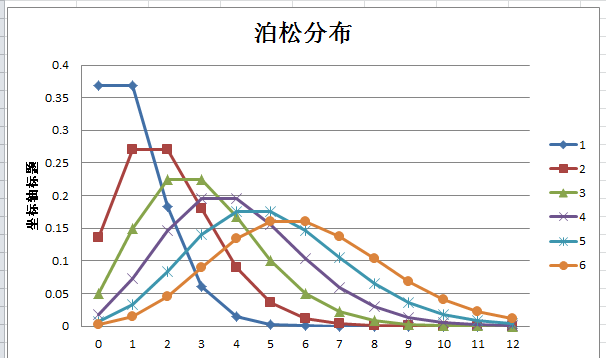
运用EXCEL统计学公式,POISSON,算出各个数据,作图。资料参考这里。
=POISSON.DIST(B$1,$A2,0)

注意这里绝对引用的方式,写完公式之后,直接上下左右拖动鼠标即可自动填充。之后插入图表。如下。
2.Python
这里stats.poisson.pmf中的pmf是probability mass function(概率质量函数)的缩写。
以下引自WIKI:
在概率论中,概率质量函数(probability mass function,简写为pmf)是离散随机变量在各特定取值上的概率。
概率质量函数和概率密度函数不同之处在于:概率质量函数是对离散随机变量定义的,本身代表该值的概率;
概率密度函数是对连续随机变量定义的,本身不是概率,只有对连续随机变量的概率密度函数在某区间内进行积分后才是概率。
import scipy.stats as stats

import matplotlib.pyplot as plt

k = range(0,13)

for ld in range(7):

    y = stats.poisson.pmf(k,ld)

    plt.xlabel('K')

    plt.ylabel('P')

    plt.title('POISSON')

    plt.plot(y,label=str(ld))

plt.legend()

plt.show()
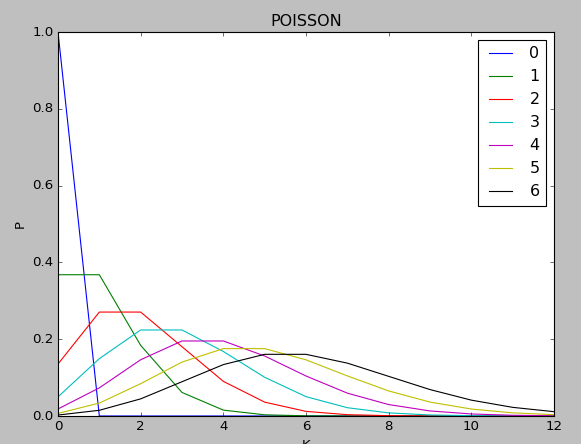
输出图形:
3.MATLAB
x=0:12;

c = ['r','g','b','y','m','k'];

for i = (1:6)

    y=poisspdf(x,i);

    plot(x,y,c(i));

    hold on

end
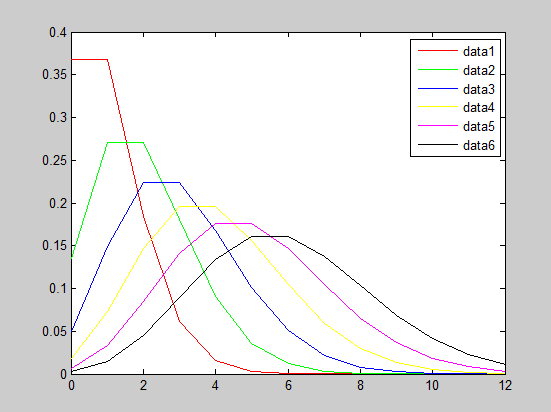
输出如下:
4.R
pmf <- function(lambda){

  y = list()

  for(k in 0:12){

      y[k+1] <- round(dpois(x=k,lambda),3)

  }

  return(y)

}

mycols <- runif(10,min=1,max=length(colors()))

for(i in 1:6){

  par(new=TRUE)

  y = plot(c(0:12),pmf(i),type='l',ylim=c(0,0.4),col = mycols[i])

  }
输出:
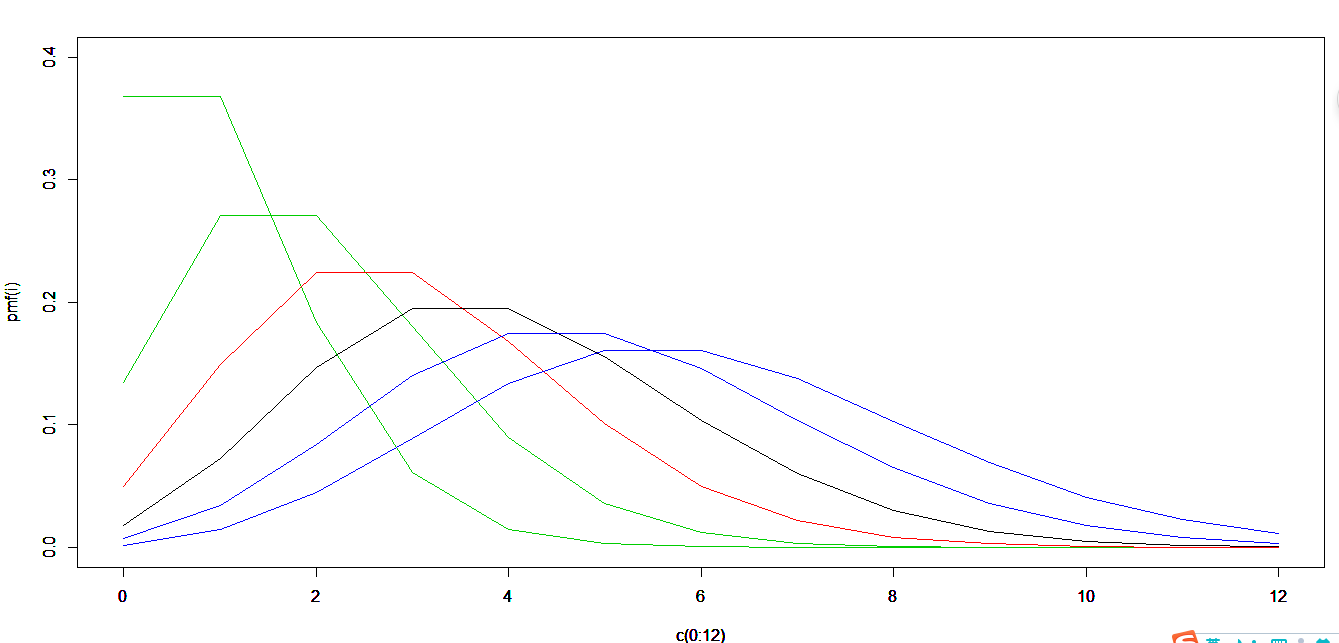
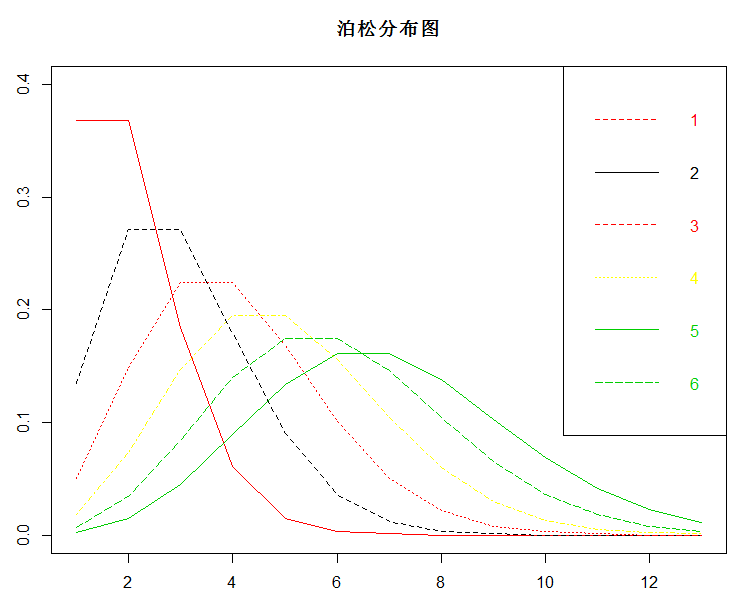
美中不足的是,楼主不知道如何为每条线设置标签。查了一下午legend函数,还是没搞定。。。
解决了回头补充吧。。。
###################################################
来补充了。。。问了问大佬们,给出下面的方法
pmf <- function(lambda){

  y = list()

  for(k in 0:12){

    y[k+1] <- round(dpois(x=k,lambda),3)

  }

  y = unlist(y)

  return(y)

}

mycols <- runif(10,min=1,max=length(colors()))

y_data <- matrix(unlist(lapply(1:6,FUN = pmf)),ncol = 6)

matplot(y_data,type='l',ylim=c(0,0.4),col = mycols)

colnames(y_data) = 1:ncol(y_data)

matplot(y_data,type='l',sub = "标记",ylim=c(0,0.4),col = mycols,main = "泊松分布图")

legend(

  "topright"

  ,legend = colnames(y_data)

  ,text.col = mycols

  ,col = mycols

  ,lty = mycols

)
输出:
Poisson Distribution——泊松分布的更多相关文章
- Poisson distribution 泊松分布 指数分布
Poisson distribution - Wikipedia https://en.wikipedia.org/wiki/Poisson_distribution Jupyter Notebook ...
- 【概率论】5-4:泊松分布(The Poisson Distribution)
title: [概率论]5-4:泊松分布(The Poisson Distribution) categories: - Mathematic - Probability keywords: - Po ...
- [转]Poisson Distribution
Poisson Distribution Given a Poisson process, the probability of obtaining exactly successes in tria ...
- 基本概率分布Basic Concept of Probability Distributions 2: Poisson Distribution
PDF version PMF A discrete random variable $X$ is said to have a Poisson distribution with parameter ...
- NLP&数据挖掘基础知识
Basis(基础): SSE(Sum of Squared Error, 平方误差和) SAE(Sum of Absolute Error, 绝对误差和) SRE(Sum of Relative Er ...
- 常用的机器学习&数据挖掘知识点【转】
转自: [基础]常用的机器学习&数据挖掘知识点 Basis(基础): MSE(Mean Square Error 均方误差),LMS(LeastMean Square 最小均方),LSM(Le ...
- 【基础】常用的机器学习&数据挖掘知识点
Basis(基础): MSE(Mean Square Error 均方误差),LMS(LeastMean Square 最小均方),LSM(Least Square Methods 最小二乘法),ML ...
- R代码展示各种统计学分布 | 生物信息学举例
二项分布 | Binomial distribution 泊松分布 | Poisson Distribution 正态分布 | Normal Distribution | Gaussian distr ...
- 常用的机器学习&数据挖掘知识(点)总结
Basis(基础): MSE(Mean Square Error 均方误差), LMS(LeastMean Square 最小均方), LSM(Least Square Methods 最小二乘法), ...
随机推荐
- Tomcat 发布war包提示war包超出大小修改
error信息: java.lang.IllegalStateException: org.apache.tomcat.util.http.fileupload.FileUploadBase$Size ...
- A feature in Netsuite Reports > Financial > Balance Sheet
最新版本的Customize balance sheet page Left side > Layout > Add Reference Row Then in right side, y ...
- HTML学习开篇
最近开的博客,一切都是从零开始,昨天刚写了java的开篇,今天写一写HTML开篇. 很多初学者都不太看重前端的学习,甚至鄙视前端,我刚开始时就这样.其实,要想成为一个真正的程序员,前端和后端都必须了解 ...
- ubuntu下安装、启动和卸载SSH
想往VMWare虚拟机上的Ubuntu里面拷贝代码,发现之前安装好的secureCRT链接不上.发现是ssh安装配置出了问题,于是就把openssh-server卸载后重装,发现又是与openssh- ...
- Python3基础 reverse 将列表倒序排列
镇场诗:---大梦谁觉,水月中建博客.百千磨难,才知世事无常.---今持佛语,技术无量愿学.愿尽所学,铸一良心博客.------------------------------------------ ...
- Windows计划任务执行时不显示窗口的问题
最近开发了工具,带界面的,需要定时执行的,为了方便直接用Windows计划任务做定时了.跑了一段时间发现,进程中也有,就是看不到程序的界面,进程的执行貌似也阻塞了. 从网上查了下,发现时启动方式的问题 ...
- Await Async Task
class Program { static void Main(string[] args) { Console.WriteLine("=======Start Main!======== ...
- 翻译:打造基于Sublime Text 3的全能python开发环境
原文地址:https://realpython.com/blog/python/setting-up-sublime-text-3-for-full-stack-python-development/ ...
- 手机测试pc端网页
在这个问题上徘徊了 一个钟头了,终于被我找到方法了,就赶紧记下来,以后好查阅!! 主要问题在防火墙,防火墙阻当了80端口,所以怎么用手机访问都是访问不了的.把防火墙关闭就好了! 贴上httpd-vho ...
- Linux_命令_积累
1.ps 查看进程状态 ZC: "ps -a" 和 "ps a" 有区别... (具体查看 "man ps") 1.1.ps aux 1.2 ...