
jQuery.validate.js表单验证插件
jQuery.validate.js表单验证插件的使用
效果:
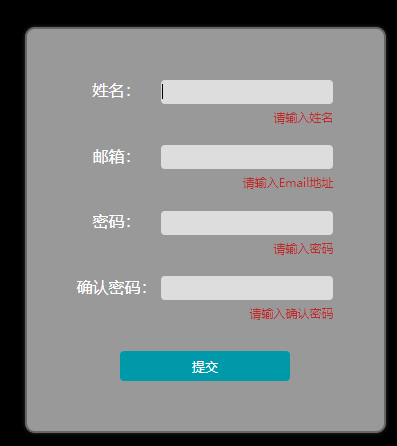
代码:
<!DOCTYPE html>

<html lang="en">

<head>

    <meta charset="UTF-8">

    <meta name="viewport" content="width=device-width, initial-scale=1.0">

    <meta http-equiv="X-UA-Compatible" content="ie=edge">

    <title>表单验证插件Validate</title>

    <script src="js/jquery-1.10.2.min.js"></script>

    <script src="js/jquery.validate.min.js"></script>

    <style>

        body {

            background-color: #000;

        }

        form {

            width: 361px;

            margin: 80px auto;

            padding: 50px;

            border: 2px solid #666;

            box-shadow: 0 0 5px rgba(255, 255, 255, 0.2);

            background-color: #999;

            border-radius: 10px;

            box-sizing: border-box;

        }

        form>div {

            margin-bottom: 20px;

            color: #fff;

        }

        form>div>label {

            display: inline-block;

            width: 80px;

            text-align: center;

        }

        label.error {

            display: block;

            width: 100%;

            color: rgb(189, 42, 42);

            font-size: 12px;

            text-align: right;

            margin-top: 5px;

        }

        input {

            width: 170px;

            height: 20px;

            outline: none;

            background-color: #ddd;

            border: 1px solid #ddd;

            border-radius: 4px;

        }

        .submit {

            width: 170px;

            margin: 30px auto 0;

        }

        .submit input {

            background-color: #0099aa;

            color: #fff;

            border: 0;

            padding: 5px;

            height: 30px;

        }

    </style>

</head>

<body>

    <form id="signupForm" action="" method="post">

        <div>

            <label for="name">姓名:</label>

            <input type="text" id="name" name="name">

        </div>

        <div>

            <label for="email">邮箱:</label>

            <input type="email" id="email" name="email">

        </div>

        <div>

            <label for="password">密码:</label>

            <input type="password" id="password" name="password">

        </div>

        <div>

            <label for="confirm_password">确认密码:</label>

            <input type="password" id="confirm_password" name="confirm_password">

        </div>

        <div class="submit">

            <input type="submit" value="提交">

        </div>

    </form>

</body>

<script>

    $(function() {

        $("#signupForm").validate({

            rules: {

                name: "required",

                email: {

                    required: true,

                    email: true

                },

                password: {

                    required: true,

                    minlength: 5

                },

                confirm_password: {

                    required: true,

                    minlength: 5,

                    equalTo: "#password"

                }

            },

            messages: {

                name: "请输入姓名",

                email: {

                    required: "请输入Email地址",

                    email: "请输入正确的Email地址"

                },

                password: {

                    required: "请输入密码",

                    minlength: "密码不能小于5个字符"

                },

                confirm_password: {

                    required: "请输入确认密码",

                    minlength: "确认密码不能小于5个字符",

                    equalTo: "两次输入的密码不一致"

                }

            }

        });

    })

</script>

</html>
jQuery.validate.js表单验证插件的更多相关文章
- Jquery.validate.js表单验证插件的使用
作为一个网站web开发人员,以前居然不知道还有表单验证这样好呀的插件,还在一行行写表单验证,真是后悔没能早点知道他们的存在. 最近公司不忙,自己学习一些东西的时候,发现了validation的一个实例 ...
- 表单验证代码实例:jquery.validate.js表单验证插件
jquery.validate.js是JQuery旗下的一个验证插件,借助JQuery的优势,我们可以迅速验证一些常见的输入,并且可以自己扩充自己的验证方法.使用前请先下载必要的JQuery插件:jq ...
- jquery.validate.js 表单验证简单用法
引入jquery.validate.js插件以及Jquery,在最后加上这个插件的方法名来引用.$('form').validate(); <!DOCTYPE html PUBLIC " ...
- jquery.validate.js表单验证
一.用前必备官方网站:http://bassistance.de/jquery-plugins/jquery-plugin-validation/ API: http://jquery.bassist ...
- jquery validate.js表单验证的基本用法入门
这里转载一篇前辈写的文章,在我自己的理解上修改了一下,仅作记录. 先贴一个国内某大公司的代码: 复制代码 代码如下: <script type="text/javascript&quo ...
- 【转】jquery.validate.js表单验证
一.用前必备官方网站:http://bassistance.de/jquery-plugins/jquery-plugin-validation/ API: http://jquery.bassist ...
- [转]jquery.validate.js表单验证
原文地址:https://www.cnblogs.com/si-shaohua/p/3780321.html 一.用前必备官方网站:http://bassistance.de/jquery-plugi ...
- 转:jquery validate.js表单验证
这里转载一篇前辈写的文章,在我自己的理解上修改了一下,仅作记录. 先贴一个国内某大公司的代码: 复制代码代码如下: <script type="text/javascript" ...
- jquery.validate.js表单验证 jquery.validate.js的用法
jquery.validate.js这个插件已经用了2年多了,是一个不可多得的表单验证最方便快捷的插件.基于jquery的小插件,基本小白一学就会上手,对于项目表单页面比较多,元素比较多的校验,该插件 ...
随机推荐
- pytorch 文本输入处理
https://blog.csdn.net/nlpuser/article/details/88067167 https://blog.csdn.net/u012436149/article/deta ...
- zabbix共享内存报错cannot create semaphore set
zabbix共享内存报错 cannot open log: cannot create semaphore set: [28] No space left on device 报错原因: kernel ...
- MHA源码分析——环境部署
为了更好地了解MHA的原理,计划对MHA源码进行详细的阅读,本文主要为部署源码阅读环境. 一.概述 mha是由perl语言开发,这里想通过eclipse+perl组件来阅读其源码,所以我们环境需要安装 ...
- js中问号
是三目运算,如:(a==b)?a:b 也就是说,先判断a是否等于b,如果是(true),那么返回a,如果否(false),则返回b greeting=(visitor=="PRES" ...
- 最近选购MP3而有感便携追求音质的一些心得
之前的创新小石头MP3的耳机接口松动了.考虑到它已经服役了4年了.所以我准备重新买一个.而小石头出色的外放,我决定让给宝宝当玩具. 选购心得MP3的时候,原来的主导思想,是在低价位的里面考虑一台国际品 ...
- 计算Pan手势到指定点的角度
计算Pan手势到指定点的角度 效果图: 源码: // // RootViewController.m // Circle // // Copyright (c) 2014年 Y.X. All righ ...
- Microsoft Windows XP SP3 官方原版镜像下载,绝对原版加系列号!
转:http://blog.sina.com.cn/s/blog_638c2e010100op5z.html 写在前面:1. VOL是Volume Licensing for Organization ...
- Scala编译器安装
1.安装JDK 因为Scala是运行在JVM平台上的,所以安装Scala之前要安装JDK. 2.安装Scala Windows安装Scala编译器 访问Scala官网http://www.scala- ...
- github air项目中遇到的几个问题及解决(nodejs居多)
https://github.com/cambecc/air 1.按照github中给出的步骤,执行到npm install,项目中的package.json包含了要安装的包的版本,但是安装的时候,p ...
- BZOJ 1491 社交网络 Floyd 最短路的数目
题目链接: https://www.lydsy.com/JudgeOnline/problem.php?id=1491 题目大意: 见链接 思路: 直接用floyd算法求最短路,同时更新最短路的数目即 ...